
Home · Tools
Free Markdown converters and tools
Convert Markdown to PDF, Word, HTML, an image or plain text, or open and edit a .md file online. Every tool runs in your browser, with no account and no upload.
- Runs in your browser
- Free, no watermark
- No account
- Works on any device
Which Markdown converter do I need?
Pick the tool by what you need at the end: a file to send or print (PDF), a document to keep editing (Word), code for a website (HTML), a picture to share (Image), or text without formatting symbols (Text). To read or edit a .md file, use the online editor.
- Markdown to PDF for pages to print, sign or send.
- Markdown to Word for a document others will edit.
- Markdown to HTML for a website, CMS or email.
- Markdown to Image for posts, chat and slides.
- Markdown to Text to remove the formatting.
All Markdown tools
Seven free tools, one for each job.
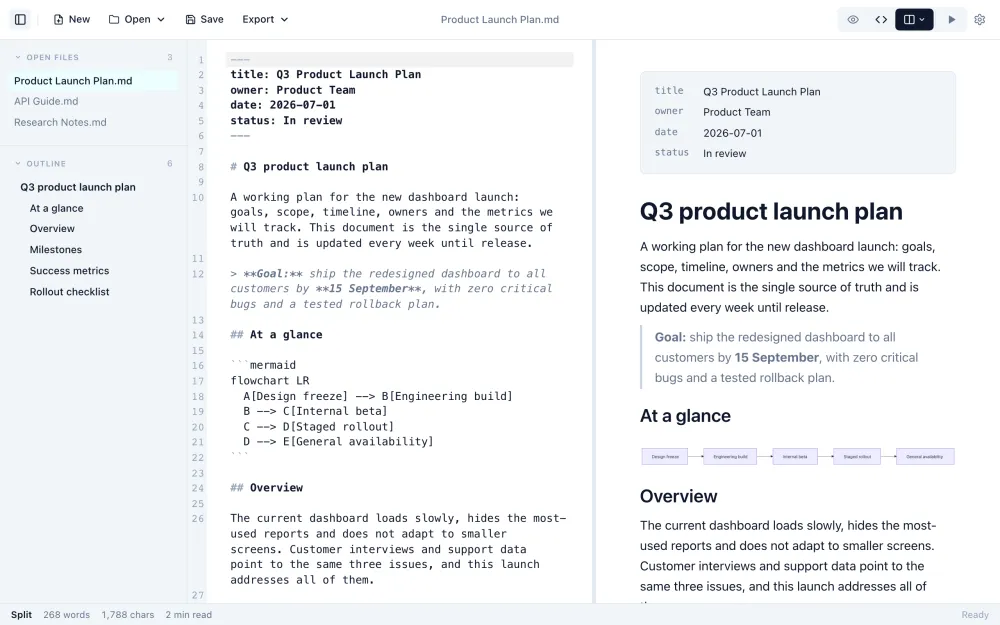
Markdown editor and viewer
Open a .md file to read it formatted, or write Markdown with a live preview. Save, or export HTML.
Markdown to PDF
Paginated preview with page size, margins, themes, page numbers, a title page and contents. Saves a PDF with selectable text.
Convert to PDFMarkdown to Word
Download a .docx with real Word heading styles, tables with column widths, math and diagrams.
Markdown to HTML
Clean, semantic HTML to copy or download, or Copy for Word to paste formatted text into a document or email.
Convert to HTMLMarkdown to Image
A PNG or JPG of the rendered Markdown at 1×, 2× or 3×, with highlighted code and math. For posts, chat and slides.
Convert to an imageMarkdown to Text
Remove Markdown formatting and keep readable text. Tables become tab-separated rows; live word and character count.
Convert to textMarkdown table generator
Build a table in a grid or paste from Excel or Google Sheets, then copy GitHub Flavored Markdown.
Build a tableCompare the converters
What each tool produces and what it is best for.
| Tool | Output | Editable after | Best for |
|---|---|---|---|
| Markdown to PDF | .pdf, paginated | No | Printing, sharing, archiving |
| Markdown to Word | .docx | Yes, in Word or Google Docs | Documents others will edit |
| Markdown to HTML | HTML, .html, or rich text | Yes, as code | Websites, CMS, email |
| Markdown to Image | PNG or JPG | No | Social posts, chat, slides |
| Markdown to Text | Plain text, .txt | Yes | Forms, emails, spreadsheets |
| Editor and viewer | .md or HTML | Yes | Reading and editing Markdown |
What every tool has in common
The same rendering and the same privacy across the set.
Private by design
The conversion runs in your browser tab. Nothing is uploaded to a server.
GitHub Flavored Markdown
Tables, task lists, footnotes, strikethrough and alerts all render.
Highlighted code
Fenced code blocks with a language name get syntax highlighting in the preview.
Math and diagrams
KaTeX math and Mermaid diagrams render, so you can check them before you export.
Paste or drop a file
Paste Markdown, or drop a .md file onto the editor.
Free, no account
No sign-up, no watermark and no daily limit.
Markdown tools FAQ
Are these Markdown tools free?
Yes. Every tool on this page is free to use, with no account, no watermark and no daily limit.
Are my files uploaded?
No. Each tool runs in your browser, so your Markdown stays on your device. Images that your Markdown links by URL are loaded from where they are hosted.
Which tool should I use for text from ChatGPT or another AI chat?
Use Markdown to Word for an editable document, Markdown to PDF for a file to send or print, and Markdown to Text to remove the formatting symbols for an email or a form.
Can I convert Markdown to Google Docs?
Convert to Word with Markdown to Word, then open the .docx in Google Docs from Google Drive. Or use Copy for Word in Markdown to HTML and paste the formatted text into a document.
Can these tools convert Word, PDF or HTML into Markdown?
Not at the moment. These tools convert from Markdown to other formats, and the editor opens and edits Markdown files.
Which Markdown features do the tools support?
Standard Markdown and GitHub Flavored Markdown: tables, task lists, footnotes, strikethrough and alerts, plus fenced code with syntax highlighting. Math and Mermaid diagrams render in the preview, and each tool page lists how they come through in its output.
Do they work on a phone or tablet?
Yes. Every tool runs in mobile browsers. The PDF tool saves through the phone's print or share screen.
Is there a desktop version?
Yes. The Markdific desktop app for Mac, Windows and Linux opens .md files with a double-click and exports to 14 formats, including PDF and Word.
Markdific for desktop
All of these, in one app
Markdific is a Markdown viewer and editor for Mac, Windows and Linux. Open .md files with a double-click, edit with a live preview, and export. See all features.
- Export to PDF, Word, HTML and 11 more formats
- Local images and diagrams included in exports
- Opens .md files from Finder and File Explorer
Free Markdown viewer · 14-day free trial of Premium features
30-day money-back guarantee. For Mac, Windows and Linux.
More Markdown resources
Reference, guides and templates for writing Markdown.