
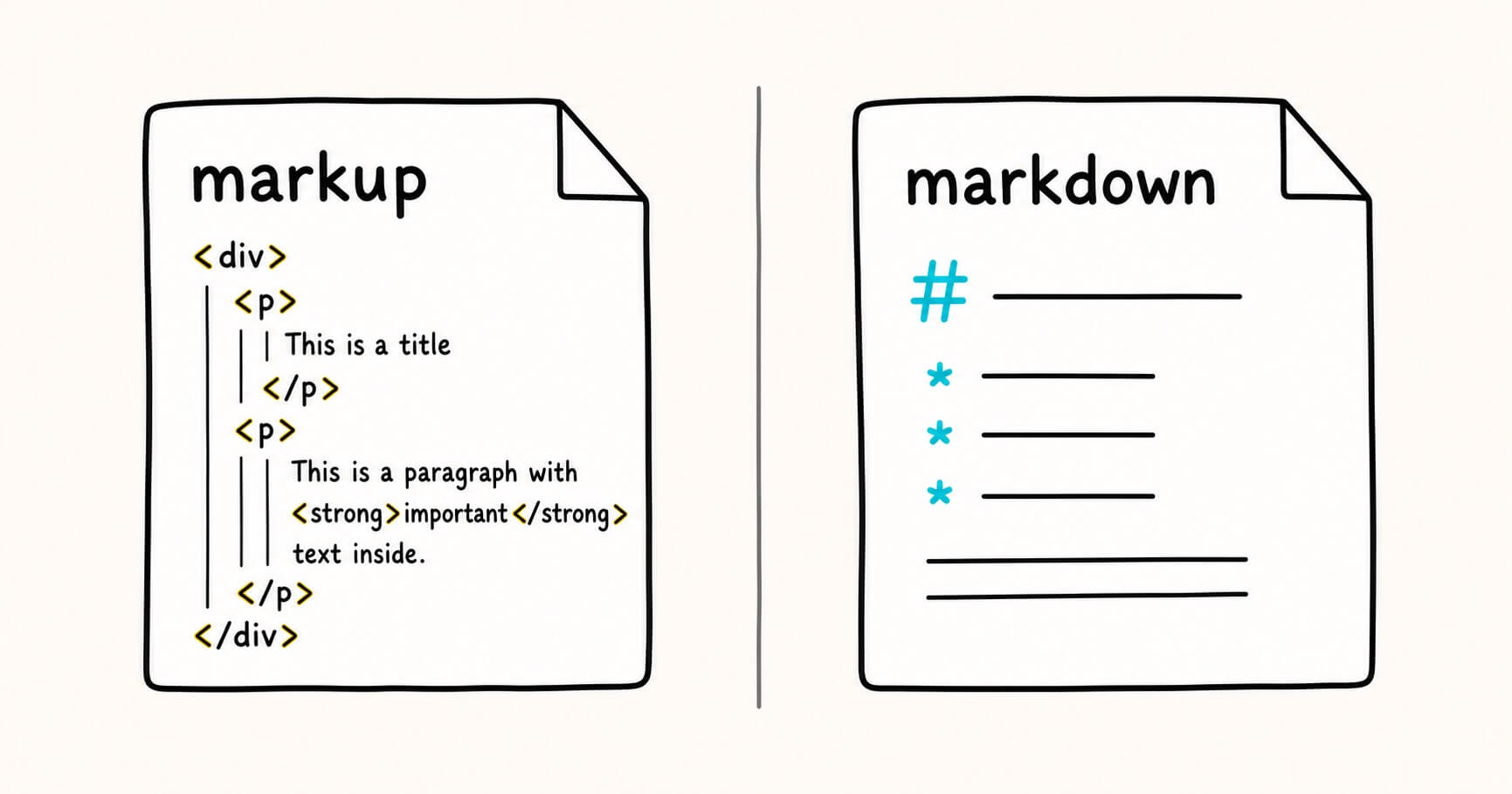
If you've ever opened a file full of angle brackets like <p> and </p>, or seen a note peppered with # and ** symbols, you've run into markup and markdown. The two words look almost identical, they're often mentioned in the same breath, and plenty of people use them interchangeably. They are not the same thing.
The short version: markdown is a type of markup. Markup is the broad family. Markdown is one lightweight, human-friendly member of that family. Understanding the relationship clears up a lot of confusion, especially now that AI tools like ChatGPT, Claude, and Gemini hand you markdown files by default.
This guide breaks down what each one is, shows you side-by-side examples, gives you a full comparison table, and helps you decide which to reach for.
What is a markup language?
A markup language is a system for annotating a document so that a computer knows how to structure, display, or process its content. The "markup" is the set of extra symbols or tags you add around your actual text. Those tags usually don't appear in the final output. Instead, they tell software what each piece of content is: a heading, a paragraph, a link, a list item, and so on.
The term comes from the print world. Editors used to "mark up" manuscripts with handwritten instructions for typesetters, notes in the margin telling them what should be bold, what should be a heading, and where a new section began. Digital markup languages do the same job, just with symbols a machine can read.
The most common markup languages you'll come across are:
- HTML (HyperText Markup Language): the backbone of every web page
- XML (eXtensible Markup Language): used for structured data, feeds, and configuration
- LaTeX: used for typesetting academic papers and complex math
- Markdown: the lightweight one this article keeps coming back to
Notice that last entry. Markdown sits inside the markup family. That's the single most important thing to understand here.
A quick HTML example
Here's a short paragraph with a bold word and a link, written in HTML:
<p>Welcome to <strong>Markdific</strong>, a clean markdown viewer.
Learn more on our <a href="https://markdific.com">homepage</a>.</p>
Every piece of meaning is wrapped in a tag:
<p>opens a paragraph and</p>closes it<strong>makes text bold<a href="...">creates a link
The tags are explicit, verbose, and unambiguous. A browser reads this and renders a tidy paragraph with one bold word and one clickable link. The reader never sees the tags themselves.
That explicitness is HTML's strength and its weakness. It can describe almost anything, but it's tedious to write and hard to read in its raw form.
What is markdown?
Markdown is a lightweight markup language created by John Gruber in 2004, with help from Aaron Swartz. The goal was simple: let people write formatted text using plain, readable symbols that look natural even before they're converted into anything.
Instead of wrapping a heading in <h1></h1>, you just put a # in front of it. Instead of <strong></strong> around a bold word, you wrap it in two asterisks. The raw markdown is meant to be readable on its own, which is why so many people write their notes, README files, and documentation in it.
The same example in markdown
Here's that same paragraph, written in markdown:
Welcome to **Markdific**, a clean markdown viewer.
Learn more on our [homepage](https://markdific.com).
Compare the two. The markdown version is shorter, cleaner, and readable even if you've never seen markdown before. You can guess that **Markdific** means bold and [homepage](...) is a link. That readability is the whole point.
When you run markdown through a converter, or open it in a viewer, it typically becomes HTML behind the scenes. So markdown isn't a replacement for HTML so much as a friendlier way to produce it.
Markup vs markdown: side-by-side comparison
Here's how markup (using HTML as the reference point) and markdown compare across the things that matter day to day.
| Feature | Markup (e.g. HTML) | Markdown |
|---|---|---|
| Relationship | The broad family of annotation languages | One lightweight member of that family |
| Syntax | Explicit opening and closing tags | Short symbols like #, *, -, > |
| Bold text | <strong>word</strong> | **word** |
| Raw readability | Cluttered, takes practice to scan | Reads almost like a plain note |
| Expressive power | Very high: tables, forms, attributes, styling | Covers common cases, stops there |
| Learning curve | Steeper, more rules and tags | Core learned in about ten minutes |
| Best for | Web pages, apps, structured data | Notes, docs, README files, AI output |
| Renders in a browser? | Yes, directly | Needs conversion or a viewer first |
| File extension | .html, .xml | .md, .markdown |

The pattern is clear. Markup gives you power and precision at the cost of verbosity. Markdown gives you speed and readability at the cost of some control. Neither is "better." They're built for different jobs.
Side-by-side: the same content, four ways
Nothing makes the difference clearer than seeing identical content written in different markup styles. Here's a small document — a heading, a sentence, a bulleted list, and a link — written four ways.
Markdown:
# Shopping list

Here's what I need from the store:

- Apples
- Bread
- Coffee

Recipe ideas are on my [blog](https://example.com).
HTML:
<h1>Shopping list</h1>
<p>Here's what I need from the store:</p>
<ul>
  <li>Apples</li>
  <li>Bread</li>
  <li>Coffee</li>
</ul>
<p>Recipe ideas are on my <a href="https://example.com">blog</a>.</p>
XML (describes data, not appearance):
<shoppingList>
  <title>Shopping list</title>
  <items>
    <item>Apples</item>
    <item>Bread</item>
    <item>Coffee</item>
  </items>
  <link url="https://example.com">blog</link>
</shoppingList>
LaTeX:
\section{Shopping list}
Here's what I need from the store:
\begin{itemize}
  \item Apples
  \item Bread
  \item Coffee
\end{itemize}
Recipe ideas are on my \href{https://example.com}{blog}.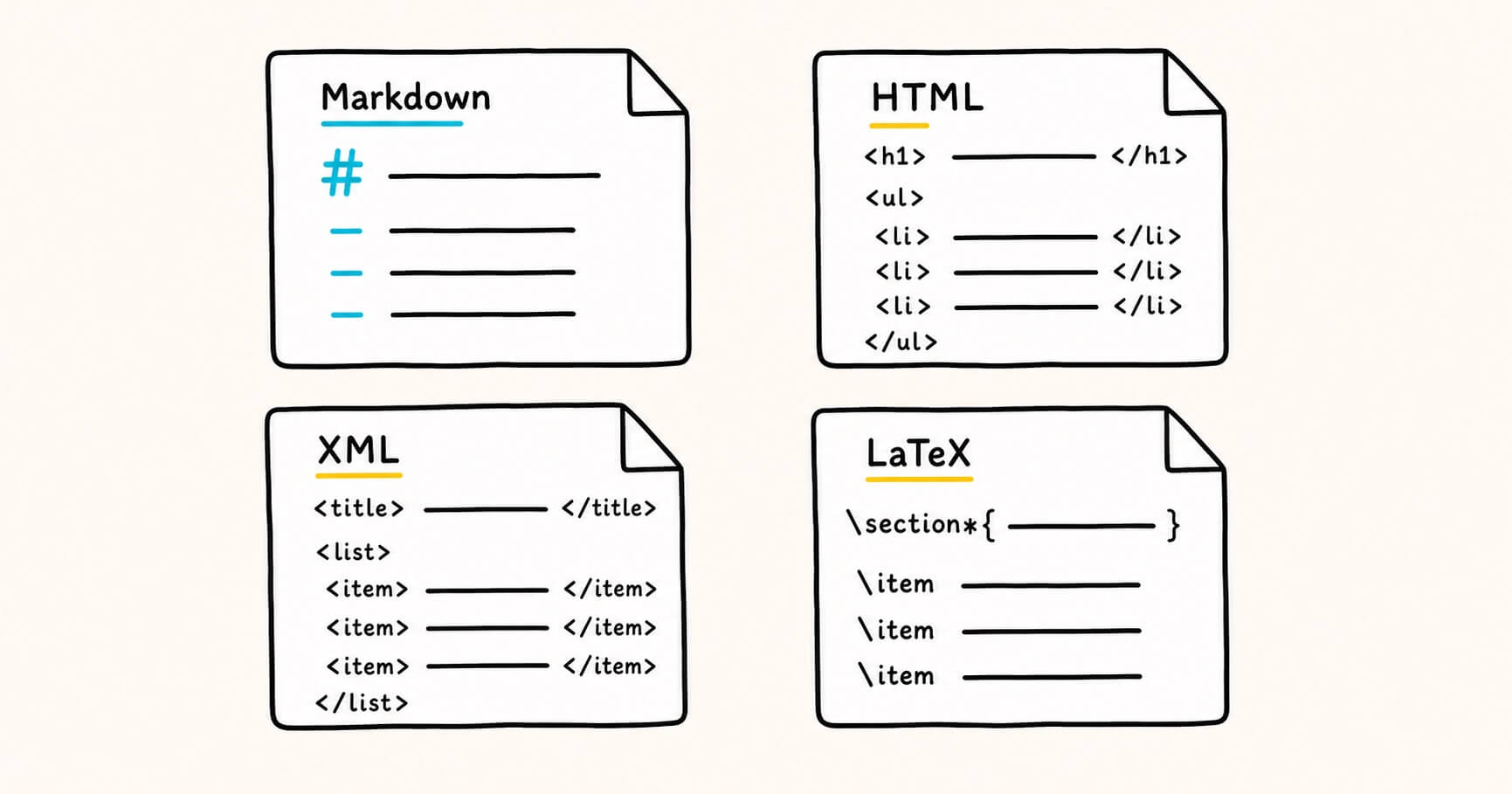
Same content, four flavors:
- Markdown is the shortest and most readable
- HTML is verbose but renders directly in browsers
- XML structures data for machines rather than describing how it looks
- LaTeX is built for precise typesetting
All four are markup. Only one is markdown.
Why markdown is everywhere now
A few years ago markdown was mostly a developer thing, tucked away in code repositories and documentation. That changed fast, and AI is a big reason why.
When you ask ChatGPT, Claude, or Gemini to write something, the response almost always comes formatted in markdown. The headings, bullet points, bold key terms, and code blocks you see are markdown under the hood. When you copy that answer or export it, you often end up with a raw .md file full of # and * symbols.
That's where a lot of non-technical people meet markdown for the first time, and it can be jarring. You expected clean formatted text and instead you're staring at symbols. The content is fine. You just need something to render it properly. This is the exact gap Markdific was built to fill: open a .md file and see it as clean, formatted text instead of raw symbols, without any developer tooling.
When to use markdown
Reach for markdown when:
- You're writing notes, drafts, or documentation that you or others will read in raw form
- You want formatting without fuss: headings, lists, bold, links, and code, without touching a single tag
- You're working with AI output, since it's already markdown by default
- You want your writing to be portable, since markdown is plain text and opens anywhere
- You're building a README, a wiki page, or a static site, where markdown is the native format
A concrete example: you're jotting meeting notes. In markdown you'd write:
# Team sync, March 4

## Decisions
- Ship the beta on Friday
- Move the pricing page live next week

## Action items
- **Sam:** finalize the onboarding email
- **Priya:** review the landing page copy
That's readable as-is, and it renders into a clean formatted document the moment you open it in a viewer.
When to use fuller markup like HTML or XML
Reach for a heavier markup language when:
- You need precise control over layout and styling, which HTML plus CSS gives you and markdown does not
- You're building interactive web pages with forms, buttons, or scripts
- You're structuring data for machines to parse, where XML or JSON fits better than prose
- You need complex tables, custom attributes, or embedded media beyond markdown's basics
- You're typesetting academic or mathematical documents, where LaTeX is the standard
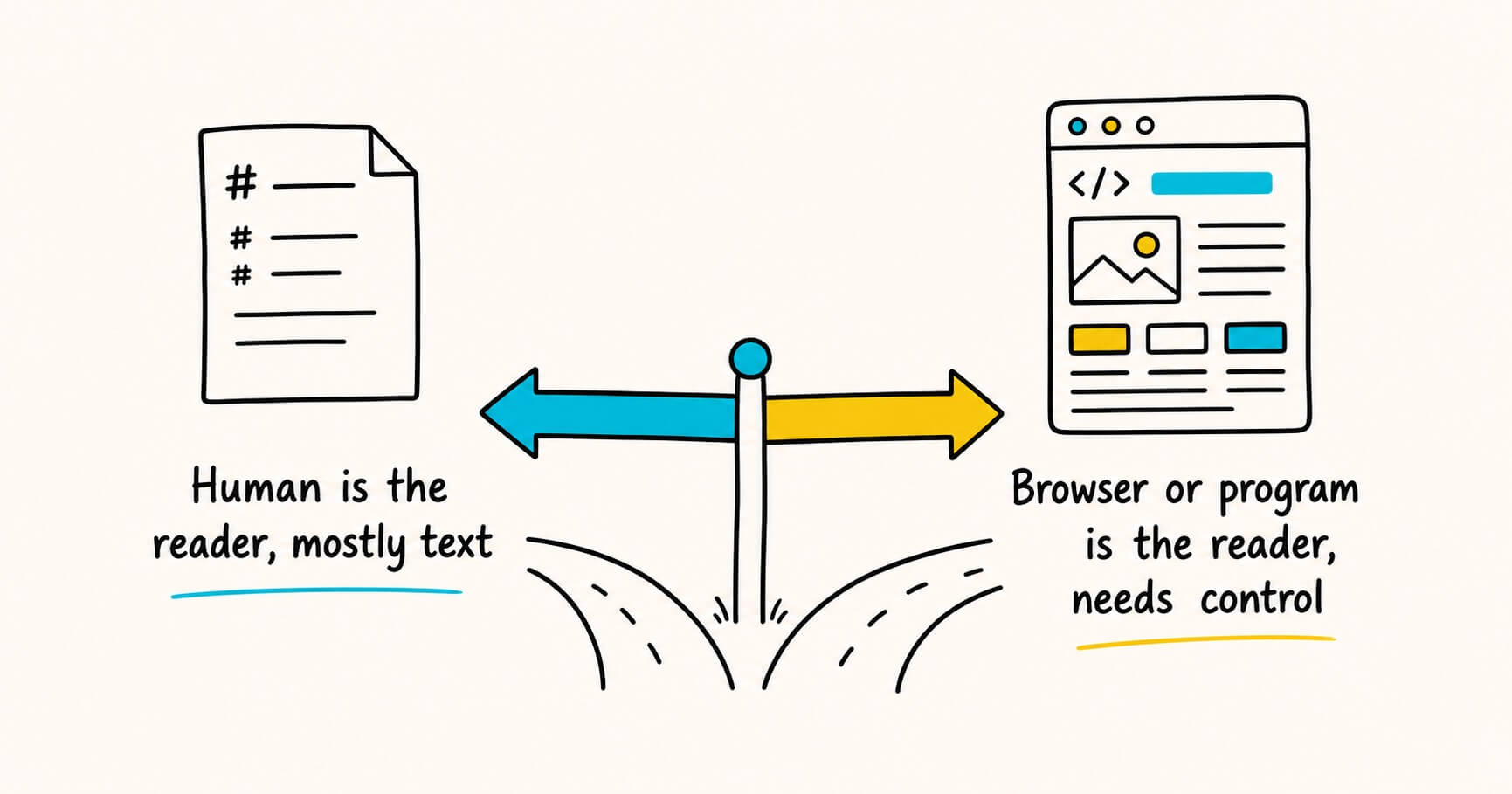
A useful rule of thumb: if a human is the main reader and the content is mostly text, markdown is usually the right call. If a browser or a program is the main consumer and you need fine control, a fuller markup language earns its extra complexity.
The best of both: mixing markdown and HTML
Here's a detail that surprises people. Because markdown was designed to produce HTML, most markdown processors let you drop raw HTML straight into a markdown file. So when markdown can't do something, you're not stuck.
For example, markdown has no built-in way to center text or set a specific image width. But you can write:
## My photo gallery

Here's a shot from last weekend:

<div align="center">
  <img src="beach.jpg" width="400" alt="Sunset over the beach">
</div>

Back to regular **markdown** down here.
The markdown parts stay simple and readable, and the HTML handles the one thing markdown can't. This mix-and-match flexibility is a big part of why markdown has held up so well. You get the easy path most of the time and an escape hatch when you need it.
Frequently asked questions
Is markdown a markup language?
Yes. Markdown is a lightweight markup language. It belongs to the same broad family as HTML and XML, but uses simple symbols instead of tags to keep the raw text readable.
What does markdown stand for?
Markdown isn't an acronym. The name is a play on "markup," signaling that it's a lighter, stripped-down take on the idea.
Is markdown the same as HTML?
No. Markdown is simpler and easier to read in raw form. Most markdown gets converted into HTML when it's displayed, so markdown is a friendlier way to produce HTML rather than a replacement for it.
Can I use HTML inside a markdown file?
Usually yes. Most markdown processors let you drop raw HTML directly into a .md file, which is handy when you need something markdown can't do on its own, like centering text or setting a specific image width.
What file extension does markdown use?
Markdown files typically end in .md, and sometimes .markdown.
Quick recap
- Markup is the broad family of languages that annotate text so software knows how to structure or display it. HTML, XML, and LaTeX are all markup languages.
- Markdown is one specific, lightweight markup language designed to be easy to read and write in its raw form.
- Markdown trades some of HTML's power for a lot of simplicity, which makes it ideal for notes, documentation, and AI output.
- When markdown isn't enough, you can often drop raw HTML right into the file.
- If a person is your main reader, markdown usually wins. If a browser or program is, a fuller markup language may be worth the complexity.
So the next time someone uses "markup" and "markdown" as if they mean the same thing, you'll know the real relationship: markdown is markup, just the friendly, stripped-down version that happens to be everywhere these days.
.md files from AI tools and want to read them as clean, formatted text instead of raw symbols, Markdific opens them in a click. It's a simple, focused markdown viewer and editor for Mac, Windows and Linux, with iOS and Android coming soon. For a full reference on the syntax, the markdown cheat sheet covers every feature with a working example.Related reading
- Markdown vs HTML: two formats, two completely different jobs — why markdown is the editable working format and HTML the finished display format.
- How to open a .md file on desktop (Mac, Windows & Linux) — three simple ways to open and read a markdown file cleanly.
- Markdown cheat sheet — every markdown syntax with a working example for each.