
On this page
Why Obsidian users look elsewhere
Obsidian is a strong app, and many people who search for a replacement end up staying. In our tests it opened our 20,000-line file in 1.4 s on macOS, saved without a shortcut and kept our notes as plain Markdown files. The reasons to look elsewhere are narrower:
- A vault for a single file. To open one .md file, such as a README, you open its folder as a vault, and Obsidian then writes a
.obsidiansettings folder there. - Line endings change on save. On macOS, Windows and Linux, Obsidian 1.14.4 turned CRLF endings into LF, so a Git repository that uses CRLF shows every line as edited.
- Mermaid asks first. Diagrams drew only after we clicked Allow on a prompt, once per vault.
- A different note model. Some people prefer outliners, blocks, objects or databases to pages in folders.
- Sync costs extra. The core app is free, and optional Sync starts at $4 a month and Publish at $8 a month, both on yearly billing (Obsidian pricing).
- Plugins to set up. The plugin library is a strength, but some people want an app that works straight after install.
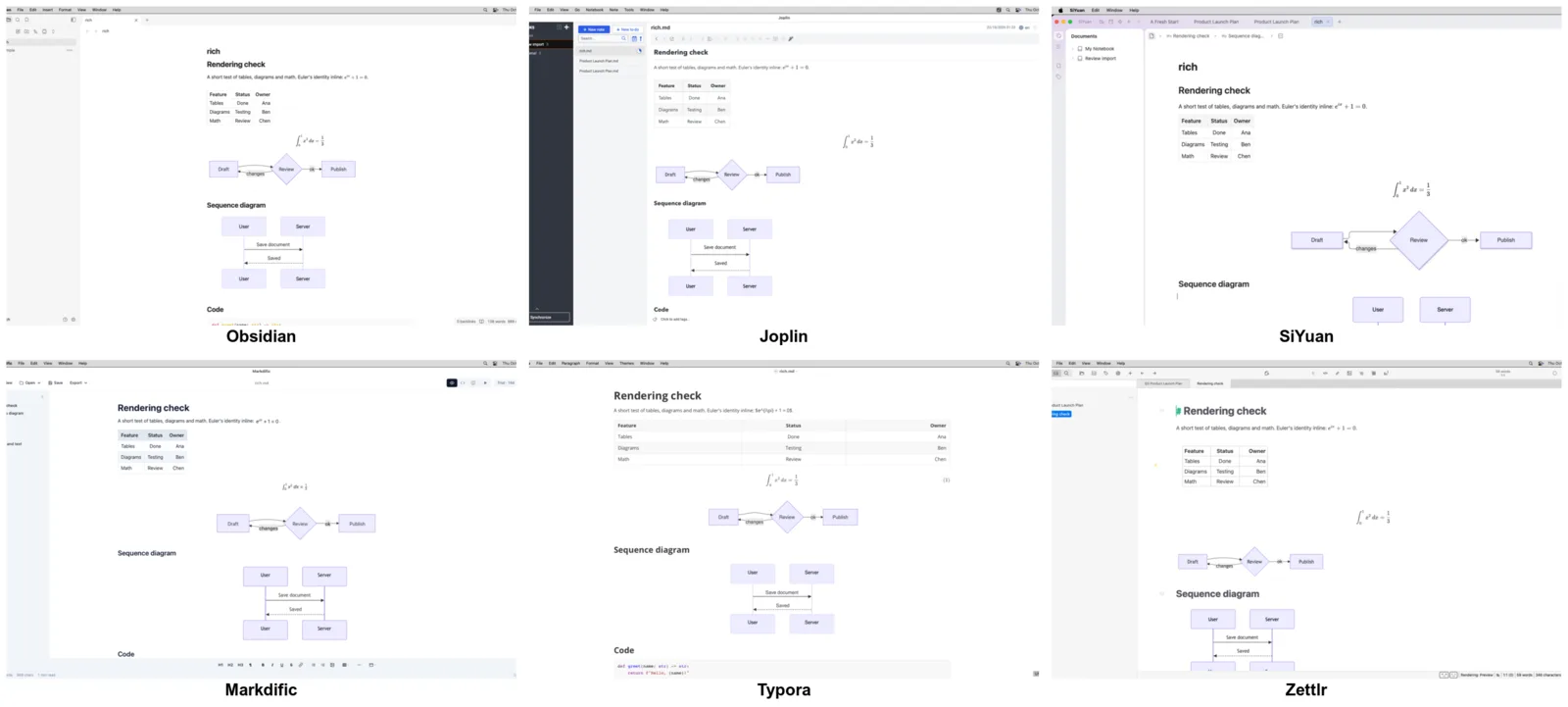
Best Obsidian alternatives comparison table
| App | Price | License | Platforms | Files stored as | Tested by us |
|---|---|---|---|---|---|
| Markdific | $14.99 once; reading free | Proprietary | Mac, Windows, Linux | .md files | Mac, Windows, Linux |
| Zettlr | Free | GPL-3.0 | Mac, Windows, Linux | .md files in folders | Mac, Windows, Linux |
| Joplin | Free; Joplin Cloud from €2.40 a month | AGPL-3.0 | Mac, Windows, Linux, iPhone, Android | Own database (imports .md) | Mac, Windows, Linux |
| SiYuan | Free; PRO $64 once | AGPL-3.0 | Mac, Windows, Linux, iPhone, Android | Own workspace (imports .md) | Mac, Linux |
| Typora | $14.99 once | Proprietary | Mac, Windows, Linux | .md files | Mac, Windows, Linux |
| VS Code | Free | Microsoft license (Code-OSS MIT) | Mac, Windows, Linux | .md files | Mac, Windows, Linux |
| MarkText | Free | MIT | Mac, Windows, Linux | .md files | Mac, Windows, Linux |
| Logseq | Free | AGPL-3.0 | Mac, Windows, Linux, web; Android (0.10), iPhone beta | Own database (2.0 beta) | Mac, Linux (pages did not load) |
| Anytype | Free; paid plans | Source-available | Mac, Windows, Linux, iPhone, Android | On device, encrypted objects | Not tested |
| Notion | Free; Plus from $10 per member | Proprietary | Web, Mac, Windows, iPhone, Android | Notion's cloud | Not tested |
| Capacities | Free; Pro from $9.99 a month | Proprietary | Web, Mac, Windows, Linux, iPhone, Android | Capacities' cloud | Not tested |
| Obsidian (for comparison) | Free; Sync and Publish paid | Proprietary | Mac, Windows, Linux, iPhone, Android | .md files in a vault | Mac, Windows, Linux |
The Obsidian alternatives
Markdific
For Obsidian users who mostly open single .md files: no vault, no .obsidian folder and 14 export formats.
- Price
- reading costs nothing; a 14-day trial covers editing, then $14.99 once for up to 3 devices
- License
- proprietary
- Platforms
- macOS (Apple silicon or Intel), Windows from the Microsoft Store, Linux as AppImage, .deb or .rpm
- Files
- any .md file on your disk, no vault needed, with tabs for several
- Website
- markdific.com
Strengths:
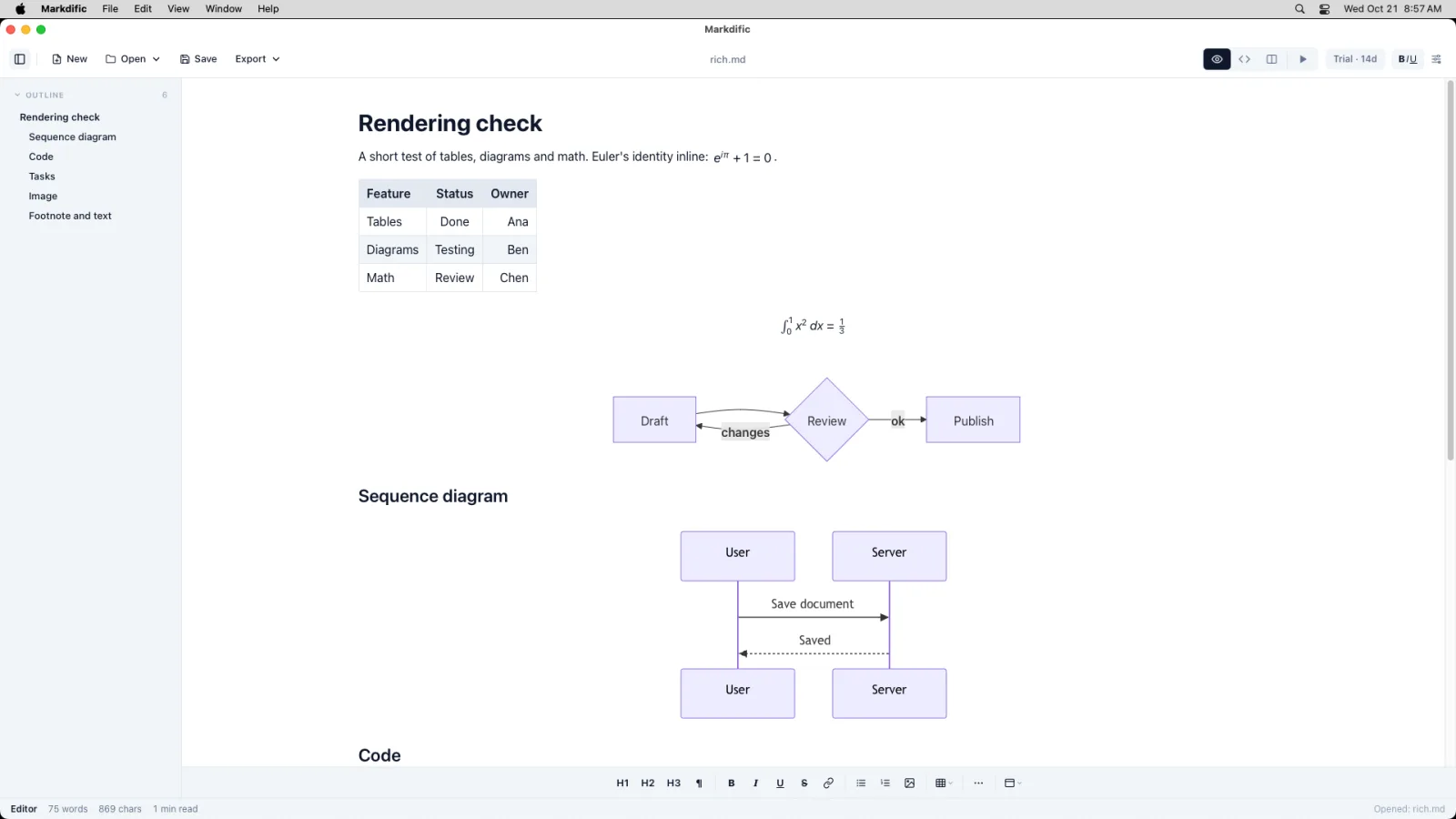
- Double-click any .md file and it opens formatted, with no vault and no settings folder written beside it.
- Mermaid draws with no Allow prompt, and inline and block math render with default settings.
- It autosaves like Obsidian, but CRLF endings and the lines you did not touch stay exactly as they were.
- Formatted, source and split views of the same file, and front matter shown as a formatted block.
- Fourteen export formats are built in, from PDF and Word to EPUB and LaTeX, where Obsidian needs community plugins beyond PDF (Linux has 13 for now, without PDF).
- On macOS it adds a Finder Quick Look preview for .md files.
Limits:
- It is a document editor, not a knowledge base: no backlinks, graph view or plugins.
- No mobile app and no sync of its own.
- It does not reload a file that another app, a sync service or a Git pull changes while the file is open. Close and reopen the file to see the new version.
- Slower than Obsidian on very large files. The 20,000-line file took 8.3 s and 1,348 MB on macOS, against 1.4 s and 778 MB.
- Editing needs a license after the trial.
Our test: tables, both Mermaid diagrams and both kinds of math rendered on all three systems, and CRLF endings survived a save on each. The 20,000-line file opened in 8.3 s on macOS, 11.6 s on Windows and 12.4 s on Linux.
Pick it if you opened vaults mainly to read or edit single files, such as READMEs, specs and reports, and rarely used links between notes.
Zettlr
The free, open-source app closest to a vault of plain files, with links, a graph and citations.
- Price
- free
- License
- GPL-3.0
- Platforms
- macOS, Windows and Linux
- Files
- plain .md files in any folders you add
- Website
- www.zettlr.com
Strengths:
- The closest free match to Obsidian that still edits ordinary files: folders instead of a vault, with Zettelkasten-style IDs and links.
- A graph view and citation management, with Pandoc bundled for export.
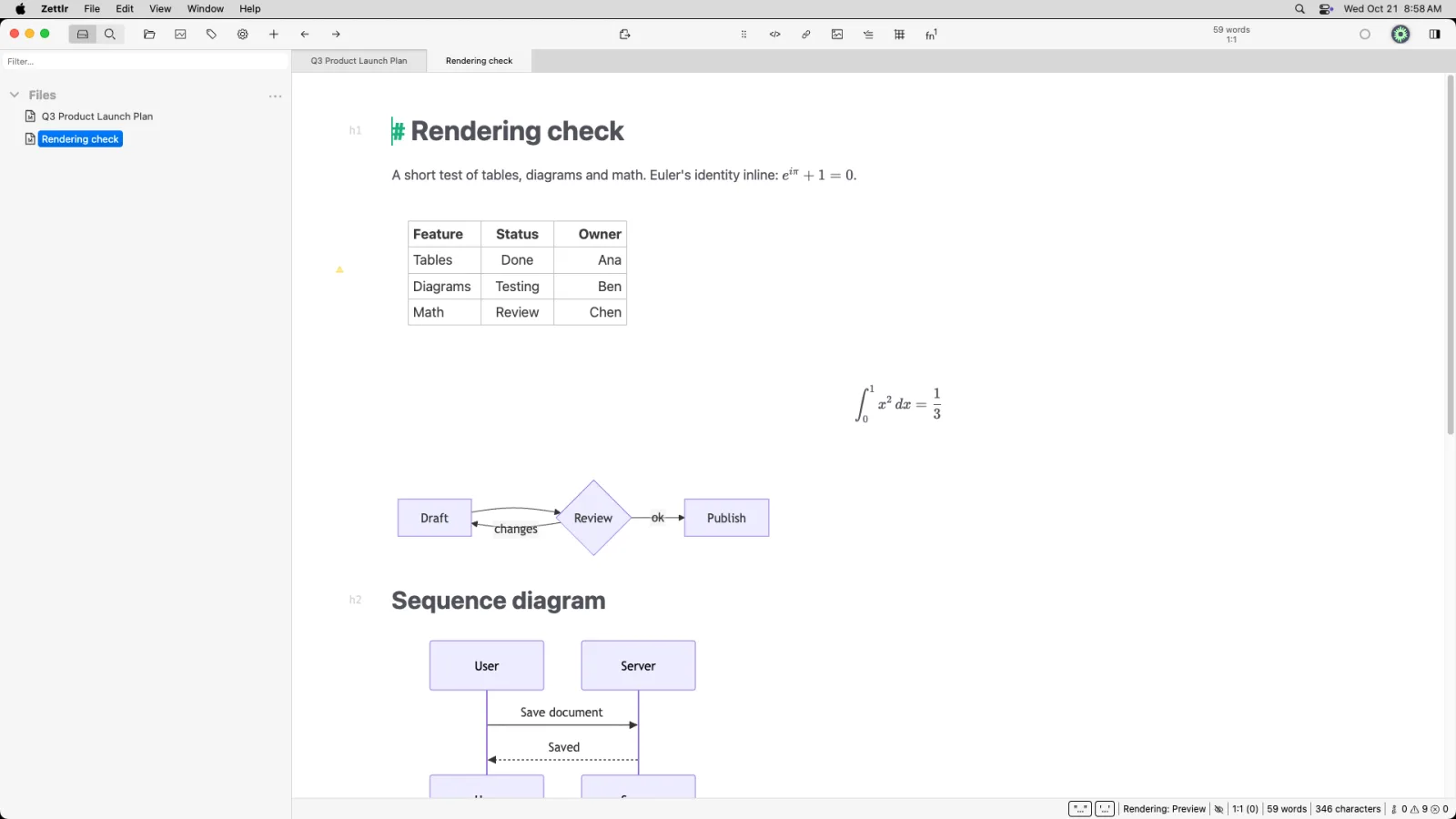
- Rendered Mermaid, tables and both kinds of math with default settings.
- Open source under GPL-3.0.
Limits:
- Typing near the end of a very large file was slow: 27.2 s on macOS and 59 s on Linux at 20,000 lines, the slowest we measured.
- Unlike Obsidian, it had written nothing to disk 15 s after we stopped typing, with default settings.
- No mobile app and no sync service of its own, and a long list of settings.
Our test: every rendering check passed, no unrelated lines changed on save and CRLF endings survived. The 20,000-line file opened in 4.4 s on macOS and used 1,307 MB.
Pick it if you want Obsidian-style linked notes on plain files, plus citations, and your notes are short enough that typing lag does not matter.
Joplin
An open-source notes app with phone apps and many sync choices, for Obsidian users who mainly want their notes on every device.
- Price
- free apps; Joplin Cloud starts at €2.40 a month billed yearly or €2.99 billed monthly, as of 29 October 2026 (plans)
- License
- AGPL-3.0
- Platforms
- Windows, macOS, Linux, iPhone and Android
- Files
- notes live in Joplin's database, and File > Import brings .md files in
- Website
- joplinapp.org
Strengths:
- Where Obsidian sells its own Sync, Joplin syncs free through Nextcloud, Dropbox, OneDrive, WebDAV, S3 or a local folder, or paid through Joplin Cloud (sync help).
- Free desktop and mobile apps, with notebooks, tags and to-dos.
- Cmd+L (Ctrl+L on Windows and Linux) switches between editor, viewer and split layout.
Limits:
- It is not a file editor. Edits stay in the database, so to get .md files back you export them.
- No graph view in the core app.
- Large downloads: 208 MB on macOS, 201 MB on Linux and 361 MB on Windows.
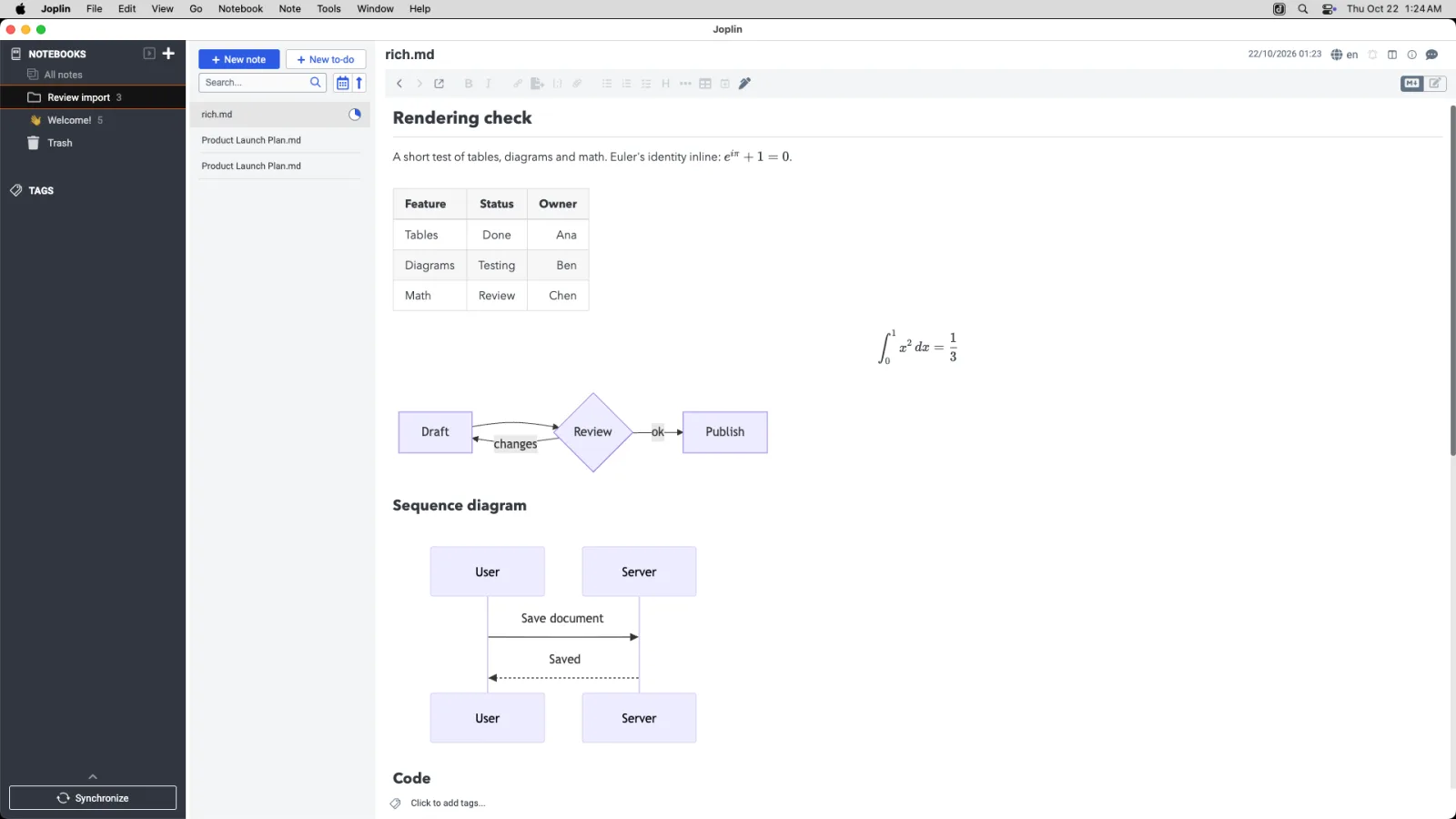
Our test: Joplin does not open .md files from the desktop, so we imported ours. On macOS the viewer drew the table, both kinds of math and both Mermaid diagrams. Because the notes live in the database, our autosave, save-fidelity and line-ending checks did not apply.
Pick it if paying for Obsidian Sync is what made you look around, and you accept notes living inside the app instead of as files.
SiYuan
A block-based notes app with backlinks and a graph, stored locally.
- Price
- free for local use; PRO features cost $64 once and add sync through your own S3 or WebDAV storage, and a $148 subscription adds official cloud sync with 8 GB of storage, as of 29 October 2026 (pricing)
- License
- AGPL-3.0 (GitHub)
- Platforms
- Windows, macOS, Linux, iPhone and Android (download)
- Files
- notes live in SiYuan's workspace, and Import > Markdown brings .md files in
- Website
- b3log.org/siyuan
Strengths:
- Every paragraph, heading and diagram is a block you can reference, with backlinks, a graph and an outline panel.
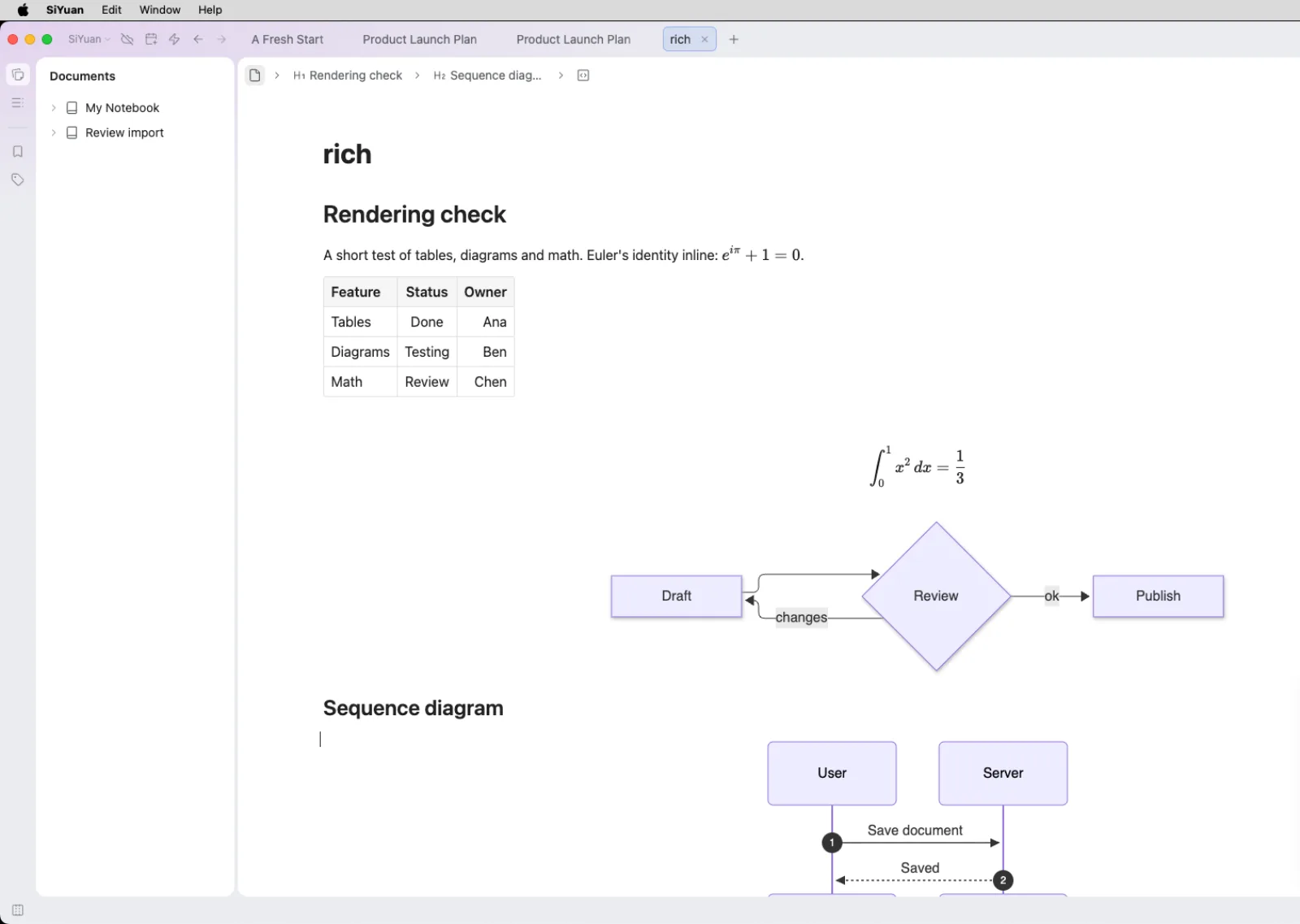
- Rendered the table, math, flowchart and sequence diagram on macOS and Linux.
- Open source under AGPL-3.0, and free for local use.
Limits:
- It is not a file editor, so edits do not reach the original .md file.
- Sync through your own S3 or WebDAV storage needs the paid PRO features, and official sync needs the subscription.
- A 279 MB download, and a welcome card on first start.
Our test: we imported the files, and the table, math, flowchart and sequence diagram all rendered on macOS and Linux. The front matter of our launch plan showed as plain lines of text.
Pick it if you want Obsidian-style backlinks and a graph with block references in an open-source app.
Typora
A paid editor that formats as you type, for Obsidian users who want a polished writing view without a vault.
- Price
- $14.99 once for up to 3 devices, with a 15-day trial first
- License
- proprietary
- Platforms
- macOS, Windows and Linux
- Files
- .md files or folders, opened directly
- Website
- typora.io
Strengths:
- Opens any file or folder with no vault, and formats as you type.
- Focus and typewriter modes, themes, and export to PDF, HTML and images.
- Short typing delay on the 20,000-line file: 1.6 s on macOS.
Limits:
- Paid once the trial ends, and nothing was on disk 15 s after typing, where Obsidian had already saved.
- No split view, no links between notes or graph, and no mobile app.
- Inline math is off until you enable it, and Word and other formats need Pandoc.
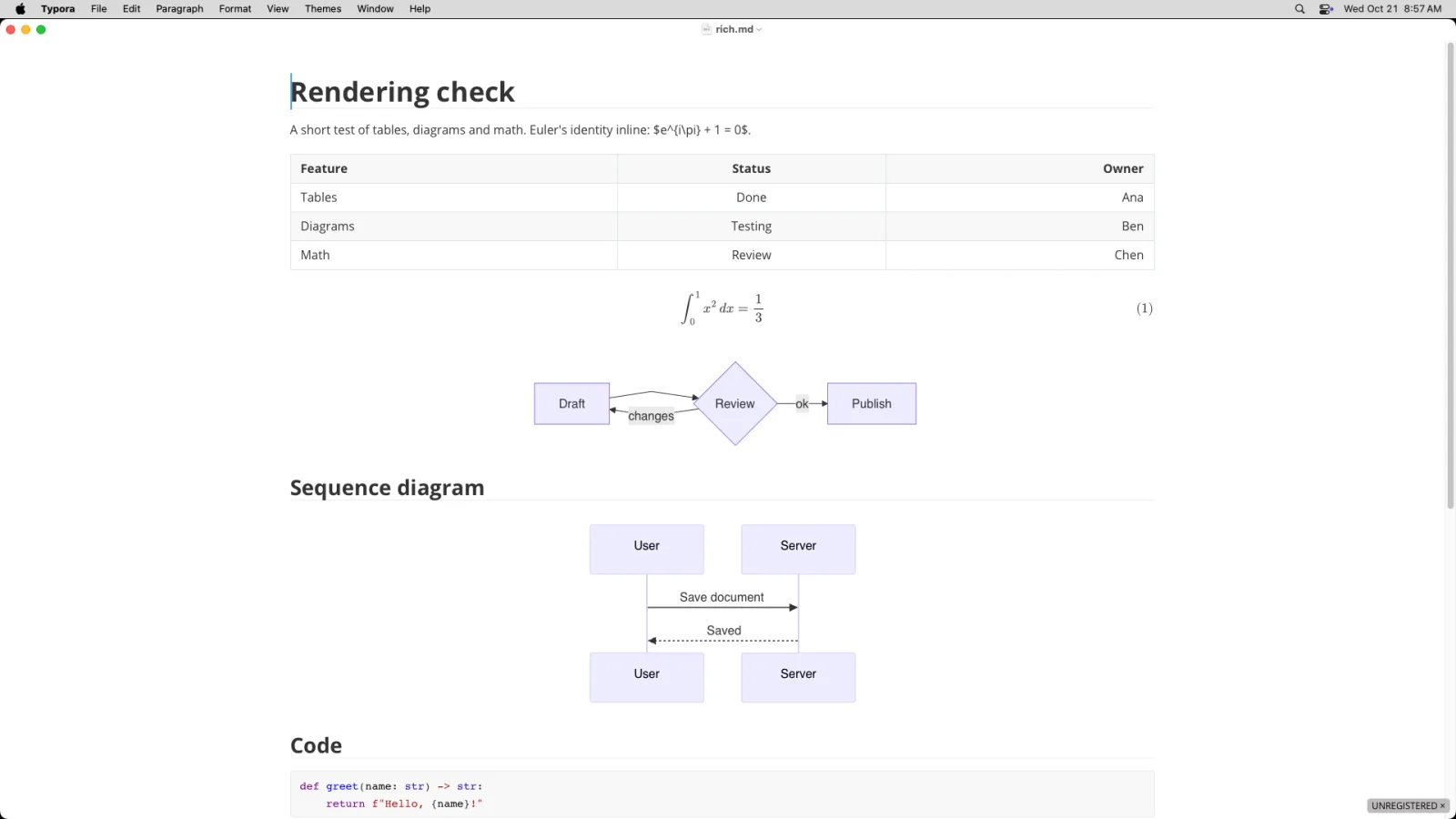
Our test: tables, Mermaid and block math rendered on all three systems, no unrelated lines changed and CRLF endings survived. The 20,000-line file opened in 4.1 s on macOS and used 887 MB. See also our Typora alternatives.
Pick it if you liked writing in Obsidian's Live Preview but want it for single documents, without links between notes.
VS Code
A free code editor for Obsidian users whose notes already sit in a Git repository.
- Price
- free
- License
- Microsoft's own license; the Code-OSS source is MIT
- Platforms
- macOS, Windows and Linux
- Files
- any folder, opened much like a vault but with no settings folder unless you add one
- Website
- code.visualstudio.com
Strengths:
- Opens any folder, with Git built in, so documentation sits beside the code.
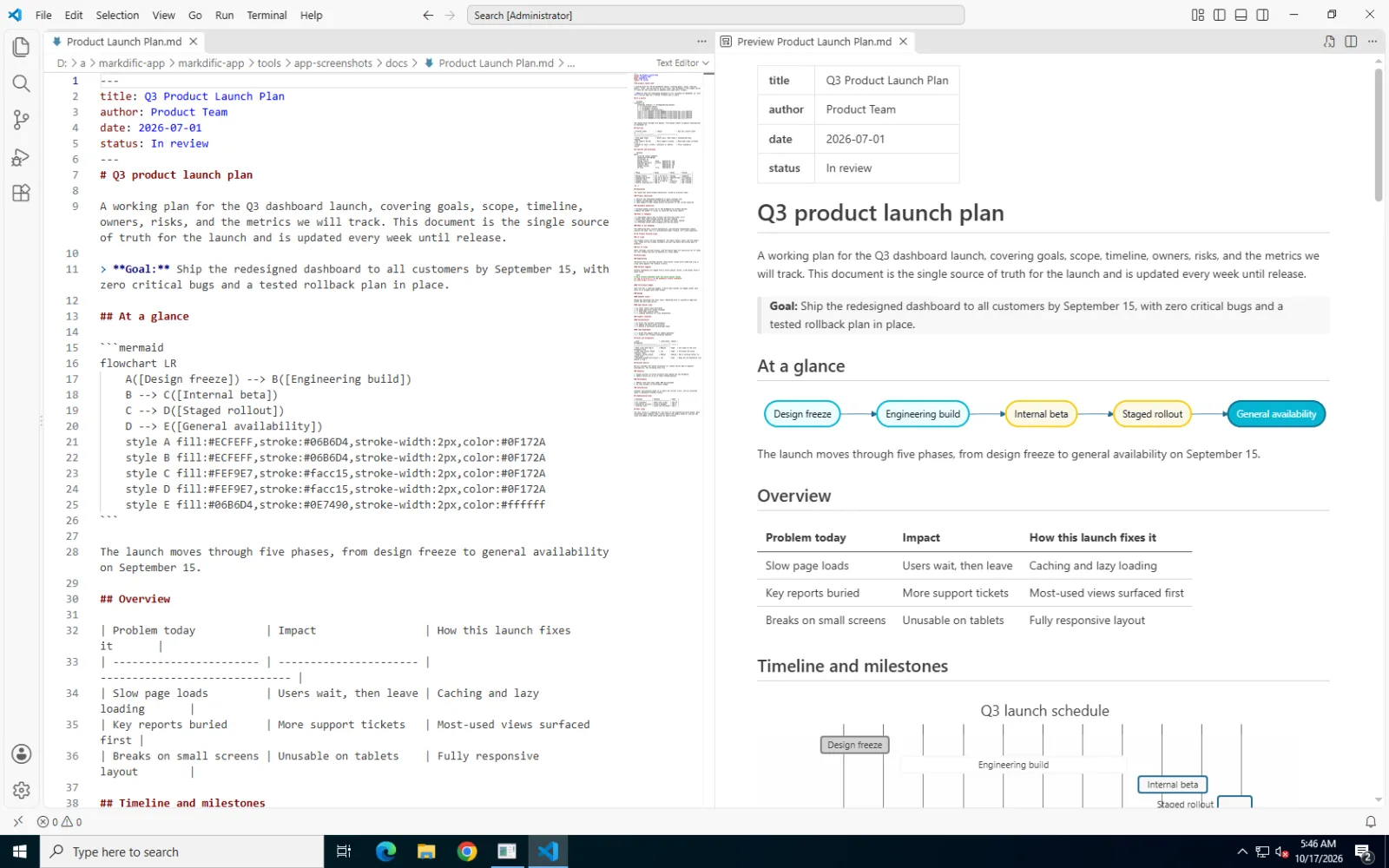
- The preview drew Mermaid and math without extensions.
- The shortest typing delay on the 20,000-line file on macOS (1.1 s).
Limits:
- You edit source with a separate preview, not formatted text.
- No autosave by default, and the highest memory use in this group: 1,506 to 1,899 MB across our stress files on macOS.
- Exporting to Word or PDF needs extensions.
Our test: the preview rendered every check, and CRLF endings survived a save. The 20,000-line file opened in 3.9 s on macOS.
Pick it if you kept notes in Git and spent your day in VS Code anyway, and can live without a graph or backlinks.
MarkText
A free, MIT-licensed editor that formats as you type, with a file sidebar in place of a vault.
- Price
- free
- License
- MIT
- Platforms
- macOS, Windows and Linux
- Files
- .md files and folders, opened in place
- Website
- github.com/marktext/marktext
Strengths:
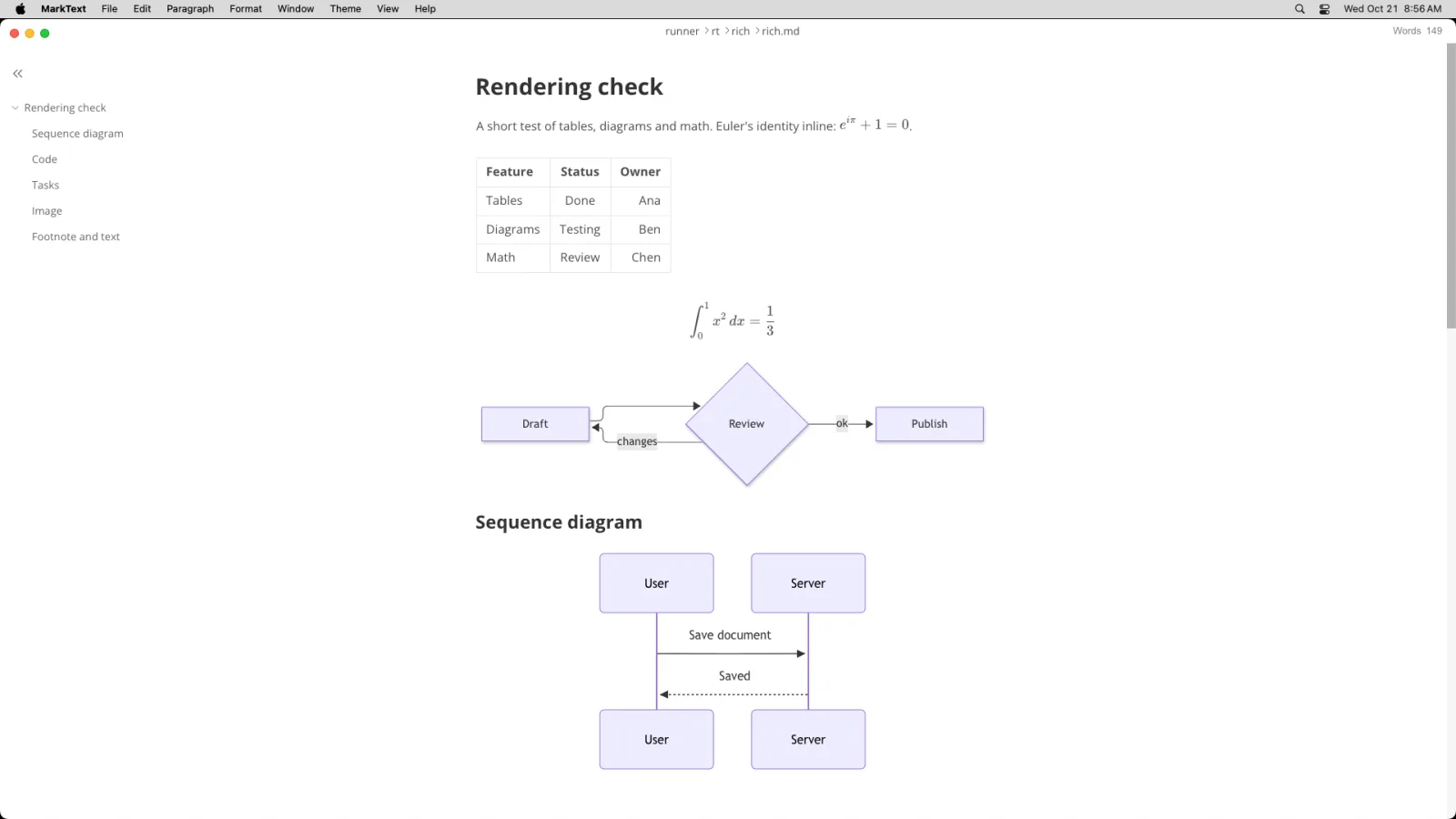
- One formatted view, a source mode and a file sidebar, with no vault.
- Rendering matched the paid apps in our checks.
- Free and open source.
Limits:
- The 20,000-line file did not load within 45 s on macOS or Windows, or 60 s on Linux.
- No autosave by default, and no links between notes or mobile app.
Our test: tables, math and both Mermaid diagrams rendered on macOS (0.23.0), and CRLF endings survived a save. See our MarkText alternatives.
Pick it if you want a free formatted editor for small and medium files and never needed Obsidian's links or plugins.
Logseq
An open-source outliner built around bullet points, daily journals and linked blocks.
- Price
- free
- License
- AGPL-3.0
- Platforms
- macOS, Windows and Linux for the 2.0 beta, Android for the older 0.10 version, and iPhone through a TestFlight beta (releases), plus a web app
- Files
- a local database in the 2.0 beta
- Website
- logseq.com
Strengths:
- Every line is a block that can be linked and referenced, which suits journals and quick capture.
- Free and open source.
Limits:
- Version 2.0 is a beta of a new database version (2.0.1 in July 2026, 2.0.2 in October), and the project says Logseq is "splitting into two versions" (2.0.1 release notes). Back up your data before testing.
- The outliner layout takes getting used to if you write long documents.
Our test (not rated): we installed Logseq 2.0.2 on macOS and Linux. It does not register for .md files, and the test pages we copied into the graph's pages folder opened empty, so we could not judge rendering. This fits the move to a database in 2.0, so check which version you install if you rely on plain Markdown files.
Pick it if you think in bullet points and daily journals, and are willing to try a beta.
Anytype
A local-first, encrypted notes app built from objects and types. Not tested by us.
- Price
- a free plan with 100 MB of remote storage, and paid plans billed monthly or yearly; check the pricing page for current figures
- License
- Any Source Available License 1.0 (GitHub), which is not an OSI open-source license
- Platforms
- macOS, Windows, Linux, iPhone and Android
- Files
- objects stored on your devices, encrypted
- Website
- anytype.io
Strengths:
- Anytype describes "local, on-device encryption" where "only you have encryption keys" (anytype.io).
- Notes are objects with types and relations, such as Book, Person or Meeting, which you can define yourself.
- Exports Markdown, PDF and HTML, plus its own format (export help).
Limits:
- Notes are not stored as .md files, so you export them to use them elsewhere.
- Not open source under an OSI license.
Pick it if you want your notes encrypted on your own devices and like building your own types.
Notion
A shared workspace with pages and databases, hosted in the cloud. Not tested by us.
- Price
- a free plan, with paid plans charged per member; Plus was listed at $10 per member per month billed yearly, or $12 billed monthly, when we checked on 29 October 2026 (pricing)
- License
- proprietary
- Platforms
- web, macOS, Windows (desktop) and mobile apps
- Files
- Notion's cloud
- Website
- notion.com
Strengths:
- Pages, databases, comments and sharing in one workspace, which suits teams.
- "Any non-database Notion page can be exported as a Markdown file", and databases export as CSV (Notion help).
Limits:
- Your notes live in Notion's cloud, not on your disk.
- Markdown is an export format, not the storage format.
Pick it if you share pages, tasks and databases with a team more than you write private notes.
Capacities
An object-based "second brain" with apps on every platform. Not tested by us.
- Price
- the Basic plan is "free forever", and Pro was listed at $9.99 per month billed yearly ($119.88 a year), or $11.99 billed monthly, when we checked on 29 October 2026 (pricing)
- License
- proprietary
- Platforms
- "web, Mac, Windows, Linux, iOS, and Android"
- Files
- Capacities' cloud, with offline support
- Website
- capacities.io
Strengths:
- Structures notes as objects such as people, books and ideas, with apps on every system.
- The free plan includes offline support and "import and export to Markdown, CSV, and more" (pricing).
Limits:
- Notes are stored by Capacities, not as files you edit with other tools.
- Proprietary.
Pick it if you want a structured notes system of linked objects on every device and accept cloud storage.
What to consider in an Obsidian alternative
Obsidian does two jobs, and the apps above replace one or the other. Decide which one you need before you compare them:
- Do you need linked notes? Zettlr, Joplin, SiYuan and Logseq link notes to each other, as do Anytype, Notion and Capacities. Markdific, Typora, VS Code and MarkText are editors for single files.
- Should your notes stay as .md files? Markdific, Zettlr, Typora, VS Code and MarkText edit your files where they are. Joplin and SiYuan copy them into their own storage, and edits do not reach the original.
- Do you need a phone app? Joplin, SiYuan, Anytype, Capacities and Notion list iPhone and Android apps. None of the file editors here has one.
- Was closed source your reason to leave? Obsidian's code is not public. Zettlr, Joplin, SiYuan, Logseq and MarkText are open source, while Markdific, Typora, Notion and Capacities are closed like Obsidian.
How we compared them: we gave every installed app the files an Obsidian vault might hold, namely a note with a table, math and two Mermaid diagrams, a 742-word launch plan with front matter, and very long notes of 5,000 and 20,000 lines plus a 2,000-row table, on macOS 15.7, Ubuntu 24.04 and Windows Server 2022. Joplin and SiYuan cannot open a file in place, so we imported the notes and rated rendering only. Anytype, Notion and Capacities are ranked last because we describe them from their own sites.
Test numbers for the file editors
If you mainly want to know how fast an app copes with a big note, our Mac, Windows and Linux guides list open time, memory, typing delay and line-ending results for each editor, Obsidian included.
Obsidian alternative FAQ
What is the best Obsidian alternative?
Markdific is our top pick for opening and editing .md files: it needs no vault, draws Mermaid and math with default settings, autosaves and keeps your line endings. For linked notes, Zettlr keeps plain .md files in folders, Joplin adds free sync and phone apps, and SiYuan has backlinks and a graph.
What is the best free alternative to Obsidian?
Zettlr, SiYuan and Logseq are free and open source, and Joplin is free with phone apps, all with linked notes. Obsidian's own core app is also free, including for work, and Markdific reads .md files free, with editing at $14.99 once after a 14-day trial.
Is there an open-source alternative to Obsidian?
Yes. Zettlr is GPL-3.0, Joplin, SiYuan and Logseq are AGPL-3.0, and MarkText is MIT. Anytype's source-available license is not an OSI open-source license, and Obsidian itself is free to use but not open source.
Which Obsidian alternatives have mobile apps?
Joplin, SiYuan, Anytype, Capacities and Notion list iPhone and Android apps. Logseq has an Android build of its older 0.10 version and an iPhone beta in TestFlight, and none of the file editors here (Markdific, Typora, Zettlr, VS Code and MarkText) has a mobile app.
Can I open a Markdown file without an Obsidian vault?
Not in Obsidian, which needs the file's folder opened as a vault and then adds a .obsidian folder there. Markdific, Typora, Zettlr, VS Code and MarkText open a single .md file with no vault and no settings folder.
Do Joplin and SiYuan keep notes as Markdown files?
No. In our tests both imported .md files into their own storage, so edits stay inside the app and the original file does not change. Export the notes to get .md files back.
Will my Obsidian notes work in other apps?
Mostly. Text, front matter, tables, Mermaid and math carry over, while wiki links, embeds, callouts and plugin syntax such as Dataview are Obsidian-specific and show as plain text, blockquotes or code elsewhere. To write standard links instead, turn off Use [[Wikilinks]] in Settings > Files and Links (Obsidian help).
Does Obsidian change line endings?
Yes. In our tests Obsidian 1.14.4 converted CRLF line endings to LF on save on macOS, Windows and Linux, so a repository that uses CRLF shows every line as changed. Markdific, Typora, Zettlr, MarkText and VS Code kept CRLF in the same test.
Related Markdown guides
- Best Markdown editors for Mac
- Best Markdown editors for Windows
- Best Markdown editors for Linux
- Typora alternatives
- MarkText alternatives
- MacDown alternatives
- Markdific features
- Pricing
About this Obsidian alternatives article
We make Markdific, so we put it through exactly the tests the other apps got, Obsidian included. Nobody paid for a place in this list. We checked prices and version numbers on 22 October 2026, and rechecked Obsidian, Logseq, Joplin, SiYuan, Notion and Capacities on 29 October 2026. Anytype's pricing page did not show its figures when we checked, so that entry avoids exact prices. Versions in captions are the ones we tested, and Zettlr 4.9 was released after our test. Corrections: hi@markdific.com.