
TL;DR
- Someone sent you a .md file? Markdific views it for free, with tables, Mermaid and math, and can be set as the default app for .md. Windows 11 Notepad shows headings, lists and links, but no diagrams or math.
- Best overall: Markdific. Microsoft Store app for Windows 11 and Windows 10 (1809 or later); the Store installs updates. Tabs, WYSIWYG, source and split views, autosave on by default, and PDF and Word export with no Pandoc. Editing is $14.99 one-time after a 14-day trial.
- Export to Word or PDF: Markdific does both natively. Typora exports PDF itself and Word through Pandoc; Zettlr ships with Pandoc.
- Keep Windows (CRLF) line endings: Markdific, Typora, VS Code, Zettlr, MarkText and Notepad++ kept every CRLF and LF line. Obsidian switched CRLF files to LF; ghostwriter and QOwnNotes switched LF files to CRLF.
- Install with winget: all 10 apps have a winget ID; Markdific installs from the Store source.
- Light and Notepad-like: Notepad++. A 7 MB installer, 51 to 54 MB of memory, ARM64 builds; source only, no preview.
- Notes apps: Obsidian for a linked vault with phone apps; QOwnNotes for .md notes in a folder; Joplin if you want sync and do not need to edit files in place.
On this page
Which Windows Markdown editor should you pick?
| Your need | Pick | Runner-up | Why |
|---|---|---|---|
| Just read a .md file someone sent you | Markdific (free viewer) | VS Code (preview) | Both rendered tables, Mermaid and math. Windows 11 Notepad shows basic formatting only and was not tested. |
| Export to Word or PDF | Markdific | Typora, Zettlr | Markdific exports PDF and Word without Pandoc; Typora exports PDF natively and Word through Pandoc; Zettlr bundles Pandoc. |
| Keep Windows (CRLF) line endings in Git | Markdific, VS Code, Typora | Zettlr, MarkText, Notepad++ | All six saved CRLF and LF files with their line endings unchanged, so Git shows only your edits. |
| Install from the Microsoft Store or winget | Markdific (Store) | Any app below (winget) | The Store updates Markdific for you; every app in this list has a winget ID. |
| Old or low-memory PC | Notepad++ | QOwnNotes, ghostwriter | 51 to 54 MB for Notepad++, 84 to 104 MB for QOwnNotes, 188 to 457 MB for ghostwriter. |
| Notepad-like plain editing | Notepad++ | VS Code | Tabs, line numbers and Markdown colouring; VS Code adds a preview. |
| Edit in the rendered view | Markdific | Typora; MarkText (free) | Tables, math and Mermaid render while you type (Typora: inline math is off by default). |
| Free and open source | Zettlr | MarkText | Both rendered Mermaid and math with no setup. |
| Linked notes on PC and phone | Obsidian | Joplin | Backlinks, graph view and mobile apps; Joplin imports files into its own database. |
| Markdown in code repositories | VS Code | Notepad++ | Preview with Mermaid and math, Git built in, line endings kept. |
| Prose writing | ghostwriter | Typora | ghostwriter has a live preview, an outline and full-screen mode; Typora has focus mode. |
| Files with 20,000+ lines | Notepad++ | Obsidian, QOwnNotes | Notepad++ opened the 20,000-line file in 1.0 s; Obsidian (3.2 s) was the fastest app that renders Mermaid. MarkText did not load it within 45 s. |
| Autosave without Ctrl+S | Markdific | Obsidian, QOwnNotes | The only three apps that saved to disk by default. |
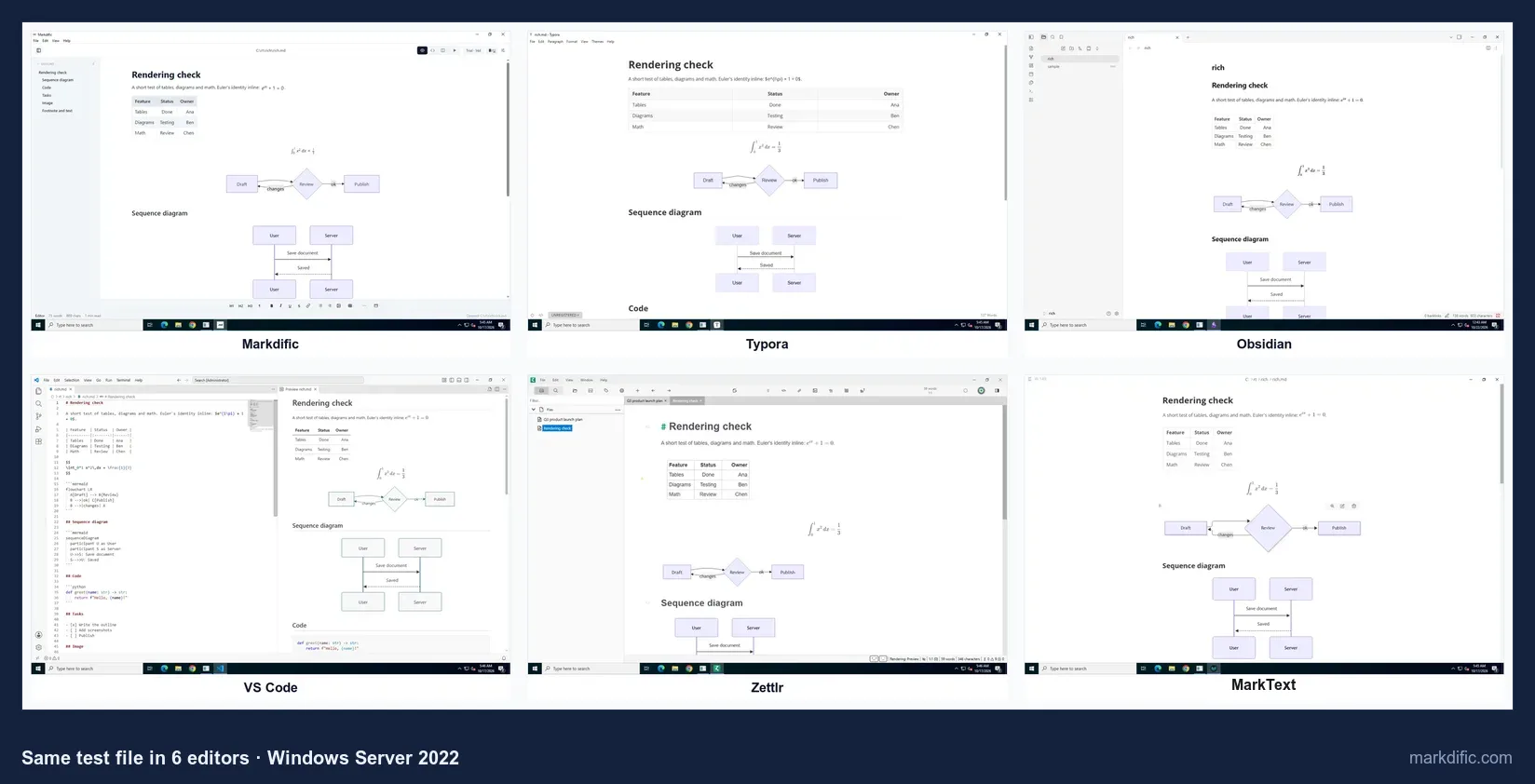
The 10 best Markdown editors for Windows, ranked
#1 Markdific
Best for opening, editing and exporting Markdown files that contain diagrams, math and tables.
- Price
- free to open and view; editing in a 14-day trial, then $14.99 one-time for up to 3 devices on Windows, macOS or Linux (pricing)
- Platforms
- Windows (Microsoft Store; Windows 11, or Windows 10 version 1809 or later, x64), macOS, Linux
- License
- proprietary
Double-click a .md file in File Explorer and Markdific opens it rendered, in a tab, with no vault or project folder to set up. It installs from the Microsoft Store, which also delivers updates, so there is no installer to approve.
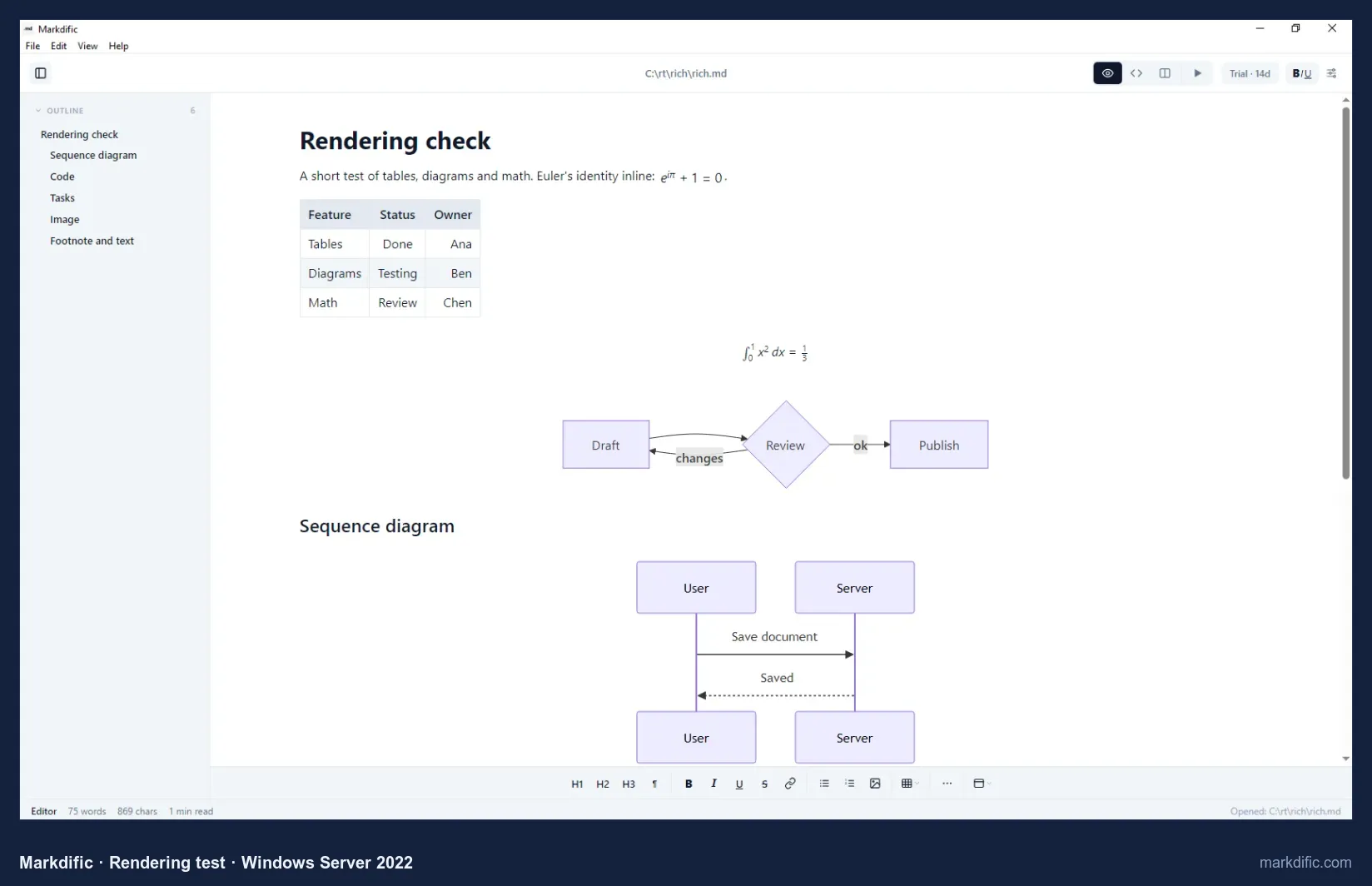
The outline sidebar on the left lists the document's headings, and front matter rendered as metadata rather than as text.
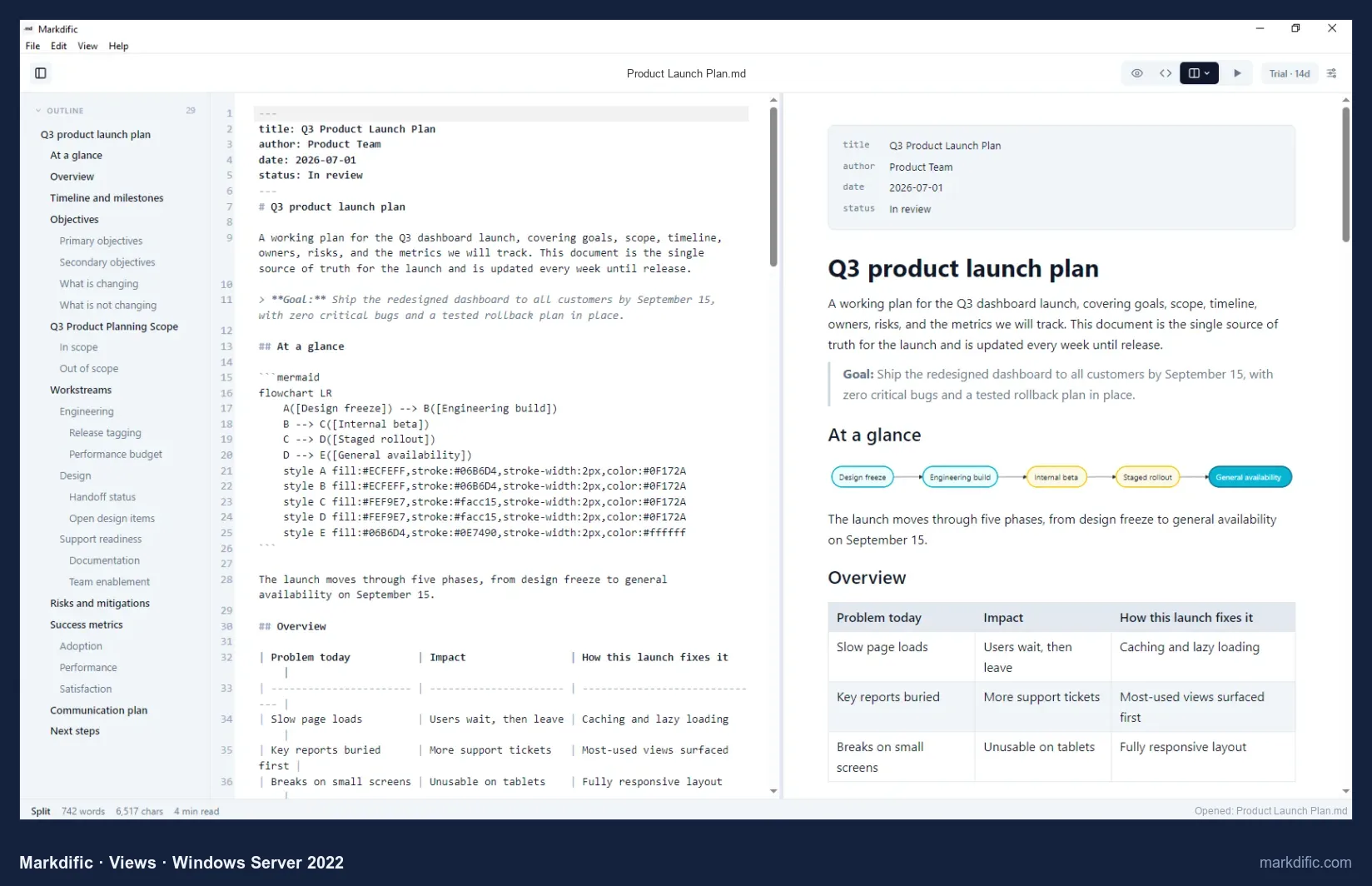
Ctrl+1 switches to WYSIWYG and Ctrl+2 to source.
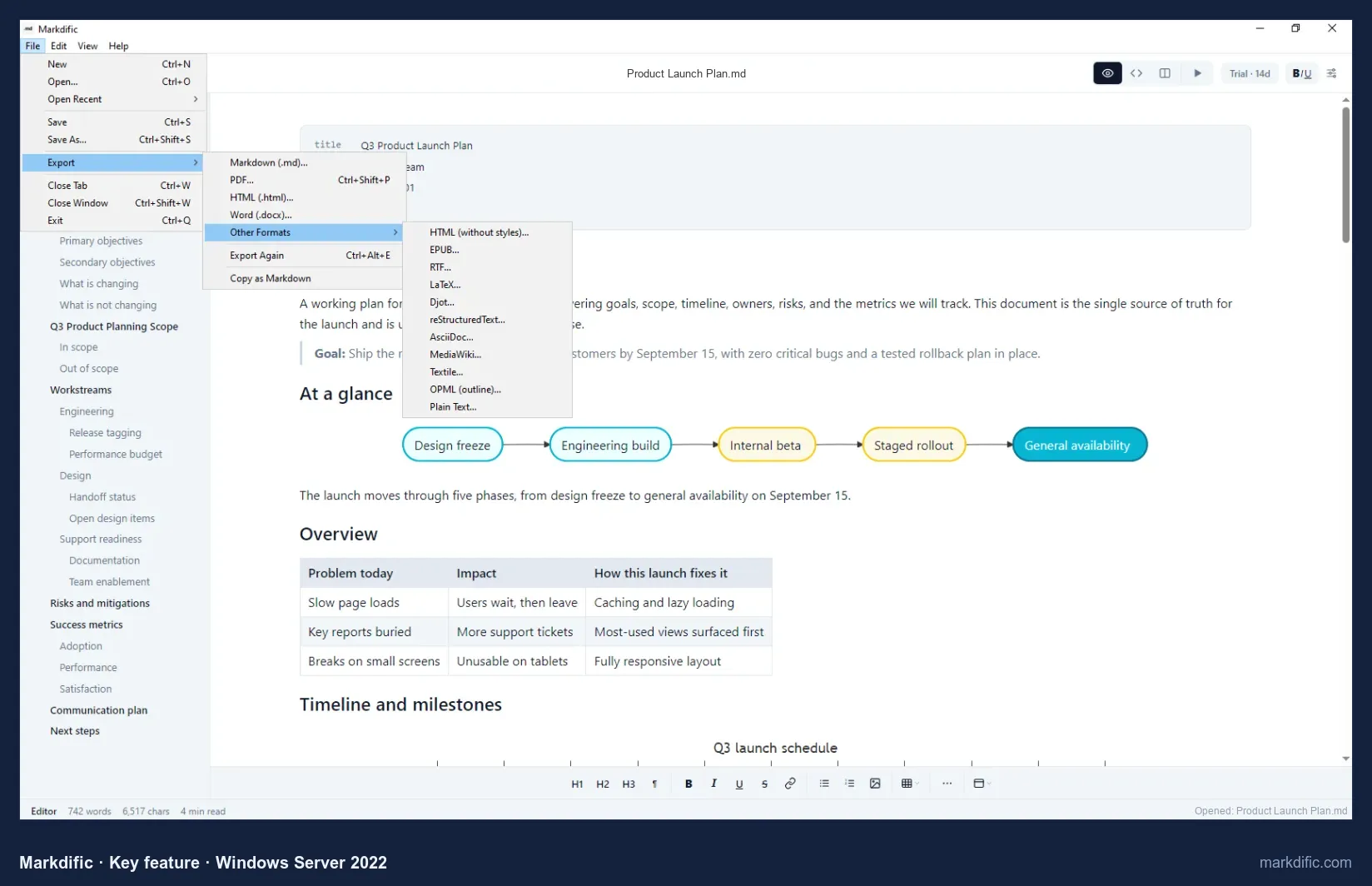
A .docx or a PDF comes straight from the File menu, without installing Pandoc. See the feature overview, the Windows page and the Markdown docs.
What makes it stand out
- Registers for .md and .markdown files, so double-click opens them.
- Free viewer: no purchase needed to read a file someone sent you.
- PDF and Word export without Pandoc.
- Autosave is on from the first launch.
Key features
- WYSIWYG, source and split views (Ctrl+1, Ctrl+2, Ctrl+3).
- Several files open at once in tabs.
- 14 export formats, including EPUB, RTF and LaTeX.
- Saved files keep their Windows or Unix line endings.
- Menus in 7 languages.
Limitations
- Opened the four stress files more slowly than Typora, and three of them more slowly than Obsidian.
- No focus or typewriter mode.
- No backlinks, graph view or mobile app.
Verdict
Passed the most of our checks for reading and editing standalone .md files, and was the only app that exports both PDF and Word without extra software. Look elsewhere for a notes vault, a phone app or the smallest memory footprint.
Test results
- Tested: 1.3.0 (current: 1.3.2), built from source on the test machine because Microsoft Store apps cannot be installed on Windows Server. Customers get the same app from the Microsoft Store.
- Opened .md files directly; registers as the handler for .md and .markdown files.
- Autosave: yes, the change was on disk 15 s after typing, without Ctrl+S.
- Save fidelity: 0 unrelated lines changed. CRLF kept (10/10 lines); LF kept.
- Open time / memory: 8.6 s / 359 MB (5k lines), 11.6 s / 1,039 MB (20k), 10.5 s / 473 MB (100 diagrams), 8.8 s / 523 MB (table).
- Long line and empty file opened. The invalid UTF-8 file showed "Open failed" in 1.3.0; 1.3.1 opens such files and shows invalid bytes as �. Not re-tested on Windows.
- A relative image next to the test file did not display, because the test files were outside the user's home folder. Fixed in 1.3.1; not re-tested on Windows.
How to install Markdific on Windows
- Click Download Free above and choose Install via Microsoft Store, then Get (or Install) in the Microsoft Store. No administrator password is needed, and the Store installs updates for you.
- Open any .md file. To make Markdific the default, right-click a .md file, choose Open with > Choose another app, pick Markdific and tick Always use this app.
- Reading files is free. To edit, start the 14-day trial; after that, buy a licence once for $14.99 with the Buy button in the app. One licence covers up to 3 devices on Windows, Mac or Linux.
Prefer the command line? Install it with winget:
winget install --id 9P549VBTG01C --source msstore#2 Typora
Best for writers who want one WYSIWYG view with focus and typewriter modes.
- Price
- $14.99 one-time, up to 3 devices, 15-day trial
- Platforms
- Windows (installer for x64, x86 and ARM64), macOS, Linux
- License
- proprietary
Typora renders Markdown in the same view you type in. Its Windows installer (114 MB for x64) also comes in x86 and ARM64 builds, so it runs natively on ARM laptops, and it registers itself for .md files.
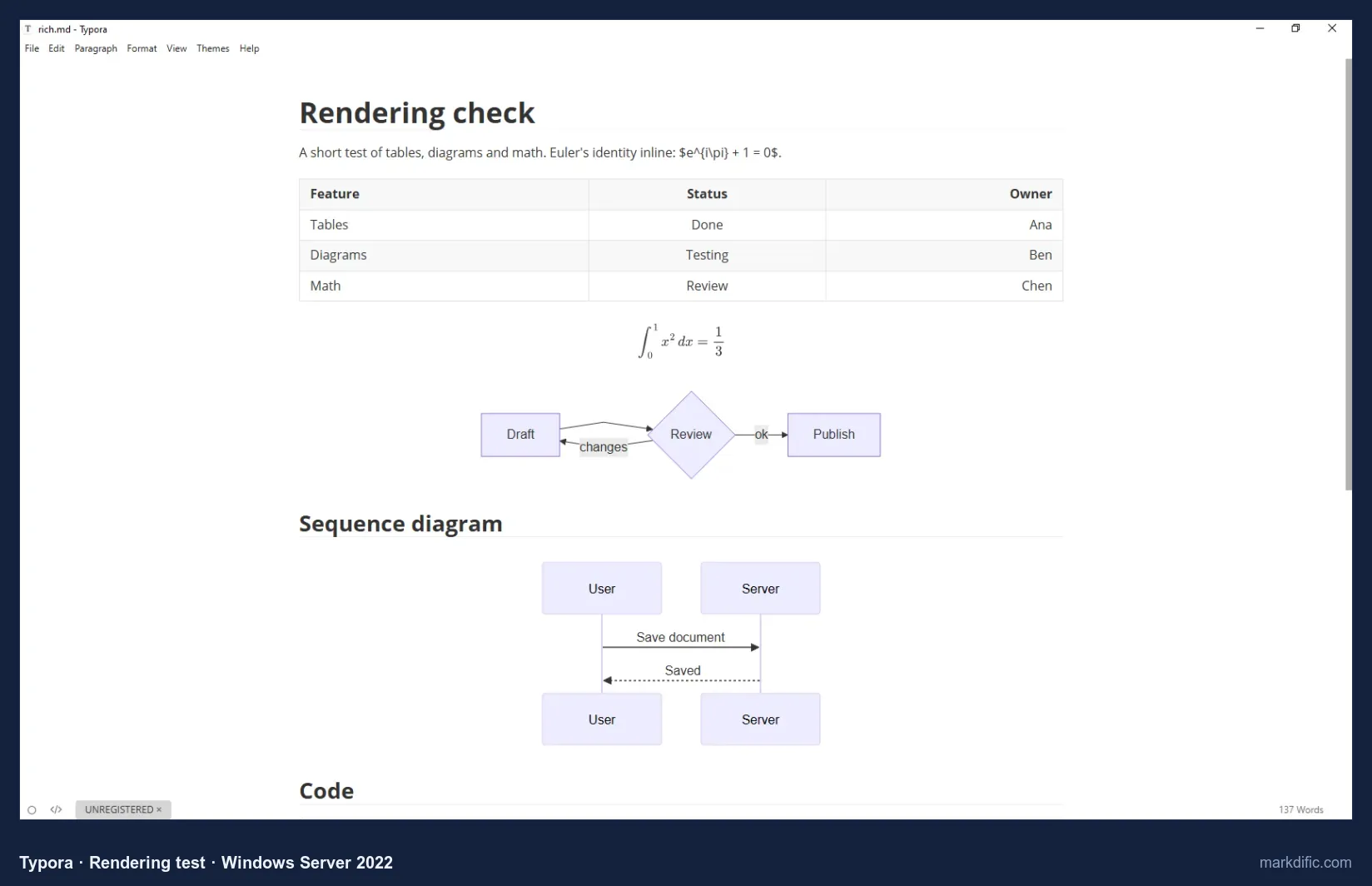
Of the apps that render Mermaid, only Obsidian (1.8 s) and MarkText (4.2 s) opened our 100-diagram file faster than Typora (5.4 s).
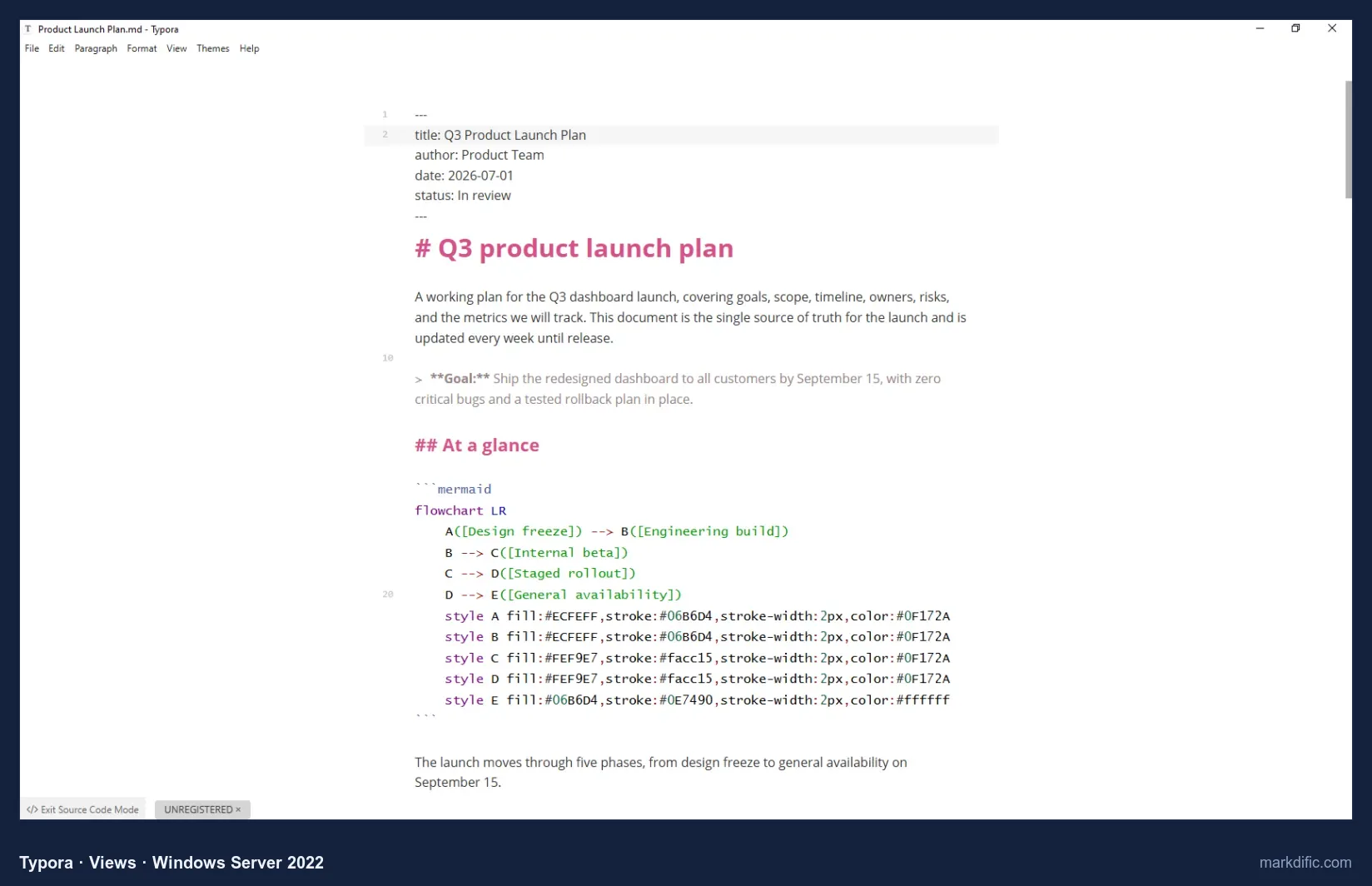
Ctrl+/ toggles between the rendered view and the raw Markdown with line numbers; there is no split view showing both.
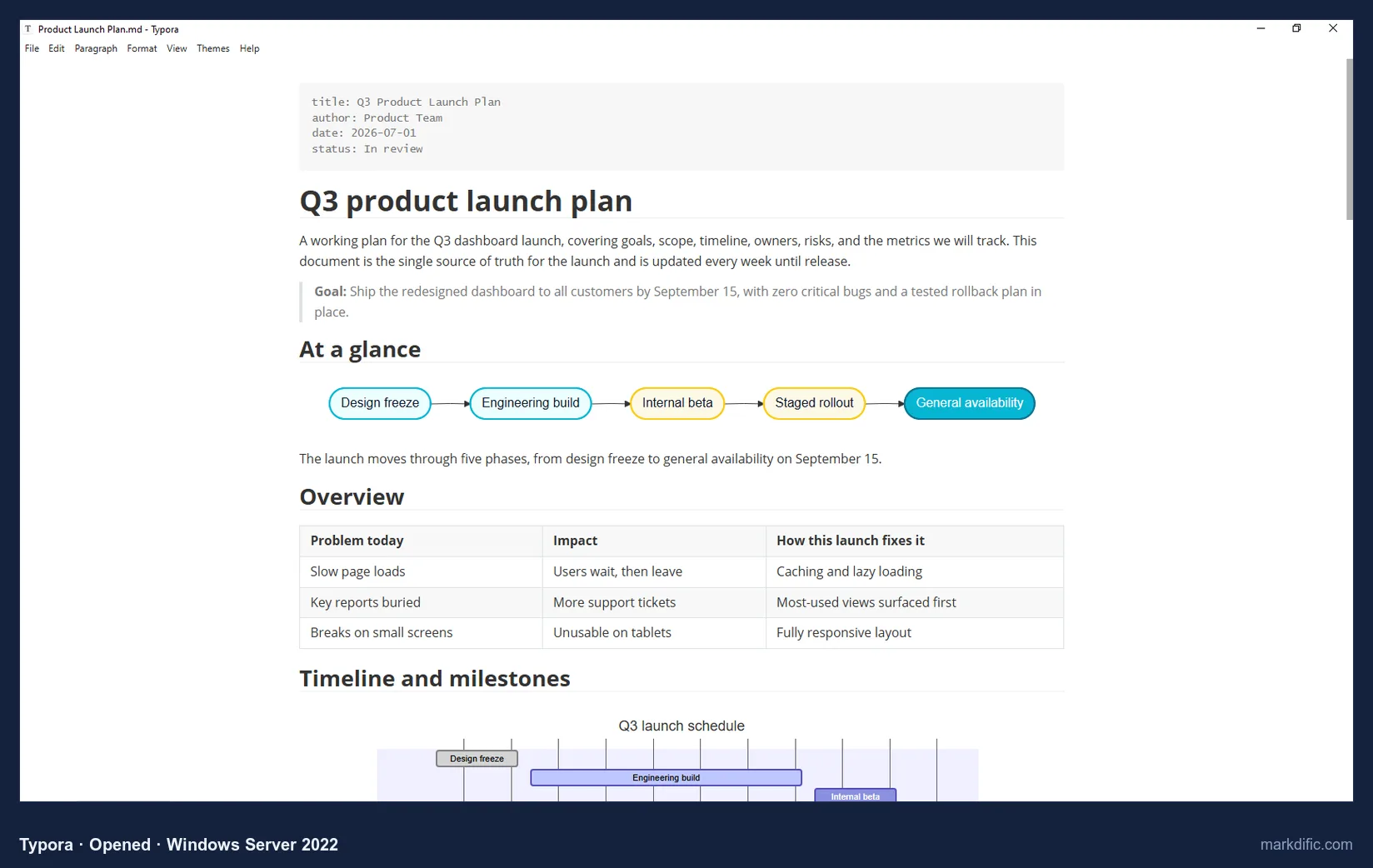
Focus mode (F8) and typewriter mode are available too. PDF, HTML and image export are built in. For Word, Typora calls Pandoc, which you install separately.
What makes it stand out
- Focus mode (F8), typewriter mode and themes.
- Opened all four stress files faster than Markdific.
- ARM64 build for Windows on ARM.
Key features
- Source code mode (Ctrl+/).
- PDF, HTML and image export built in.
- Word, ODT, EPUB and LaTeX through Pandoc.
- Kept Windows and Unix line endings when saving.
Limitations
- No split view.
- Inline math needs a setting.
- Extra export formats need Pandoc.
Verdict
The closest paid alternative on Windows, and the better pick if you want focus mode or an ARM64 build. See Typora alternatives.
Test results
- Tested: 1.14.10 (trial mode).
- Opened files directly; registers as the .md handler. No autosave in 15 s; 0 unrelated lines changed; CRLF and LF kept.
- Open time: 6.1 s (5k), 8.9 s (20k), 5.4 s (100 diagrams), 6.2 s (table); memory 549 to 1,016 MB.
- Long line, invalid UTF-8 and empty file all opened.
Install on Windows: download the installer from typora.io, or:
winget install --id appmakes.Typora#3 Obsidian
Best for a personal knowledge base of linked notes with sync to phones.
- Price
- free core app (including commercial use); Sync from $4 per month and Publish from $8 per month, billed yearly
- Platforms
- Windows (installer), macOS, Linux, iOS, Android
- License
- proprietary (not open source)
Obsidian treats a folder on your PC as a vault and builds links, backlinks and a graph across the notes in it. A single .md file from an email or a download opens inside a vault, not on its own.
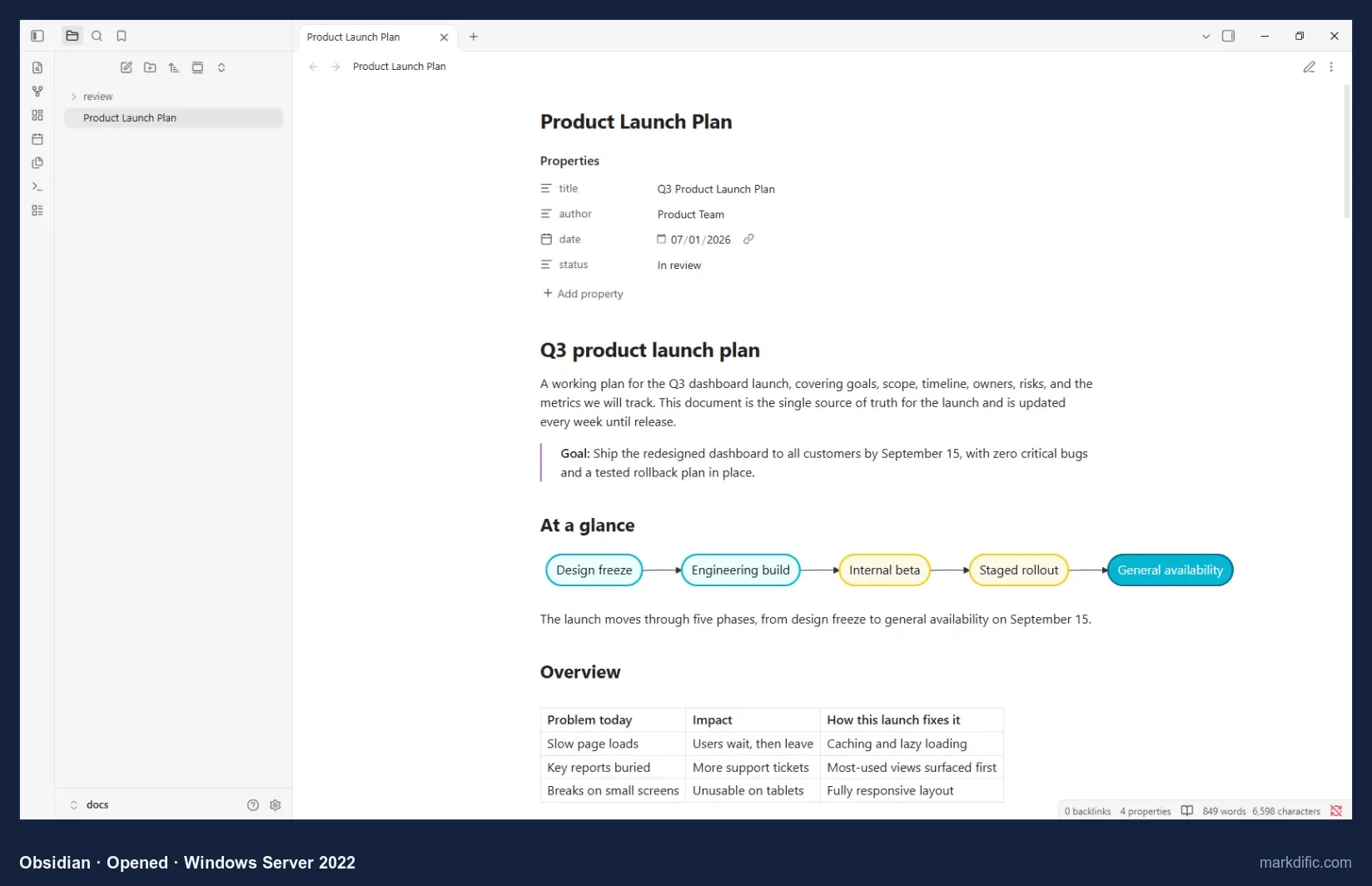
The vault here is the folder that held our test files, so no import step was needed.
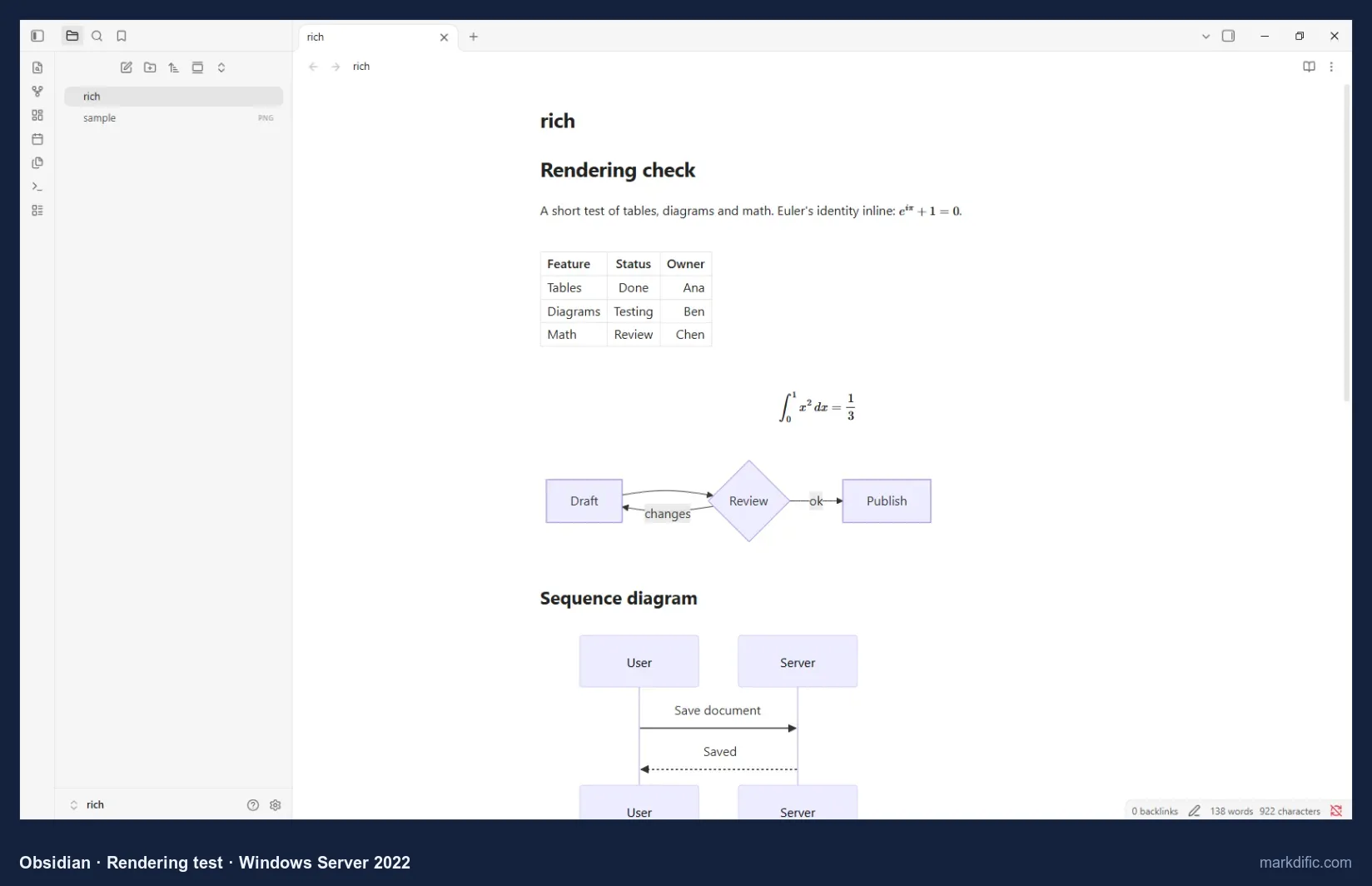
Mermaid only rendered after we clicked Allow on a once-per-vault prompt.
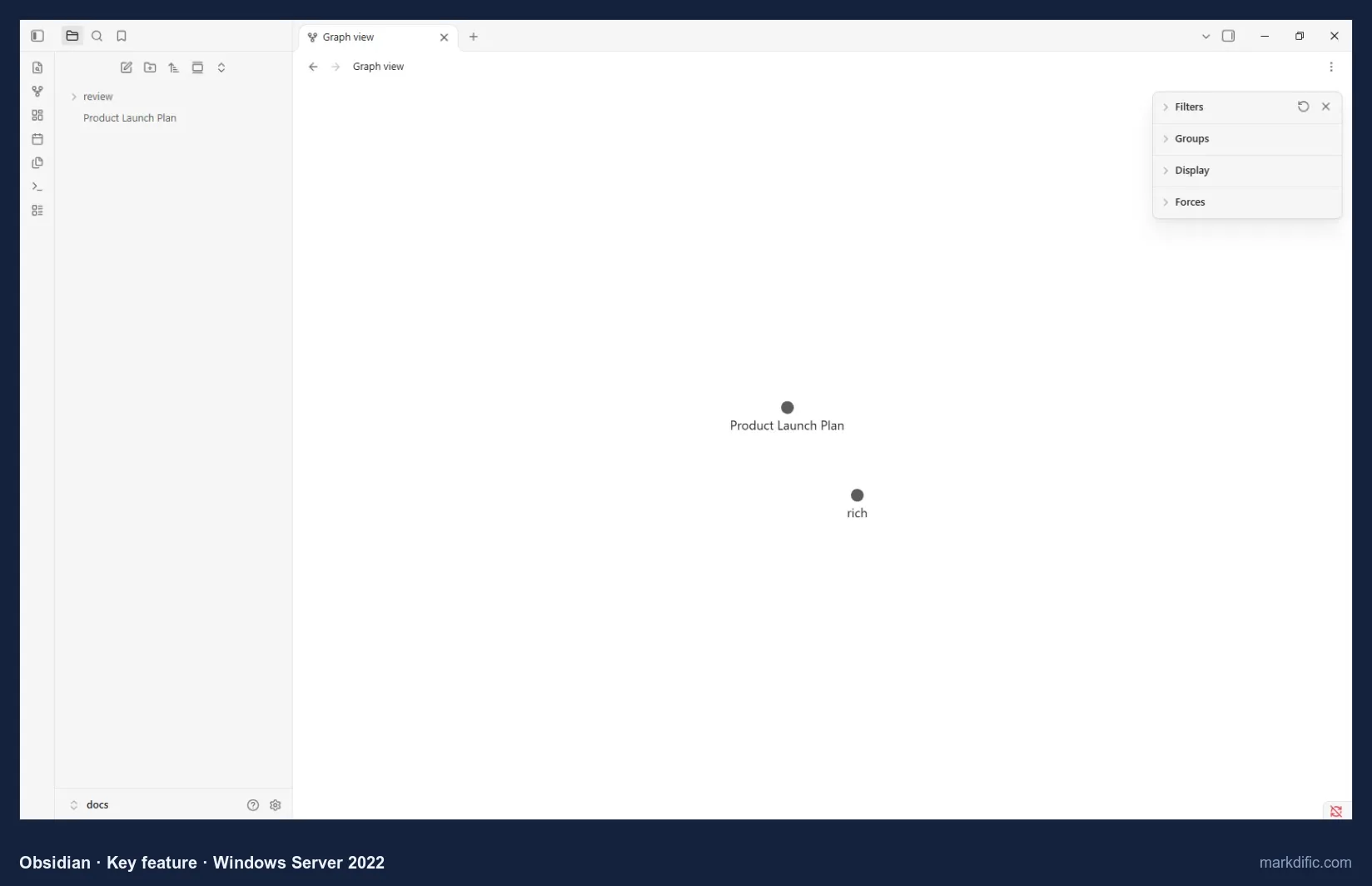
Our vault held two test notes, so the graph shows two nodes. When it saved a file with Windows line endings, Obsidian rewrote every line with Unix (LF) endings; in a repository that expects CRLF, Git then marks the whole file as changed.
What makes it stand out
- Backlinks and graph view across a vault.
- Community plugins for extra features such as more export formats.
- Phone apps for iOS and Android.
- 3.2 s for the 20,000-line file, the fastest of the apps that render Mermaid.
Key features
- Notes stay plain .md files in the vault folder.
- Front matter shown as editable properties.
- Autosave on by default.
- Paid add-ons: Sync and Publish.
Limitations
- The vault model adds a step for single files.
- Converts CRLF to LF.
- Export beyond PDF needs community plugins.
Verdict
Choose it for a notes vault you also read on your phone, not for editing .md files that live in a Windows Git repository.
Test results
- Tested: 1.14.4.
- Files open inside a vault (the containing folder). In the first run, Mermaid rendered after clicking Allow on a "Display Mermaid diagrams in this vault?" prompt.
- Autosave: yes. 0 unrelated lines changed; CRLF converted to LF; LF kept.
- Open time: 5.8 s (5k), 3.2 s (20k), 1.8 s (100 diagrams), 9.0 s (table); memory 386 to 705 MB.
- Long line, invalid UTF-8 and empty file all opened.
Install on Windows: download the installer from obsidian.md/download, or:
winget install --id Obsidian.Obsidian#4 Visual Studio Code
Best for developers whose Markdown lives in code repositories.
- Price
- free
- Platforms
- Windows (user or system installer, .zip), macOS, Linux, web
- License
- Microsoft build under a Microsoft licence; source (Code-OSS) MIT
VS Code's built-in preview rendered Mermaid and math with no extension installed. The per-user installer (243 MB) needs no administrator rights; a system-wide installer and a .zip are also available.
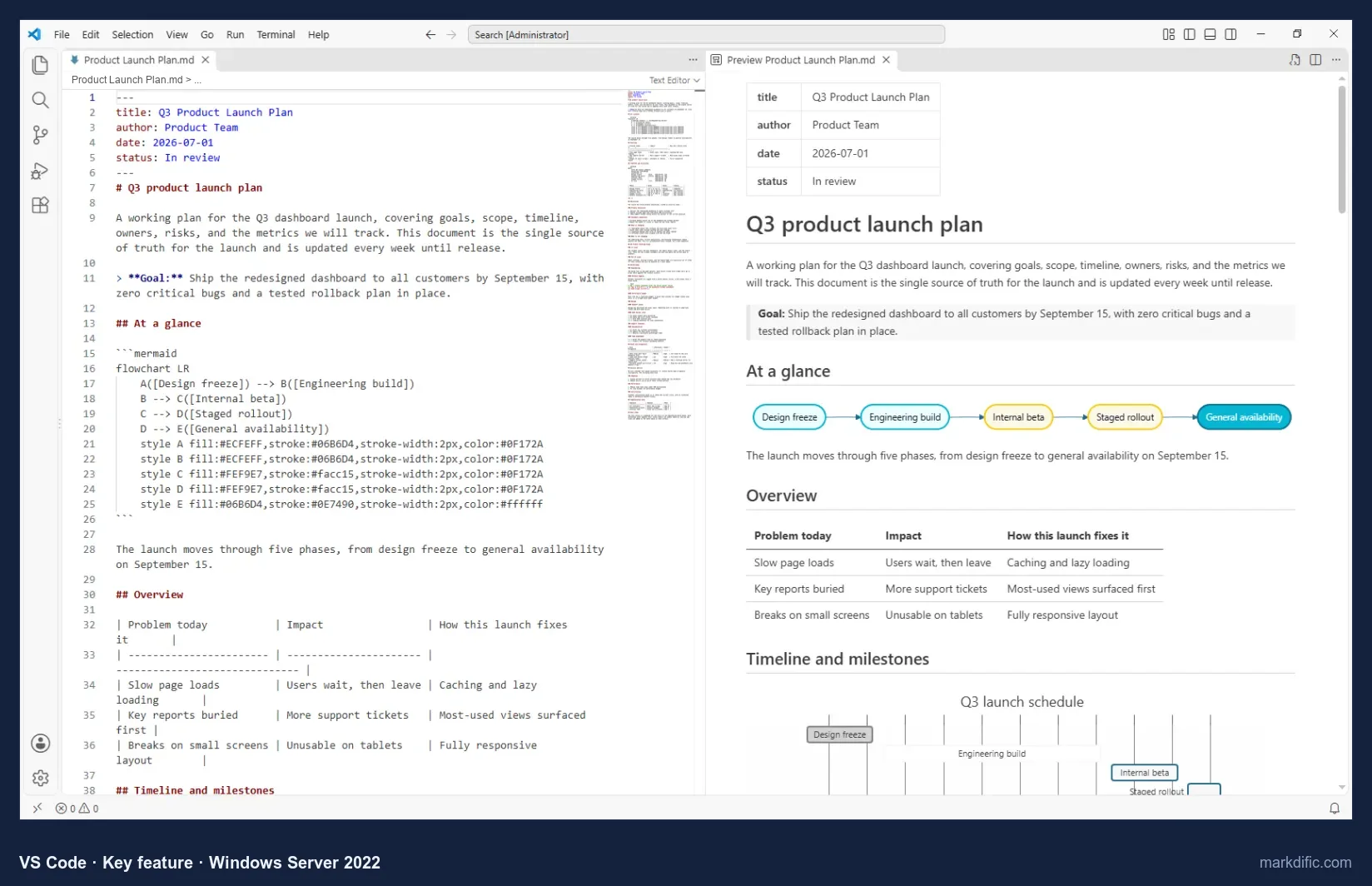
Ctrl+Shift+V opens the same preview in its own tab instead.
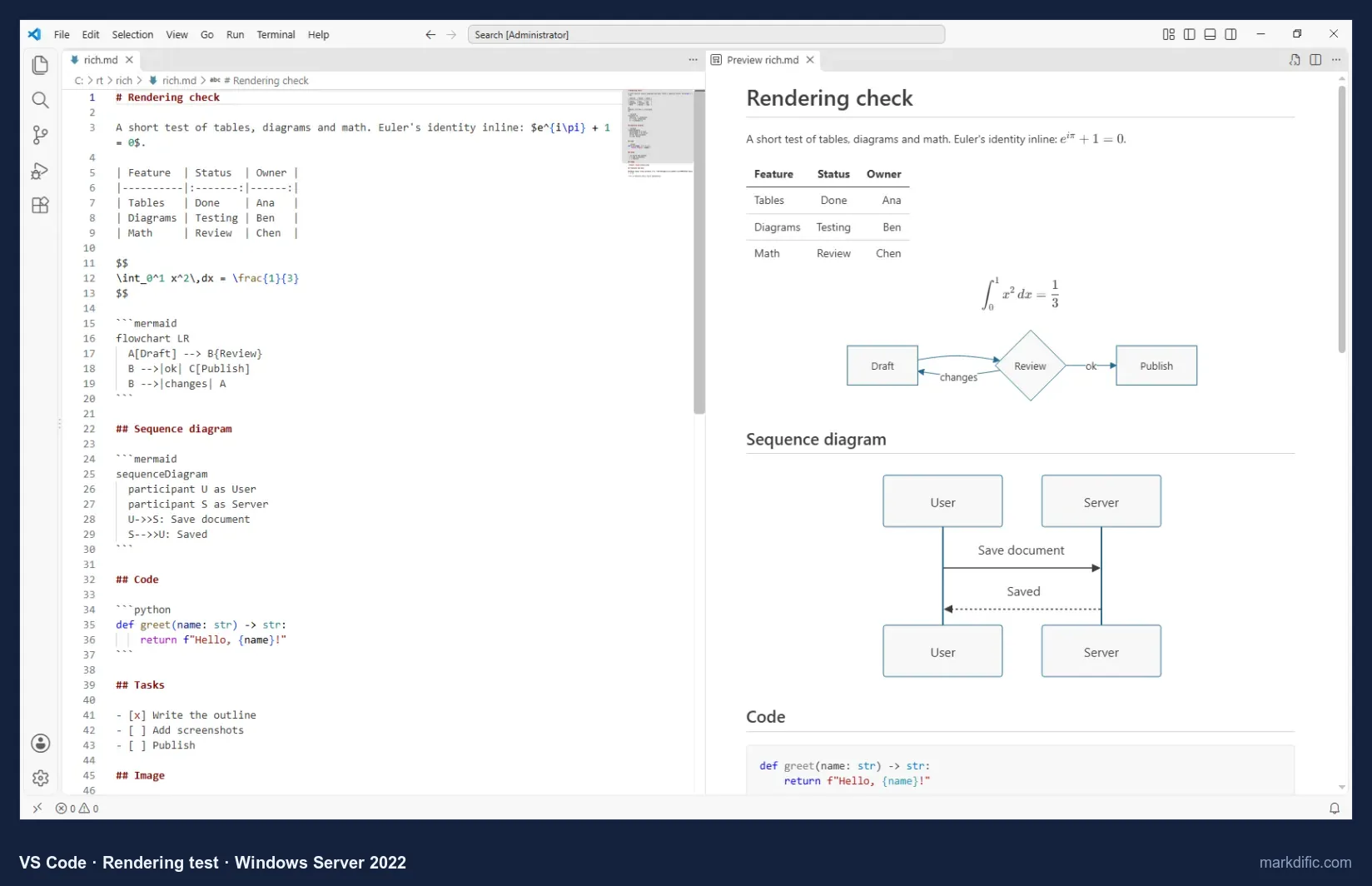
The preview is read-only: you type in the source pane and the preview follows.
What makes it stand out
- Git built in, next to your Markdown.
- Kept CRLF and LF files as they were.
- Per-user install without administrator rights.
Key features
- Side-by-side preview (Ctrl+K V).
- Preview in its own tab (Ctrl+Shift+V).
- Autosave is a setting, off by default.
Limitations
- Read-only rendered view.
- Export needs extensions.
- Highest memory use in the test (1,358 to 1,559 MB).
Verdict
A good free choice if your Markdown already sits in a repository. As a plain .md viewer it used the most memory of any app we tested.
Test results
- Tested: 1.142.0 (user installer).
- Opens single files and registers as the .md handler; preview via Ctrl+Shift+V or Ctrl+K V.
- No autosave by default; 0 unrelated changes; CRLF and LF kept.
- Open time: 10.8 s (5k), 12.9 s (20k), 9.3 s (100 diagrams), 11.0 s (table); memory 1,358 to 1,559 MB.
- Long line, invalid UTF-8 and empty file all opened.
Install on Windows: download from code.visualstudio.com, or:
winget install --id Microsoft.VisualStudioCode#5 Zettlr
Best free and open-source editor for academic, citation-heavy writing.
- Price
- free
- Platforms
- Windows (installer, x64), macOS, Linux
- License
- GPL-3.0
Zettlr is built around citations and linked notes for academic writing. Its 157 MB Windows installer (x64) includes Pandoc, so Word and other export formats work without a separate install.
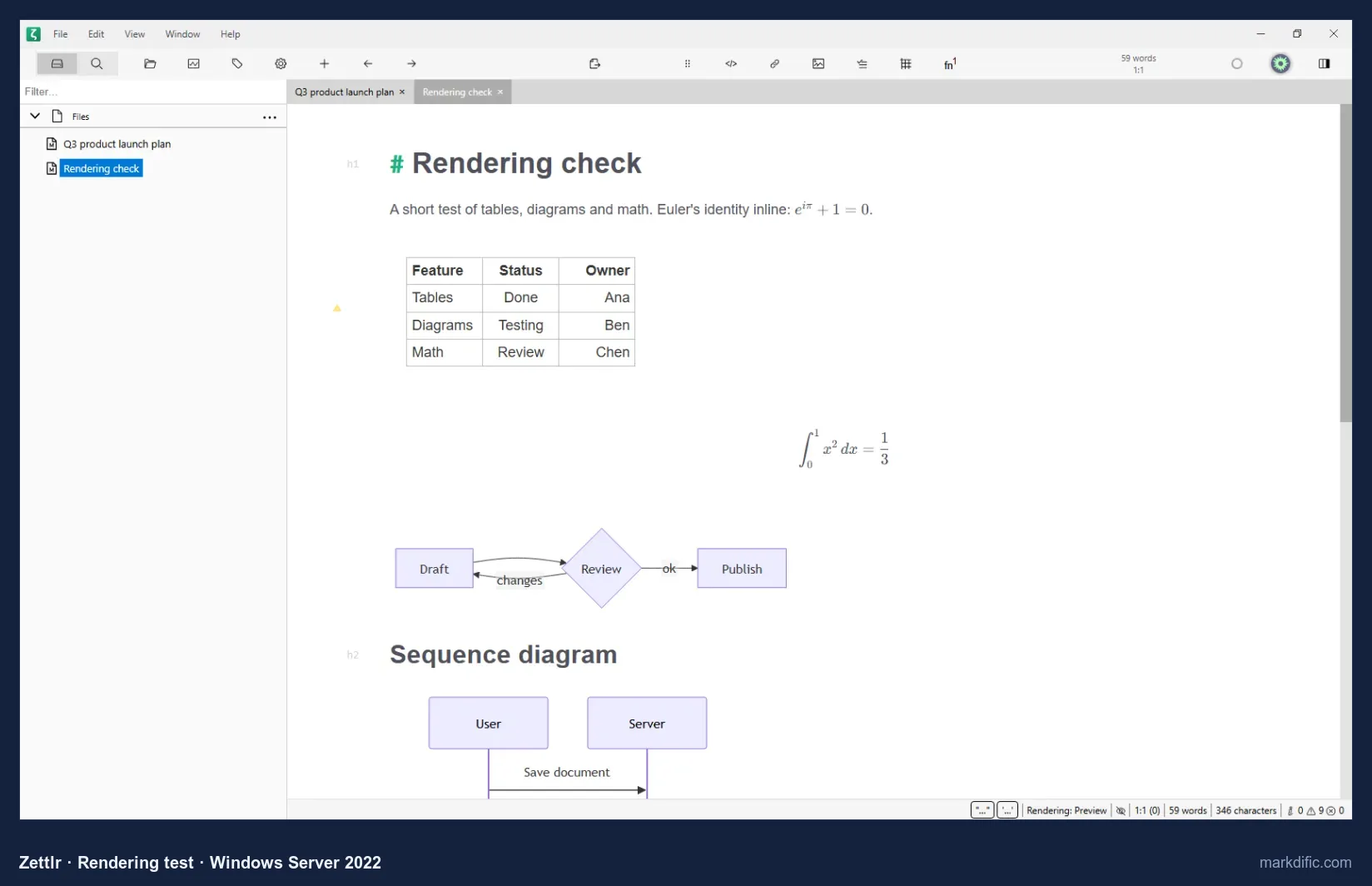
Rendering happens in the editing view itself; there is no second pane.
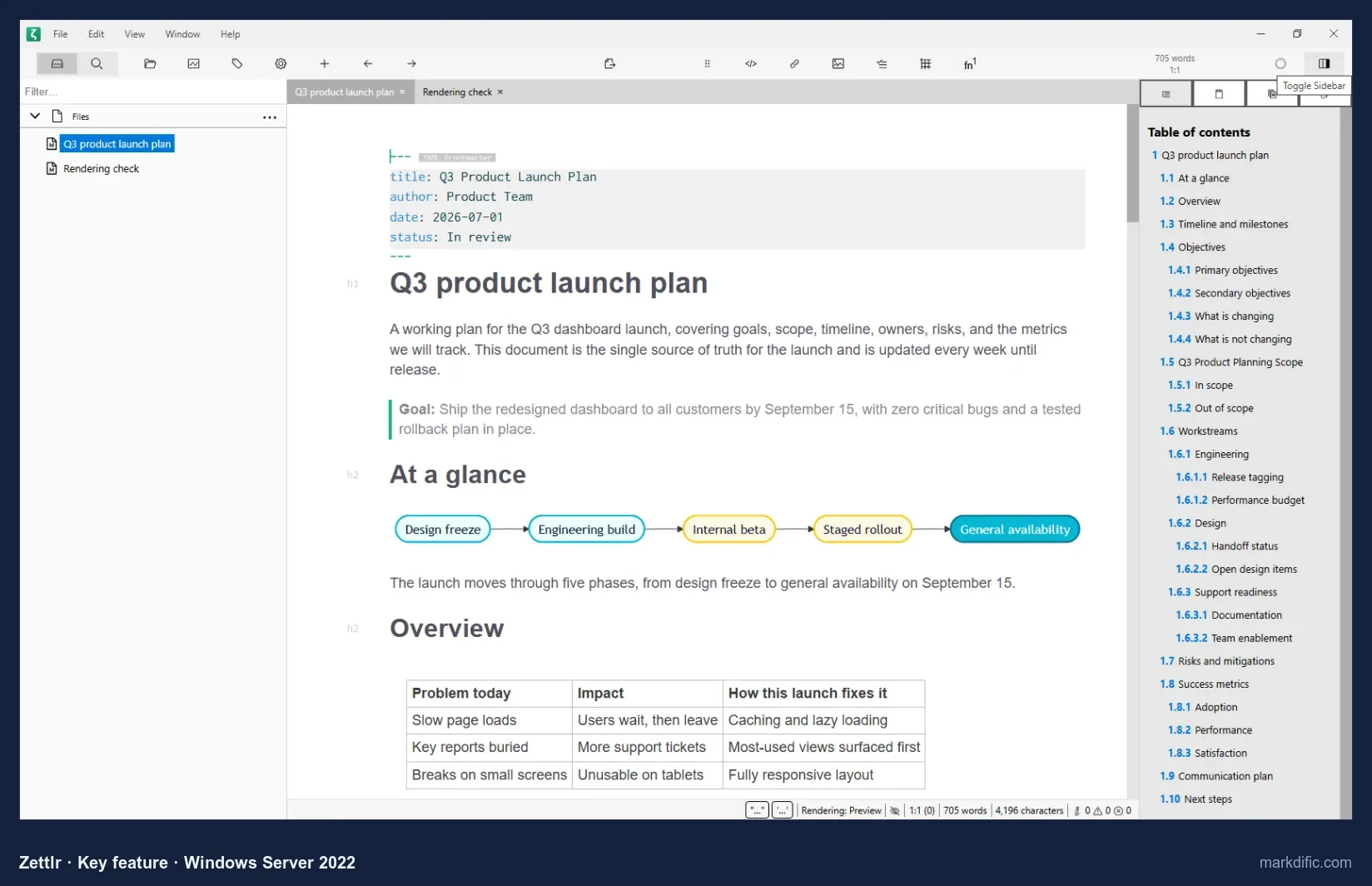
The same sidebar holds your references when you cite.
What makes it stand out
- Citations and Zettelkasten links.
- Open source (GPL-3.0) with Mermaid and math rendered inline.
- Line endings unchanged after saving.
Key features
- Table of contents and references sidebar.
- Registers for .md files.
- Saves on Ctrl+S; no autosave by default.
Limitations
- No separate preview pane.
- The slowest to open the stress files of the apps that loaded all four (14.3 to 20.1 s).
Verdict
The best free pick on Windows for papers and theses with citations.
Test results
- Tested: 4.8.0.
- Opens single files and registers as the .md handler; no autosave in 15 s; 0 unrelated changes; CRLF and LF kept.
- Open time: 14.4 s (5k), 14.3 s (20k), 20.1 s (100 diagrams), 16.8 s (table); memory 671 to 1,193 MB.
- Long line, invalid UTF-8 and empty file all opened.
Install on Windows: download the installer from zettlr.com, or:
winget install --id Zettlr.Zettlr#6 MarkText
Best free, open-source WYSIWYG editor for small and mid-size files.
- Price
- free
- Platforms
- Windows (installer or .zip; x64, ARM64), macOS, Linux
- License
- MIT
MarkText works like Typora, with one view that renders as you type, but it is free under the MIT licence. The Windows installer and .zip both come in x64 and ARM64.
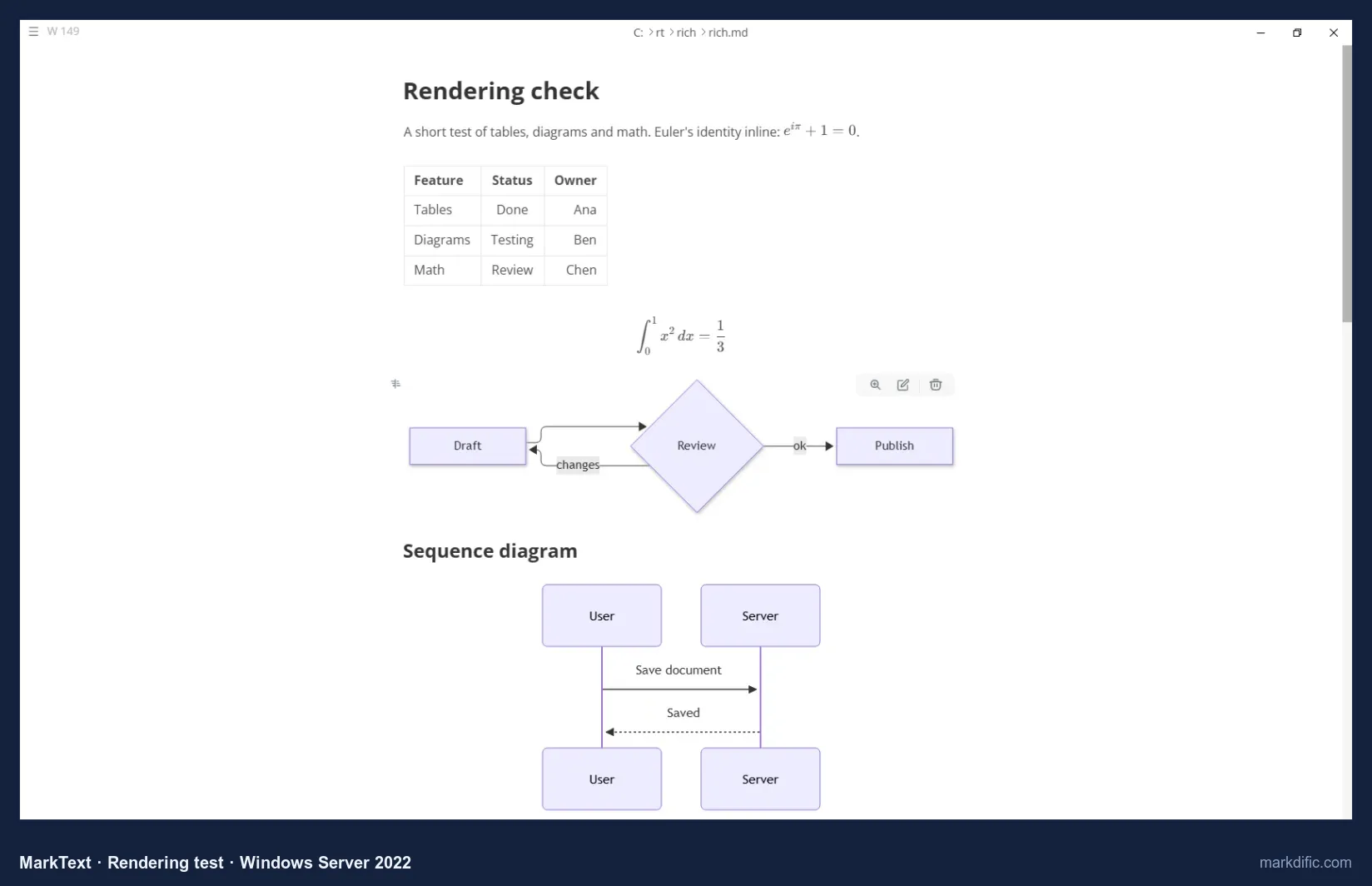
Both diagrams and inline and block math rendered with no settings changed.
On Windows, the source-mode shortcut (Ctrl+Alt+S) did nothing in our run; the View menu switched modes.
Is MarkText still maintained? Yes, as of October 2026. There was no stable release from March 2022 (0.17.1) to May 2026; releases resumed with 0.19.0 on 28 May 2026, and 0.23.0 shipped on 21 October 2026.
What makes it stand out
- Opened the 5,000-line file in 3.8 s, the fastest of the apps that render Mermaid.
- Mermaid and math in the WYSIWYG view with no settings changed.
- New releases again since May 2026.
Key features
- Source code mode (View menu).
- Kept CRLF and LF line endings.
- Saves on Ctrl+S; no autosave by default.
Limitations
- Did not load the 20,000-line file or the 2,000-row table within 45 seconds.
- Front matter was shown as headings.
- The source-mode shortcut had no effect on Windows.
Verdict
A free WYSIWYG editor for documents up to a few thousand lines. It did not load our 20,000-line file. See MarkText alternatives.
Test results
- Tested: 0.21.2 (current: 0.23.0).
- Opens single files and registers as the .md handler; no autosave; 0 unrelated changes; CRLF and LF kept.
- Open time: 3.8 s (5k), 4.2 s (100 diagrams); the 20,000-line file and the 2,000-row table did not load within 45 s; memory 453 to 610 MB.
- Long line, invalid UTF-8 and empty file all opened.
Install on Windows: download from github.com/marktext/marktext/releases, or:
winget install --id MarkText.MarkText#7 ghostwriter
Best for focused prose writing with a live preview.
- Price
- free
- Platforms
- Windows (portable .zip), Linux
- License
- GPL-3.0 (KDE)
On Windows, ghostwriter is a portable .zip: unzip and run, with no installer and no file association. The latest Windows release on GitHub is 2.1.6, from 2022.
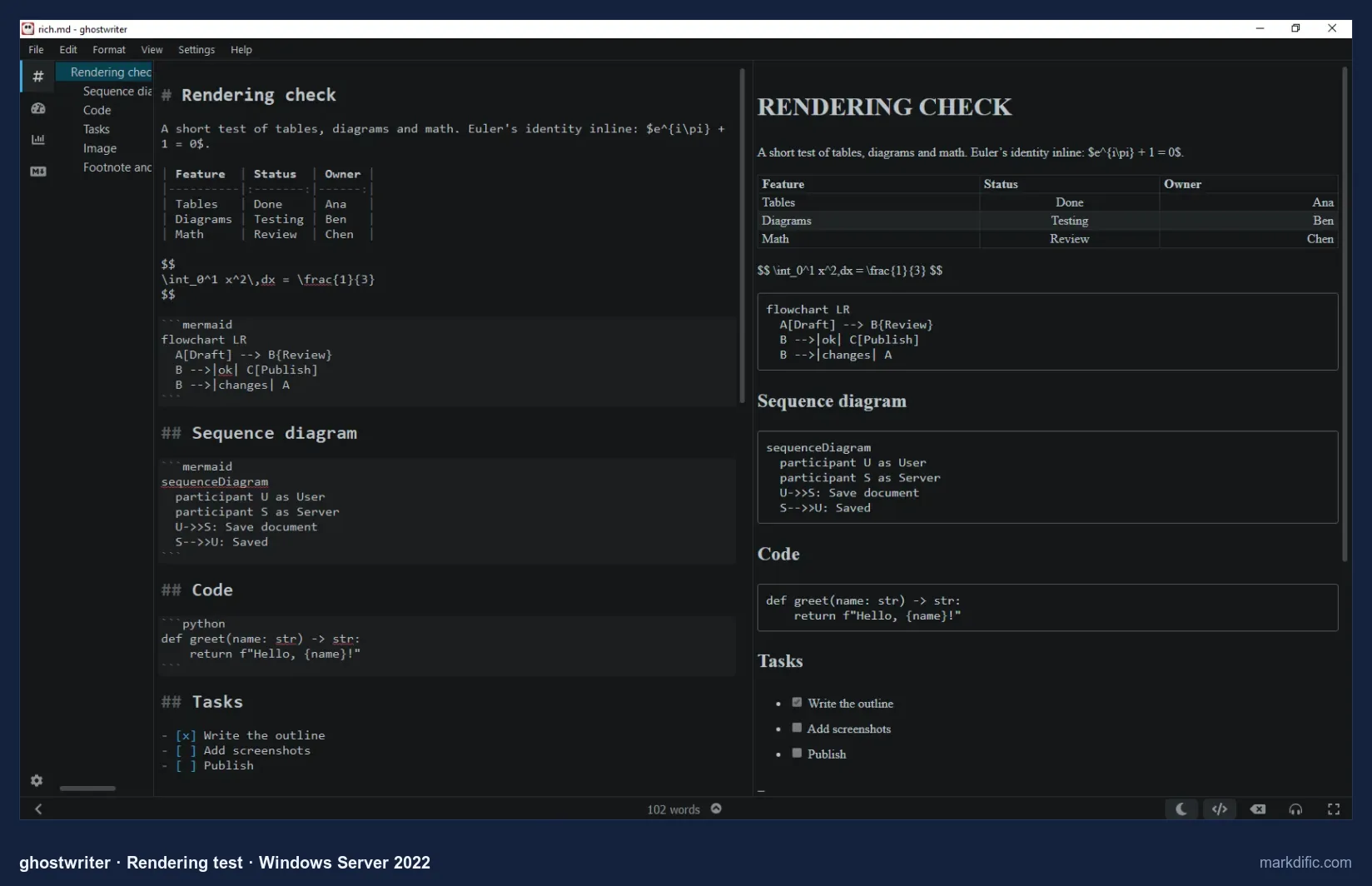
Dark is the default theme on Windows; our Linux screenshots of the same app show its light theme.
When it saved an LF file, ghostwriter wrote CRLF on every line. On a repository that uses LF, Git then shows the whole file as changed.
What makes it stand out
- Live preview beside the text.
- Outline and full-screen mode (F11).
- 188 to 457 MB, the least memory of the apps with a rendered preview.
Key features
- Preview toggled with Ctrl+P.
- Runs from a folder, nothing to install.
- Autosave off unless you change it.
Limitations
- No diagrams or math by default.
- Converts LF to CRLF.
- No installer, and the latest Windows release is from 2022.
Verdict
Suits prose on a PC where you cannot install software. Technical documents with diagrams or math show those parts as plain text.
Test results
- Tested: 2.1.6 portable (the latest Windows release on GitHub). The portable build does not register as the .md handler.
- No autosave; 0 unrelated changes; CRLF kept; an LF file was saved with CRLF on every line.
- Open time: 4.2 s (5k), 11.2 s (20k), 3.9 s (100 diagrams, shown as code), 4.9 s (table); memory 188 to 457 MB.
- Long line, invalid UTF-8 and empty file all opened.
Install on Windows: download the portable .zip from github.com/KDE/ghostwriter/releases, or:
winget install --id KDE.ghostwriter#8 Notepad++
Best lightweight, Notepad-like editor for Markdown as plain text; it has no preview.
- Price
- free
- Platforms
- Windows only (installer, MSI, portable .zip; x86, x64, ARM64)
- License
- GPL-3.0
Notepad++ was the fastest and lightest app in our test: every stress file opened in 1.4 s or less. It is Windows-only and comes as a 7 MB installer, an MSI for managed PCs or a portable .zip, in x86, x64 and ARM64 builds.
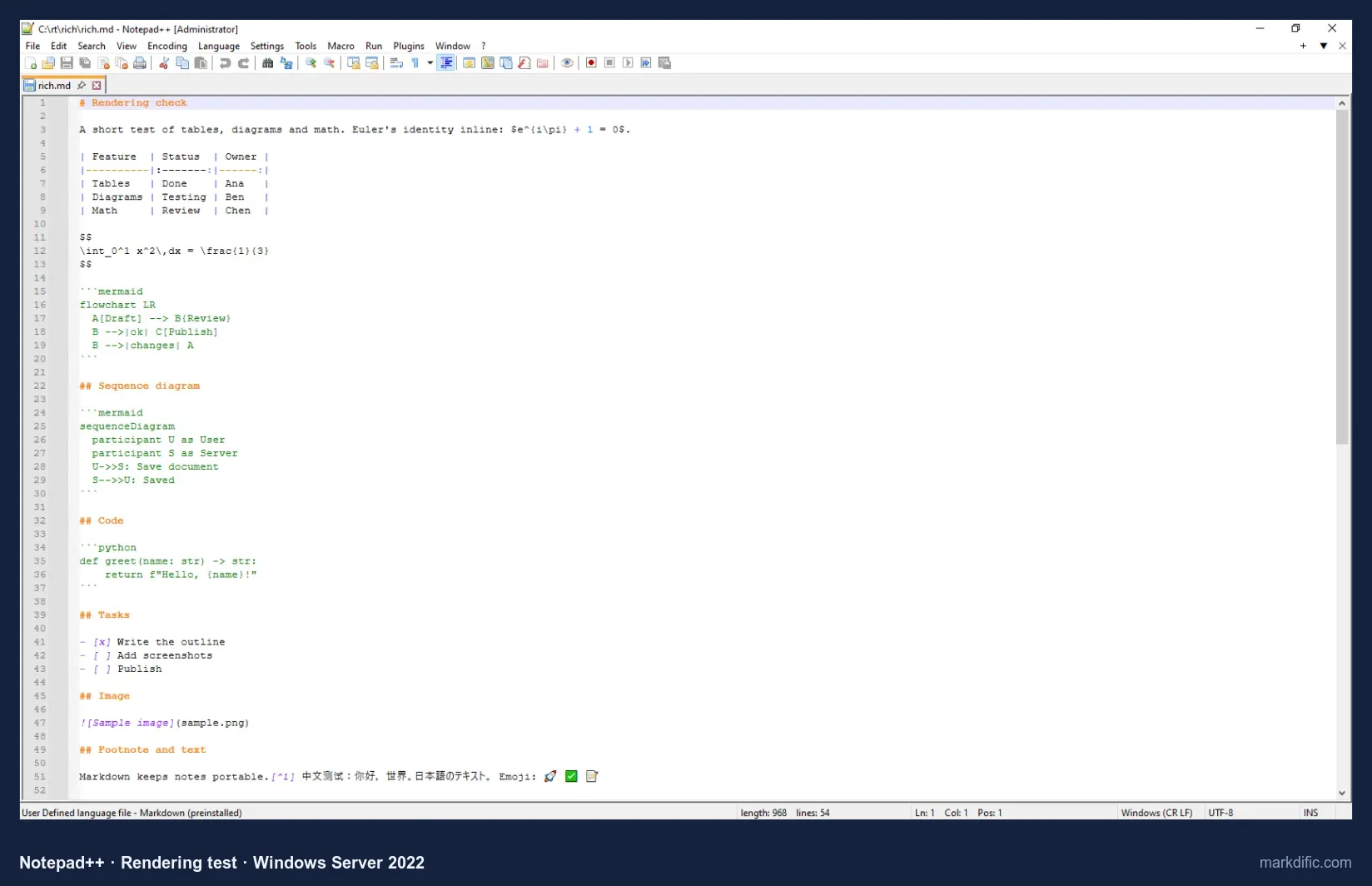
Headings and links are coloured, but a table stays as pipes and dashes and Mermaid stays as code. The status bar shows the file's line endings (Windows CR LF here) and encoding.
It does not take over .md files when installed; use Open with, or set it as the default app.
What makes it stand out
- 51 to 54 MB of memory on every stress file.
- MSI and portable options for managed or locked-down PCs.
- CRLF and LF unchanged.
Key features
- Markdown colouring as a preinstalled user-defined language.
- Line-ending and encoding shown in the status bar.
- Saves only on Ctrl+S by default.
Limitations
- Source only: no preview, Mermaid or math.
- No export.
Verdict
The pick for an old PC or quick edits of Markdown as text. Pair it with a viewer when you need the rendered document.
Test results
- Tested: 8.9.8.1 (ran as Administrator, as the title bar shows).
- Opens files directly; does not register as the .md handler by default.
- No autosave; 0 unrelated changes; CRLF and LF kept.
- Open time: 1.4 s (5k), 1.0 s (20k), 1.0 s (100 diagrams), 1.0 s (table); memory 51 to 54 MB.
- Long line, invalid UTF-8 and empty file all opened.
Install on Windows: download from notepad-plus-plus.org/downloads, or:
winget install --id Notepad++.Notepad++#9 QOwnNotes
Best for notes kept as .md files in a folder, on a PC with little memory.
- Price
- free
- Platforms
- Windows (portable .zip), macOS, Linux
- License
- GPL-2.0
On Windows, QOwnNotes is a portable .zip. You point it at a notes folder, and each note stays a .md file there that File Explorer, other editors and Git can see.
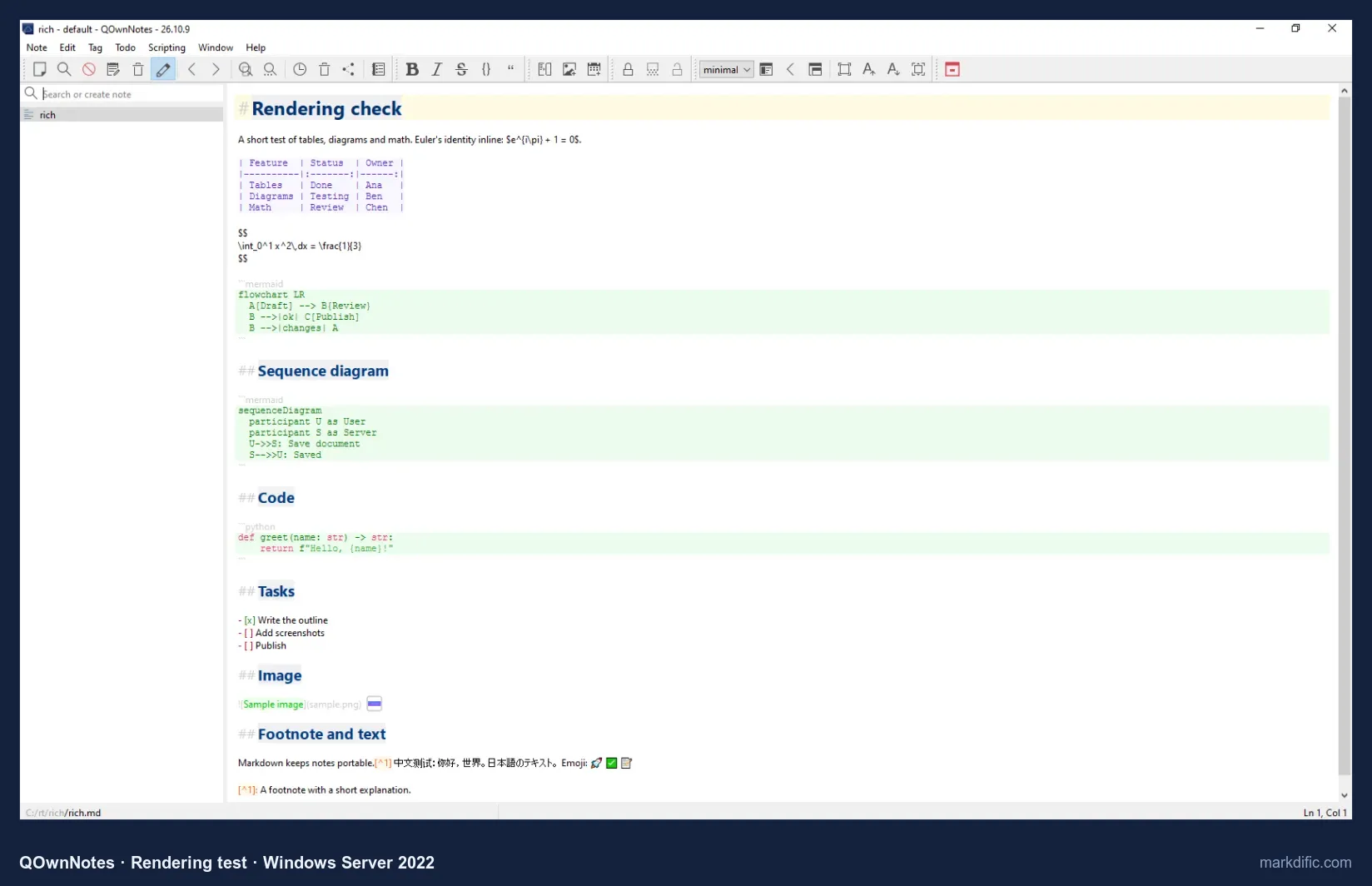
An optional preview pane exists, but we could not open it in our test setup.
Two default behaviours matter on Windows: an LF note was saved with CRLF endings, and an edited note was renamed after its first heading.
What makes it stand out
- Notes are ordinary .md files in a folder you choose.
- Autosave on by default.
- 84 to 104 MB, second only to Notepad++.
Key features
- Note list and full-text search.
- Optional preview pane.
- Sync through the Nextcloud client, Syncthing or Git (not built in).
Limitations
- No Mermaid or math in the default view.
- Renames a file after its first heading when you edit it (default setting), which can break links to the old name.
- Converts LF to CRLF.
- Works on a notes folder rather than single files.
Verdict
A notes app for a folder of .md files that stayed under 105 MB in every test; not for diagrams or math.
Test results
- Tested: 26.10.9 (released 20 October 2026), portable build.
- There is no open-file command: the test folder was set as the notes folder and each note was picked from the list. It does not register as the .md handler.
- Autosave: yes, the change was on disk 15 s after typing, without Ctrl+S. 0 unrelated lines changed; CRLF kept (9/9 lines); an LF file was saved with CRLF on every line.
- Each edited file was renamed after its first heading (for example, save.md became Q3 product launch plan.md).
- Open time: 12.9 s (5k, the first file opened; the window took 8.1 s to appear), 3.9 s (20k), 3.5 s (100 diagrams), 4.0 s (table); memory 84 to 104 MB.
- Long line, invalid UTF-8 and empty file all opened.
Install on Windows: download the portable .zip from qownnotes.org/installation, or:
winget install --id pbek.QOwnNotes#10 Joplin
Best for notes synced between desktop and phone; it imports .md files instead of editing them in place.
- Price
- free; Joplin Cloud is paid, and sync through Dropbox, OneDrive, Nextcloud, WebDAV, S3 or a local folder is free
- Platforms
- Windows (installer, portable), macOS, Linux, iOS, Android
- License
- AGPL-3.0
Joplin copies imported Markdown into its own database, so the original .md file is never changed. In return you get notebooks, tags, phone apps and free sync through OneDrive or Dropbox.
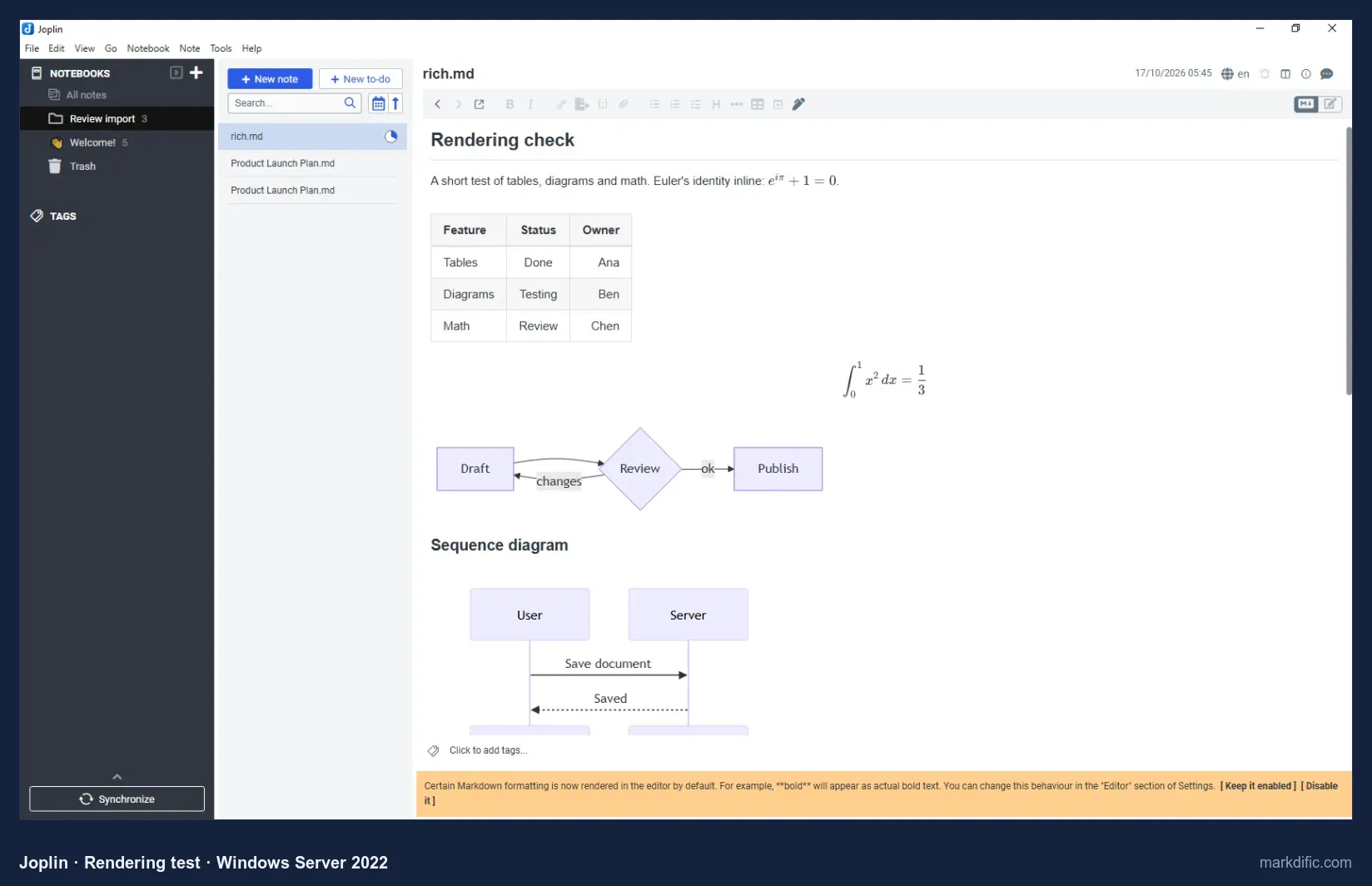
This is the imported copy of rich.md inside a Joplin notebook, not the file on disk.
Changes typed here go to Joplin's copy; to get a .md file back out, use File > Export.
What makes it stand out
- Notes organised in notebooks with tags.
- Free sync through OneDrive, Dropbox or your own storage.
- Phone apps.
Key features
- Editor, viewer and split layouts (Ctrl+L).
- Import from Markdown (File > Import > MD).
- Installer and portable builds.
Limitations
- Cannot edit .md files in place, so it does not suit a Git repository.
- Showed a notice about its new editor on first start.
- The largest installer in the test (361 MB).
Verdict
Fits notes you also read on a phone. To edit .md files where they are, pick an app ranked higher.
Test results
- Tested: 3.7.21.
- Joplin does not open a .md file directly and does not register as the .md handler; the test files were imported (the same as File > Import > MD).
- Tables, Mermaid and math rendered in the viewer.
- Autosave, save fidelity, line endings, open times and robustness do not apply to an import and were not tested.
Install on Windows: download from joplinapp.org/download, or:
winget install --id Joplin.JoplinWindows Markdown editors compared: features and price
Rendering, price and licence
| App (version) | Price | Open source | Mermaid | Math | Views | Best for |
|---|---|---|---|---|---|---|
| Markdific 1.3.0 | Free to view; $14.99 one-time to edit | No | Yes | Inline + block | WYSIWYG, source, split | Single files with diagrams and math |
| Typora 1.14.10 | $14.99 one-time | No | Yes | Block; inline off by default | WYSIWYG, source | WYSIWYG writing |
| Obsidian 1.14.4 | Free core; Sync and Publish paid | No | Yes, after a prompt | Inline + block | Live preview, reading, source | Knowledge bases |
| VS Code 1.142 | Free | Source MIT; Microsoft build not | Yes (preview) | Yes (preview) | Editor + side preview | Developers |
| Zettlr 4.8 | Free | Yes (GPL-3.0) | Yes | Inline + block | Inline rendering | Academic writing |
| MarkText 0.21.2 | Free | Yes (MIT) | Yes | Inline + block | WYSIWYG, source | Free WYSIWYG |
| ghostwriter 2.1.6 (portable) | Free | Yes (GPL-3.0) | No | No (default) | Editor + live preview | Prose writing |
| Notepad++ 8.9.8 | Free | Yes (GPL-3.0) | No (no preview) | No | Source only | Plain-text editing |
| QOwnNotes 26.10.9 | Free | Yes (GPL-2.0) | No (default view) | No (default view) | Editor; optional preview¹ | Plain-text notes in a folder |
| Joplin 3.7.21 | Free; Joplin Cloud paid | Yes (AGPL-3.0) | In viewer | In viewer | Editor, viewer, split | Synced notes (imports files) |
Autosave, line endings and install options
| App | Autosave (default) | CRLF kept | LF kept | Open 20k lines (s) | Windows install |
|---|---|---|---|---|---|
| Markdific | Yes | Yes | Yes | 11.6 | Microsoft Store, winget |
| Typora | No | Yes | Yes | 8.9 | Installer, winget |
| Obsidian | Yes | No (LF) | Yes | 3.2 | Installer, winget |
| VS Code | No | Yes | Yes | 12.9 | Installer, .zip, winget |
| Zettlr | No | Yes | Yes | 14.3 | Installer, winget |
| MarkText | No | Yes | Yes | Not loaded in 45 s | Installer, .zip, winget |
| ghostwriter | No | Yes | No (CRLF) | 11.2 | Portable .zip, winget |
| Notepad++ | No | Yes | Yes | 1.0 | Installer, MSI, .zip, winget |
| QOwnNotes | Yes | Yes | No (CRLF) | 3.9 | Portable .zip, winget |
| Joplin | n/a (imports) | n/a | n/a | n/a | Installer, portable, winget |
All times include start-up, on a Windows virtual machine with no GPU. See How we tested.
¹ QOwnNotes has an optional preview pane; we could not open it in our test setup, so its rendering was not judged.
Speed, memory and stress-test results on Windows
Open time and memory
| App | 5k lines: s / MB | 20k lines: s / MB | 100 diagrams: s / MB | 2,000-row table: s / MB |
|---|---|---|---|---|
| Markdific 1.3.0 | 8.6 / 359 | 11.6 / 1,039 | 10.5 / 473 | 8.8 / 523 |
| Typora | 6.1 / 549 | 8.9 / 1,016 | 5.4 / 667 | 6.2 / 692 |
| Obsidian | 5.8 / 386 | 3.2 / 595 | 1.8 / 396 | 9.0 / 705 |
| VS Code | 10.8 / 1,372 | 12.9 / 1,559 | 9.3 / 1,447 | 11.0 / 1,358 |
| Zettlr | 14.4 / 671 | 14.3 / 1,193 | 20.1 / 1,081 | 16.8 / 955 |
| MarkText | 3.8 / 453 | not loaded in 45 s / 610² | 4.2 / 602 | not loaded in 45 s / 503² |
| ghostwriter | 4.2 / 188 | 11.2 / 457 | 3.9 / 188 | 4.9 / 253 |
| Notepad++ | 1.4 / 52 | 1.0 / 54 | 1.0 / 51 | 1.0 / 52 |
| QOwnNotes | 12.9 / 85 | 3.9 / 104 | 3.5 / 84 | 4.0 / 85 |
| Joplin | n/a (imports) | n/a | n/a | n/a |
Time runs from launch until the first heading was visible, start-up included (about ±1 s). Memory is the working set of all the app's processes, 8 s after the file loaded.
² Memory at 45 s, file not shown. Apps that show Mermaid as code (ghostwriter, Notepad++, QOwnNotes) do no diagram rendering, so their diagram-file times are not directly comparable. QOwnNotes ran on 22 October 2026, the other apps on 17 October 2026, on the same machine type.
Robustness
| App | 200k-char line | Invalid UTF-8 | Empty file |
|---|---|---|---|
| Markdific 1.3.0 | Opens | "Open failed"³ | Opens |
| Typora | Opens | Opens | Opens |
| Obsidian | Opens | Opens | Opens |
| VS Code | Opens | Opens | Opens |
| Zettlr | Opens | Opens | Opens |
| MarkText | Opens | Opens | Opens |
| ghostwriter | Opens | Opens | Opens |
| Notepad++ | Opens | Opens | Opens |
| QOwnNotes | Opens | Opens | Opens |
| Joplin | n/a (imports) | n/a | n/a |
³ Fixed in Markdific 1.3.1: the file opens and invalid bytes are shown as �. Not re-tested on Windows. Typing lag was not measured on Windows, because reading the screen on the test machine was too coarse to time it.
Autosave, save fidelity and line endings
| App | Autosave without Ctrl+S (defaults) | Unrelated lines changed on save | CRLF after save | LF after save |
|---|---|---|---|---|
| Markdific | Yes | 0 | Kept | Kept |
| Typora | No | 0 | Kept | Kept |
| Obsidian | Yes | 0 | Converted to LF | Kept |
| VS Code | No | 0 | Kept | Kept |
| Zettlr | No | 0 | Kept | Kept |
| MarkText | No | 0 | Kept | Kept |
| ghostwriter | No | 0 | Kept | Converted to CRLF |
| Notepad++ | No | 0 | Kept | Kept |
| QOwnNotes | Yes | 0 | Kept | Converted to CRLF |
| Joplin | n/a (imports) | n/a | n/a | n/a |
We did not count blank lines added next to the inserted word.
How we tested the Windows Markdown editors
We installed all 10 apps on the same clean Windows PC (Windows Server 2022, no graphics card) on 17 and 22 October 2026, and opened the same Markdown files in each one: a product launch plan, a short page with a table, math and diagrams, and large files of up to 20,000 lines.
For every app we checked:
- whether tables, math and Mermaid diagrams display
- whether it saves on its own (autosave)
- whether saving changes anything else in the file, including Windows line endings
- how long large files take to open, and how much memory the app uses
A PC with a graphics card will be faster than ours, so compare the apps with each other rather than reading the times as exact. Each app section lists the version we tested.
What to look for in a Windows Markdown editor
Opening .md files with a double-click
- Set themselves as the .md app: Markdific, Typora, VS Code, Zettlr, MarkText.
- Did not: Notepad++, ghostwriter (portable) and QOwnNotes.
- To change it: right-click a .md file, choose Open with > Choose another app (how to open .md files).
Microsoft Store, installer or portable
- Microsoft Store (no admin prompt, updates itself): Markdific.
- Own installer: Typora, Obsidian, VS Code, Zettlr, Joplin. Notepad++ also has an MSI for managed PCs.
- Portable .zip: ghostwriter, QOwnNotes.
- All 10 can also be installed with winget.
Windows line endings (CRLF vs LF)
- If an editor changes line endings when it saves, Git shows every line as changed.
- Kept them: Markdific, Typora, VS Code, Zettlr, MarkText, Notepad++.
- Changed them: Obsidian (CRLF to LF), ghostwriter and QOwnNotes (LF to CRLF).
Word and PDF export
- Built in: Markdific (PDF and Word), Typora (PDF; Word through Pandoc), Obsidian (PDF), Zettlr (comes with Pandoc).
- Needs an extension or another tool: VS Code, Notepad++.
Older or low-memory PCs
- Lightest: Notepad++, 51 to 54 MB.
- Heaviest: VS Code, 1,358 to 1,559 MB.
Windows 10, Windows 11 and ARM
- Markdific runs on Windows 11 and Windows 10 version 1809 or later (x64).
- Typora, MarkText and Notepad++ have ARM64 builds.
- Notepad's Markdown view is a Windows 11 feature and does not show diagrams or math.
Diagrams and math
- 7 of the 10 apps showed Mermaid diagrams and block math. Joplin does this only in its viewer, Obsidian after a prompt, and Typora has inline math off by default.
Other Windows Markdown editors we considered
Other Windows roundups often include these six. Each row says why it did not finish our tests; details come from the developers' own pages, checked on 2026-10-22, and our run that day.
| App | What it is | License / price | Version | Why not ranked | Install |
|---|---|---|---|---|---|
| Windows 11 Notepad | Built-in text editor with a Markdown formatting view | Built in | Not tested | Not available on Windows Server | Built into Windows 11 |
| Markdown Monster | Windows Markdown editor with a live preview | Proprietary; free evaluation, $99 single user | 4.0 (installed) | Stopped at a "WebView Runtime is out of Date" dialog on our test machine | winget install --id WestWind.MarkdownMonster |
| MarkdownPad 2 | Older Windows editor with free and Pro editions | Proprietary; free, Pro paid | 2.5.0.27920 (partly tested) | Its preview crashed on our test machine, and typed text did not reach the document | Installer from markdownpad.com |
| SiYuan | Privacy-first knowledge base with blocks | AGPL-3.0, free core, paid membership | 3.8.8 (installed) | Imports Markdown into its own workspace (JSON .sy files); we could not get past its first-run window in our test setup | Installer from github.com/siyuan-note/siyuan |
| Logseq | Outliner for connected notes | AGPL-3.0, free | 2.0.2 (partly tested) | Outliner model, not a document editor; only a pasted page was captured | winget install --id Logseq.Logseq |
| Microsoft Store apps | Small Markdown editors and viewers | Mostly free | Not tested | Not tested | Microsoft Store |
Windows 11 Notepad. Microsoft started rolling out text formatting in Notepad to Windows Insiders on 30 May 2025. Headings, lists, bold, italic and links render, and a toggle shows the raw Markdown. Tables reached Insider builds first in January 2026. Notepad does not render Mermaid diagrams or math, and what you see depends on your Notepad version.
Markdown Monster. A Windows-only editor by West Wind. The evaluation version is free and fully functional, with occasional notices; continued or commercial use needs a licence ($99 single user, as listed on 2026-10-22). Version 4.0 installed on our test machine, but it required Microsoft Edge WebView2 runtime build 4258 or later and the machine had build 2903, so we have no test results. On a normal Windows 10 or 11 PC, WebView2 updates automatically.
MarkdownPad 2. Its website lists Windows XP to 8. Version 2.5.0.27920 installed (38 MB), registered as the .md handler and showed an "Upgrade to MarkdownPad Pro" dialog on every launch. Its preview component crashed on our test machine ("This view has crashed!"), so rendering could not be judged. Partial data: it opened the stress files in 6.2 to 6.4 s (23.8 s for the 2,000-row table) using 149 to 159 MB, and the long-line, invalid UTF-8 and empty files opened.
Microsoft Store apps. Searching the Store for "Markdown" returns small apps, for example Markdown Editor simple (Trawivo, free), Markdown View (Alan Mendelevich, free viewer), EZ Markdown (Ape Apps, free) and DA-MarkdownEditor (DA-Software, $13.99), as listed in the US Store on 2026-10-22. We did not test them.
How to install each Markdown editor on Windows
Each app section above ends with its install commands, with a Copy button. Jump to an app: Markdific · Typora · Obsidian · Visual Studio Code · Zettlr · MarkText · ghostwriter · Notepad++ · QOwnNotes · Joplin.
Windows Markdown editor FAQ
How do I open an MD file on Windows 11?
Right-click the .md file, choose Open with, and pick a Markdown app such as Markdific, Typora or VS Code; Notepad opens it as text. To make it permanent, go to Settings > Apps > Default apps, search for .md and choose the app. Markdific views files for free, including tables, Mermaid diagrams and math.
Does Windows Notepad support Markdown?
Partly. Recent Windows 11 Notepad versions have a formatting view for headings, lists, bold, italic and links, with a toggle back to raw text. Microsoft rolled it out to Windows Insiders from May 2025 and added tables to Insider builds in January 2026, so features depend on your version. Notepad does not render Mermaid diagrams or math.
What is the best free Markdown editor for Windows?
In our tests Zettlr was the best free Markdown editor for Windows: it is open source (GPL-3.0), rendered Mermaid and math, and bundles Pandoc for export. MarkText is the best free WYSIWYG option for smaller files, VS Code suits Markdown in code repositories, and Notepad++ is the lightest for plain-text editing.
Which Windows Markdown editors export to PDF?
Markdific exports PDF and Word on Windows without Pandoc, as part of its paid editing. Typora exports PDF natively and needs Pandoc for Word. Zettlr exports through its bundled Pandoc, and Obsidian exports PDF. VS Code needs an extension, and Notepad++ has no export. Markdown files can also be printed from a viewer.
Which Markdown editors keep CRLF line endings?
In our Windows test, Markdific, Typora, VS Code, Zettlr, MarkText and Notepad++ kept every CRLF line and every LF line when saving. Obsidian converted CRLF files to LF, while ghostwriter and QOwnNotes converted LF files to CRLF. A converted file shows every line as changed in Git, even if you edited one word.
Is there a Markdown viewer for Windows 10?
Yes. Markdific runs on Windows 10 version 1809 or later as well as Windows 11, and viewing .md files is free, with tables, Mermaid diagrams and math rendered. Install it from the Microsoft Store or with winget. The Markdown formatting in Notepad is a Windows 11 feature, and it does not show diagrams or math.
Which Markdown editors autosave on Windows?
Only three apps wrote changes to disk on their own within 15 seconds in their default setup: Markdific, Obsidian and QOwnNotes. Typora, VS Code, Zettlr, MarkText, ghostwriter and Notepad++ did not. VS Code and Typora both have an autosave option you can turn on in their settings.
Is Markdific free on Windows?
Yes, for viewing. Markdific is a free download from the Microsoft Store, and opening and viewing Markdown files is free. Editing, saving, autosave, themes and export are included in a 14-day trial, then cost $14.99 one-time. One licence works on up to 3 devices on Windows, macOS or Linux.
Related Markdown guides
- Markdific for Windows
- Best Markdown editors for Linux
- Best Markdown editors for Mac
- Quick Look for Markdown on Mac
- Typora alternatives
- MarkText alternatives
- How to open .md files
- Markdown in VS Code
- Markdown in Obsidian
- Mermaid diagrams in Markdown
- Math in Markdown
- Markdown cheat sheet
About this test
Markdific is made by the team that publishes this guide. It went through the same tests as every other app, and no developer paid to be included. Prices and versions were checked on 21–22 October 2026 and may change. Corrections: hi@markdific.com.
Last tested 2026-10-22.