
TL;DR
- Best overall: Markdific. Opens .md files directly, several in tabs. WYSIWYG, source and split views; Mermaid and math render with no setup; autosave on by default; exports to Word, HTML, EPUB, LaTeX and other formats. $14.99 one-time after a 14-day trial.
- Best for a knowledge base: Obsidian. Free core app, backlinks, graph view, mobile apps. Works inside a vault, not on loose files.
- Best free WYSIWYG: MarkText (MIT). Renders Mermaid and math; slow on very large files.
- Best free for academic writing: Zettlr (GPL-3.0). Mermaid, math, citations and Pandoc export.
- Best for developers: VS Code. Built-in preview renders Mermaid and math.
- Lightest editors: Kate (about 130 MB), GNOME Text Editor (about 250 MB, no preview) and ReText (about 300 MB, with preview). GNOME Text Editor and ReText do not render Mermaid; Kate's preview plugin was not judged.
- Viewer only: Okular. Paginated page view and 136 to 178 MB of memory; no Mermaid or math.
On this page
Which Linux Markdown editor should you pick?
| Your need | Pick | Runner-up | Why |
|---|---|---|---|
| Free and open source | Zettlr | MarkText | Both rendered Mermaid and math with no setup; both are free and open source. |
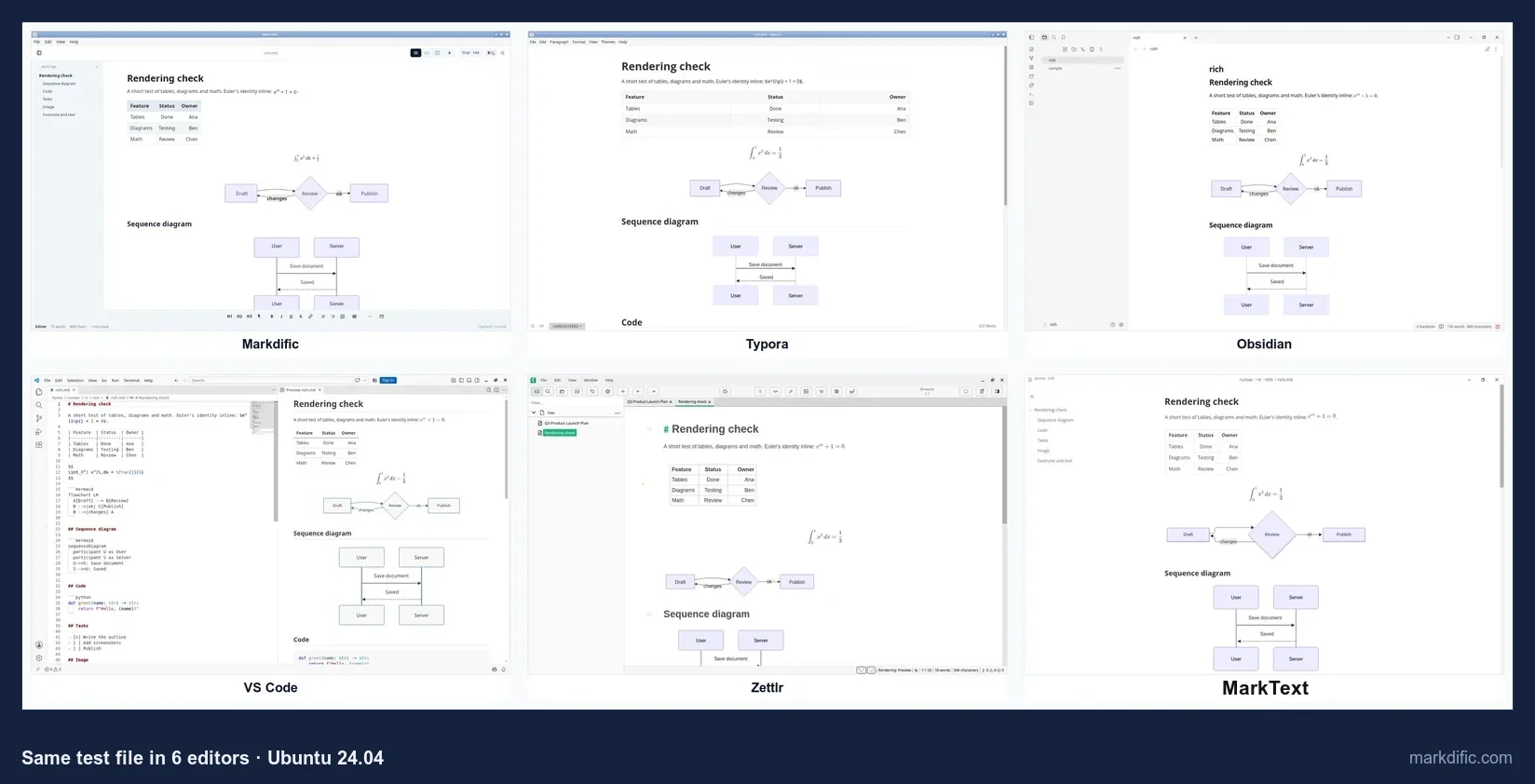
| WYSIWYG (edit in the rendered view) | Markdific | Typora; MarkText (free) | All three render tables, math and Mermaid while you type. |
| Diagrams and math | Markdific | Zettlr, MarkText, Typora | Inline and block math plus Mermaid flowcharts and sequence diagrams rendered with no setup (Typora: inline math is off by default). |
| Knowledge base, linked notes | Obsidian | Joplin (synced notebook) | Backlinks, graph view, plugins, mobile apps. Joplin imports files into its own database. |
| Lightweight, old hardware | Kate | ReText, GNOME Text Editor | Lowest memory among the editors we measured (132 to 136 MB). |
| Developers, docs in Git repos | VS Code | Kate | Built-in Mermaid and math preview; Git integration; CRLF kept. |
| Viewing only | Okular | Markdific (free viewer) | Okular shows a paginated page; Markdific views files for free and renders Mermaid and math. |
| GNOME native | Apostrophe | GNOME Text Editor, Marker | libadwaita apps; Apostrophe has a preview and focus mode. |
| KDE native | ghostwriter | Kate, Okular | KDE apps; ghostwriter has a live preview and focus mode. |
| Big files (20,000+ lines) | Obsidian | ReText, Kate | Obsidian opened the 20,000-line file in 2.6 s, the fastest in the test; MarkText did not load it within 60 s. |
| Autosave without Ctrl+S | Markdific | Obsidian, KeenWrite | The only three apps that saved to disk by default. |
| Keep Windows (CRLF) line endings | Markdific, VS Code, Kate | Typora, Zettlr, MarkText, GNOME Text Editor | All seven apps kept every CRLF line. |
The 17 best Markdown editors for Linux, ranked
#1 Markdific
Best for opening and editing individual Markdown files that contain diagrams, math and tables.
- Price
- free to open and view; editing in a 14-day trial, then $14.99 one-time for up to 3 devices on Linux, Windows or macOS (pricing)
- Platforms
- Linux (.deb, .rpm, AppImage; x64, ARM64), macOS, Windows
- License
- proprietary
Markdific is a desktop editor that opens .md files directly, one or several in tabs, and shows them rendered. You do not need a vault or a project.
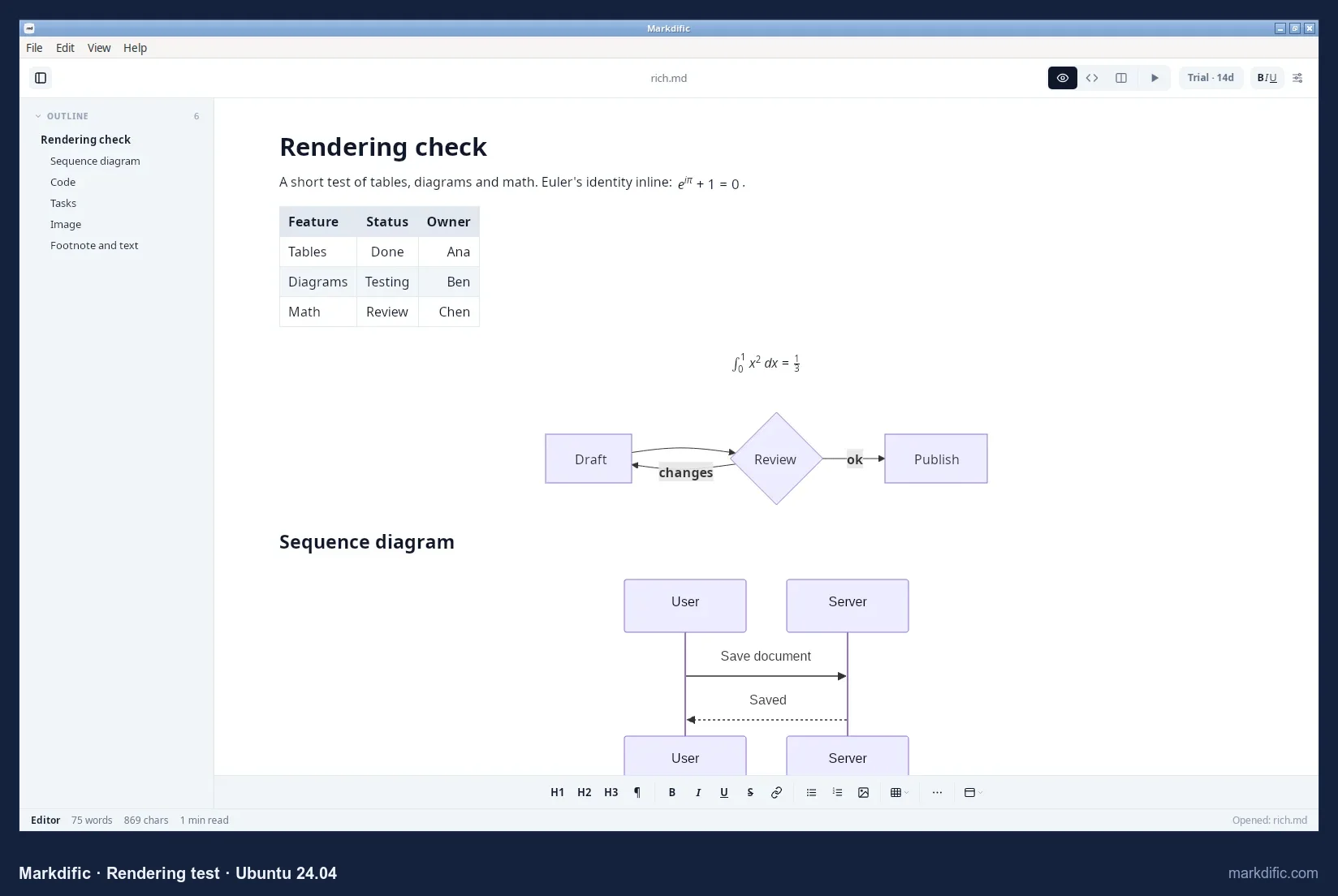
Mermaid diagrams, inline and block math, tables and front matter rendered correctly, with no setup.
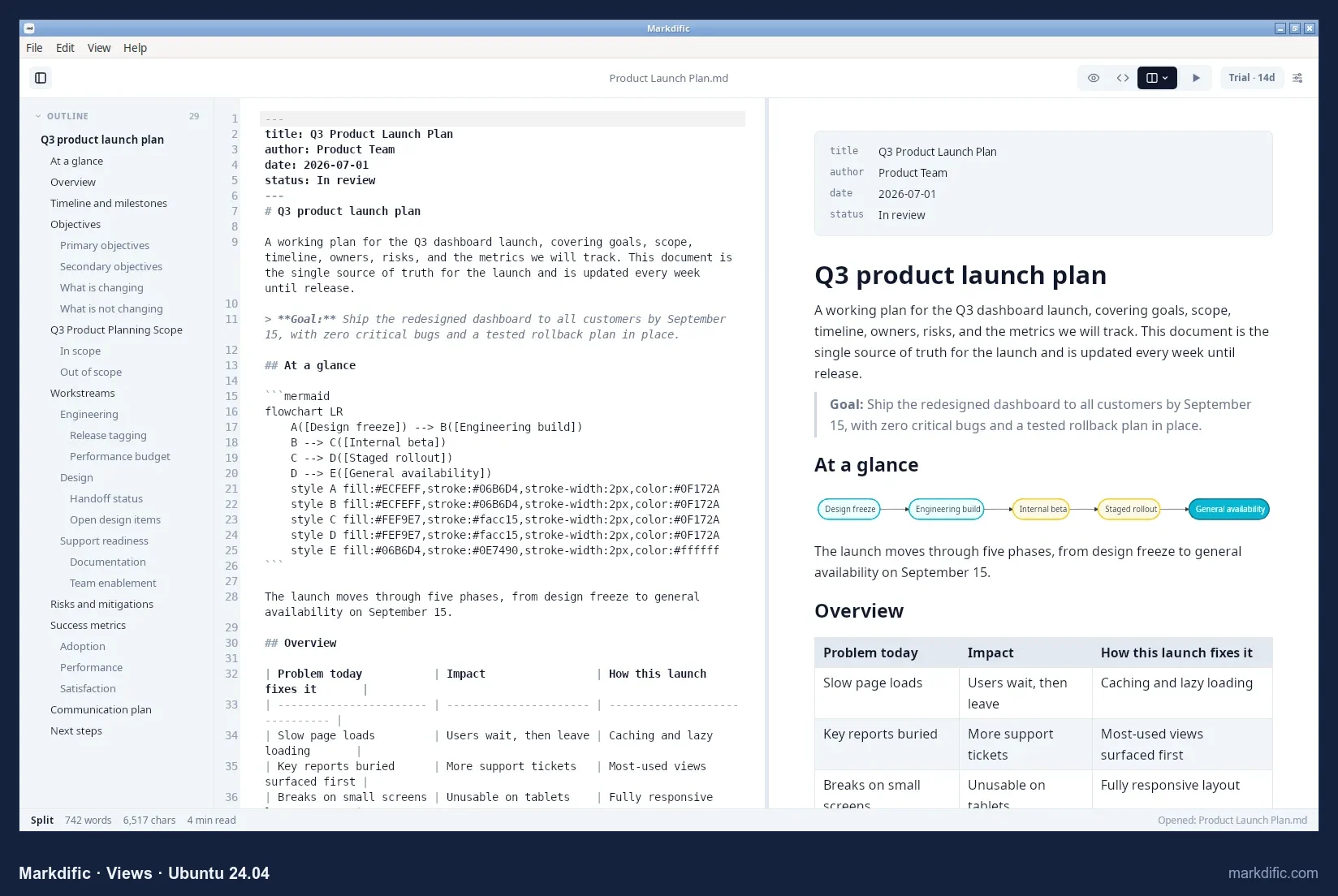
There are three views: WYSIWYG (Ctrl+1), source (Ctrl+2) and split (Ctrl+3).
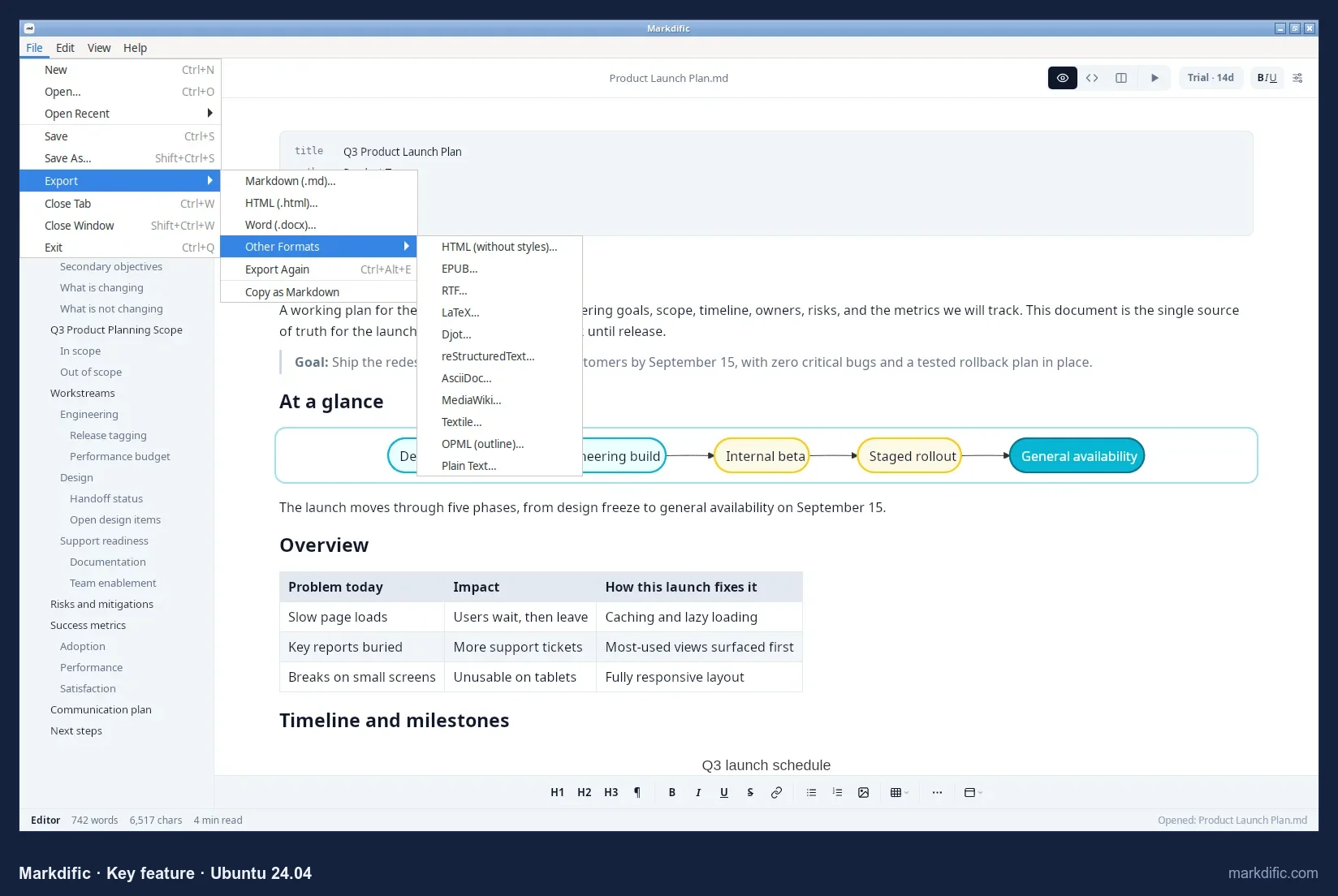
It exports 13 formats on Linux, including Word, EPUB, LaTeX and HTML, without Pandoc. See the feature overview, the Linux page and the Markdown docs.
What makes it stand out
- Opens single .md files without a vault or project.
- Renders Mermaid and math without setup.
- Saves your changes automatically by default.
- Keeps Windows line endings when it saves.
Key features
- WYSIWYG, source and split views.
- Tabs for several open files.
- Tables, math, Mermaid and front matter rendered in the editor.
- Autosave on by default.
- Export to 13 formats without Pandoc.
- Interface in 7 languages.
Limitations
- No PDF export on Linux (export HTML and print to PDF from a browser).
- Typing at the end of the 20,000-line file took 17.7 s to appear on this no-GPU machine.
- Not a knowledge base: no backlinks or graph view.
Verdict
In this test, Markdific had the broadest feature set for reading and editing individual Markdown files on Linux. Choose a different app if you need a knowledge base, PDF export on Linux or the lowest memory use.
Test results
- Tested: 1.3.1 (current: 1.3.2), AppImage.
- Opened .md files directly; registers as a handler for text/markdown.
- Autosave on by default (verified in a separate installed-app test: an edit reached disk within about 6 seconds without Ctrl+S). In the shared 15-second test we could not confirm that the typed text reached the editor, so that run is counted as inconclusive, not as a pass.
- Save fidelity: 0 unrelated lines changed. CRLF kept (10/10 lines).
- Open time / memory: 3.1 s / 991 MB (5k lines), 12.4 s / 1,249 MB (20k), 5.6 s / 786 MB (100 diagrams), 7.4 s / 735 MB (table).
- Typing lag, 20k lines: 17.7 s (indicative), the fourth slowest of the 11 apps measured.
- Long line, invalid UTF-8 and empty file all opened.
How to install Markdific on Linux
- Click Download Free above, choose Download for Linux and pick the package for your system: .deb (Debian, Ubuntu), .rpm (Fedora, RHEL, openSUSE) or AppImage (any distribution). Each comes for x64 and ARM64.
- Install it with the command for your package (below).
- Open any .md file. Markdific registers as an app for Markdown files, so it appears under Open With in your file manager, and
markdific file.mdworks in a terminal. - Reading files is free. To edit, start the 14-day trial; after that, buy a licence once for $14.99. One licence covers up to 3 devices on Linux, Windows or Mac.
Install commands:
sudo apt install ./Markdific_*_amd64.deb       # Debian, Ubuntu
sudo dnf install ./Markdific-*.x86_64.rpm      # Fedora, RHEL
chmod +x Markdific-*.AppImage && ./Markdific-*.AppImage   # any distribution
#2 Typora
Best for writers who want a single, polished WYSIWYG view and PDF export on Linux.
- Price
- $14.99 one-time, up to 3 devices, 15-day trial
- Platforms
- Linux (.deb, apt repository, tarball; x64 and ARM), macOS, Windows
- License
- proprietary
Typora is a paid editor that renders Markdown as you type in one clean view.
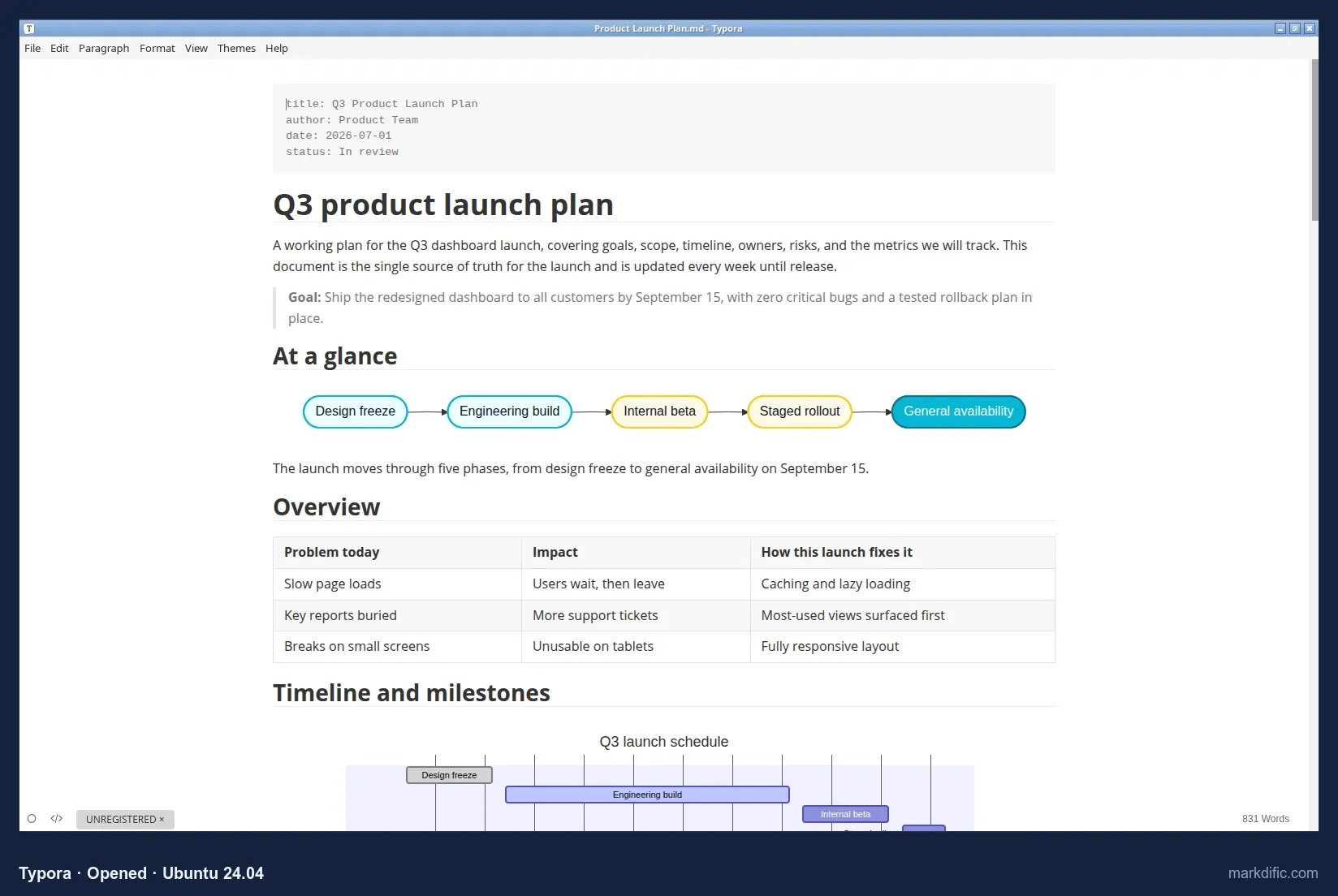
Mermaid diagrams, tables and block math render in the same view you type in.
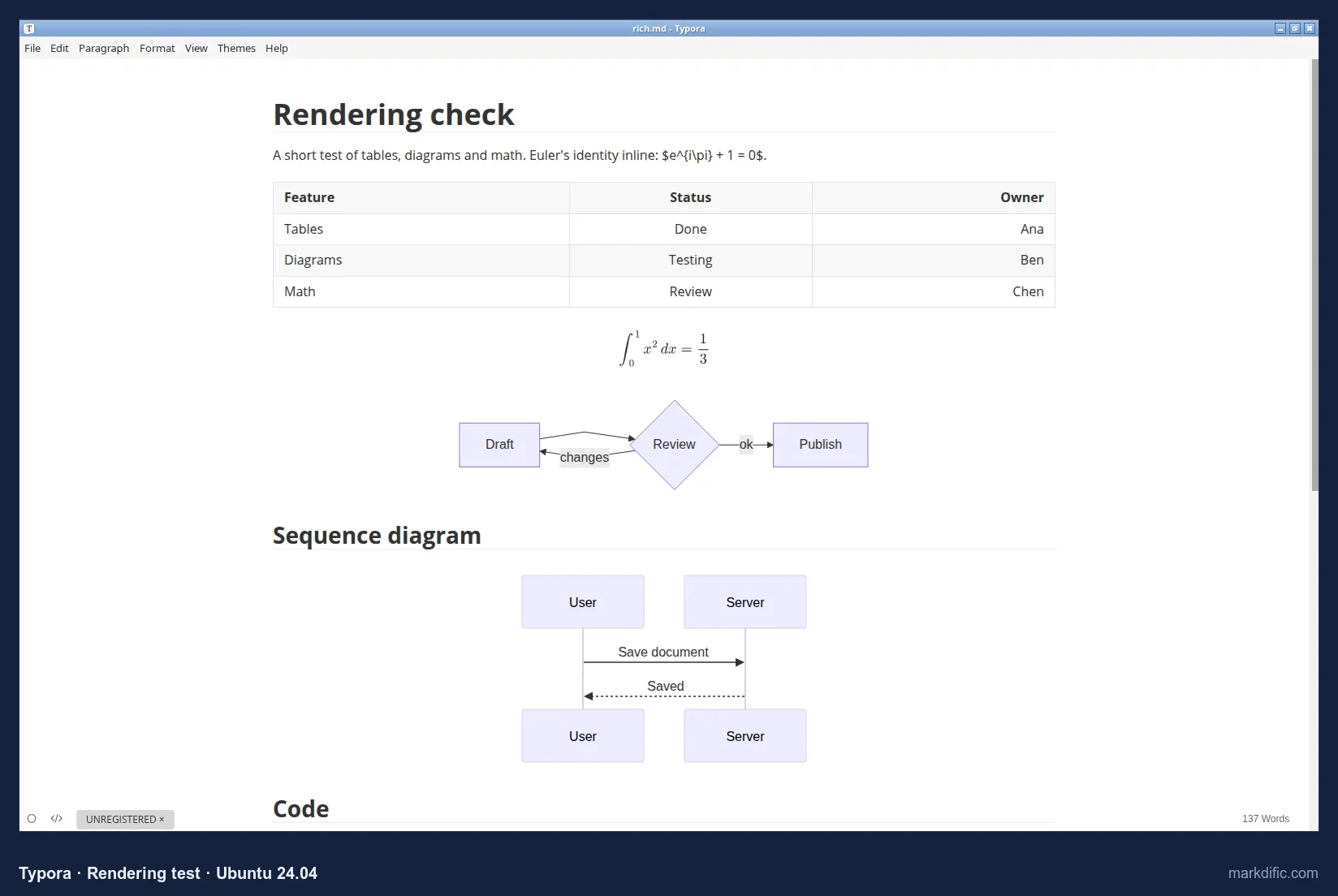
Inline math is off by default and needs a setting in preferences.
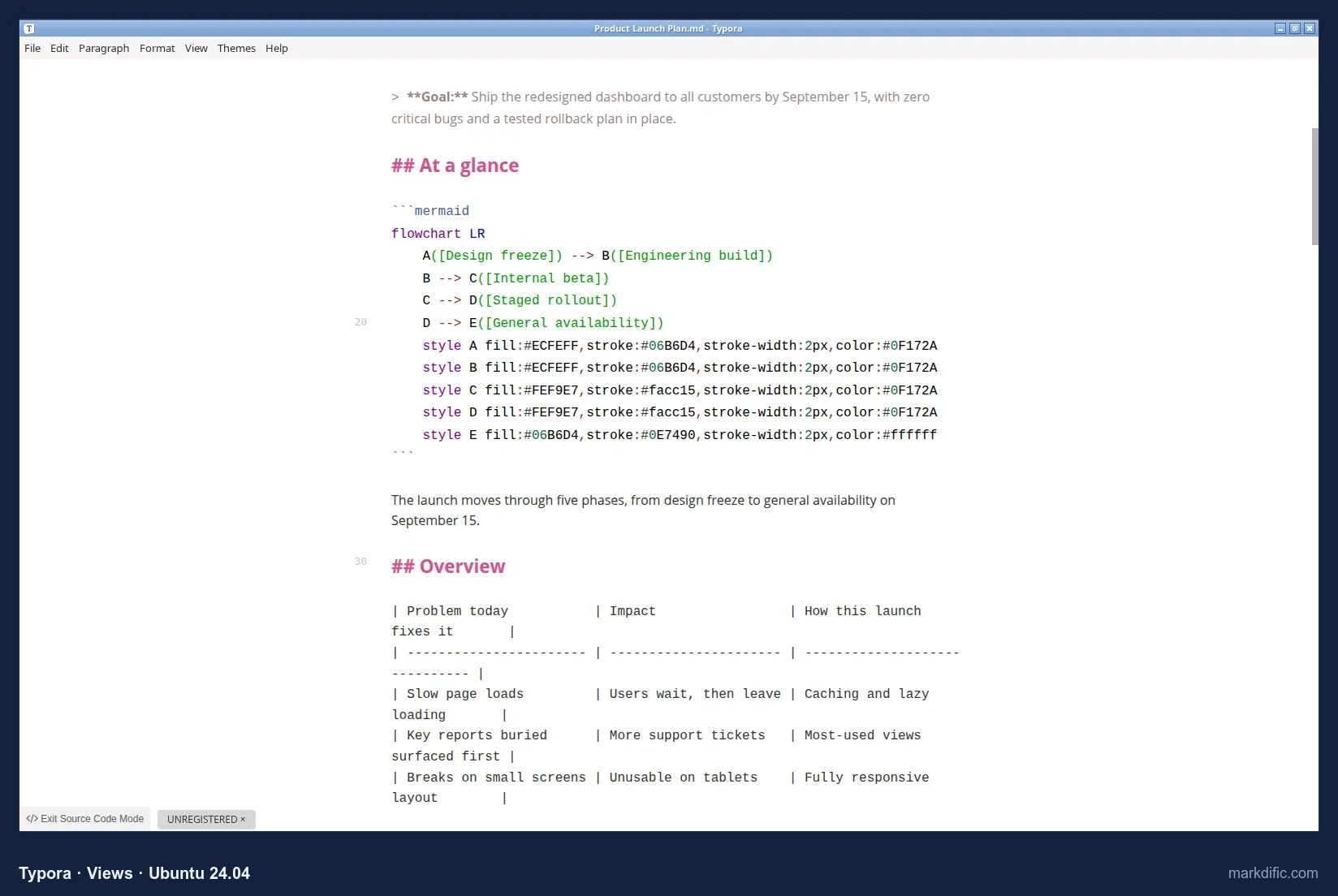
A source code mode shows the raw Markdown when you need it.
What makes it stand out
- One clean view that renders as you type.
- Focus and typewriter modes, and themes.
- Built-in PDF export on Linux, the only paid app in this test with it.
- Keeps Windows line endings when it saves.
Key features
- Mermaid and block math rendering.
- Source code mode (Ctrl+/).
- Native export to PDF, HTML and images.
- More formats (Word, ODT, EPUB, LaTeX) through Pandoc.
- Does not autosave by default.
Limitations
- No split view.
- Inline math needs a setting.
- Extra export formats need Pandoc.
- Third-highest memory use at 20,000 lines.
Verdict
A mature WYSIWYG editor. It is the only paid app in this test with built-in PDF export on Linux. See Typora alternatives.
Test results
- Tested: 1.14.
- Opened files directly. No autosave in 15 s; 0 unrelated lines changed; CRLF kept.
- Open time: 8.5 s (5k), 8.2 s (20k), 7.4 s (100 diagrams), 6.6 s (table); memory 820 to 1,453 MB.
- Typing lag on 20k lines about 8 s (indicative). All robustness files opened.
Install on Linux: add Typora's apt repository (instructions at typora.io) or download the .deb:
sudo apt install ./typora_*_amd64.deb#3 Obsidian
Best for a personal knowledge base of linked notes with sync to phones.
- Price
- free core app (including commercial use); Sync from $4 per month and Publish from $8 per month, billed yearly
- Platforms
- Linux (AppImage for x86-64 and ARM64, .deb, Snap, community-maintained Flatpak), macOS, Windows, iOS, Android
- License
- proprietary (not open source)
Obsidian is a notes app that keeps Markdown files in a vault (a folder) and links them together.
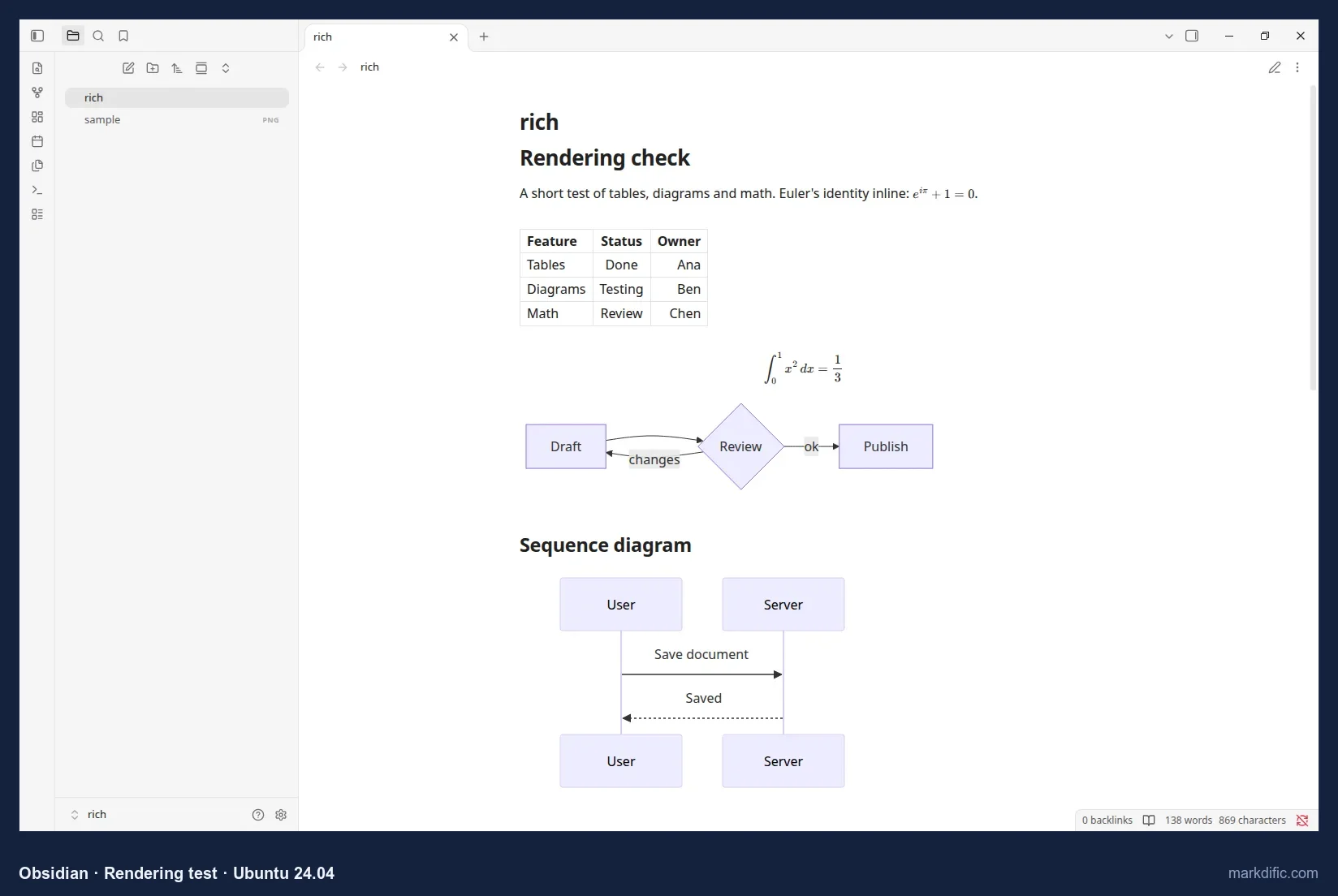
Tables and math render. Mermaid renders after you allow it once per vault.
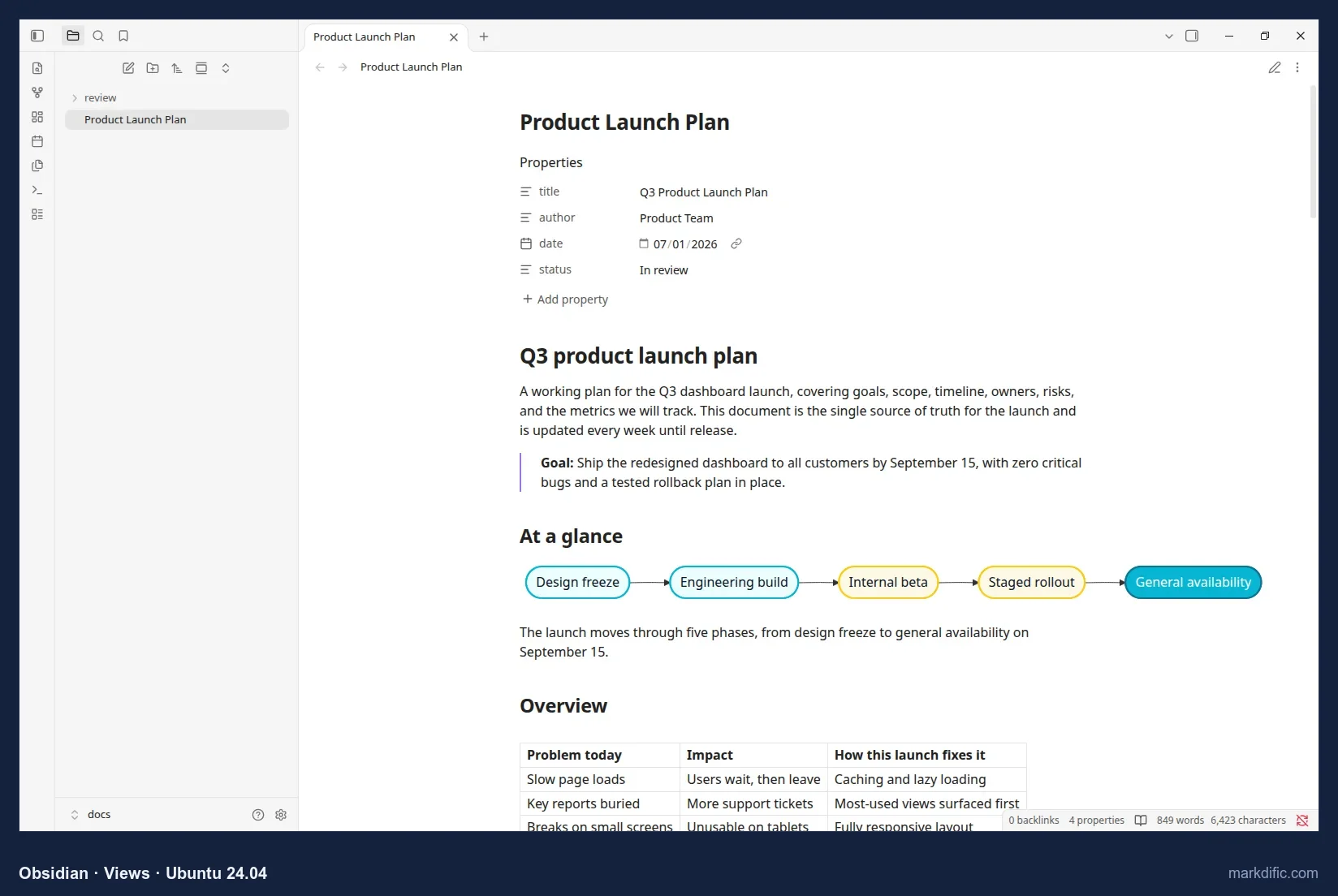
In reading view, front matter shows as a list of properties.
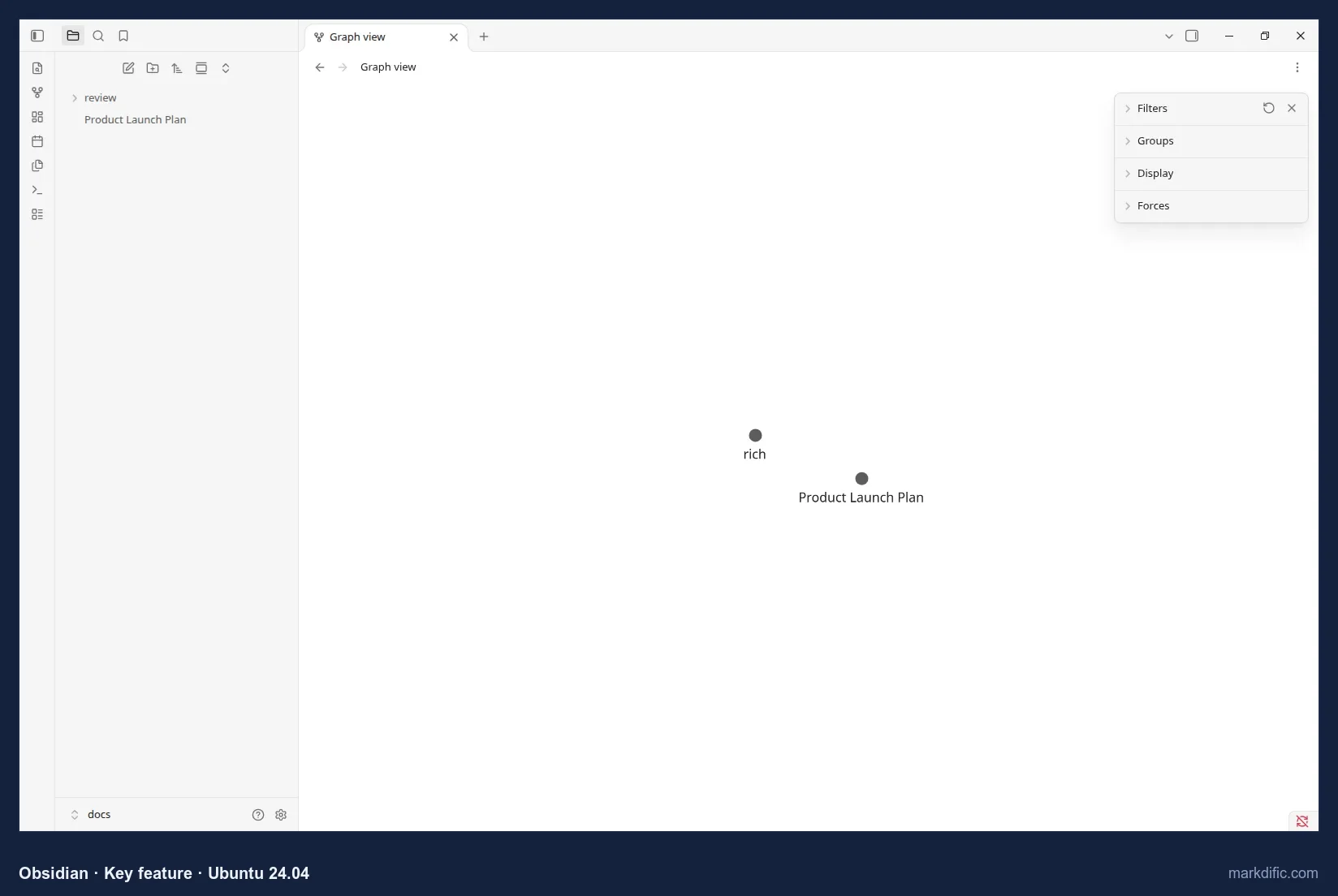
The graph view shows how your notes link to each other.
What makes it stand out
- Backlinks and a graph view of linked notes.
- A large plugin library.
- iOS and Android apps.
- Opened the 20,000-line file in 2.6 s, the fastest of all 17 apps.
Key features
- Vault of plain Markdown files.
- Mermaid (after a per-vault prompt) and math rendering.
- Reading view with front matter as properties.
- Autosave on by default.
- Optional paid Sync and Publish.
Limitations
- The vault model adds a step for single files.
- Changes Windows line endings to Unix ones (LF).
- Export beyond PDF needs community plugins.
- The Flatpak is community maintained.
Verdict
The best choice here for linked notes and mobile sync.
Test results
- Tested: 1.14.
- Files open inside a vault (the containing folder). Mermaid rendered after clicking Allow on a "Display Mermaid diagrams in this vault?" prompt.
- Autosave: yes. 0 unrelated lines changed; CRLF converted to LF.
- Open time: 2.5 s (5k), 2.6 s (20k), 1.7 s (100 diagrams), 5.7 s (table); 758 to 1,051 MB.
- Typing lag about 7 s (indicative). All robustness files opened.
Install on Linux: download from obsidian.md/download, or:
flatpak install flathub md.obsidian.Obsidian#4 Visual Studio Code
Best for developers whose Markdown lives in code repositories.
- Price
- free
- Platforms
- Linux (.deb, .rpm with repository, Snap), macOS, Windows, web
- License
- Microsoft build under a Microsoft licence; source (Code-OSS) MIT
VS Code is a free code editor with a built-in Markdown preview.
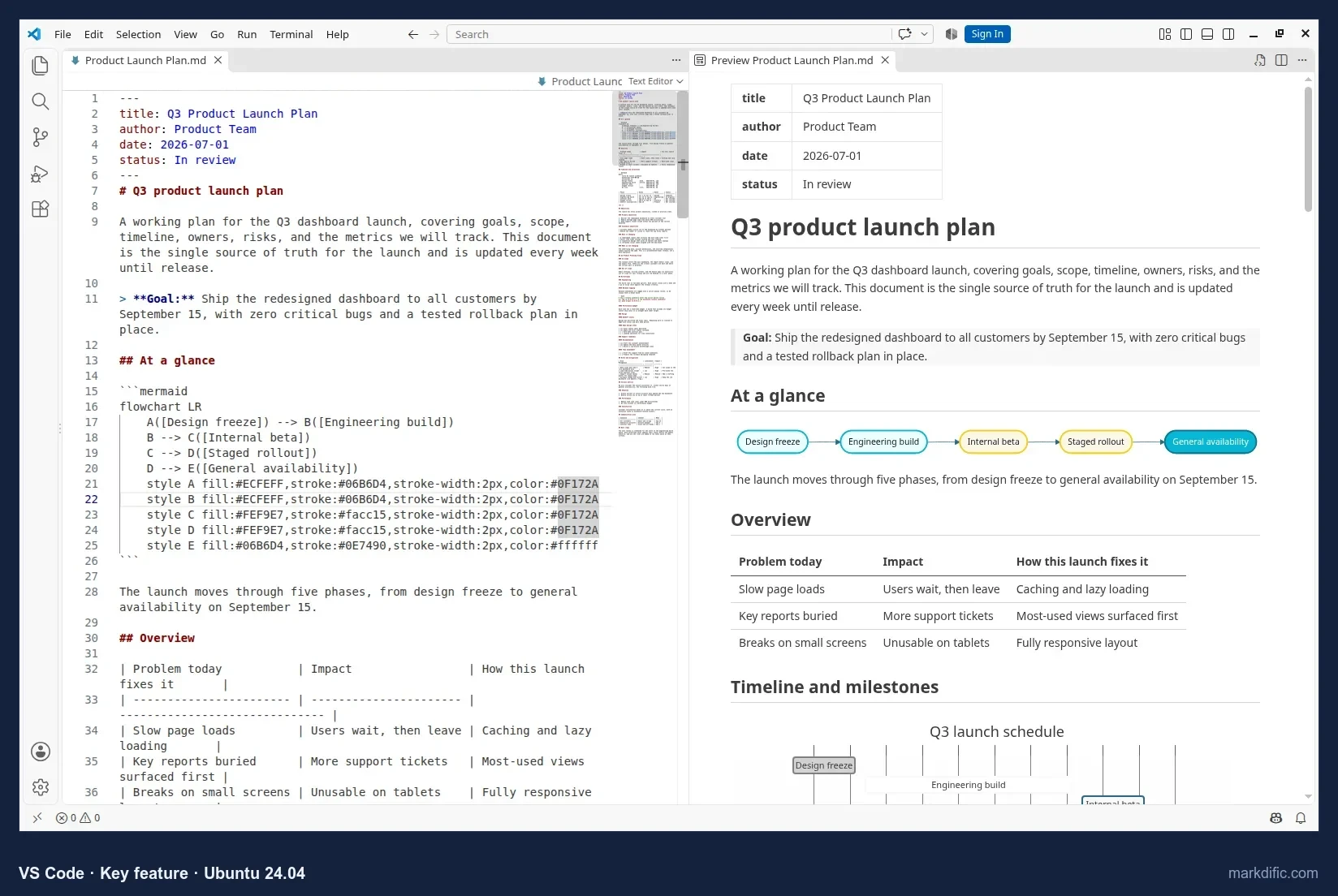
You edit the source on one side and see the preview on the other.
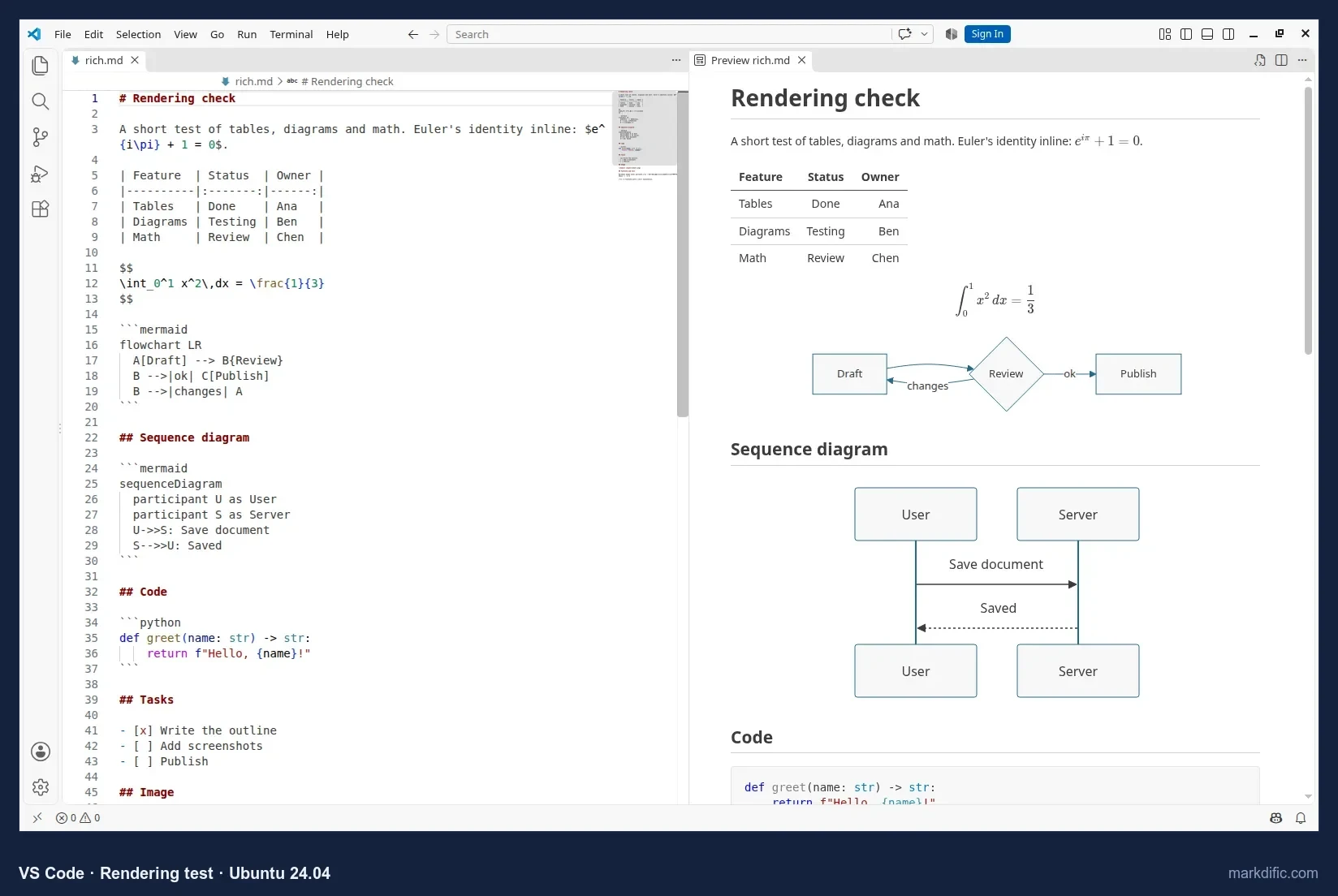
The preview renders tables, Mermaid and KaTeX math without extensions.
What makes it stand out
- Mermaid and math in the preview with no extensions.
- Typing lag on the 20,000-line file was about 2.5 s, the second lowest in the test.
- Keeps Windows line endings when it saves.
- Fits a workflow where Markdown sits next to code.
Key features
- Source editor with a side-by-side preview (Ctrl+K V).
- Preview in its own tab (Ctrl+Shift+V).
- Opens single files.
- Does not autosave by default.
Limitations
- The rendered view is read-only.
- Export needs extensions.
- Highest memory use in the test and the largest download (240 MB).
Verdict
The practical choice for Markdown next to code; less suited to prose.
Test results
- Tested: 1.142.
- Opens single files; preview via Ctrl+Shift+V. Does not register as a text/markdown handler.
- No autosave by default; 0 unrelated changes; CRLF kept.
- Open time: 11.2 s (5k), 11.9 s (20k), 8.8 s (100 diagrams), 10.8 s (table); 1,974 to 2,203 MB.
Install on Linux:
sudo snap install --classic code
# or download the .deb and: sudo apt install ./code_*_amd64.deb
#5 Zettlr
Best free and open-source editor for academic, citation-heavy writing.
- Price
- free
- Platforms
- Linux (.deb, .rpm, AppImage; x64, ARM; Flathub, APT repository, AUR), macOS, Windows
- License
- GPL-3.0
Zettlr is a free, open-source editor for academic writing.
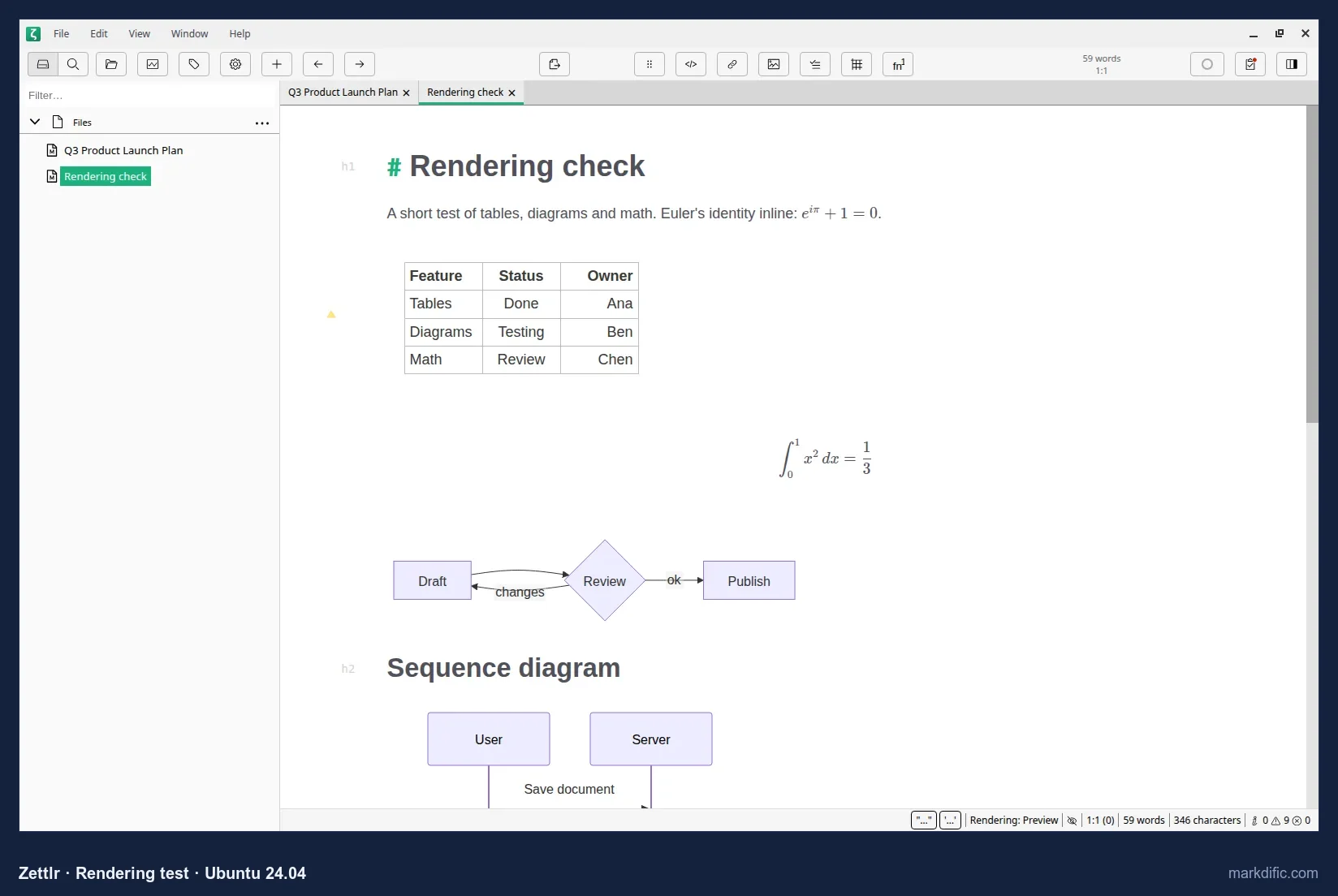
Tables, math and Mermaid render inline, in the same place you type.
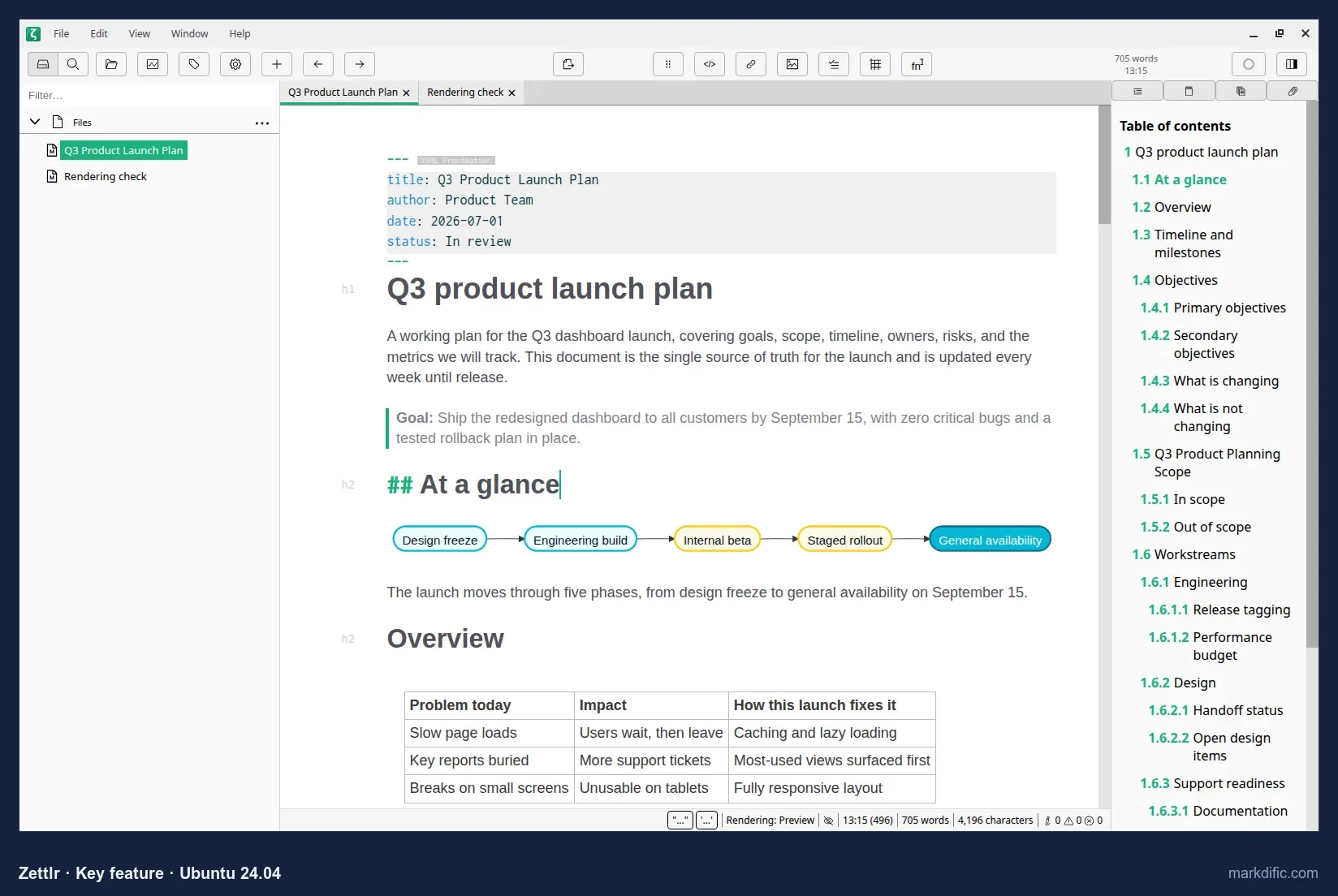
A sidebar lists your files next to the editor.
What makes it stand out
- Citations and Zettelkasten links.
- Many export formats through the bundled Pandoc.
- Keeps Windows line endings when it saves.
Key features
- Mermaid and math rendered inline.
- File manager sidebar (Ctrl+Shift+0).
- Opens single files.
- Pandoc bundled for export.
- Does not autosave by default.
Limitations
- No separate preview pane.
- Typing in the 20,000-line file was the slowest in our test.
Verdict
The strongest free option for structured, citation-heavy writing.
Test results
- Tested: 4.8.
- Opens single files; no autosave in 15 s; 0 unrelated changes; CRLF kept.
- Open time: 8.4 s (5k), 16.9 s (20k), 6.0 s (100 diagrams), 15.4 s (table); 893 to 1,234 MB.
- Typing lag about 59 s on 20k lines (indicative), the slowest measured.
Install on Linux:
flatpak install flathub com.zettlr.Zettlr#6 MarkText
Best free, open-source WYSIWYG editor for small and mid-size files.
- Price
- free
- Platforms
- Linux (AppImage from GitHub releases, Flathub), macOS, Windows
- License
- MIT
MarkText is a free, open-source editor that renders Markdown as you type.
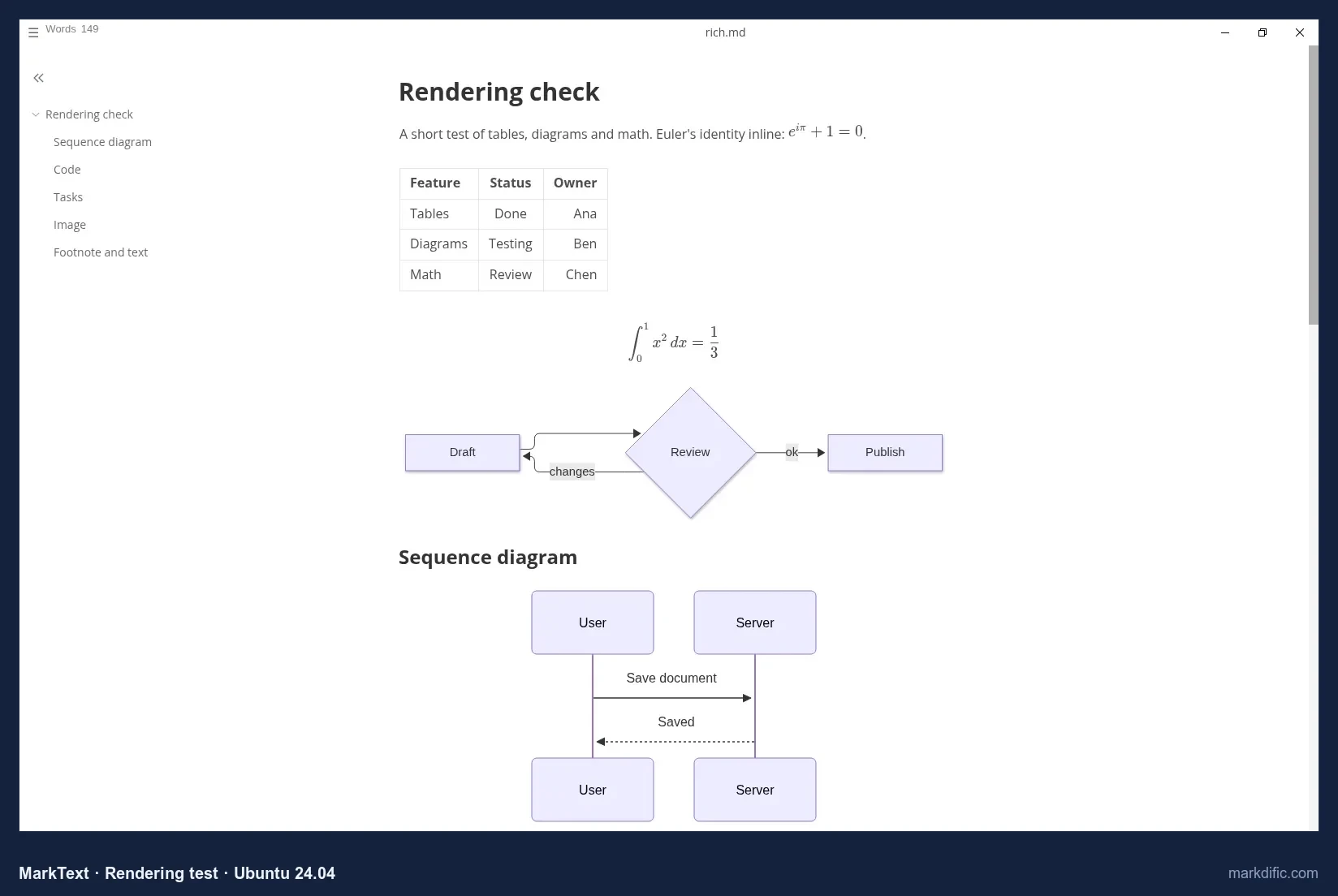
Tables, math and Mermaid render in the WYSIWYG view, and an outline sidebar shows the document's headings.
Is MarkText still maintained? Yes, as of October 2026. There was no stable release from March 2022 (0.17.1) to May 2026; releases resumed with 0.19.0 on 28 May 2026, and 0.23.0 shipped on 21 October 2026.
What makes it stand out
- Free and MIT-licensed.
- Renders Mermaid and math in the WYSIWYG view.
- Keeps Windows line endings when it saves.
- Releases resumed in 2026.
Key features
- WYSIWYG editing.
- Outline sidebar.
- Opens single files.
- Does not autosave by default.
Limitations
- Slow with large files and large tables; it did not load a 20,000-line file within 60 seconds.
- The AppImage needed
libsecret-1-0on the host.
Verdict
A good free WYSIWYG editor for everyday documents. Avoid it for very large files. See MarkText alternatives.
Test results
- Tested: 0.21.2 (current: 0.23.0).
- Opens single files; no autosave; 0 unrelated changes; CRLF kept.
- Open time: 5.4 s (5k), 4.4 s (100 diagrams), 52.5 s (table); 662 to 815 MB.
- The 20,000-line file did not load within 60 s, so typing lag was not tested.
Install on Linux:
flatpak install flathub com.github.marktext.marktext
# or AppImage: sudo apt install libsecret-1-0 && chmod +x marktext-*.AppImage
#7 Apostrophe
Best for distraction-free prose writing on GNOME.
- Price
- free
- Platforms
- Linux only (Flathub; x86_64, aarch64)
- License
- GPL-3.0
Apostrophe is a free, open-source writing app for the GNOME desktop.
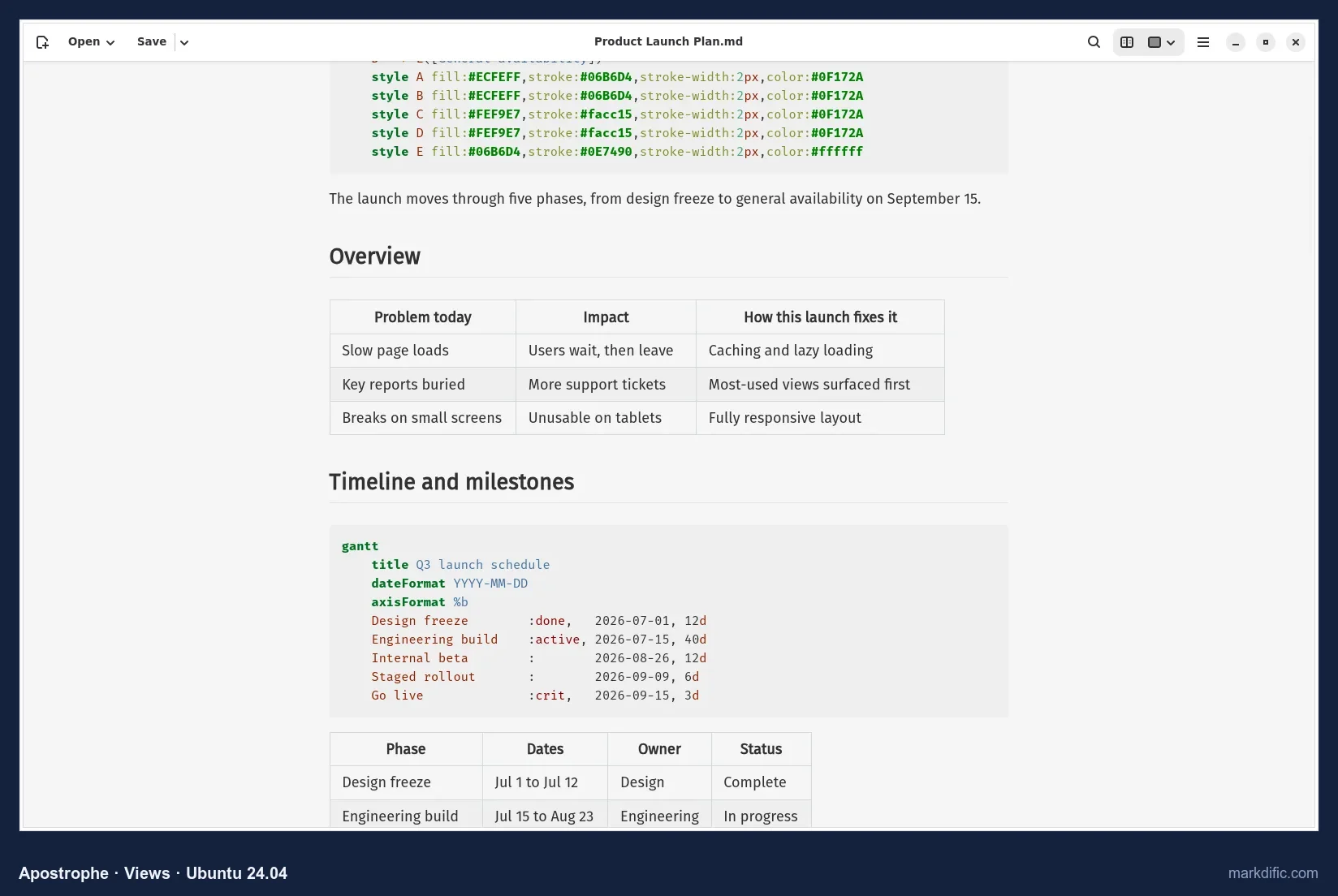
The preview renders tables and math. Mermaid diagrams stay as code.
Focus mode dims the text around the part you are writing.
What makes it stand out
- A simple, distraction-free interface.
- Focus mode.
- Memory stayed under 500 MB.
Key features
- Preview (Ctrl+P) with tables and math.
- Focus mode (Ctrl+D).
- Shows a notice before opening files that contain raw HTML.
- Does not autosave by default.
Limitations
- No Mermaid.
- Mixed line endings after saving a file with Windows line endings.
- Linux only.
Verdict
A simple, distraction-free writing app for GNOME users.
Test results
- Tested: 3.5.
- Files with raw HTML first show a "This file may be insecure" notice.
- No autosave; 0 unrelated changes; line endings mixed after save (8 of 9 CRLF).
- Open time: 4.7 s (5k), 6.9 s (20k), 4.2 s (100 diagrams), 4.0 s (table); 462 to 483 MB.
- Typing lag not measured within 60 s.
Install on Linux:
flatpak install flathub org.gnome.gitlab.somas.Apostrophe#8 ghostwriter
Best for focused prose writing on KDE with a live preview.
- Price
- free
- Platforms
- Linux (distribution repositories, Flathub), Windows (portable)
- License
- GPL-3.0 (KDE)
ghostwriter is a free, open-source KDE writing app with a live preview next to the text.
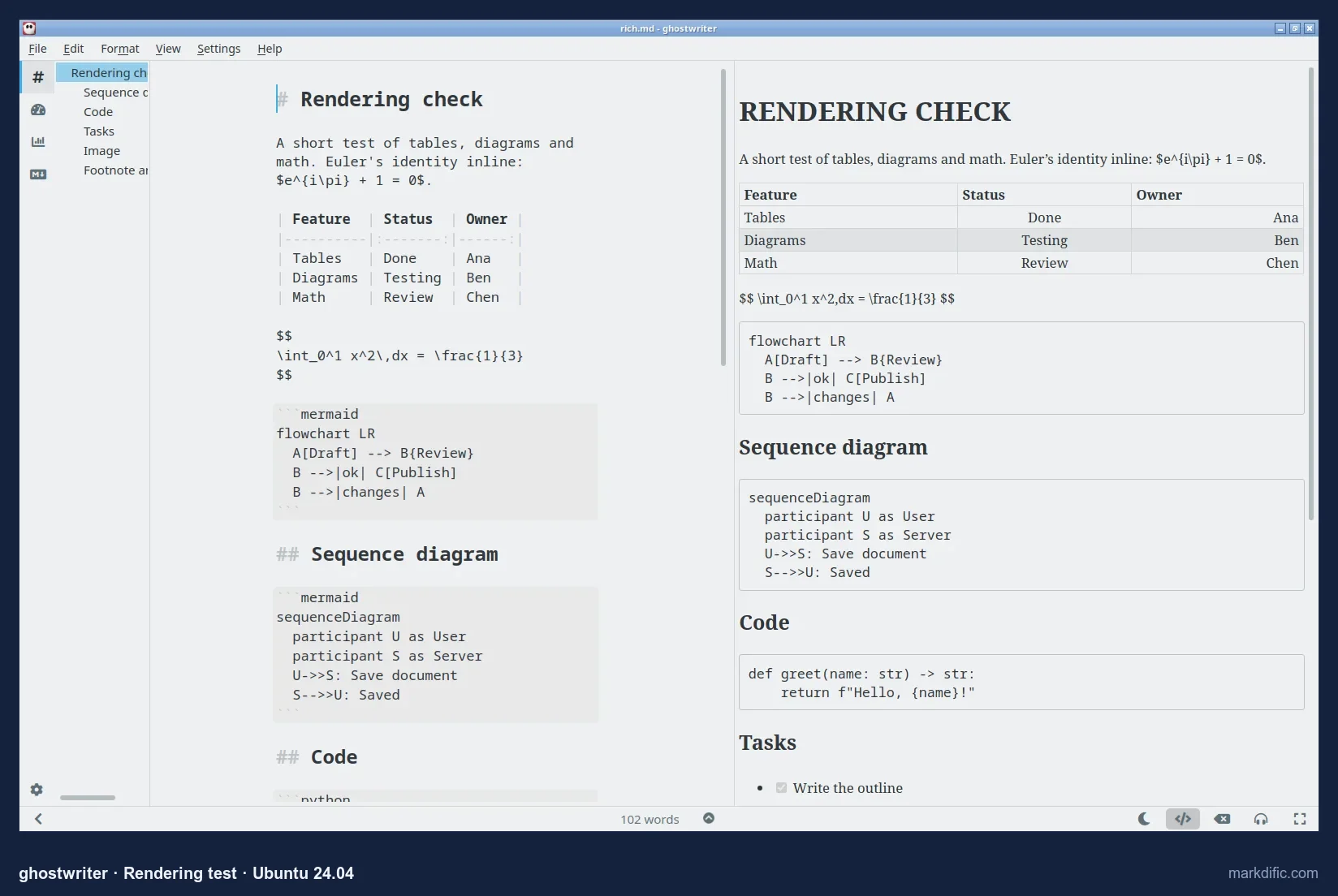
The live preview renders tables. Mermaid and math appear as text by default.
Focus mode highlights only the current paragraph, with the outline on the left.
What makes it stand out
- Live preview next to the text.
- Focus mode and an outline.
- Built for prose.
Key features
- Live preview.
- Outline panel.
- Focus mode.
- Does not autosave by default.
Limitations
- No diagrams or math by default.
- Changes Windows line endings to Unix ones, so Git shows every line as changed.
- Ubuntu's package is older than Flathub's.
Verdict
A good tool for prose; less suited to technical documents.
Test results
- Tested: 23.08 (Ubuntu package; Flathub has 26.04).
- No autosave; 0 unrelated changes; CRLF converted to LF.
- Open time: 2.3 s (5k), 6.4 s (20k), 2.3 s (100 diagrams), 2.6 s (table); 482 to 785 MB.
- Typing lag about 23 s (indicative).
Install on Linux:
sudo apt install ghostwriter
# or: flatpak install flathub org.kde.ghostwriter
#9 Kate
Best lightweight editor for Markdown source and code on KDE.
- Price
- free
- Platforms
- Linux (distribution repositories, Flathub), Windows, macOS
- License
- LGPL-2.1+ (KDE)
Kate is a free, open-source text and code editor from KDE.
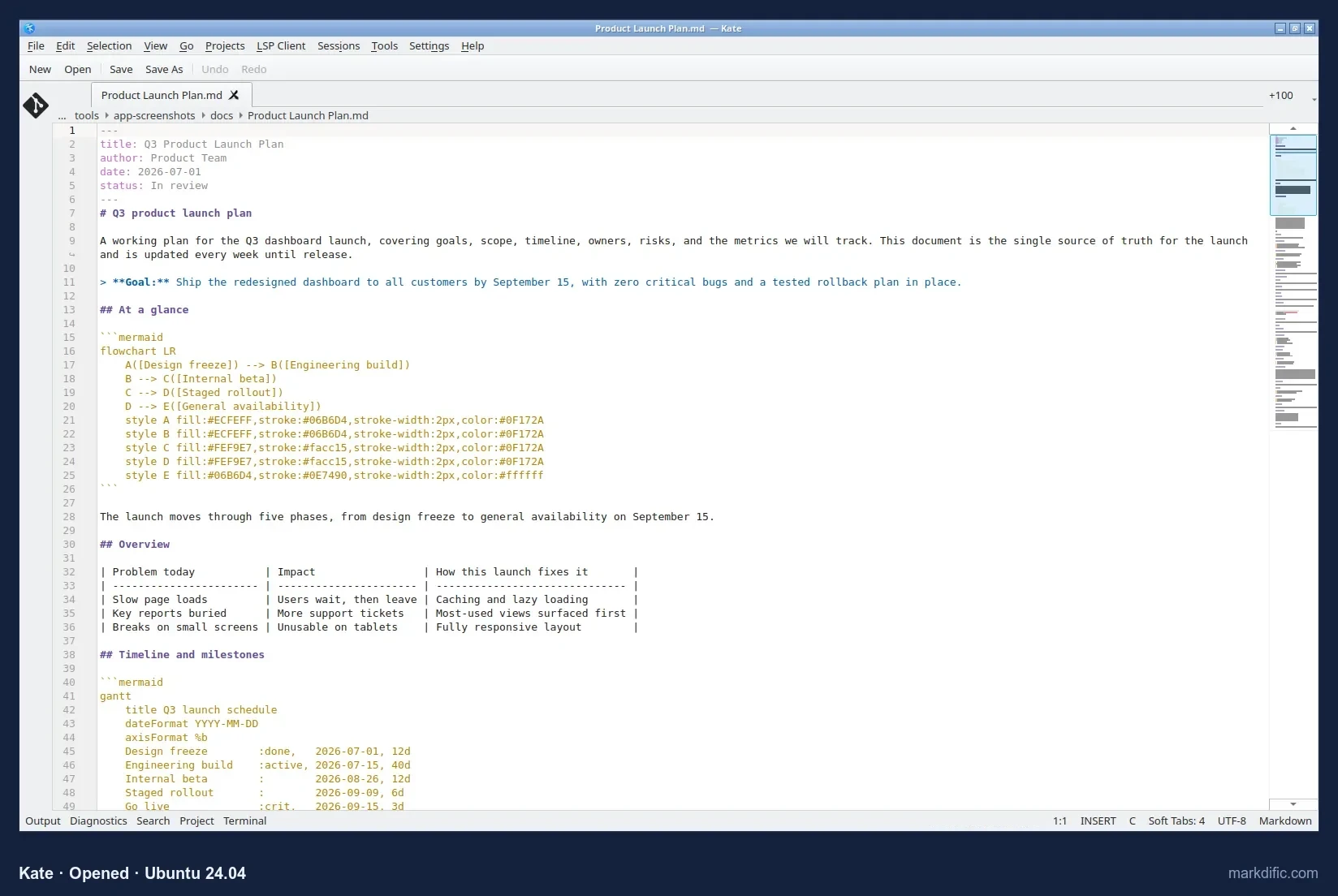
You edit Markdown as highlighted source. Its Document Preview plugin can show rendered Markdown next to the source; we could not open it in our test setup, so rendering was not judged.
What makes it stand out
- Used about 132 MB, the least of any editor tested.
- Fast.
- Keeps Windows line endings when it saves.
Key features
- Syntax highlighting, line numbers and a minimap.
- LSP support and a terminal panel.
- Markdown preview as a plugin panel.
- Opens single files.
- Does not autosave by default.
Limitations
- Source-first; the preview needs the plugin enabled.
- Rendering of Mermaid and math not verified.
Verdict
A light choice for editing Markdown as text, especially for developers on KDE.
Test results
- Tested: 23.08.5 (Ubuntu package; Flathub has 26.04).
- Opens single files; does not register as a text/markdown handler.
- No autosave; 0 unrelated lines changed (one blank line added); CRLF kept (10/10).
- Open time: 9.4 s (5k), 4.1 s (20k), 3.0 s (100 diagrams), 5.3 s (table); 132 to 136 MB.
- Typing lag about 4.1 s (indicative). Invalid UTF-8: process stayed open but text was not shown within 45 s.
Install on Linux:
sudo apt install kate
# or: flatpak install flathub org.kde.kate
#10 Marker
Best GNOME app with a source and preview split view.
- Price
- free
- Platforms
- Linux only (Flathub)
- License
- GPL-3.0
Marker is a free, open-source GNOME editor with source and preview side by side.
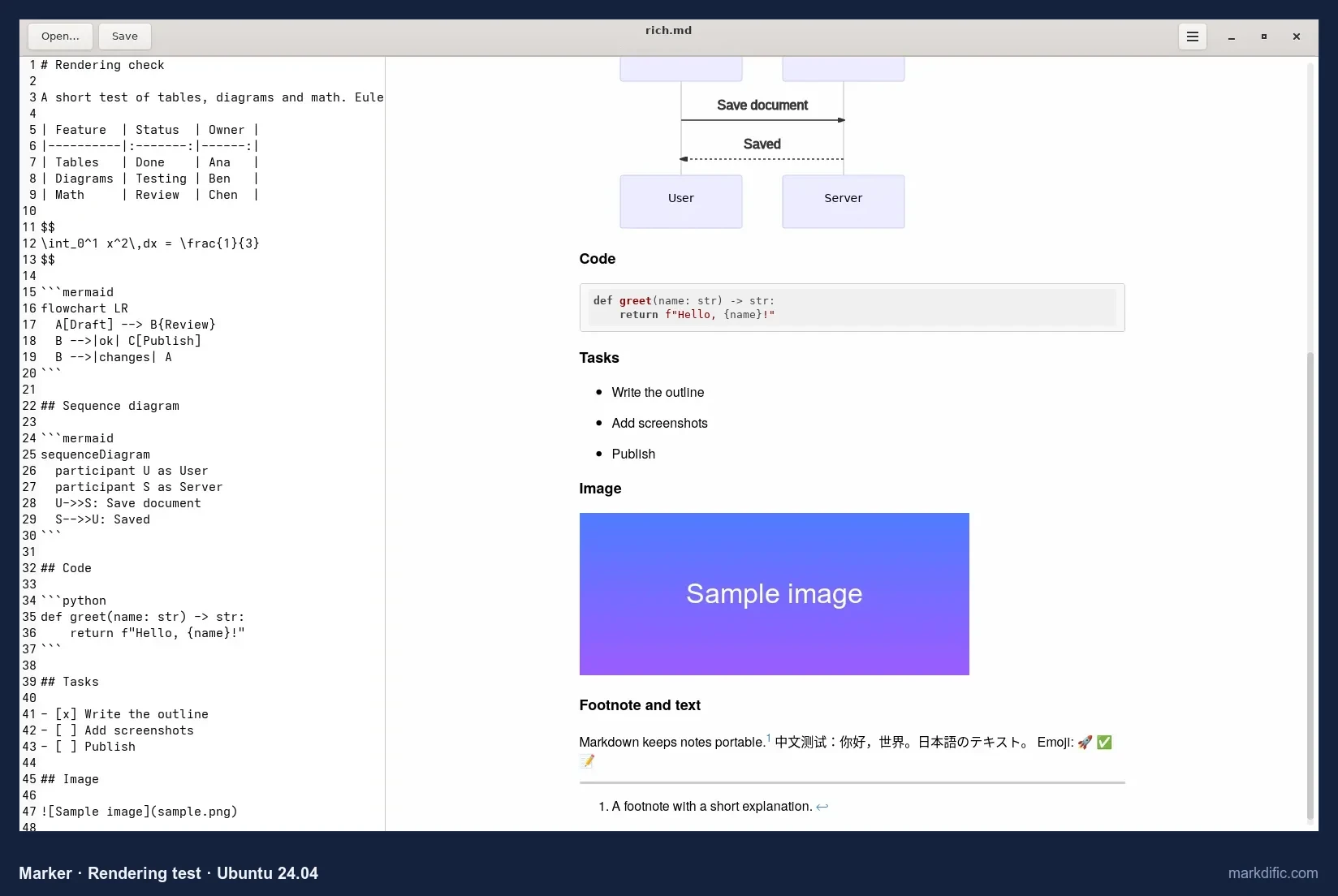
The preview rendered a Mermaid diagram, images and tasks.
Tables render in the preview as well.
What makes it stand out
- Split view of source and preview.
- Rendered a Mermaid diagram in the preview.
- Fast to open small files.
Key features
- Source and preview side by side.
- Mermaid and table rendering in the preview.
- Opens single files.
- Does not autosave by default.
Limitations
- No release since 2 May 2023 (the repository still receives commits).
- Mixed line endings after saving.
- Math rendering not visible in our screenshot.
Verdict
A GNOME split-view editor that renders Mermaid. It has had no release since 2023, so check the project status before you depend on it.
Test results
- Tested: 2023.05.02 (latest release).
- Opens single files. No autosave; 0 unrelated lines changed; line endings mixed (8 of 9 CRLF).
- Open time: 1.9 s (5k), 13.1 s (20k), 1.9 s (100 diagrams), 7.3 s (table); 644 to 798 MB.
- Typing lag not measured within 60 s. Invalid UTF-8: process stayed open, text not shown within 45 s.
Install on Linux:
flatpak install flathub com.github.fabiocolacio.marker#11 KeenWrite
Best for writing Markdown that you will export as a typeset PDF.
- Price
- free
- Platforms
- Linux (single binary
keenwrite.bin, Java.jar), Windows, macOS - License
- GPL-2.0 (LICENSE)
KeenWrite is a free, open-source editor built around typeset PDF output.
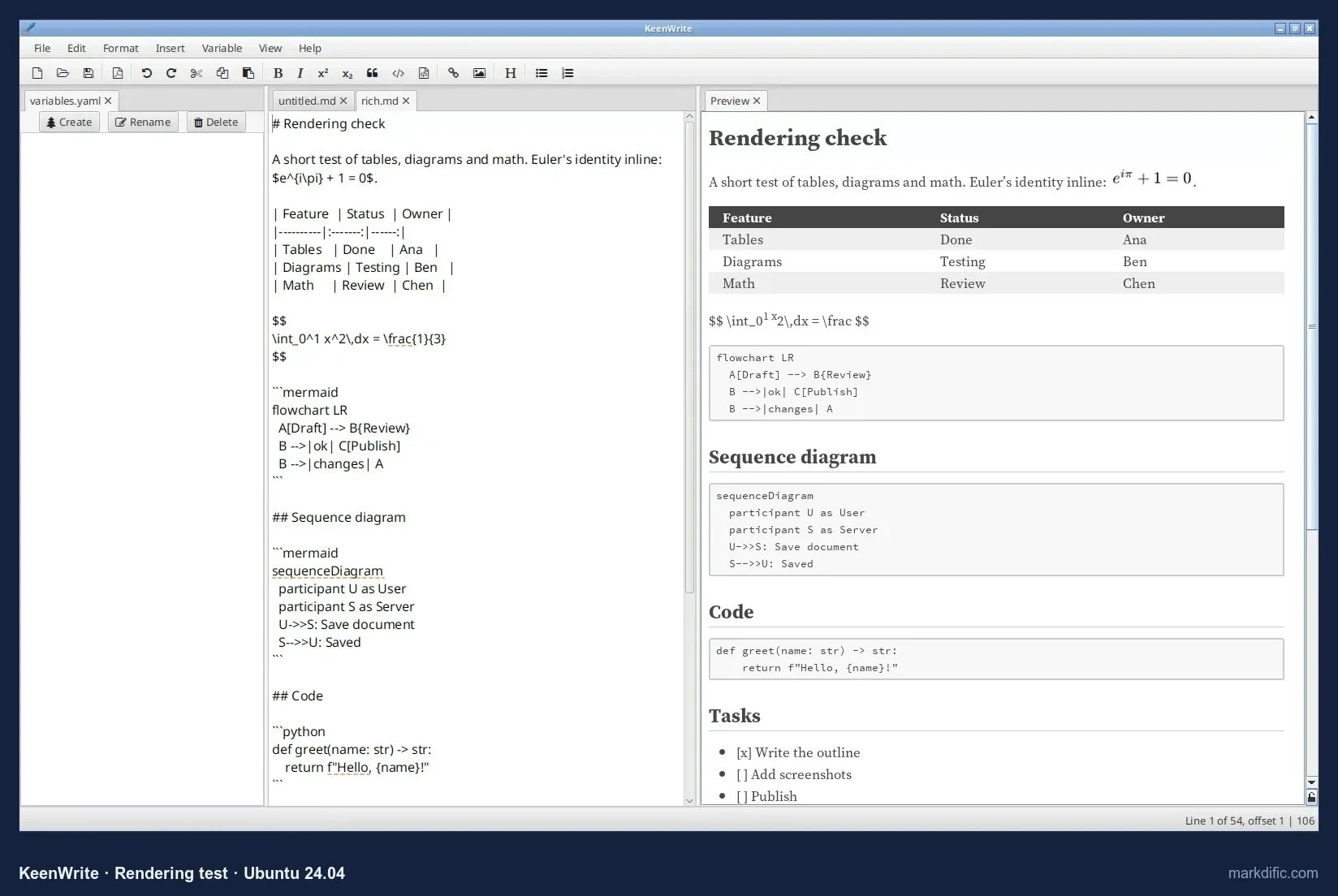
The preview renders tables and inline math. Block math and Mermaid stay as text.
Source and preview sit side by side.
What makes it stand out
- Built for typeset PDF output.
- Variables from a
variables.yamlpanel that you can insert into the text. - One of three apps that saved to disk without Ctrl+S.
Key features
- Source and preview side by side.
- Variables panel.
- Autosave on by default.
- Command-line exporter.
Limitations
- No Mermaid; block math shown as text.
- Slow to open and type in large files on this no-GPU machine.
- Changes Windows line endings to Unix ones.
- High memory use (1,226 to 1,632 MB).
Verdict
Worth a look if your goal is a typeset PDF. For everyday editing with diagrams and math, the apps ranked above did more in our tests.
Test results
- Tested: 3.6.5 (latest release on 2026-10-22).
- A file path on the command line runs its command-line exporter, so files were opened with Ctrl+O; it does not register as a text/markdown handler.
- Autosave: yes (the change was on disk 3.5 s after typing). 0 unrelated lines changed (one blank line added); CRLF converted to LF (0 of 9 lines kept CRLF).
- Open time, including the file dialog: 21.8 s (5k), 24.2 s (20k), 19.5 s (100 diagrams), 21.4 s (table); 1,226 to 1,632 MB.
- Typing lag about 37.8 s (indicative), the second slowest measured. Long line, invalid UTF-8 and empty file all opened.
Install on Linux: download keenwrite.bin from keenwrite.com, then:
chmod +x keenwrite.bin
./keenwrite.bin
#12 ReText
Best lightweight editor with a side-by-side preview for plain documents.
- Price
- free
- Platforms
- Linux (distribution repositories, PyPI), any platform with Python and Qt
- License
- GPL-2.0 or later
ReText is a free, open-source editor with a live preview next to the source.
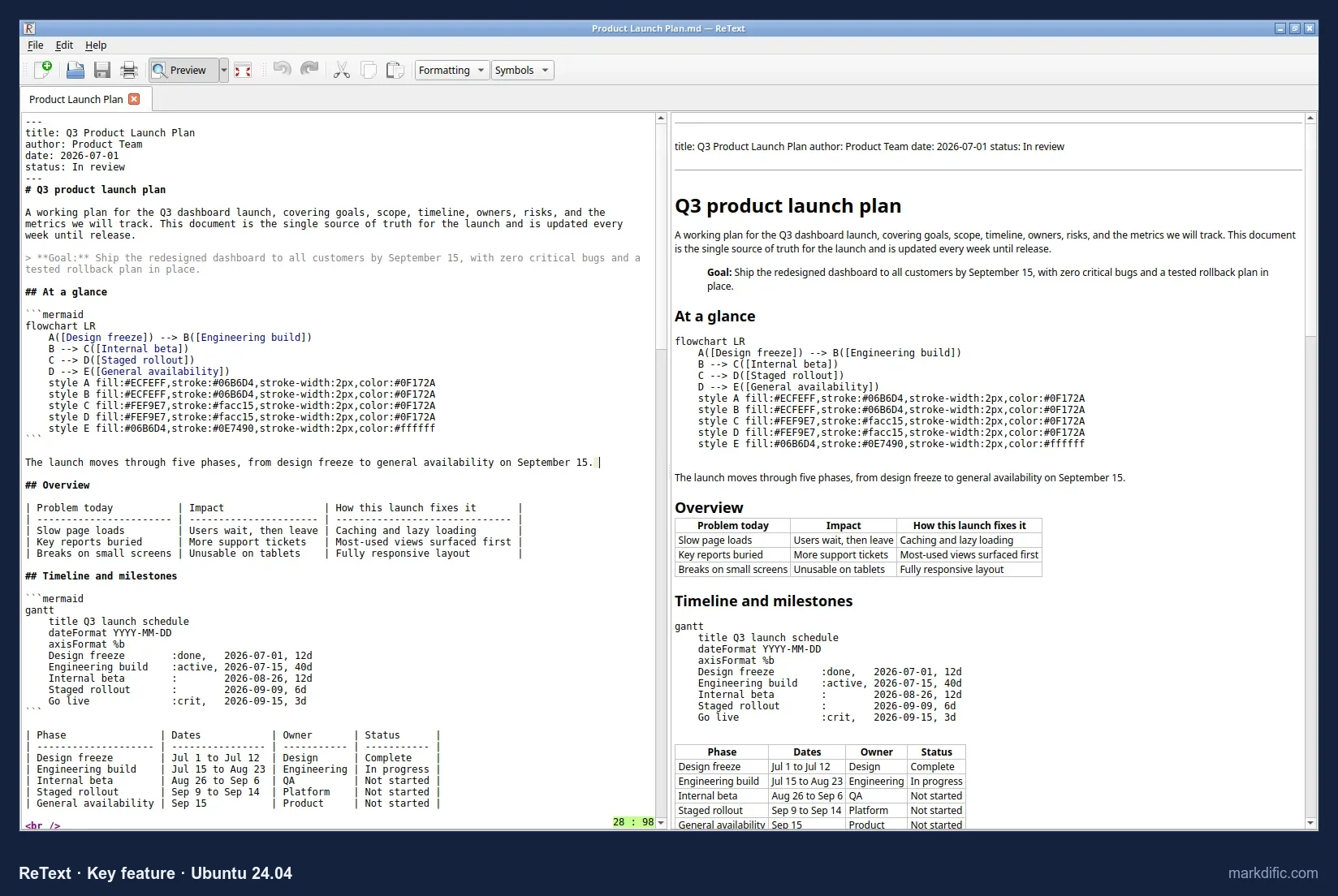
The live preview renders tables. Math and Mermaid stay as text by default.
What makes it stand out
- Light: it used about 300 MB.
- Simple side-by-side preview.
- Exports HTML, ODT and PDF.
Key features
- Live preview (Ctrl+L).
- Table rendering.
- Export to HTML, ODT and PDF.
- Does not autosave by default.
Limitations
- Basic interface.
- No diagrams.
- Did not load the 2,000-row table within 60 s.
- Changes Windows line endings to Unix ones.
Verdict
A simple, light editor for plain documents.
Test results
- Tested: 8.0.
- No autosave; 0 unrelated changes; CRLF converted to LF.
- Open time: 2.3 s (5k), 3.0 s (20k), 1.1 s (100 diagrams); the 2,000-row table did not load within 60 s; 286 to 303 MB.
- Typing lag about 5 s (indicative). Invalid UTF-8 showed a decode error.
Install on Linux:
sudo apt install retext#13 GNOME Text Editor
Best for quick plain-text edits of .md files on GNOME; it has no Markdown preview.
- Price
- free
- Platforms
- Linux only (distribution repositories, default on Ubuntu 24.04 and Fedora; Flathub)
- License
- GPL-3.0 or later
GNOME Text Editor is the free, open-source default text editor on many GNOME desktops.
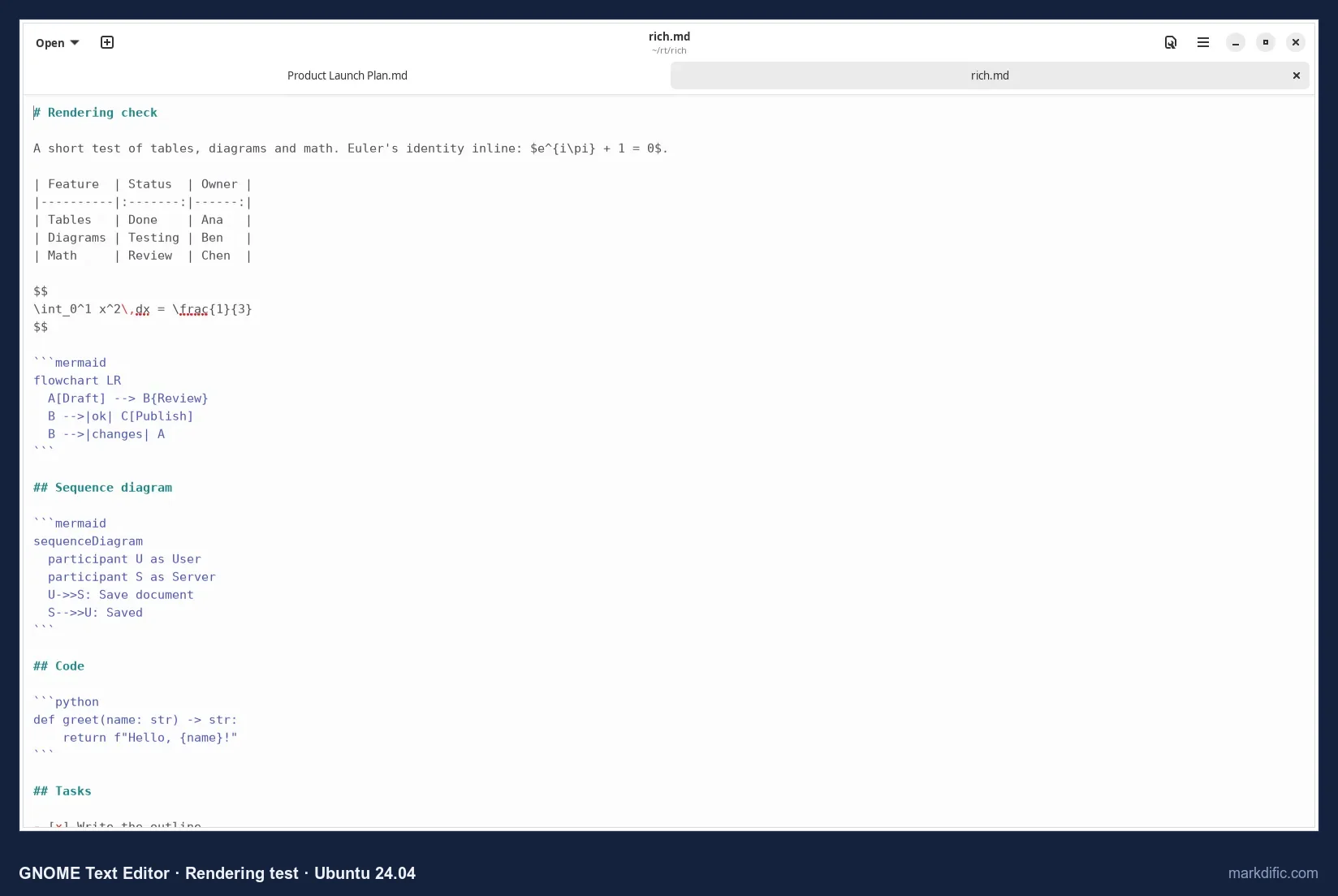
It shows Markdown as highlighted source, with tabs. There is no rendered preview.
What makes it stand out
- Lowest typing lag measured (2.4 s, indicative).
- Already installed on many GNOME desktops.
- Keeps Windows line endings when it saves.
- Used about 250 MB.
Key features
- Syntax highlighting for Markdown.
- Tabs.
- Opens single files.
Limitations
- Source only: no preview, Mermaid or math.
Verdict
Already installed on many GNOME desktops, and it kept line endings. Use it together with a viewer to see the rendered document.
Test results
- Tested: 46.3.
- Opens single files; registers for text/plain, not text/markdown.
- Autosave inconclusive (the typed marker did not appear on screen). 0 unrelated changes; CRLF kept (9/9).
- Open time: 7.0 s (5k), 4.6 s (20k), 3.2 s (100 diagrams), 4.4 s (table); 251 to 265 MB.
- All robustness files opened.
Install on Linux:
sudo apt install gnome-text-editor
# or: flatpak install flathub org.gnome.TextEditor
#14 Okular
Best for viewing Markdown only, as a paginated page with low memory use. It was the only viewer-only app we tested.
- Price
- free
- Platforms
- Linux (distribution repositories, Flathub), Windows (Microsoft Store)
- License
- GPL-2.0 or later (KDE)
Okular is a free, open-source KDE document viewer. It shows Markdown as a page; it is not an editor.
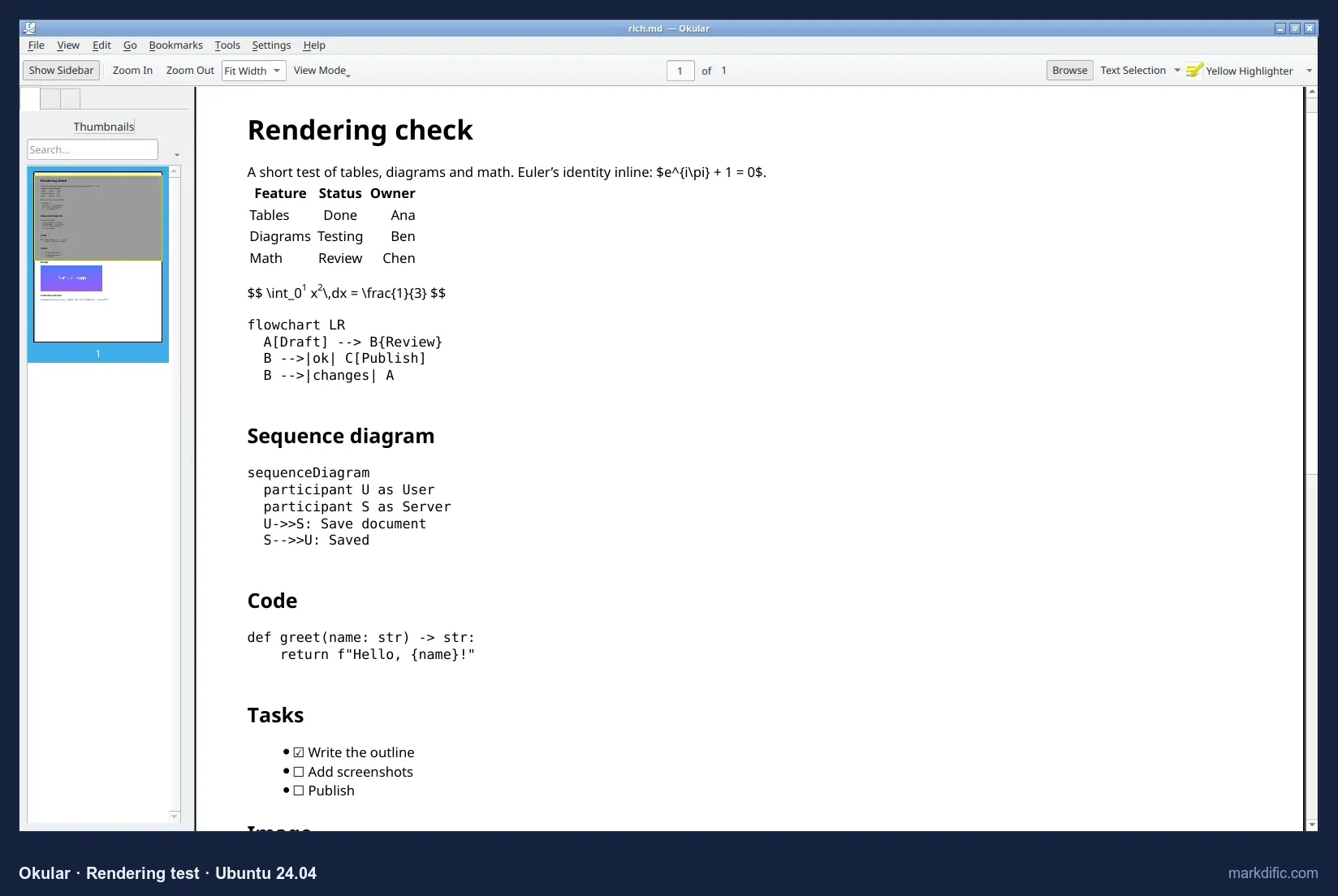
Tables render. Math and Mermaid appear as text.
What makes it stand out
- Low memory use (136 to 178 MB).
- Shows Markdown as a paginated page.
- Opened all the unusual test files.
Key features
- Paginated page view.
- Table rendering.
- Sidebar that can be hidden (F7).
Limitations
- No editing, source or split view.
- No Mermaid or math.
Verdict
Useful if you only read Markdown and already use KDE. For diagrams and math, Markdific's free viewer or VS Code's preview render both.
Test results
- Tested: 23.08.
- Tables render.
- Open times: 5.5 s (5k), 4.6 s (20k), 1.9 s (100 diagrams), 4.4 s (table); 136 to 178 MB.
- All robustness files opened.
Install on Linux:
sudo apt install okular
# or: flatpak install flathub org.kde.okular
#15 Joplin
Best for notes synced between desktop and phone; it imports .md files instead of editing them in place.
- Price
- free; Joplin Cloud is paid
- Platforms
- Linux (AppImage, Flathub), Windows, macOS, iOS, Android
- License
- AGPL-3.0
Joplin is a free, open-source notes app. It imports Markdown into its own database, so edits are not written back to the original file.
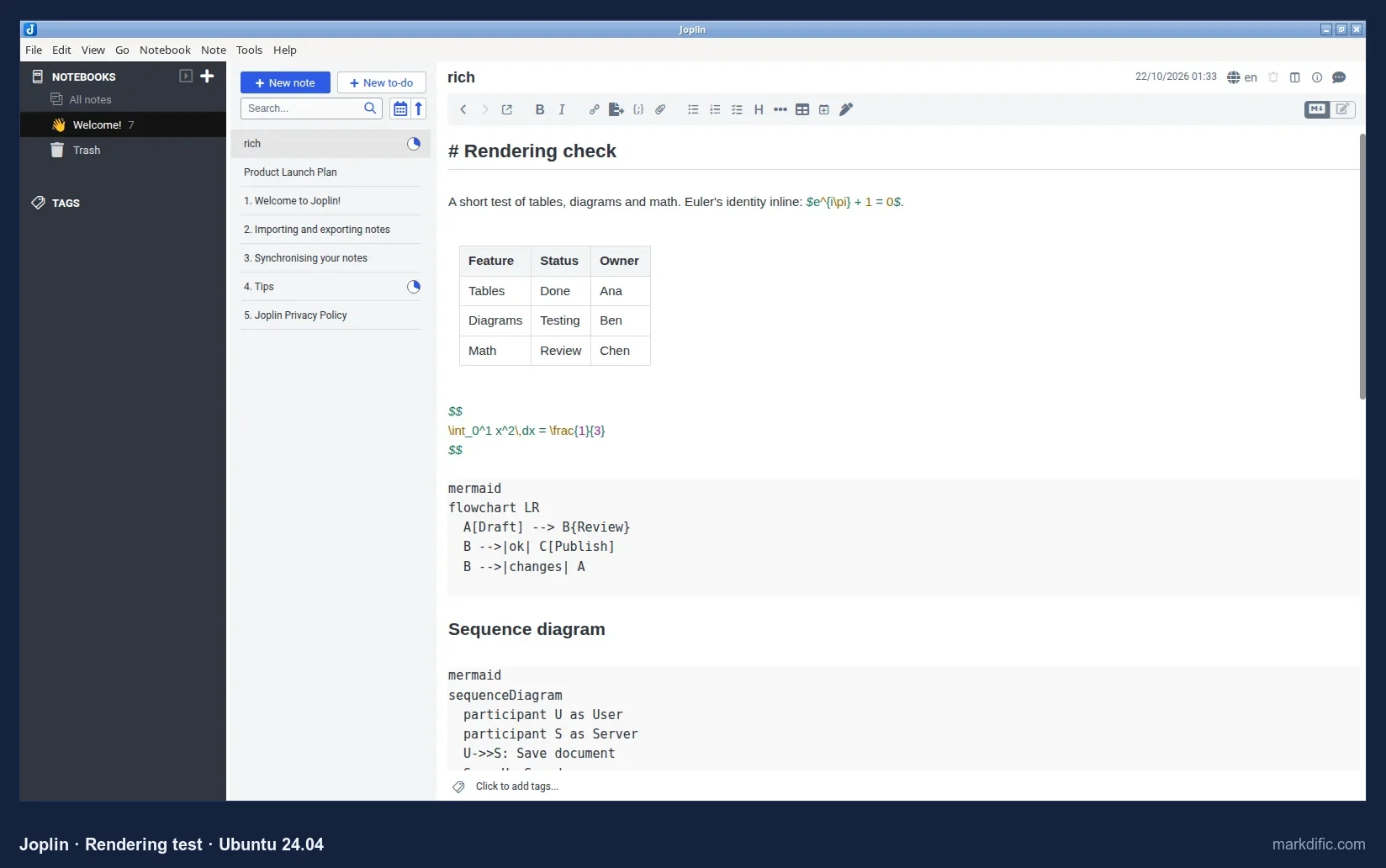
The default editor rendered the table but showed Mermaid and block math as text. The viewer layout rendered a Mermaid sequence diagram.
What makes it stand out
- Notebooks and tags.
- Sync through Joplin Cloud or your own storage.
- Mobile apps.
Key features
- Notebooks and tags.
- Viewer layout (Ctrl+L).
- Import from Markdown (File > Import > MD).
- Desktop and mobile apps.
Limitations
- Not for .md files in a folder or Git repository.
- A notice about the new editor behaviour appeared on first launch.
- The AppImage is 201 MB.
Verdict
Good for synced notes. To edit existing .md files, choose an app ranked above.
Test results
- Tested: 3.7.21.
- Joplin does not open a .md file directly and does not register as a text/markdown handler; the test files were imported (the same as File > Import > MD).
- The table rendered in the default editor; Mermaid and block math showed as text. The viewer layout rendered a Mermaid sequence diagram.
- Autosave, save fidelity, line endings, open times and robustness do not apply to an import and were not tested.
Install on Linux:
flatpak install flathub net.cozic.joplin_desktop#16 Notable
Best for an existing Notable notes library; not recommended for new setups because it has not been updated since 2020.
- Price
- free
- Platforms
- Linux (.deb, .rpm, AppImage, Snap from GitHub releases), macOS, Windows
- License
- none listed in the current repository (earlier versions were open source)
Notable is a free notes app. Its last release was 1.8.4 in January 2020.
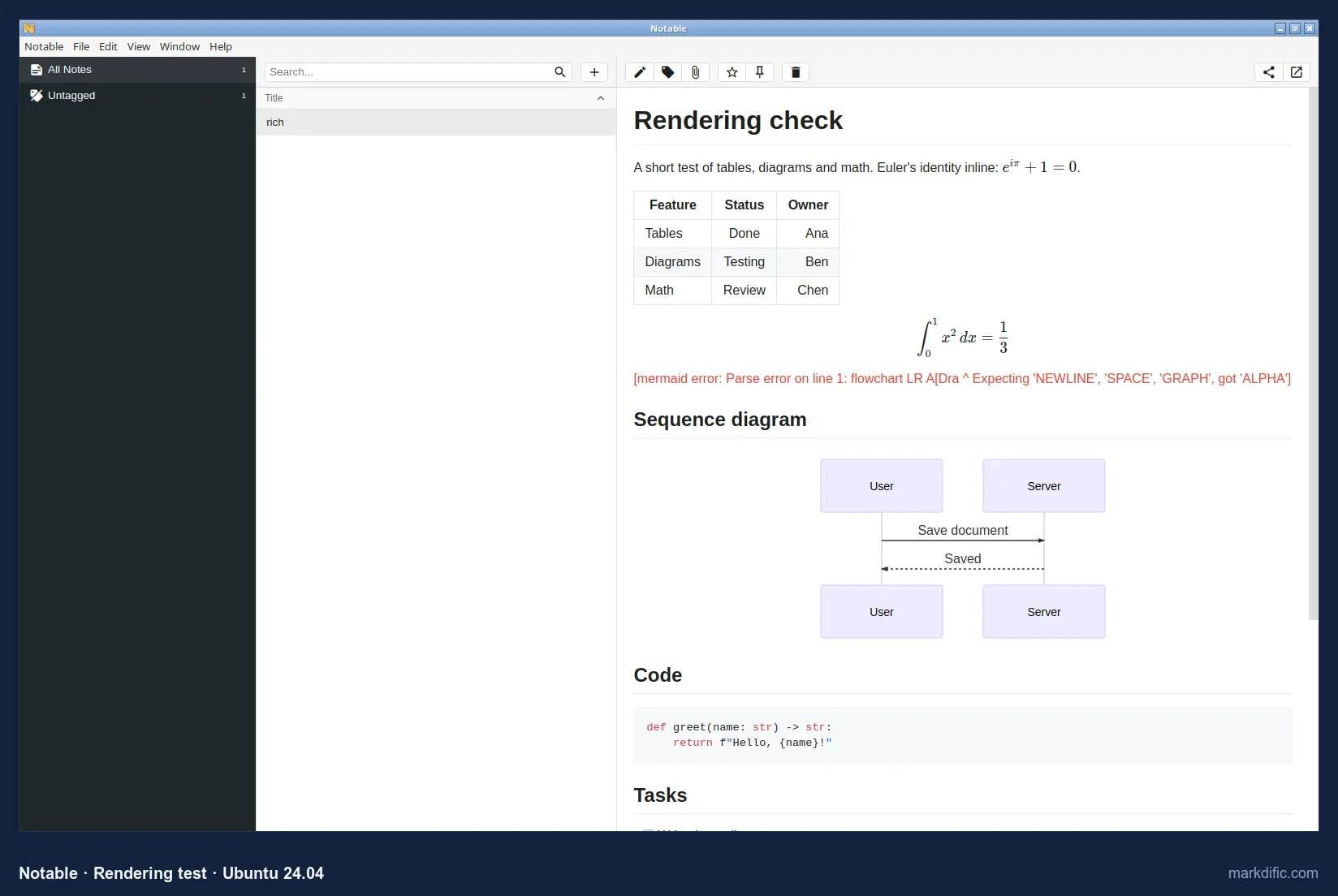
It rendered the table, math, the sequence diagram and the Gantt chart. Its bundled Mermaid version failed on our flowchart.
What makes it stand out
- Renders math, sequence diagrams and Gantt charts.
- A notes list next to the rendered note.
- Opened all the unusual test files.
Key features
- Notes list and preview.
- Math and diagram rendering.
- Separate edit mode.
Limitations
- Unmaintained since 2020.
- Older Mermaid version.
- Editing needs a mode switch.
Verdict
It works, but choose a maintained app for new work.
Test results
- Tested: 1.8.4 (January 2020, latest).
- Opens a file from the command line into its notes view. Notes open in preview mode, so our typed text did not reach an editor: autosave, save fidelity and line endings were not tested.
- Open times 1.5 s (5k), 8.5 s (20k), 1.5 s (100 diagrams), 1.5 s (table), indicative only; 515 to 654 MB.
- All robustness files opened.
Install on Linux:
sudo apt install ./notable_1.8.4_amd64.deb
# also: Notable-1.8.4.AppImage or the snap from github.com/notable/notable/releases
#17 Abricotine
Best for a hybrid source view with styled headings; the project is archived.
- Price
- free
- Platforms
- Linux (.deb, .rpm from GitHub releases), macOS, Windows
- License
- GPL-3.0
Abricotine is a free, open-source editor with a hybrid source view. Its GitHub repository was archived in 2023.
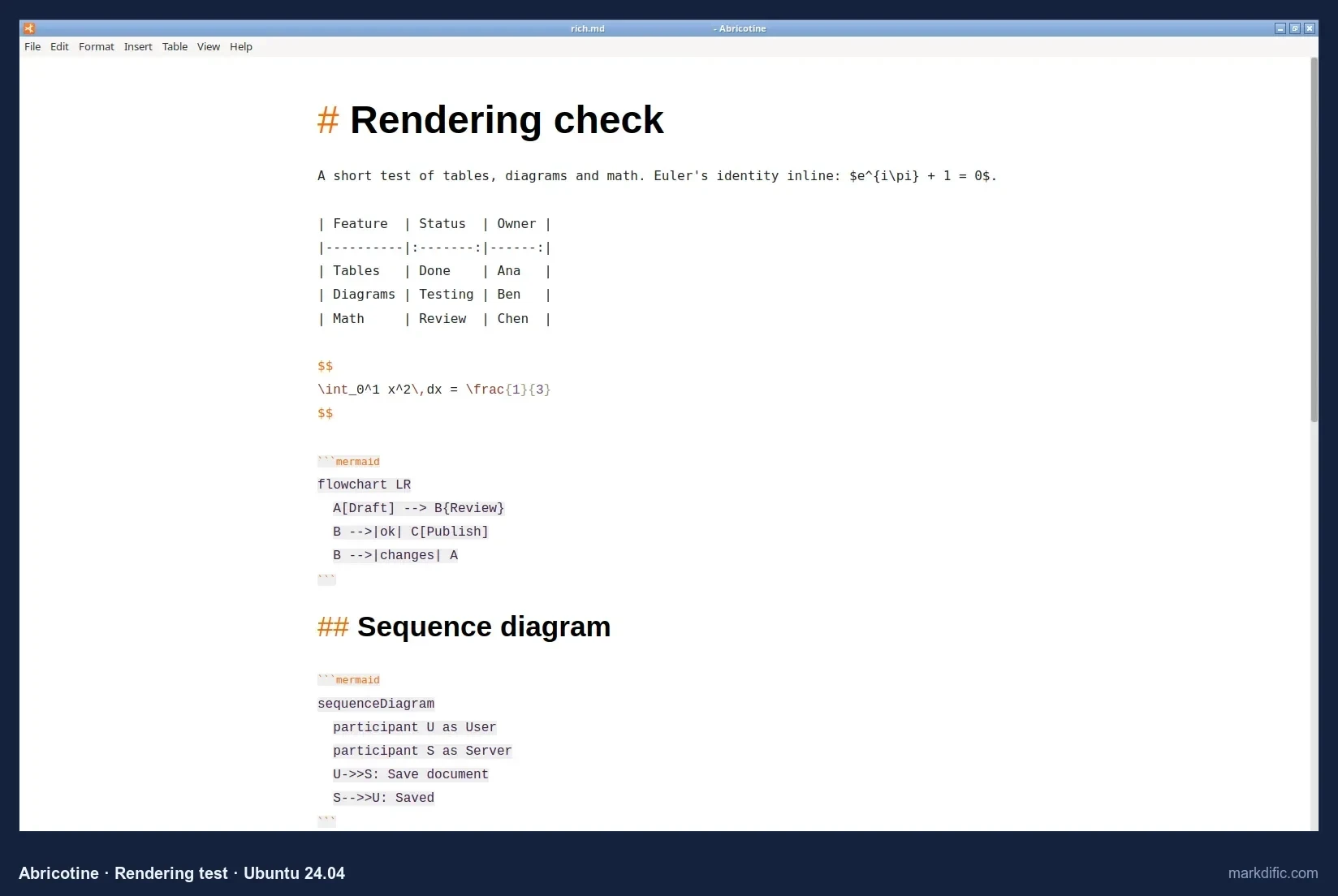
Headings are styled. Tables, math and Mermaid stayed as source in our test.
What makes it stand out
- Hybrid view: source text with styled headings.
- Opened all the unusual test files.
Key features
- Hybrid source view.
- Opens single files and registers for .md files.
- Does not autosave by default.
Limitations
- Archived.
- No rendering of tables, math or diagrams in our run.
- Changes Windows line endings to Unix ones.
Verdict
Ranked last because it is archived and rendered the least.
Test results
- Tested: 1.1.4 (June 2022, latest).
- Opens single files; registers for text/markdown.
- No autosave; 0 unrelated changes; CRLF converted to LF.
- Open time: 4.2 s (5k), 3.9 s (20k), 3.5 s (100 diagrams), 5.5 s (table); 669 to 706 MB.
- Typing lag about 6.8 s (indicative). All robustness files opened.
Install on Linux:
sudo apt install ./abricotine_1.1.4_amd64.debLinux Markdown editors compared: features and price
Rendering, price and licence
| App (version) | Price | Open source | Mermaid | Math | Views | Best for |
|---|---|---|---|---|---|---|
| Markdific 1.3.1 Download | Free to view; $14.99 one-time to edit | No | Yes | Inline + block | WYSIWYG, source, split | Single files with diagrams and math |
| Typora 1.14 | $14.99 one-time | No | Yes | Block; inline off by default | WYSIWYG, source | WYSIWYG writing |
| Obsidian 1.14 | Free core; Sync and Publish paid | No | Yes, after a prompt | Inline + block | Live preview, reading, source | Knowledge bases |
| VS Code 1.142 | Free | Source MIT; Microsoft build not | Yes (preview) | Yes (preview) | Editor + side preview | Developers |
| Zettlr 4.8 | Free | Yes (GPL-3.0) | Yes | Inline + block | Inline rendering | Academic writing |
| MarkText 0.21.2 | Free | Yes (MIT) | Yes | Inline + block | WYSIWYG, source | Free WYSIWYG |
| Apostrophe 3.5 | Free | Yes (GPL-3.0) | No | Yes (preview) | Editor + preview | GNOME writing |
| ghostwriter 23.08 | Free | Yes (GPL-3.0) | No | No (default) | Editor + live preview | KDE writing |
| Kate 23.08 | Free | Yes (LGPL-2.1+) | Not judged² | Not judged² | Source; preview plugin | Light editing, code |
| Marker 2023.05.02 | Free | Yes (GPL-3.0) | Yes | Not judged³ | Source + preview | GNOME split view |
| KeenWrite 3.6.5⁶ | Free | Yes (GPL-2.0) | No | Inline; block shown as text | Editor + side preview | Typeset PDF output |
| ReText 8.0 | Free | Yes (GPL-2.0+) | No | No (default) | Editor + side preview | Lightweight preview |
| GNOME Text Editor 46.3 | Free | Yes (GPL-3.0+) | No (no preview) | No | Source only | Quick plain-text edits |
| Okular 23.08 | Free | Yes (GPL-2.0+) | No | No | Page view | Viewing only |
| Joplin 3.7.21 | Free; Joplin Cloud paid | Yes (AGPL-3.0) | In viewer only⁵ | Not in editor⁵ | Editor, viewer, split | Synced notes (imports files) |
| Notable 1.8.4 | Free | No current licence in repository⁴ | Partial | Inline + block | Preview, editor | Notes app (unmaintained) |
| Abricotine 1.1.4 | Free | Yes (GPL-3.0) | No | No | Hybrid source | Hybrid editor (archived) |
Autosave, line endings and packages
| App | Autosave (default) | CRLF kept | Open 20k lines (s) | Linux packages |
|---|---|---|---|---|
| Markdific | Yes¹ | Yes | 12.4 | .deb, .rpm, AppImage |
| Typora | No | Yes | 8.2 | .deb, apt repository, tarball |
| Obsidian | Yes | No (LF) | 2.6 | AppImage, .deb, Snap, Flatpak (community) |
| VS Code | No | Yes | 11.9 | .deb, .rpm, Snap |
| Zettlr | No | Yes | 16.9 | .deb, .rpm, AppImage, Flatpak |
| MarkText | No | Yes | Not loaded in 60 s | AppImage, Flatpak |
| Apostrophe | No | Mixed | 6.9 | Flatpak |
| ghostwriter | No | No (LF) | 6.4 | apt, Flatpak |
| Kate | No | Yes | 4.1 | apt, Flatpak |
| Marker | No | Mixed | 13.1 | Flatpak |
| KeenWrite | Yes | No (LF) | 24.2⁶ | .bin, .jar |
| ReText | No | No (LF) | 3.0 | apt, PyPI |
| GNOME Text Editor | Inconclusive | Yes | 4.6 | apt, Flatpak |
| Okular | n/a (viewer) | n/a | 4.6 | apt, Flatpak |
| Joplin | n/a (imports) | n/a | n/a | AppImage, Flatpak |
| Notable | Not tested | Not tested | 8.5 (indicative) | .deb, AppImage, Snap, .rpm |
| Abricotine | No | No (LF) | 3.9 | .deb, .rpm |
Open times include application start-up and were timed from the screen on a machine without a GPU. See How we tested.
¹ Markdific autosave is on by default and was verified in a separate installed-app test; the shared 15-second check was inconclusive for Markdific (details in #1).
² Kate's Markdown preview is a plugin panel; we could not open it in our test setup, so rendering was not judged.
³ Marker's preview pane was scrolled past the math in our screenshot; Mermaid (a sequence diagram) was visible.
⁴ Notable 1.8.4 (January 2020) is the last release. The GitHub repository does not list an open-source licence today.
⁵ Joplin's default editor showed Mermaid and block math as text. Its viewer layout (Ctrl+L) showed a rendered Mermaid sequence diagram; math in the viewer was not captured.
⁶ KeenWrite open times include choosing the file in the Ctrl+O dialog, because a file path on the command line runs KeenWrite's command-line exporter instead of opening the window. We did not record the KeenWrite version; 3.6.5 was the latest release tag in the project repository on the test date.
Speed, memory and stress-test results on Linux
Open time and memory
| App | 5k lines: s / MB | 20k lines: s / MB | 100 diagrams: s / MB | 2,000-row table: s / MB |
|---|---|---|---|---|
| Markdific 1.3.1 | 3.1 / 991 | 12.4 / 1,249 | 5.6 / 786 | 7.4 / 735 |
| Typora | 8.5 / 820 | 8.2 / 1,453 | 7.4 / 1,091 | 6.6 / 958 |
| Obsidian | 2.5 / 758 | 2.6 / 1,045 | 1.7 / 763 | 5.7 / 1,051 |
| VS Code | 11.2 / 2,036 | 11.9 / 2,203 | 8.8 / 1,974 | 10.8 / 2,074 |
| Zettlr | 8.4 / 899 | 16.9 / 1,234 | 6.0 / 893 | 15.4 / 1,184 |
| MarkText | 5.4 / 662 | not loaded in 60 s / 815⁷ | 4.4 / 792 | 52.5 / 709 |
| Apostrophe | 4.7 / 462 | 6.9 / 473 | 4.2 / 483 | 4.0 / 462 |
| ghostwriter | 2.3 / 486 | 6.4 / 785 | 2.3 / 482 | 2.6 / 581 |
| Kate | 9.4 / 132 | 4.1 / 136 | 3.0 / 132 | 5.3 / 132 |
| Marker | 1.9 / 644 | 13.1 / 798 | 1.9 / 716 | 7.3 / 718 |
| KeenWrite | 21.8 / 1,632 | 24.2 / 1,485 | 19.5 / 1,226 | 21.4 / 1,388 |
| ReText | 2.3 / 303 | 3.0 / 298 | 1.1 / 292 | not loaded in 60 s / 286⁷ |
| GNOME Text Editor | 7.0 / 251 | 4.6 / 265 | 3.2 / 252 | 4.4 / 259 |
| Okular | 5.5 / 136 | 4.6 / 178 | 1.9 / 136 | 4.4 / 139 |
| Joplin | n/a (imports) | n/a | n/a | n/a |
| Notable (indicative) | 1.5 / 515 | 8.5 / 654 | 1.5 / 521 | 1.5 / 560 |
| Abricotine | 4.2 / 685 | 3.9 / 706 | 3.5 / 669 | 5.5 / 675 |
Seconds from launch until the first heading appeared on screen, including app start-up. Memory is RSS summed over the app's processes 10 s after load.
⁷ Memory at 60 s, file not shown. Apps that show Mermaid as code do no diagram rendering, so their diagram-file times are not directly comparable. KeenWrite times include choosing the file in the Ctrl+O dialog. The first 10 apps ran on 17 October 2026 (Markdific re-run with 1.3.1); Kate, Marker, GNOME Text Editor, KeenWrite, Notable and Abricotine ran on 22 October 2026 on the same runner type.
Typing lag and robustness
| App | Typing lag, 20k lines (s)⁸ | 200k-char line | Invalid UTF-8 | Empty file |
|---|---|---|---|---|
| Markdific 1.3.1 | 17.7 | Opens | Opens | Opens |
| Typora | 8.1 | Opens | Opens | Opens |
| Obsidian | 6.7 | Opens | Opens | Opens |
| VS Code | 2.5 | Opens | Opens | Opens |
| Zettlr | 59.0 | Opens | Opens | Opens |
| MarkText | not tested (file did not load) | Opens | Opens | Opens |
| Apostrophe | not measured⁹ | Opens | Opens | Opens |
| ghostwriter | 22.7 | Opens | Opens | Opens |
| Kate | 4.1 | Opens | Text not shown in 45 s | Opens |
| Marker | not measured⁹ | Opens | Text not shown in 45 s | Opens |
| KeenWrite | 37.8 | Opens | Opens | Opens |
| ReText | 5.3 | Opens | Error message | Opens |
| GNOME Text Editor | 2.4 | Opens | Opens | Opens |
| Okular | n/a (viewer) | Opens | Opens | Opens |
| Joplin | n/a (imports) | n/a | n/a | n/a |
| Notable | not measured⁹ | Opens | Opens | Opens |
| Abricotine | 6.8 | Opens | Opens | Opens |
⁸ Seconds from the end of typing 100 characters until they appeared on screen, on a machine without a GPU; about 1 s resolution, indicative only.
⁹ Typed text not detected within 60 s; could be lag, a caret outside the visible area or (Notable) preview mode.
Autosave, save fidelity and line endings
| App | Autosave without Ctrl+S (defaults) | Unrelated lines changed on save | CRLF after save |
|---|---|---|---|
| Markdific | Yes (separate installed-app test; shared test inconclusive) | 0 | Kept |
| Typora | No | 0 | Kept |
| Obsidian | Yes | 0 | Converted to LF |
| VS Code | No | 0 | Kept |
| Zettlr | No | 0 | Kept |
| MarkText | No | 0 | Kept |
| Apostrophe | No | 0 | Mixed |
| ghostwriter | No | 0 | Converted to LF |
| Kate | No | 0 | Kept |
| Marker | No | 0 | Mixed |
| KeenWrite | Yes | 0 | Converted to LF |
| ReText | No | 0 | Converted to LF |
| GNOME Text Editor | Inconclusive | 0 | Kept |
| Okular | n/a | n/a | n/a |
| Joplin | n/a (imports) | n/a | n/a |
| Notable | Not tested | Not tested | Not tested |
| Abricotine | No | 0 | Converted to LF |
Blank-line changes next to the inserted word are not counted as unrelated.
How we tested the Linux Markdown editors
We installed all 17 apps on the same clean Ubuntu 24.04 PC (no graphics card) on 17 and 22 October 2026, each from its official package, and opened the same Markdown files in each one: a product launch plan, a short page with a table, math and diagrams, and large files of up to 20,000 lines.
For every app we checked:
- whether tables, math and Mermaid diagrams display
- whether it saves on its own (autosave)
- whether saving changes anything else in the file, including Windows line endings
- how long large files take to open, how much memory the app uses, and how quickly typing shows up in a very long file
A PC with a graphics card will be faster than ours, so compare the apps with each other rather than reading the times as exact. Each app section lists the version we tested.
What to look for in a Linux Markdown editor
Viewer or editor. A viewer is enough if you mostly read README files and notes. If you write, you need a preview: side by side (VS Code, ReText, ghostwriter, Marker) or rendered in place (Markdific, Typora, MarkText, Zettlr, Obsidian).
Diagrams and math. Mermaid and LaTeX-style math are common in technical documents. In our test, 9 of the 17 apps rendered at least some Mermaid (Notable failed on the flowchart; Joplin rendered it only in its viewer), and the rest showed the code.
Autosave and file safety. Only Markdific, Obsidian and KeenWrite saved to disk without Ctrl+S in their default settings. All apps that completed the save test changed 0 unrelated lines. Line endings differed: 7 apps kept CRLF, 5 converted to LF and 2 produced mixed endings.
Big files. Logs, generated documentation and long specifications can have thousands of lines. MarkText did not load our 20,000-line file within 60 seconds, and ReText did not load the 2,000-row table.
Open source or paid. 12 of the 17 apps are free and open source, and VS Code is built from MIT-licensed source. Typora and Markdific are paid one-time; Obsidian is free with paid services.
Packaging. Distribution packages (apt, dnf) update with the system. Flatpak sandboxes the app and ships its own runtime. AppImage is a single file that needs chmod +x and sometimes host libraries. To make an app the default for .md files, use xdg-mime default <app>.desktop text/markdown (how to open .md files).
Other Linux Markdown editors we considered
These four apps appear in other lists of Linux Markdown editors. We did not complete the full test on them, for the reason given in each row. Facts are from official sources and our 2026-10-22 run.
| App | What it is | License / price | Version | Why not ranked | Install |
|---|---|---|---|---|---|
| SiYuan | Privacy-first personal knowledge management system with blocks | AGPL-3.0, free core | 3.8.8 (tested) | Imports Markdown into its own workspace (JSON .sy files), so file tests do not apply; only the rendering screenshot below was captured | flatpak install flathub org.b3log.siyuan |
| Logseq | Outliner for connected notes, stored as Markdown files in a graph folder | AGPL-3.0, free | 2.0.2 (tested) | Outliner model, not a document editor; our copied pages opened as empty pages, so no results | flatpak install flathub com.logseq.Logseq |
| QOwnNotes | Markdown note-taking app working on plain files in a folder, with Nextcloud/ownCloud sync | GPL-2.0+, free | 26.10.9 (tested) | The window stayed black under our software-rendered display in three attempts, so no test could see the document | flatpak install flathub org.qownnotes.QOwnNotes |
| HedgeDoc | Self-hosted, real-time collaborative Markdown notes in the browser | AGPL-3.0, free | 1.12.0 (August 2026) | A web server application, not a desktop editor | Docker image or manual install (docs.hedgedoc.org) |
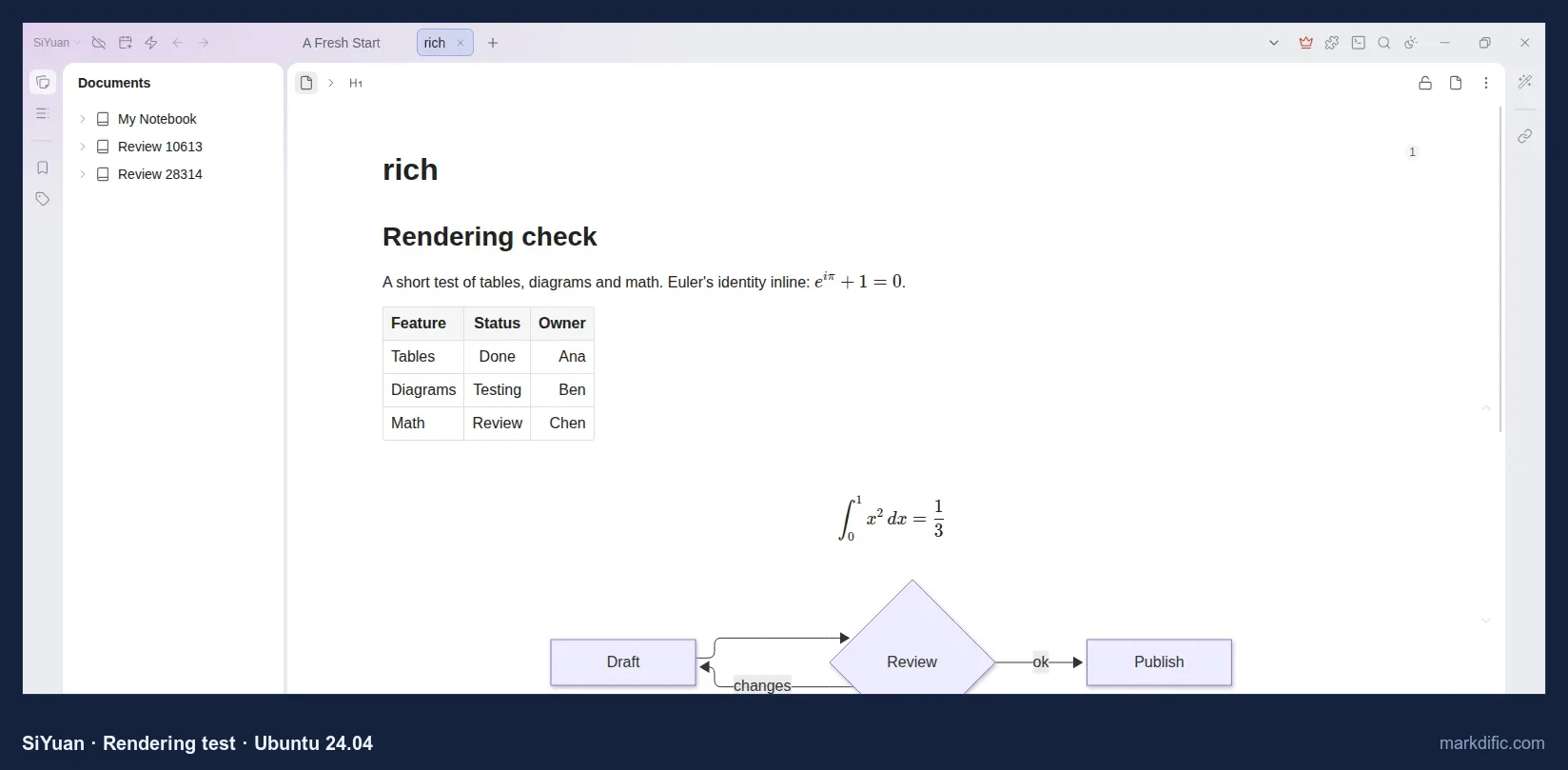
SiYuan. In our run, the imported test document rendered the table, inline and block math and both Mermaid diagrams. Because SiYuan keeps documents in its own workspace format, the autosave, save and line-ending tests do not apply, and the other screenshots were not usable.
QOwnNotes and Logseq. Both installed, but we could not capture a usable screenshot. QOwnNotes showed a black window under the virtual display; Logseq 2.0.2 started but showed the copied pages as empty. QOwnNotes is ranked in our Windows test, where it ran normally.
How to install each Markdown editor on Linux
Each app section above ends with its install commands, with a Copy button. Jump to an app: Markdific · Typora · Obsidian · Visual Studio Code · Zettlr · MarkText · Apostrophe · ghostwriter · Kate · Marker · KeenWrite · ReText · GNOME Text Editor · Okular · Joplin · Notable · Abricotine.
Linux Markdown editor FAQ
What is the best free Markdown editor for Linux?
Zettlr is the best free Markdown editor for Linux for technical and academic writing in our tests: it is open source (GPL-3.0) and rendered Mermaid and math. MarkText is the best free WYSIWYG option for smaller files. Kate used the least memory. Obsidian's core app is free but not open source.
Does Typora work on Linux?
Yes. Typora runs on Linux and provides a .deb package, an apt repository and tarballs for x64 and ARM. It costs $14.99 one-time for up to 3 devices after a 15-day trial. On Ubuntu 24.04 it rendered Mermaid and block math; inline math must be enabled in preferences, and it does not autosave by default.
What is the best Markdown viewer for Linux?
Okular is a good viewer-only app for Linux if you want a paginated page view and low memory use, but it does not render Mermaid or math. If you need diagrams and math rendered, Markdific opens and views files for free, and the built-in preview in VS Code also renders both.
What is a good Markdown editor with preview for Ubuntu?
For Ubuntu, ghostwriter and ReText install with apt and show a live side-by-side preview; neither renders Mermaid by default. Markdific, Typora, MarkText and Zettlr render the preview in place, including Mermaid and math. VS Code shows a side preview with Mermaid and math, opened with Ctrl+Shift+V or Ctrl+K V.
Which Linux Markdown editors render Mermaid diagrams?
Nine of the 17 apps we tested rendered Mermaid. They were Markdific, Typora, Obsidian (after a per-vault prompt), VS Code (preview), Zettlr, MarkText, Marker, Joplin (viewer only) and Notable (partly). Apostrophe, ghostwriter, KeenWrite, ReText, Okular, Abricotine and GNOME Text Editor showed the code. Kate's preview was not judged.
Should I use Obsidian or an app that opens single files?
Use Obsidian if you keep many linked notes and want backlinks, graph view and mobile apps; it works inside a vault, a folder it manages. If you mostly open separate .md files from a file manager, email or Git repository, a single-file editor such as Markdific, Typora or MarkText opens them directly.
Which Markdown editors on Linux autosave?
With default settings, only Markdific, Obsidian and KeenWrite saved changes to disk without Ctrl+S in our tests. Markdific's autosave was confirmed in a separate installed-app test. The other editors did not save within 15 seconds by default, though several, including Kate, VS Code and Typora, offer an autosave option.
Is MarkText still maintained?
Yes. MarkText is maintained again as of October 2026. It had no stable release between March 2022 and May 2026. Version 0.19.0 was released on 28 May 2026 and 0.23.0 on 21 October 2026. It is still free and MIT-licensed, and Flathub has a current build.
Related Markdown guides
- Markdific for Linux
- Best Markdown editors for Windows
- Best Markdown editors for Mac
- Quick Look for Markdown on Mac
- Typora alternatives
- MarkText alternatives
- How to open .md files
- Markdown in VS Code
- Markdown in Obsidian
- Mermaid diagrams in Markdown
- Math in Markdown
- Markdown cheat sheet
About this test
Markdific is made by the team that publishes this guide. It went through the same tests as every other app, and no developer paid to be included. Prices and versions were checked on 21–22 October 2026 and may change. Corrections: hi@markdific.com.
Last tested 2026-10-22.