
We make Markdific, the app ranked first here, so weigh our ranking with that in mind. Where a free app is enough, we say so. Every app was tested on macOS 15.7 on 22 October 2026, and prices and versions are as of that date.
Which one to pick
You mostly read .md files
MarkdificFree viewerOpens .md files formatted from Finder. Space shows a Quick Look preview. No time limit. QLMarkdownFreeOnly a Quick Look preview in Finder, with Mermaid diagrams.You also write or export
Markdific$14.99 onceWYSIWYG, source and split views, autosave, 14 export formats, 3 devices. Typora$14.99One rendered view with focus and typewriter modes. ObsidianFreeLinked notes in a vault folder, with an iPhone app. VS CodeFreeMarkdown next to your code. ZettlrFree, open sourceCitations, with Pandoc included. MarkTextFree, open sourceWYSIWYG editing.On this page
Best Mac Markdown editors: comparison table
| App | Price | Open source | Mermaid | Math | Views | Best for |
|---|---|---|---|---|---|---|
| Markdific | Free to view; $14.99 one-time to edit | No | Yes | Inline + block | WYSIWYG, source, split | Opening, editing and exporting .md files with diagrams and math |
| Typora | $14.99 one-time | No | Yes | Block; inline off by default | WYSIWYG, source | Long-form writing |
| Obsidian | Free core; Sync and Publish paid | No | Yes, after a prompt | Inline + block | Live preview, reading, source | Linked notes with an iPhone app |
| VS Code | Free | Source MIT; Microsoft build not | Yes (preview) | Yes (preview) | Editor + preview | Developers |
| Zettlr | Free | Yes (GPL-3.0) | Yes | Inline + block | Inline rendering | Academic writing |
| MarkText | Free | Yes (MIT) | Yes | Inline + block | WYSIWYG, source | Free WYSIWYG |
| Zed | Free; Pro $10 per month | Yes (GPL-3.0) | Yes (preview) | No | Editor + preview | Fast code and Markdown editing |
| MarkEdit | Free | Yes (MIT) | No (source only) | No (source only) | Source only | Native plain-text editing |
| MacDown 3000 | Free | Yes (MIT) | No (default) | No (default) | Editor + preview | Classic MacDown layout |
| Joplin | Free; Joplin Cloud paid | Yes (AGPL-3.0) | In viewer | In viewer | Editor, viewer, split | Synced notes (imports files) |
| SiYuan | Free core | Yes (AGPL-3.0) | Yes | Inline + block | Block editor | Block notes (imports files) |
| Notable | Free | No licence listed¹ | Partly | Inline + block | Editor, preview | Existing Notable libraries |
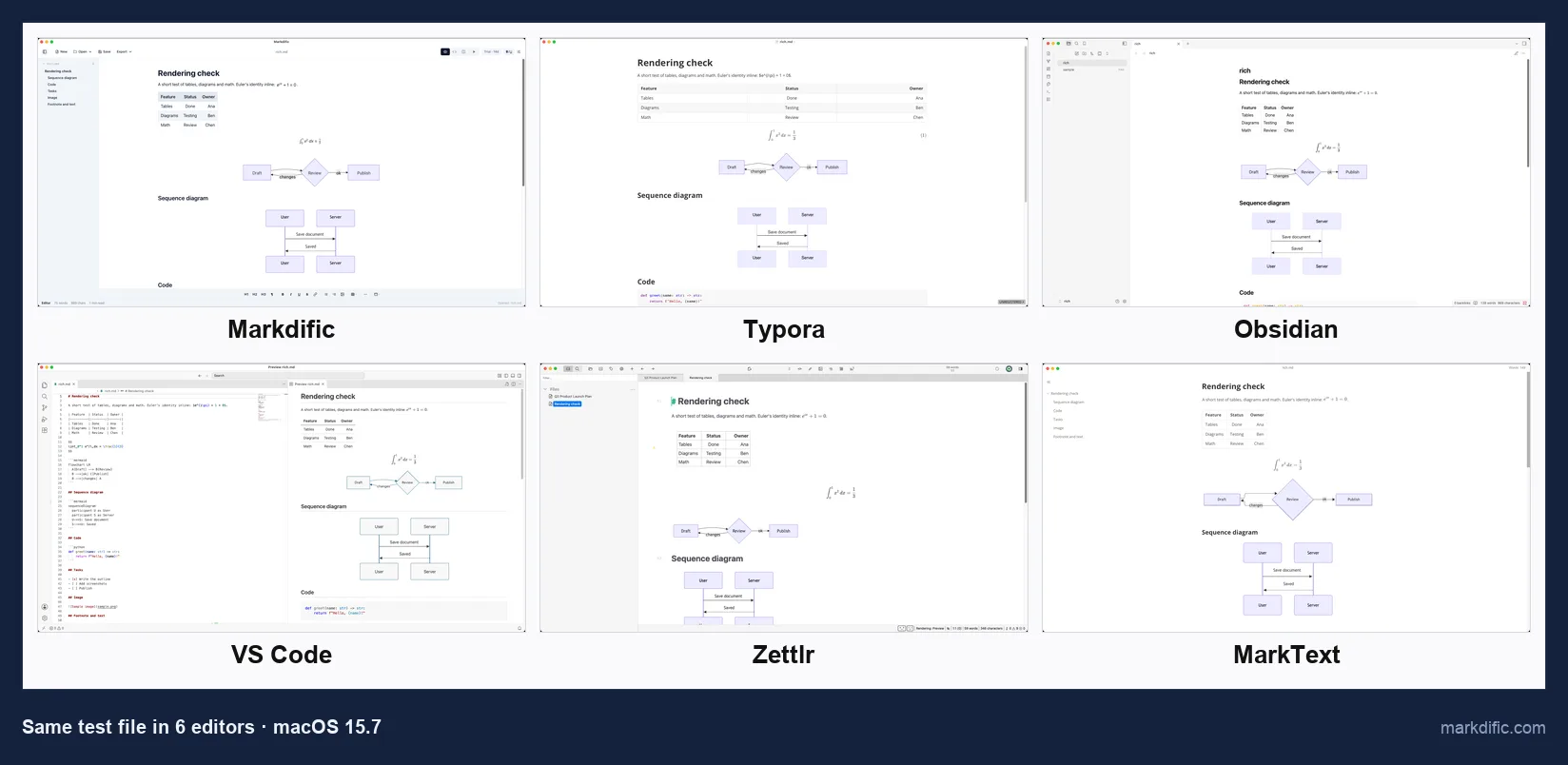
¹ Notable 1.8.4 (January 2020) is the last release; the GitHub repository does not list an open-source licence today.
The 12 best Markdown editors for Mac, ranked
#1 Markdific
Best for opening, editing and exporting Markdown files that contain diagrams, math and tables.
- Price
- free to open and view; editing in a 14-day trial, then $14.99 one-time for up to 3 devices on macOS, Windows or Linux (pricing)
- Platforms
- macOS 11 or later (universal: Apple silicon and Intel), Windows, Linux
- License
- proprietary
Markdific registers for .md and .markdown files, so a double-click in Finder opens the document rendered in a tab. It comes as a 34 MB universal DMG, signed and notarised by Apple, that runs natively on Apple silicon and Intel Macs.
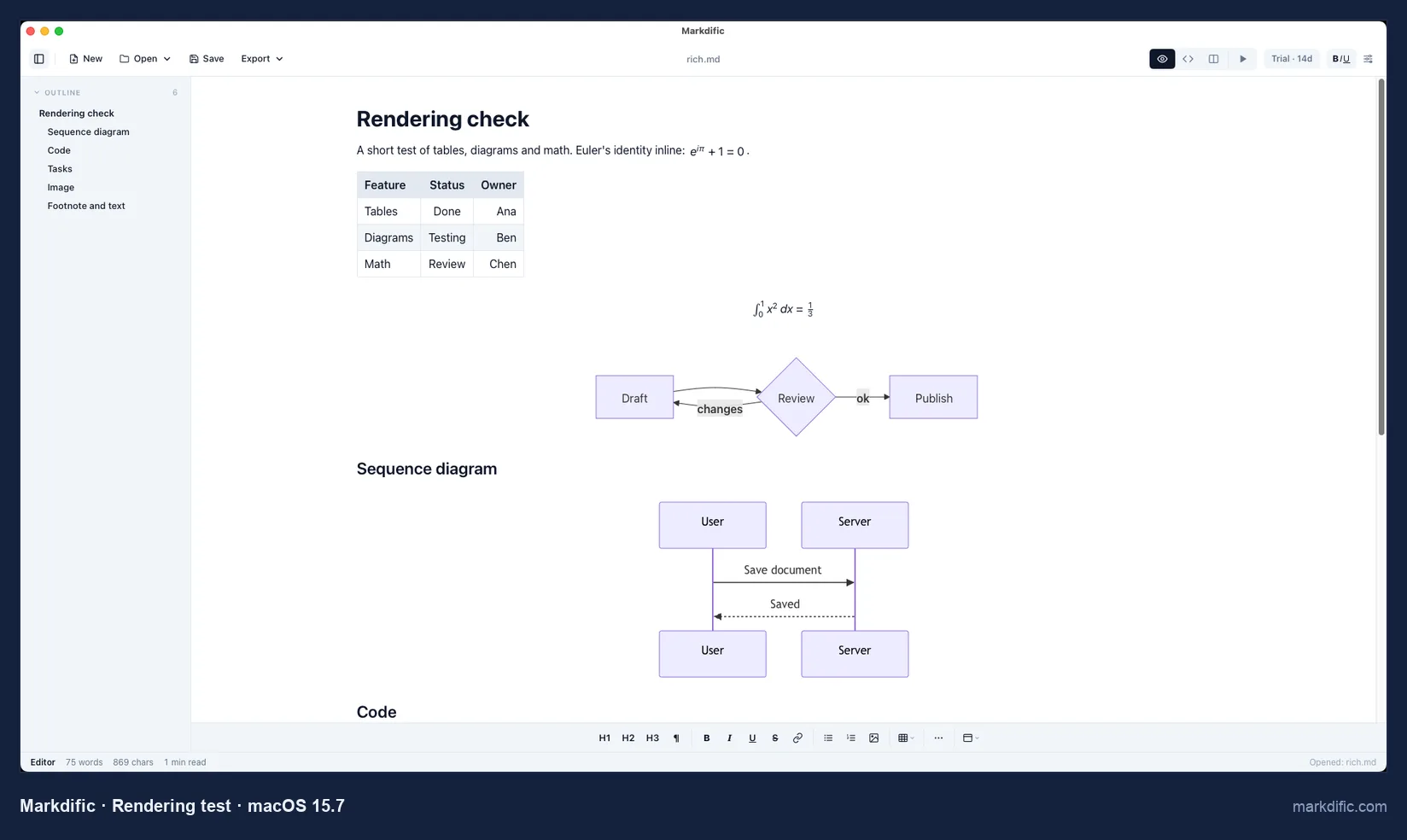
The outline on the left lists the six headings of rich.md and jumps to each one; the formatting toolbar sits at the bottom of the window.
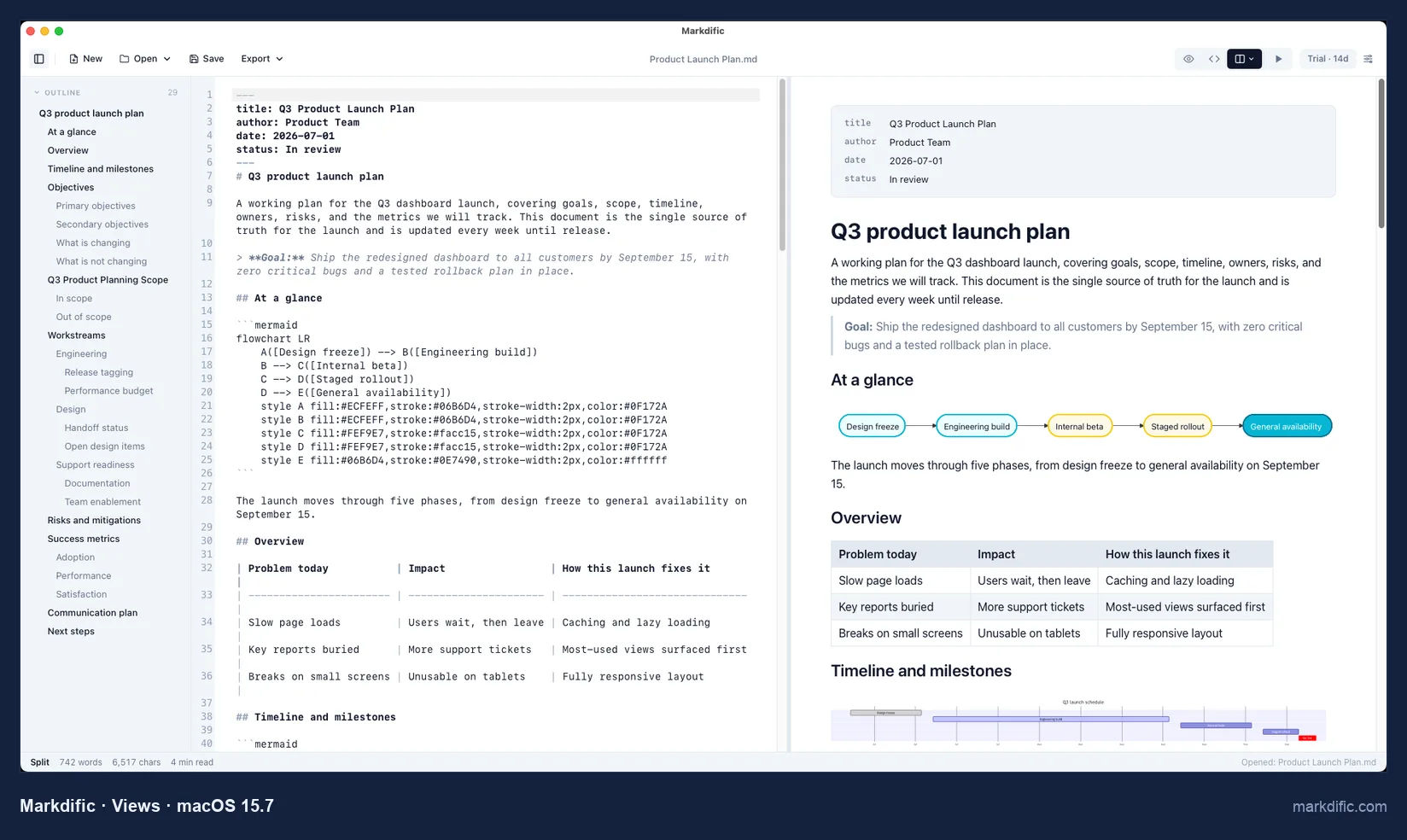
Cmd+1 shows only the rendered document and Cmd+2 only the source. The status bar counts words and characters and estimates reading time.
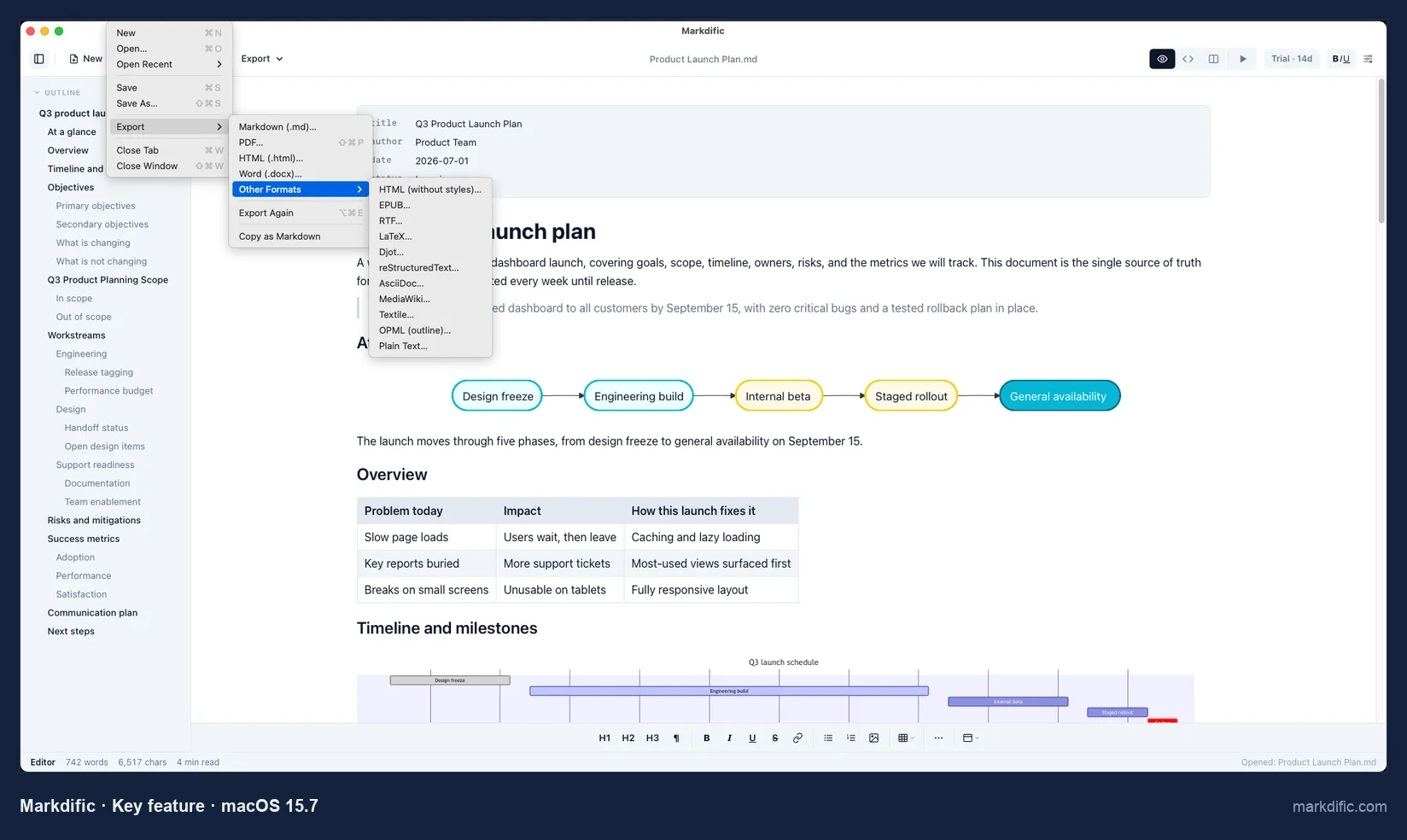
PDF and .docx come from this menu without Pandoc. The Other Formats submenu adds EPUB, RTF, LaTeX, AsciiDoc and seven more.
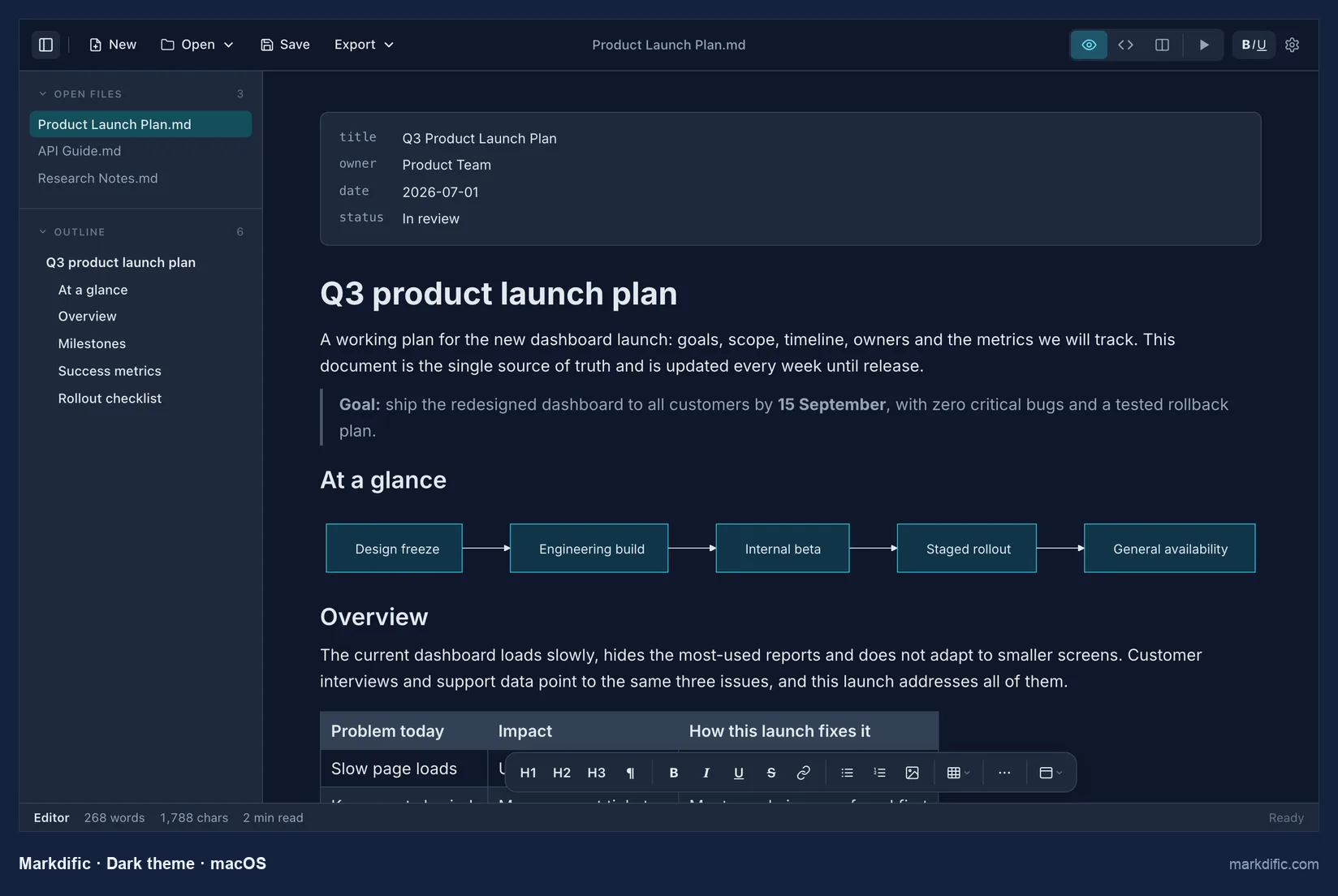
Themes, including dark, are in Settings > Appearance. The Quick Look preview comes with the free viewer and needs macOS 12 or later: select a .md file in Finder and press Space. More: Markdific for Mac, features.
What makes it stand out
- Free viewer and Quick Look preview in Finder, with no purchase.
- One universal app for Apple silicon and Intel, signed and notarised.
- Source and rendered document side by side in split view.
- PDF, Word and EPUB export without Pandoc.
- Autosave on by default: the change was on disk 1.1 s after typing.
- CRLF and LF line endings kept, with 0 unrelated lines changed on save.
Key features
- WYSIWYG, source and split views (Cmd+1, Cmd+2, Cmd+3).
- Several files in tabs, with an outline sidebar.
- 14 export formats.
- Opened the long-line, invalid UTF-8 and empty test files.
- Menus in 7 languages.
Limitations
- Very large files take a few seconds longer to open.
- The Quick Look preview shows Mermaid as code, without code colours or images.
- No focus mode, backlinks or iPhone app.
Verdict
The most complete app in this test for reading, editing and exporting standalone .md files on a Mac, and the only one that exports both PDF and Word without Pandoc. For a notes vault you also read on an iPhone, Obsidian is the better fit.
Test results
- Tested: 1.3.2 (current version), universal DMG, notarised.
- Opened .md files directly; registers as a Markdown document handler.
- Autosave: yes, 1.1 s after typing, without Cmd+S.
- Save fidelity: 0 unrelated lines changed. CRLF kept (10/10 lines); LF kept.
- Stress files, open time / memory: 6.3 s / 319 MB (5k lines), 8.3 s / 1,348 MB (20k), 4.9 s / 437 MB (100 diagrams), 6.8 s / 470 MB (table).
- Typing lag on the 20,000-line file: 3.1 s.
- Robustness: the 200,000-character line, the invalid UTF-8 file and the empty file all opened.
- Quick Look extension 1.1.1: tables and inline and block math yes; Mermaid, code colours and images no.
How to install Markdific on Mac
- Click Download Free above and choose Download for Mac, open the downloaded .dmg and drag Markdific into the Applications folder. The app is notarised, so macOS opens it without a security warning. With Homebrew, run
brew trust markdific/tap, thenbrew install --cask markdific/tap/markdific. - Double-click any .md file. To make Markdific the default, select a .md file in Finder, choose File > Get Info, pick Markdific under Open with and click Change All.
- To preview without opening the app, select a .md file in Finder and press Space (macOS 12 or later). If the preview shows plain text, open Markdific once and try again.
- Viewing stays free after the trial. Editing, export and autosave run for 14 days, then a single $14.99 payment unlocks them on up to 3 of your devices, on any mix of Mac, Windows and Linux.
#2 Typora
Best for writers who want one rendered view with focus and typewriter modes.
- Price
- $14.99 one-time, up to 3 devices, 15-day trial
- Platforms
- macOS, Windows, Linux
- License
- proprietary
Typora hides the Markdown syntax as you type and shows the formatted result in the same place. Its Mac download is 15 MB, the smallest of the apps that render Mermaid, and the build is notarised.
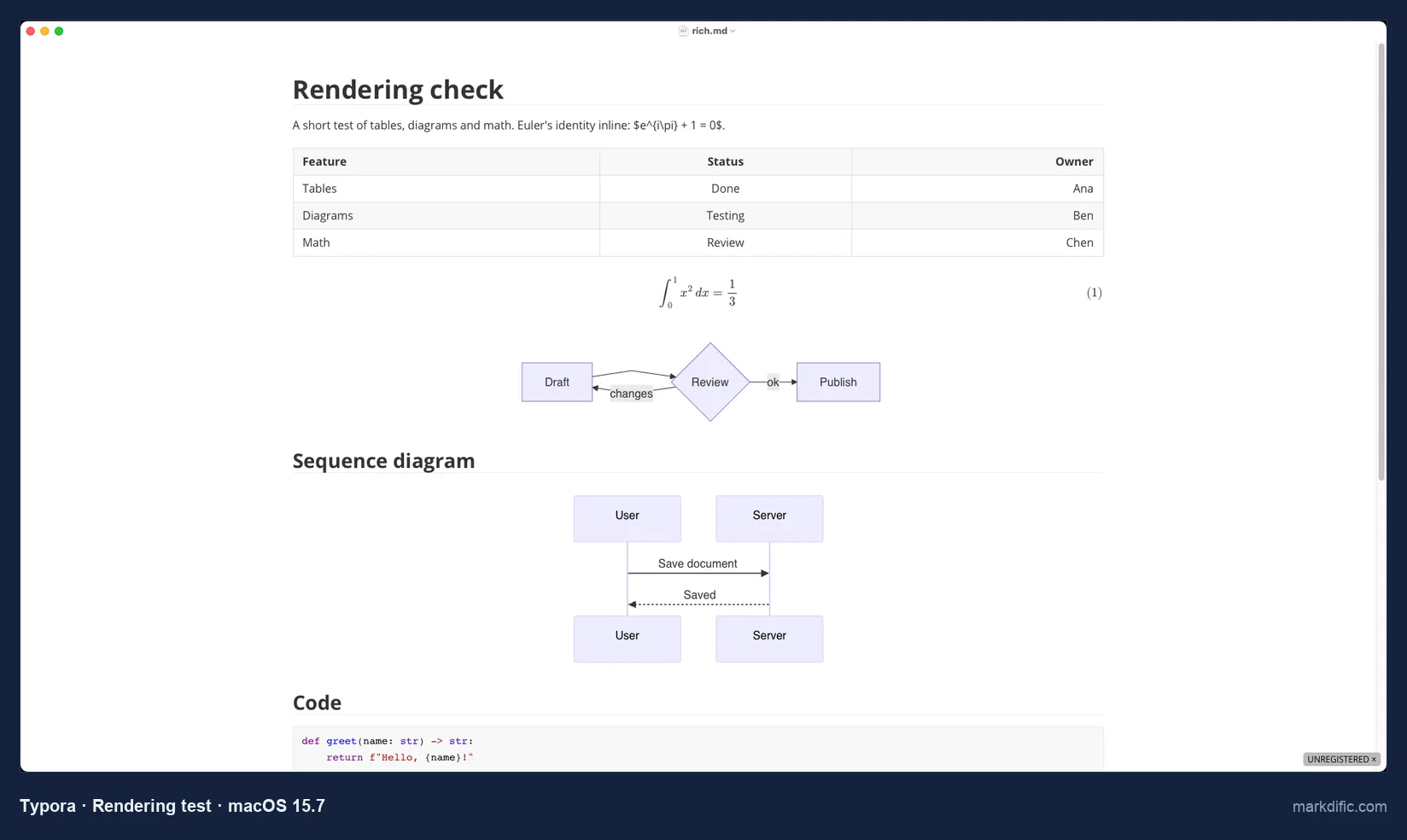
Inline math is a Markdown setting in Typora's preferences and is off by default, so the inline formula shows as source.
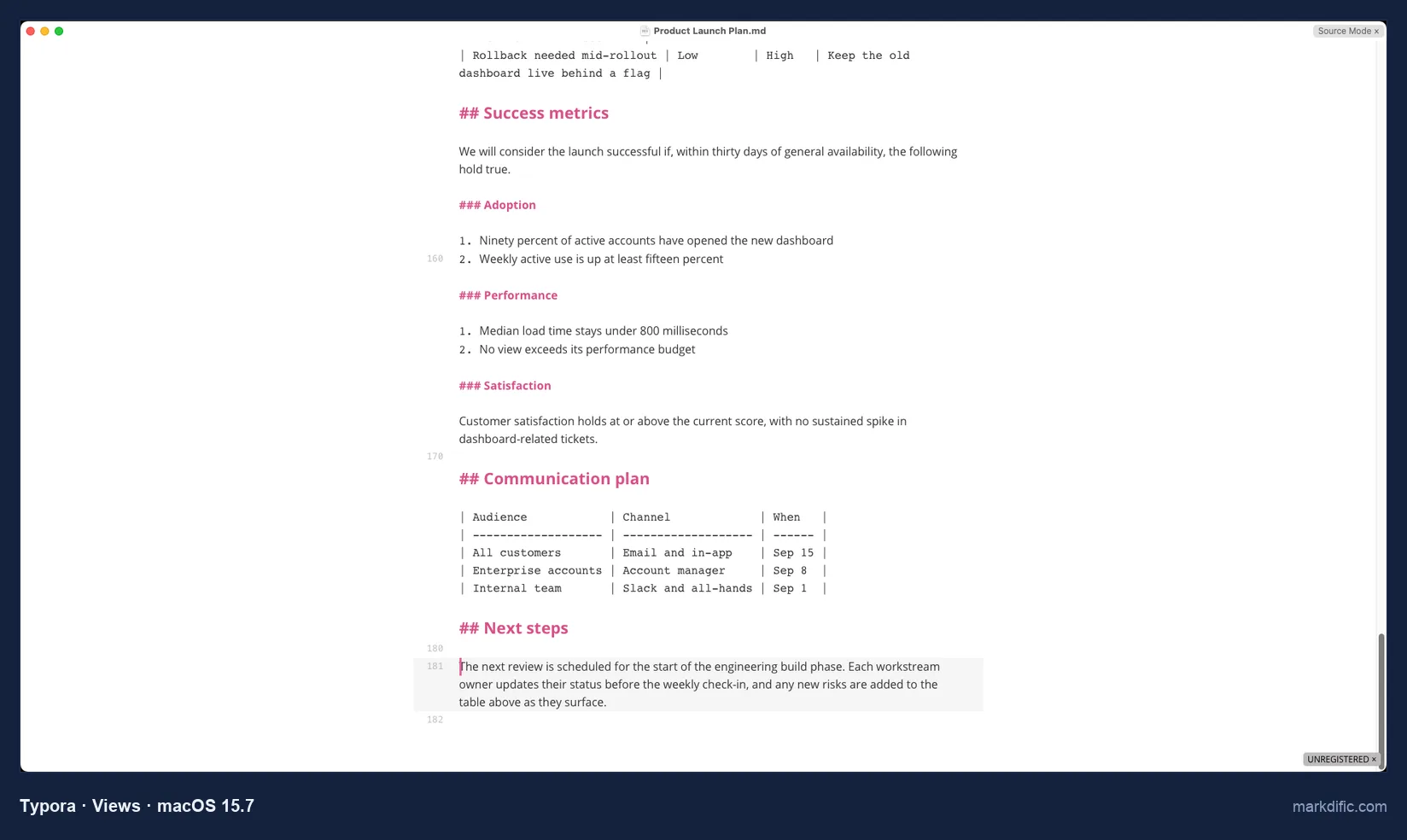
Cmd+/ swaps the whole window between rendered and raw Markdown; there is no view with both.
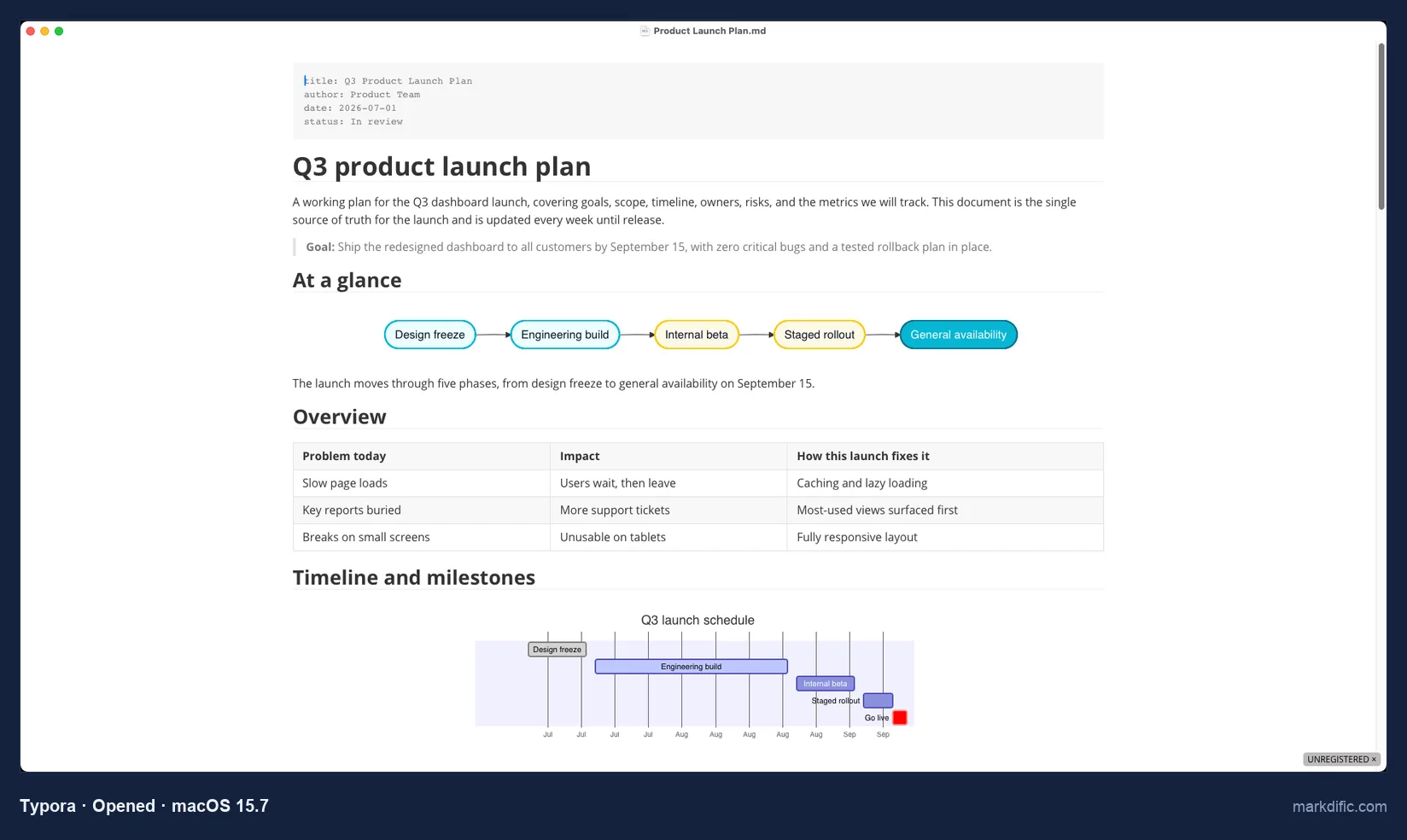
Front matter appears as a grey code block above the title. PDF, HTML and image export are built in; Word, EPUB and LaTeX go through Pandoc, which you install separately.
What makes it stand out
- Focus mode (F8) and typewriter mode.
- 15 MB download, notarised, with a Homebrew cask.
- Opened the 20,000-line file in 4.1 s.
Key features
- Source code mode (Cmd+/).
- PDF, HTML and image export built in.
- Themes.
- Kept CRLF and LF line endings.
Limitations
- No split view.
- Inline math needs a setting.
- Word, EPUB and LaTeX need Pandoc.
Verdict
The closest paid alternative on a Mac, and the better fit if you write long prose in one view. See Typora alternatives.
Test results
- Tested: 1.14.10 (trial mode).
- Opened the .md file directly and registers for .md. Nothing on disk 15 s after typing; 0 unrelated lines changed; CRLF and LF kept.
- Stress files, open time / memory: 7.4 s / 422 MB (5k), 4.1 s / 887 MB (20k), 3.9 s / 576 MB (100 diagrams), 4.5 s / 600 MB (table).
- Typing lag on 20k lines: 1.6 s.
- Robustness: the 200,000-character line, the invalid UTF-8 file and the empty file all opened.
Install on Mac:
brew install --cask typora#3 Obsidian
Best for a vault of linked notes that you also open on an iPhone or iPad.
- Price
- free core app (including commercial use); Sync from $4 per month and Publish from $8 per month, billed yearly
- Platforms
- macOS (universal), Windows, Linux, iOS, Android
- License
- proprietary (not open source)
Obsidian works on a vault, a folder of .md files, and adds links, backlinks and a graph across them. Obsidian also has iPhone, iPad and Android apps.
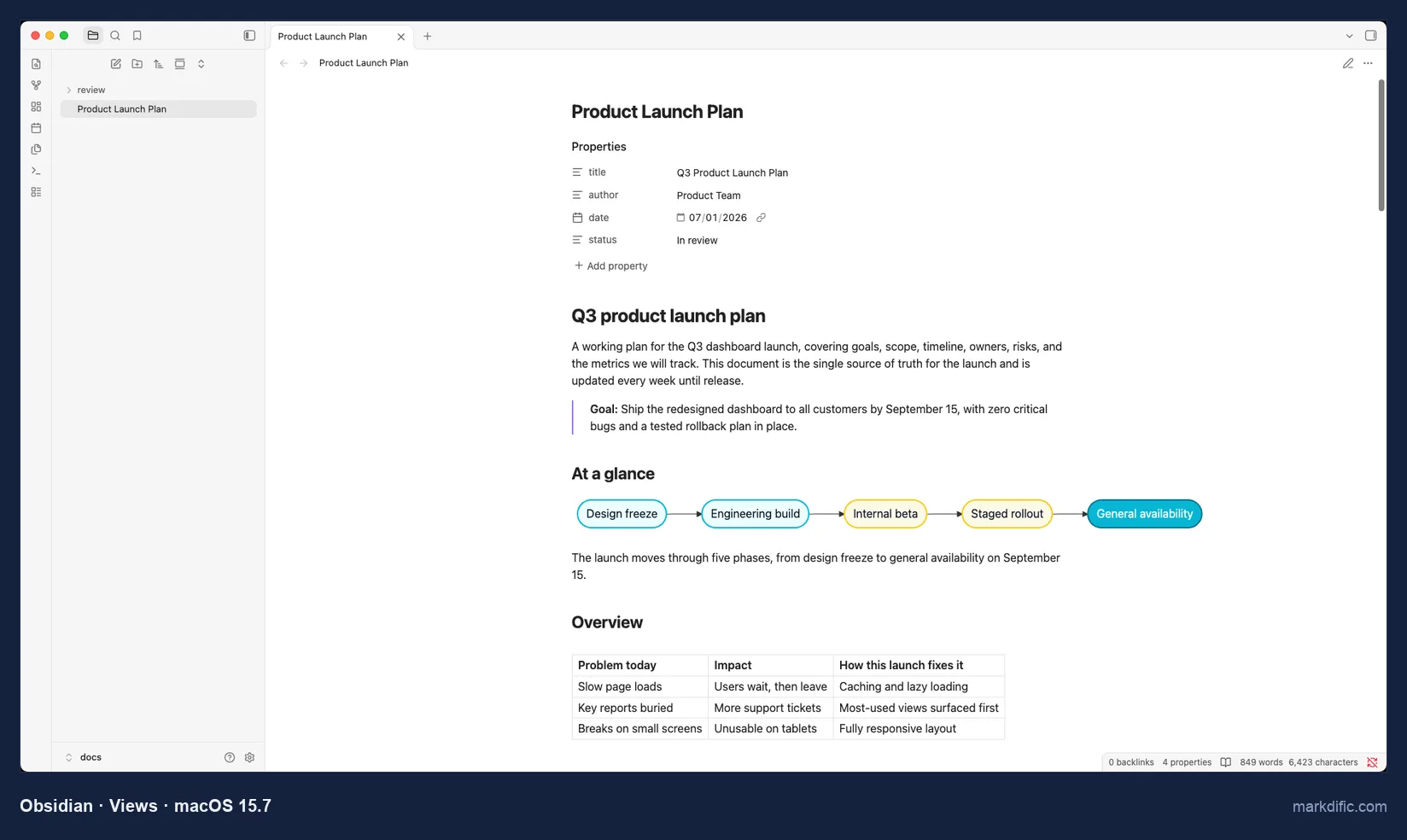
Cmd+E switches between this reading view and editing. The title, author, date and status fields from the front matter appear as editable properties.
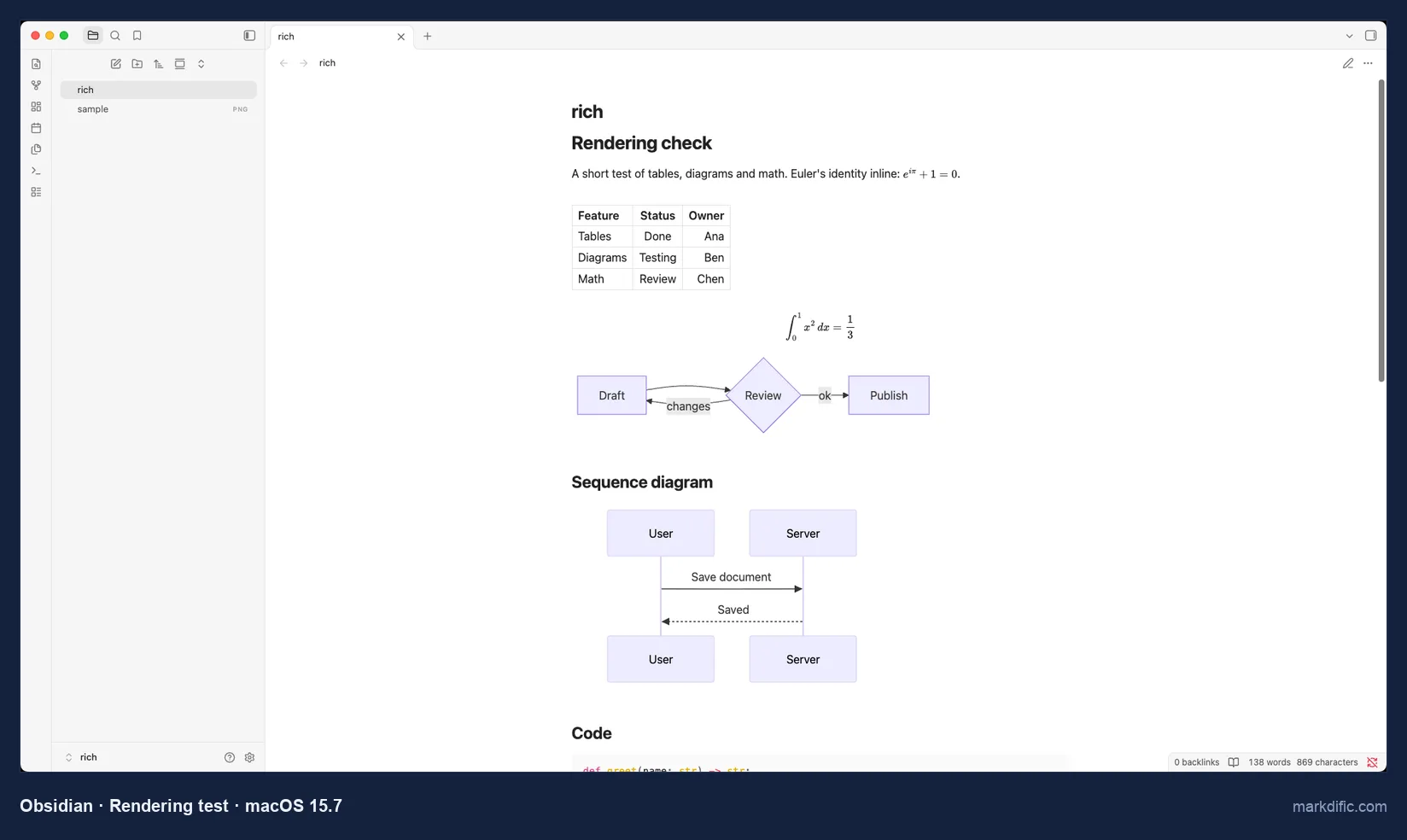
The diagrams appeared only after we clicked Allow on a "Display Mermaid diagrams in this vault?" prompt.
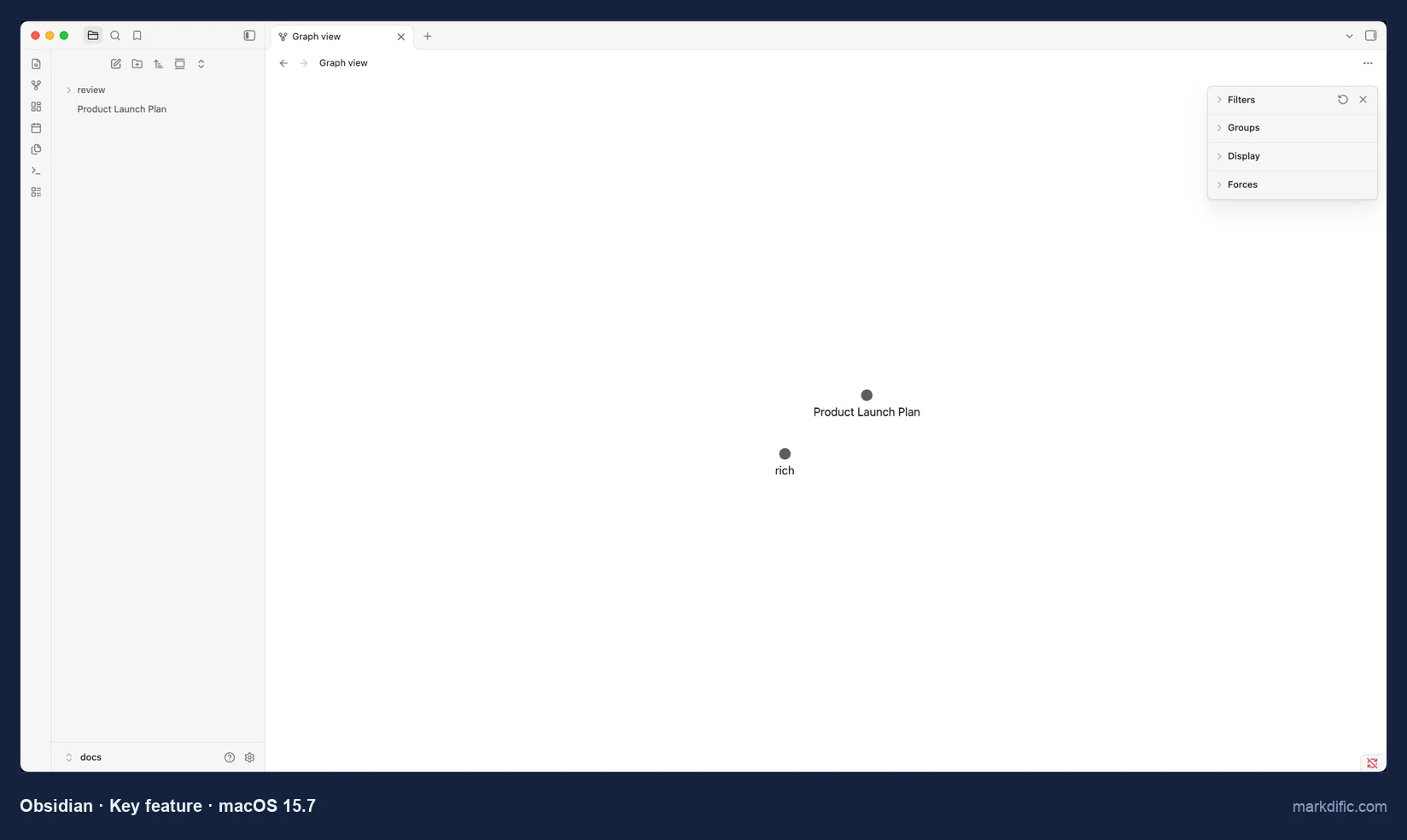
The test vault held two notes, so the graph has two nodes. Obsidian 1.14.4 also installs a Quick Look extension; in Finder it rendered tables, Mermaid, math and code colours, and left the image area blank.
What makes it stand out
- Backlinks, graph view and community plugins.
- iPhone, iPad and Android apps.
- Opened three of the four stress files in 1.5 s or less.
- Bundled Quick Look preview with Mermaid.
Key features
- Notes stay as .md files in the vault folder.
- Front matter as editable properties.
- Autosave on by default (0.5 s in our test).
- Paid add-ons: Sync and Publish.
Limitations
- Single files open inside a vault.
- Saved CRLF files as LF.
- Export beyond PDF needs community plugins.
Verdict
Choose it for a personal knowledge base you also read on a phone. For one-off .md files from email or a Git checkout, an app ranked above opens them without a vault.
Test results
- Tested: 1.14.4.
- Files open inside a vault (the containing folder). Mermaid rendered after the per-vault prompt.
- Autosave: yes, 0.5 s. 0 unrelated lines changed; CRLF converted to LF; LF kept.
- Stress files, open time / memory: 1.5 s / 467 MB (5k), 1.4 s / 778 MB (20k), 1.3 s / 470 MB (100 diagrams), 3.2 s / 736 MB (table).
- Typing lag on 20k lines: 1.9 s.
- Robustness: the 200,000-character line, the invalid UTF-8 file and the empty file all opened.
Install on Mac:
brew install --cask obsidian#4 Visual Studio Code
Best for developers who edit Markdown next to code in a Git checkout.
- Price
- free
- Platforms
- macOS, Windows, Linux, web
- License
- Microsoft build under a Microsoft licence; source (Code-OSS) MIT
VS Code shows Markdown as source and renders it in a separate preview. The built-in preview drew Mermaid and math with no extension installed.
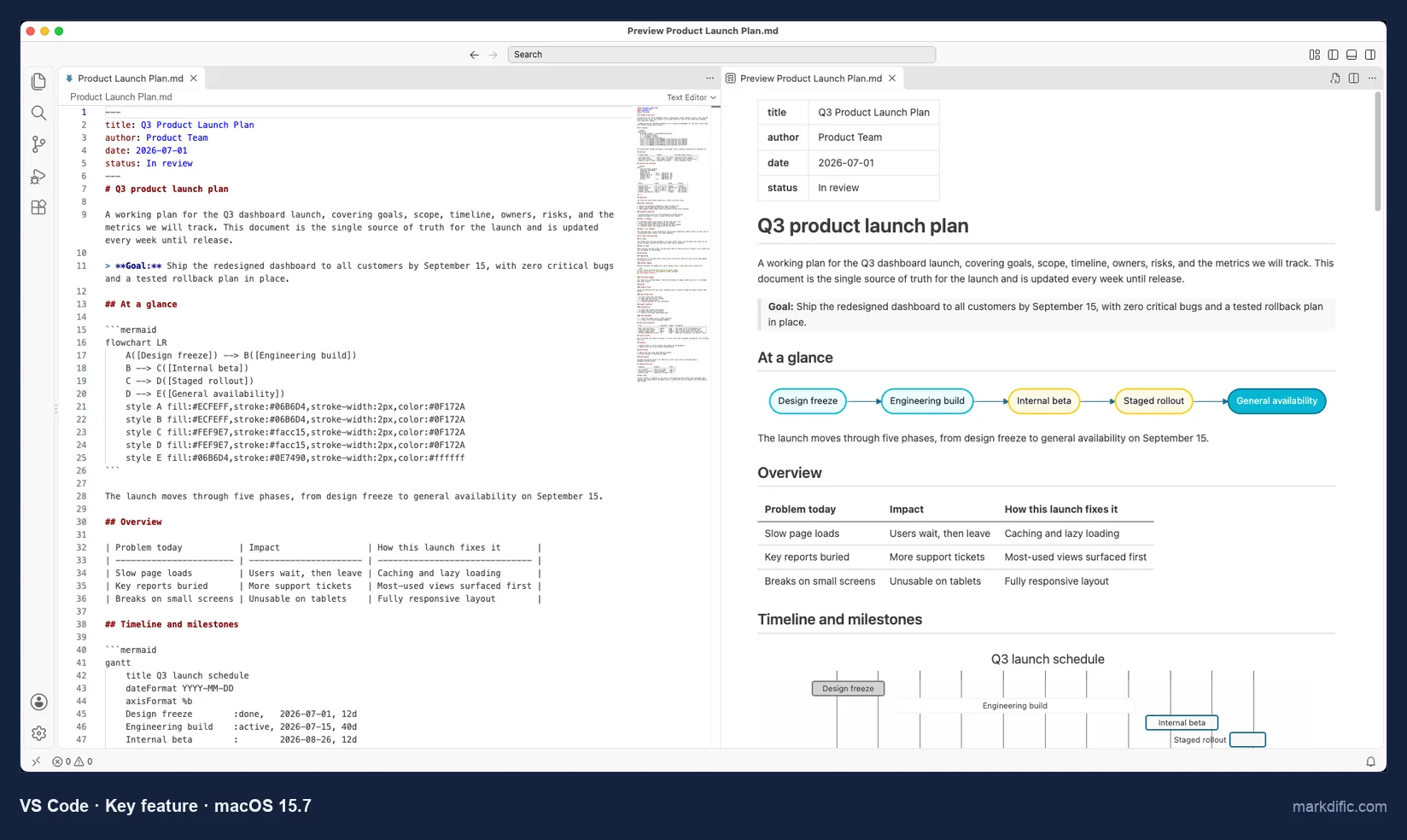
The front matter becomes a small table at the top of the preview. Cmd+Shift+V opens the preview in its own tab instead.
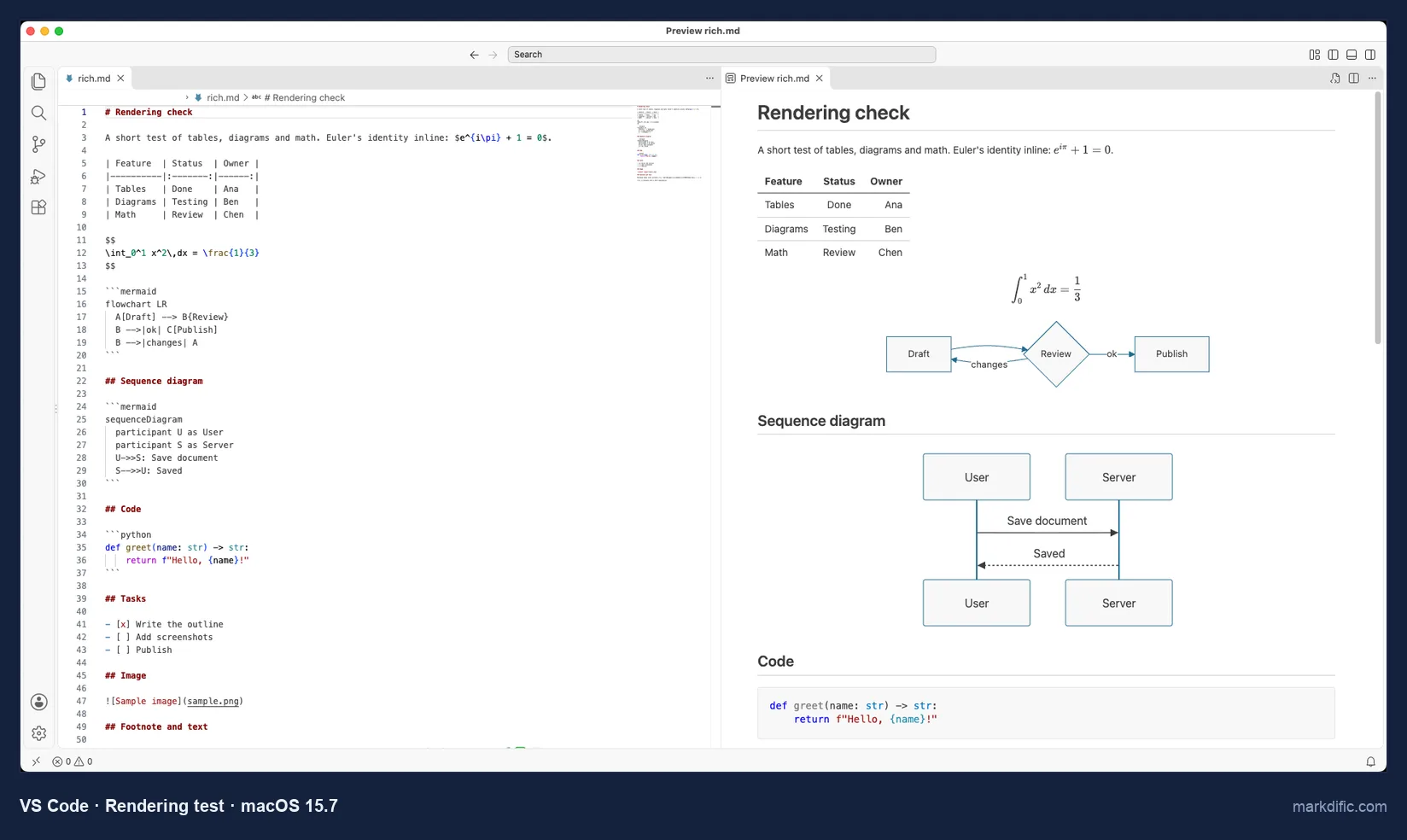
The preview is read-only, and the source pane is where you type. VS Code had the lowest typing lag in the test (1.1 s on 20,000 lines) and the highest memory use on every stress file.
What makes it stand out
- Git and a terminal in the same window.
- Lowest typing lag on the 20,000-line file.
- Mermaid and math in the built-in preview.
Key features
- Side-by-side preview (Cmd+K V) or a preview tab (Cmd+Shift+V).
- Extensions for linting and export.
- Kept CRLF and LF files unchanged.
Limitations
- Read-only rendered view.
- Export needs extensions.
- Most memory in the test (1,506 to 1,899 MB) and the largest download (317 MB).
Verdict
A free pick if your Markdown already lives in a repository. As a viewer for files from Finder it is heavier than the apps above.
Test results
- Tested: 1.142.0.
- Opened the .md file directly and registers for .md.
- No autosave by default; 0 unrelated lines changed; CRLF and LF kept.
- Stress files, open time / memory: 4.7 s / 1,561 MB (5k), 3.9 s / 1,899 MB (20k), 3.3 s / 1,506 MB (100 diagrams), 3.9 s / 1,636 MB (table).
- Typing lag on 20k lines: 1.1 s.
- Robustness: the 200,000-character line, the invalid UTF-8 file and the empty file all opened.
Install on Mac:
brew install --cask visual-studio-code#5 Zettlr
Best free, open-source editor for academic writing with citations.
- Price
- free
- Platforms
- macOS 12 or later (Apple silicon and Intel builds), Windows, Linux
- License
- GPL-3.0
Zettlr is built for academic writing, with citations and Zettelkasten links between notes. It bundles Pandoc, so Word and LaTeX export work after a normal install.
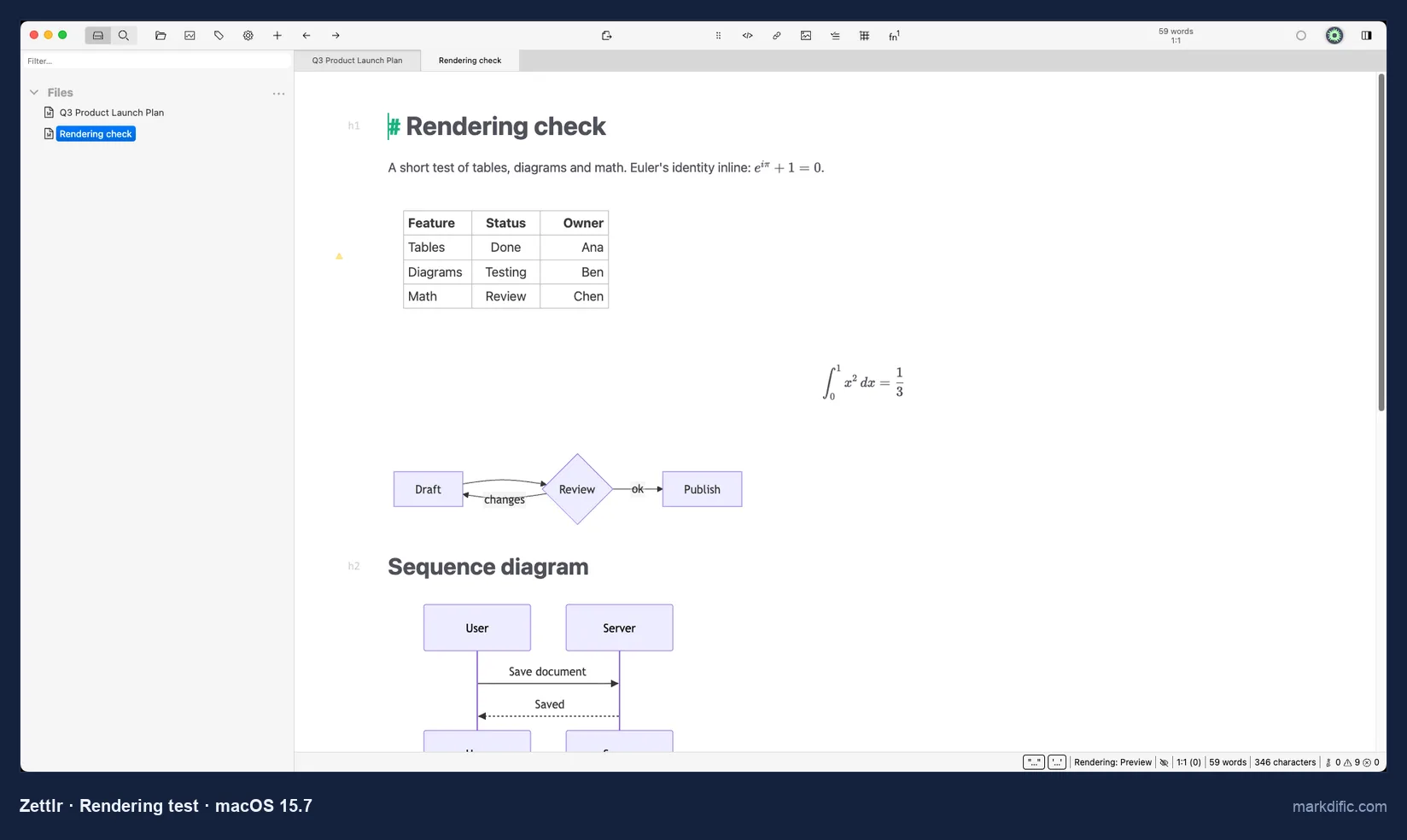
Formatting renders in the text itself, and heading marks such as # stay visible.
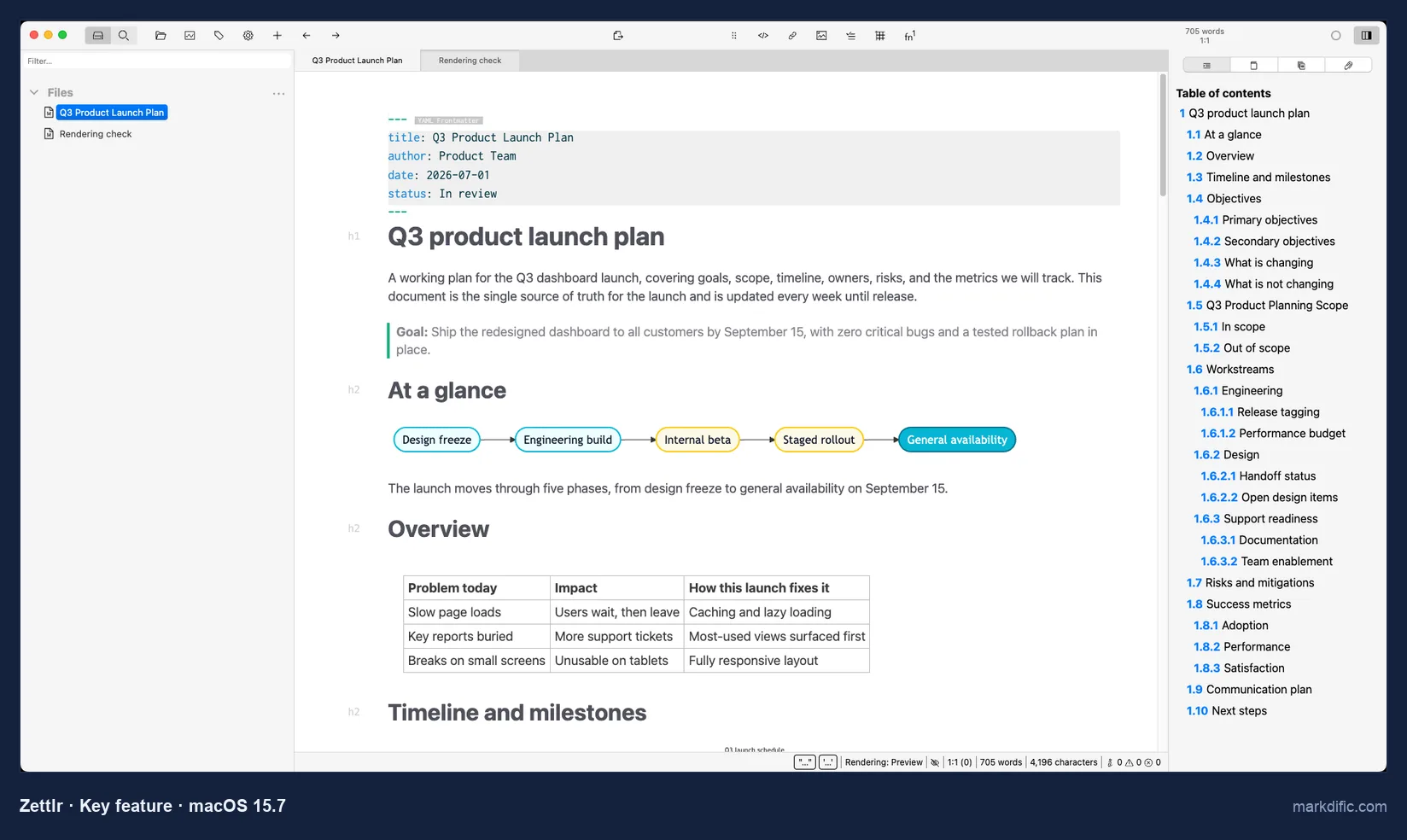
The same sidebar lists references once a bibliography is set. Cmd+J hides everything except the text.
What makes it stand out
- Citations and Zettelkasten links.
- Pandoc included for export.
- Open source, with Mermaid and math rendered by default.
Key features
- Table of contents and references sidebar.
- Distraction-free mode (Cmd+J).
- Line endings unchanged on save.
Limitations
- No separate preview or split view.
- Slowest typing in the 20,000-line file (27.2 s).
- No autosave by default.
Verdict
The best free choice on a Mac for papers and theses.
Test results
- Tested: 4.8.0.
- Opened the .md file directly and registers for .md; nothing on disk 15 s after typing; 0 unrelated lines changed; CRLF and LF kept.
- Stress files, open time / memory: 6.6 s / 777 MB (5k), 4.4 s / 1,307 MB (20k), 4.4 s / 682 MB (100 diagrams), 4.1 s / 1,000 MB (table).
- Typing lag on 20k lines: 27.2 s.
- Robustness: the 200,000-character line, the invalid UTF-8 file and the empty file all opened.
Install on Mac:
brew install --cask zettlr#6 MarkText
Best free WYSIWYG editor for documents of a few thousand lines.
- Price
- free
- Platforms
- macOS (separate Apple silicon and Intel DMGs), Windows, Linux
- License
- MIT
MarkText renders as you type, like Typora, and costs nothing. On a Mac it takes an extra step: the 0.23.0 build is not notarised, so Gatekeeper refuses to open it until the quarantine flag is removed, and its Homebrew cask is disabled.
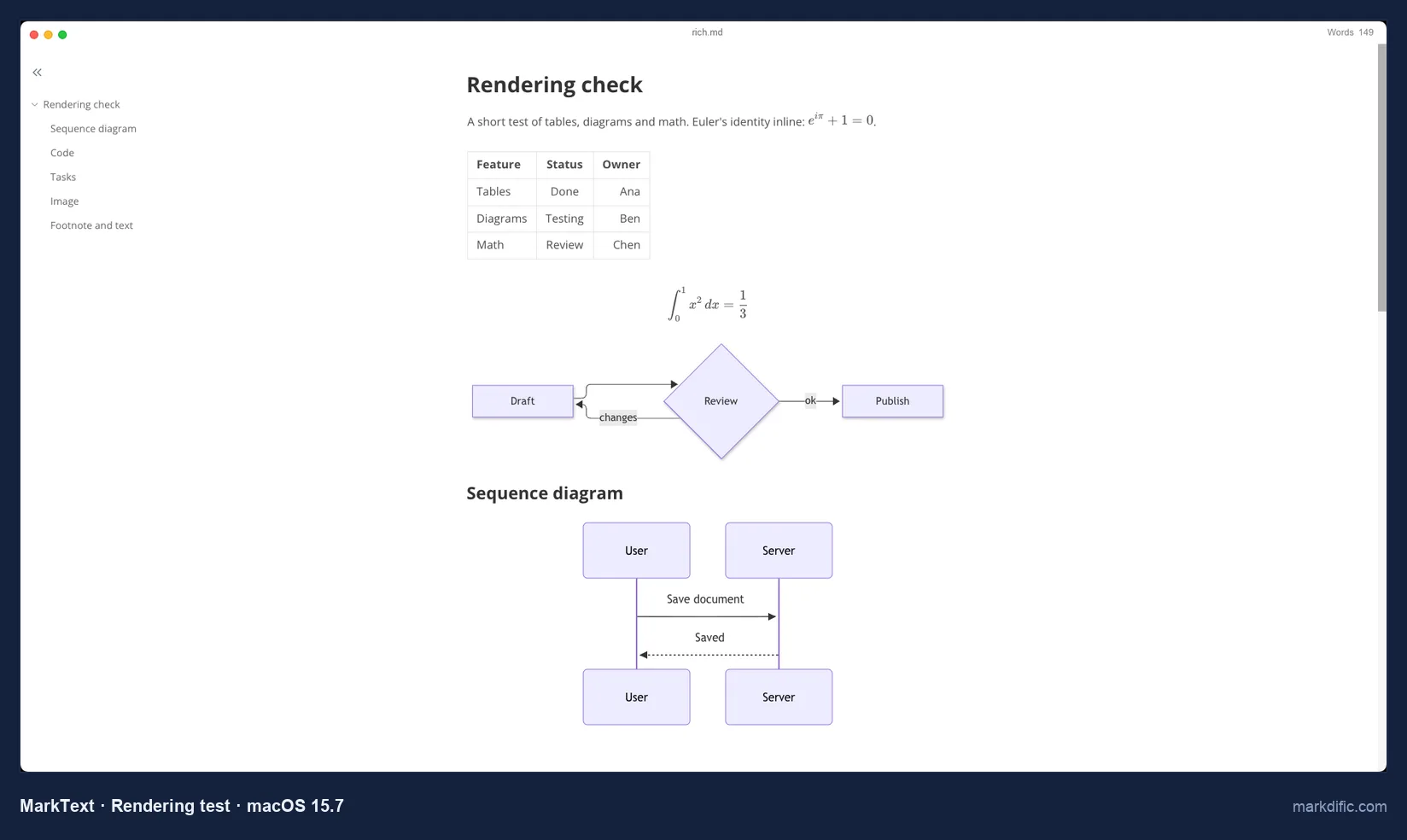
Both diagrams and both kinds of math rendered with default settings, next to an outline of the headings.
Is MarkText still maintained? Yes, as of October 2026. There was no stable release between 0.17.1 (March 2022) and 0.19.0 (28 May 2026); 0.23.0 came out on 21 October 2026.
What makes it stand out
- Free WYSIWYG with Mermaid and math.
- Opened the 5,000-line file in 3.1 s.
- Regular releases again since May 2026.
Key features
- Source code mode (Cmd+Option+S).
- Outline sidebar (Cmd+J).
- CRLF and LF kept.
Limitations
- Did not load the 20,000-line file within 45 s; the 2,000-row table took 20.1 s.
- Not notarised; needs the quarantine flag removed.
- Added a blank line after each front matter
---line when saving.
Verdict
A free alternative to Typora for everyday documents; avoid it for very large files. See MarkText alternatives.
Test results
- Tested: 0.23.0 (DMG from GitHub).
- Opened the .md file directly and registers for .md; no autosave; 0 non-blank lines changed; CRLF and LF kept.
- Stress files, open time / memory: 3.1 s / 514 MB (5k), 2.3 s / 683 MB (100 diagrams), 20.1 s / 661 MB (table); the 20,000-line file did not load within 45 s (688 MB at that point).
- Robustness: the 200,000-character line, the invalid UTF-8 file and the empty file all opened.
Install on Mac: download the DMG for your processor from github.com/marktext/marktext/releases, drag MarkText to Applications, then run:
xattr -d com.apple.quarantine /Applications/MarkText.app#7 Zed
Best fast code editor with a Markdown preview that draws Mermaid.
- Price
- free Personal plan; Pro $10 per month for AI features
- Platforms
- macOS, Linux, Windows
- License
- open source (GPL-3.0; some components Apache-2.0)
Zed is a native code editor written in Rust, not an Electron app. It opened every stress file in 2.0 s or less and used the least memory of all apps on three of the four.
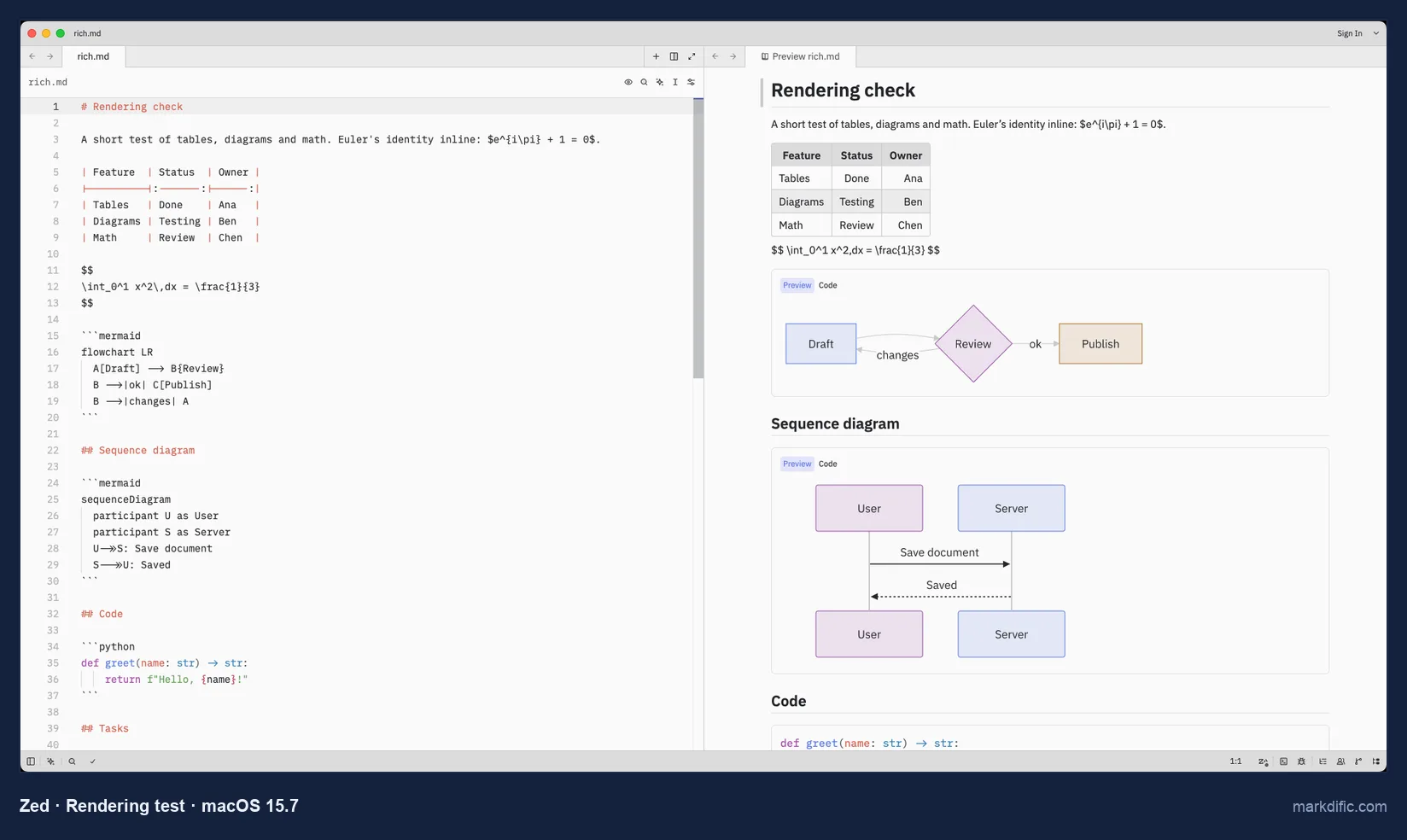
Each Mermaid block in the preview has Preview and Code tabs. Gatekeeper reported our build as signed but not notarised.
What makes it stand out
- 0.9 s for the 20,000-line file, 187 to 321 MB of memory.
- Mermaid in the preview.
- Open source.
Key features
- Side-by-side preview (Cmd+K V) or preview tab (Cmd+Shift+V).
- CRLF and LF kept.
- Homebrew cask.
Limitations
- No math in the preview.
- Read-only preview.
- No autosave by default.
Verdict
A fast, light choice for Markdown edited as text with diagrams in the preview; documents with math need another app.
Test results
- Tested: 1.25.2 (Apple silicon DMG).
- Opens single files; nothing on disk 15 s after typing; 0 unrelated lines changed; CRLF and LF kept.
- Stress files, open time / memory: 1.6 s / 209 MB (5k), 0.9 s / 321 MB (20k), 0.8 s / 187 MB (100 diagrams), 2.0 s / 222 MB (table).
- Typing lag on 20k lines: 4.4 s.
- Robustness: the 200,000-character line, the invalid UTF-8 file and the empty file all opened.
Install on Mac:
brew install --cask zed#8 MarkEdit
Best native Mac text editor for Markdown source, with autosave.
- Price
- free
- Platforms
- macOS only
- License
- MIT
MarkEdit is a 5 MB native app that colours Markdown syntax and does not render it. The current release, 1.37.0, needs macOS 26; older releases on GitHub run on macOS 12 to 15.
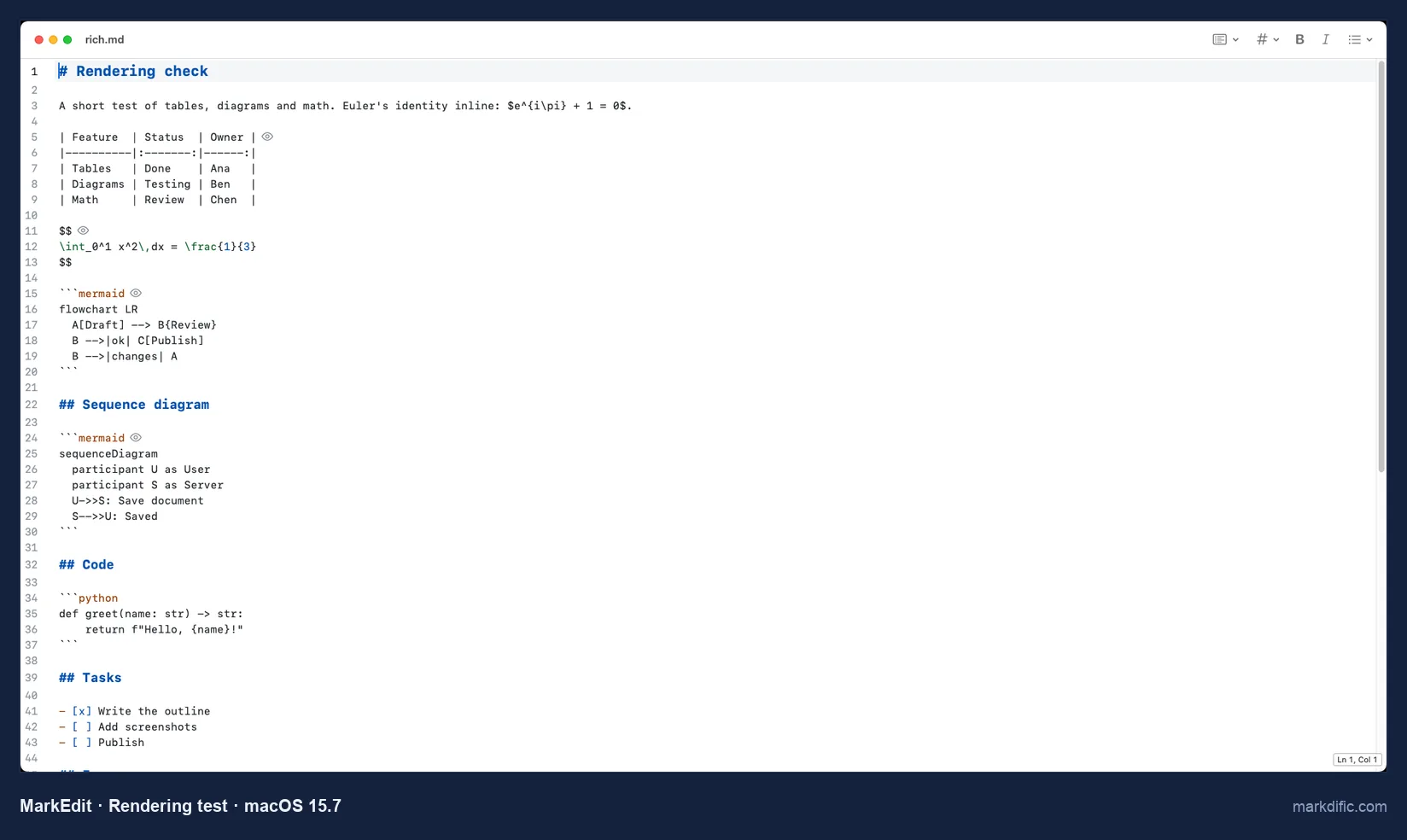
It saves in the background: our change was on disk 14.6 s after typing, without Cmd+S. The developer offers a preview as a separate extension, which we did not test.
What makes it stand out
- 5 MB download, notarised.
- Autosave on by default.
- 369 to 399 MB on every stress file.
Key features
- Syntax colours for headings, code and front matter.
- Line numbers.
- CRLF and LF kept.
Limitations
- No rendered view.
- The current version needs macOS 26.
- Mac only.
Verdict
A good free editor for Markdown as text. Pair it with Quick Look or a viewer to see the formatted result.
Test results
- Tested: 1.35.0 (current: 1.37.0, which needs macOS 26).
- Opened the .md file directly and registers for .md. Autosave: yes, 14.6 s. 0 unrelated lines changed; CRLF and LF kept.
- Stress files, open time / memory: 3.7 s / 369 MB (5k), 3.1 s / 399 MB (20k), 2.5 s / 378 MB (100 diagrams), 2.6 s / 391 MB (table).
- Typing lag on 20k lines: 3.3 s.
- Robustness: the 200,000-character line, the invalid UTF-8 file and the empty file all opened.
Install on Mac:
brew install --cask markedit#9 MacDown 3000
Best for the classic MacDown layout: source on the left, preview on the right.
- Price
- free
- Platforms
- macOS 11 or later only
- License
- MIT
MacDown 3000 is a maintained continuation of MacDown by Schuyler Erle. The original MacDown has had no release since 0.7.3 on 3 January 2020, and its Homebrew cask is disabled; 3000.0.7 came out on 13 July 2026.
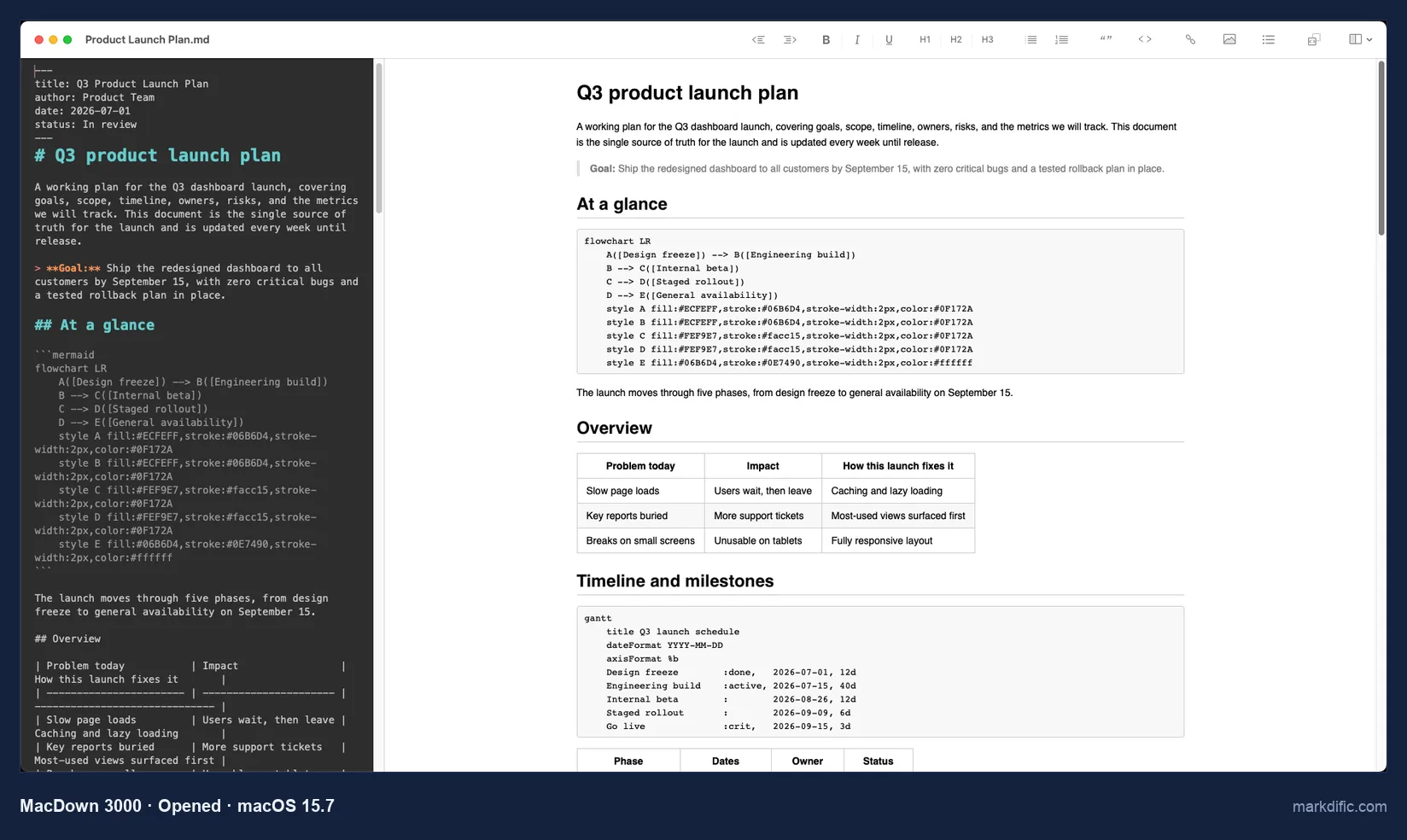
The preview rendered tables; Mermaid and math stayed as text, because both are off in the default settings. It opened the 20,000-line file in 0.8 s, the fastest of all apps tested.
What makes it stand out
- Fastest open of the 20,000-line file (0.8 s).
- 8 MB download, notarised.
- Live preview beside the source.
Key features
- Export from the File menu.
- Preview pane toggled in the View menu.
- Homebrew cask.
Limitations
- Mermaid and math off by default.
- Did not open the invalid UTF-8 file.
- Autosave and line endings could not be confirmed.
Verdict
Fast and familiar for anyone who used MacDown. Turn on Mermaid and math in its settings if your documents need them.
Test results
- Tested: 3000.0.7.
- Opens single files. The typed marker did not appear on screen, so autosave and line endings were not confirmed; a word added to the file was saved with 0 unrelated lines changed.
- Stress files, open time / memory: 1.3 s / 199 MB (5k), 0.8 s / 415 MB (20k), 0.7 s / 194 MB (100 diagrams), 1.1 s / 247 MB (table).
- Typing lag: not measured (text not seen within 60 s).
- Invalid UTF-8: "could not be opened" message; long line and empty file opened.
Install on Mac:
brew install --cask macdown-3000#10 Joplin
Best for synced notes and to-dos; it imports .md files rather than editing them in place.
- Price
- free; Joplin Cloud is paid, and sync through Dropbox, OneDrive, Nextcloud or WebDAV is free
- Platforms
- macOS, Windows, Linux, iOS, Android
- License
- AGPL-3.0
Joplin copies Markdown into its own database. The .md file in Finder stays as it was, and changes live in Joplin until you export them.
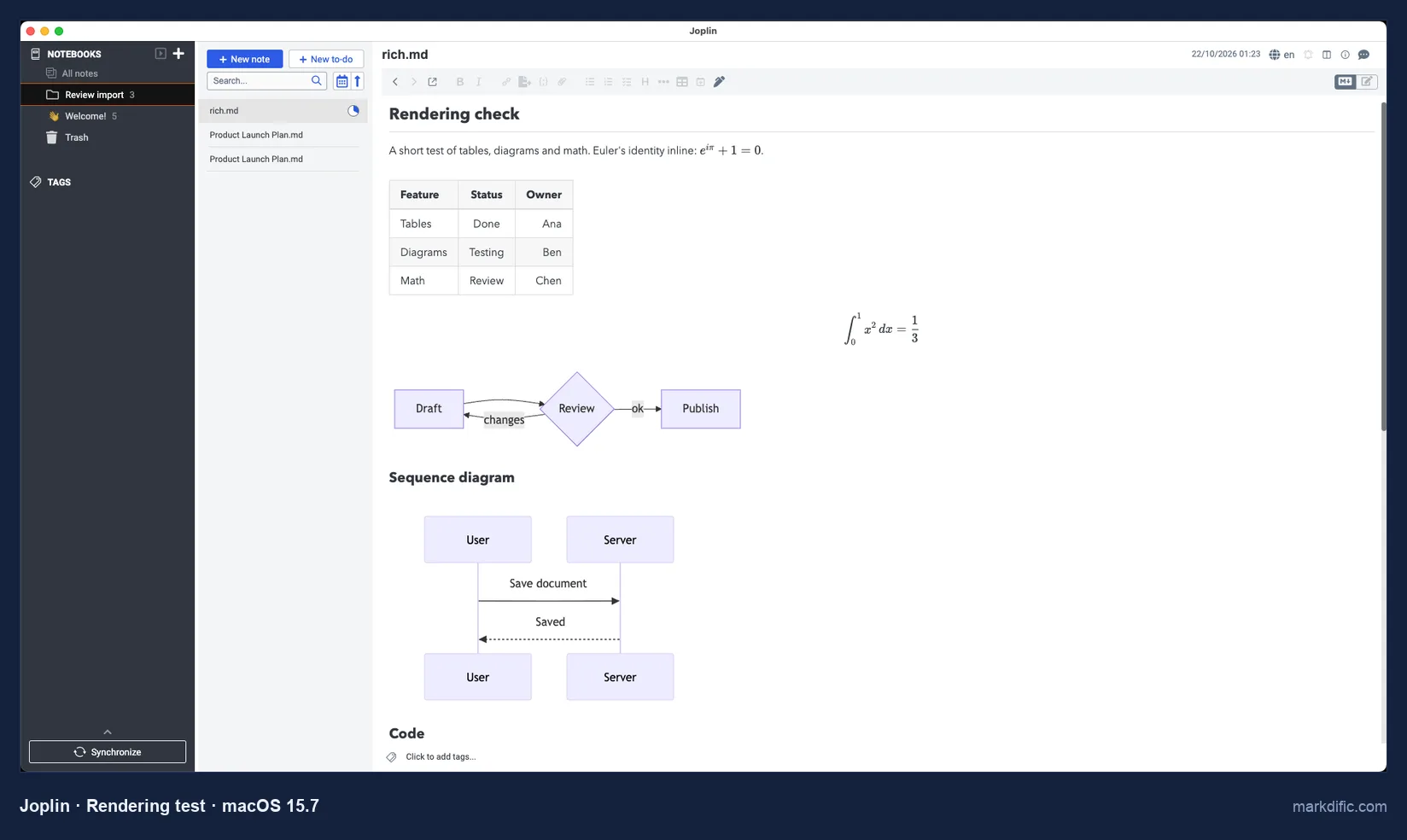
The image in rich.md was not carried over by the import we used.
What makes it stand out
- Notebooks, tags and to-dos.
- Free sync through Dropbox, OneDrive, Nextcloud or WebDAV.
- iPhone and Android apps.
Key features
- Editor, viewer and split layouts (Cmd+L).
- Import and export as Markdown.
- Apple silicon build.
Limitations
- Does not edit .md files in place.
- Does not register as the .md handler.
- 208 MB download.
Verdict
A notes app with sync for Mac and phone. To change the .md file itself, use an app ranked higher.
Test results
- Tested: 3.7.21.
- The test files were imported; tables, Mermaid and math rendered in the viewer.
- File tests (autosave, save fidelity, line endings, open time) do not apply to an import.
Install on Mac:
brew install --cask joplin#11 SiYuan
Best for block-based notes; it imports Markdown into its own workspace.
- Price
- free core
- Platforms
- macOS, Windows, Linux, iOS, Android
- License
- AGPL-3.0
SiYuan stores each paragraph, heading and list as a block in its own workspace. Imported files are copies, so edits do not reach the original .md file.
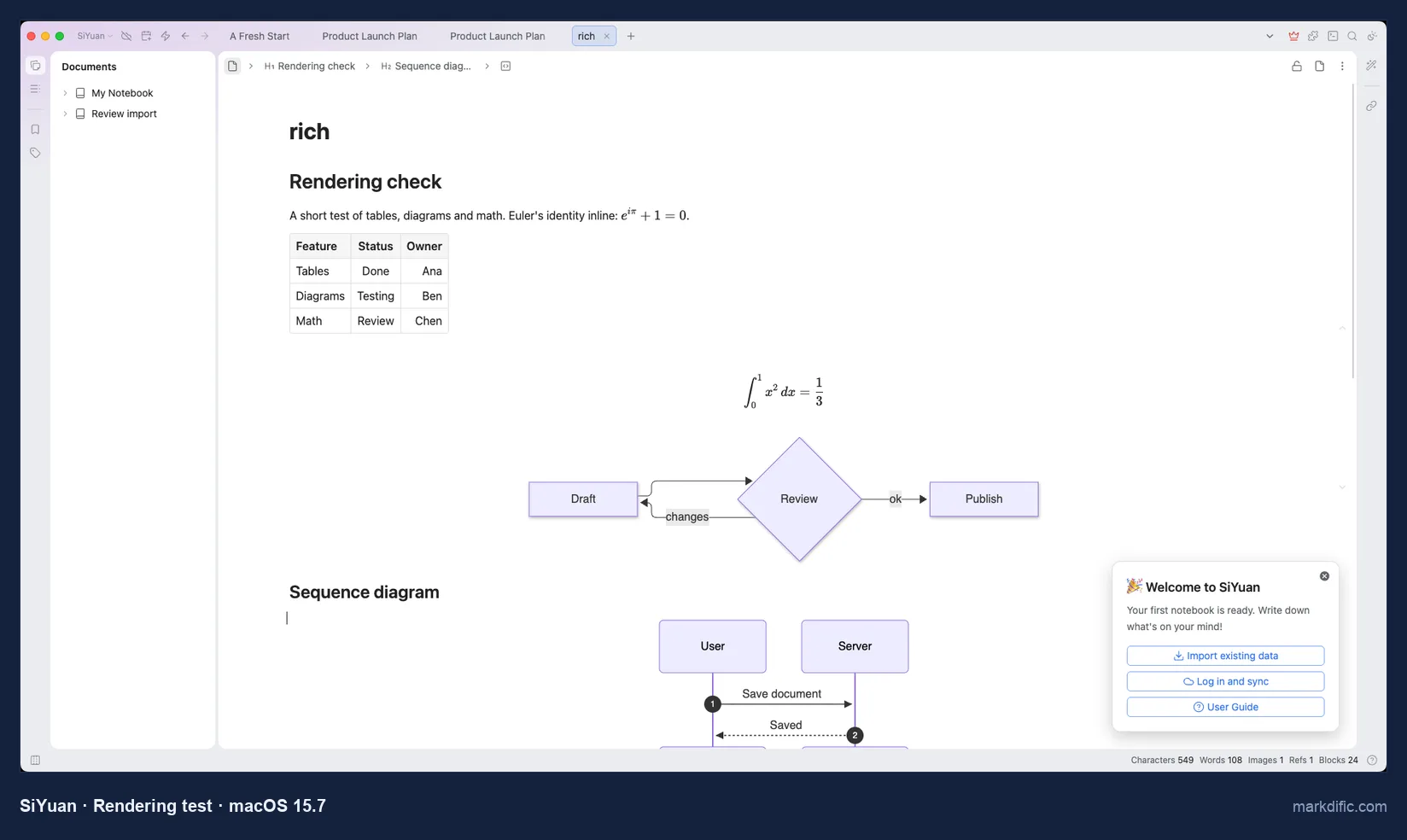
A welcome panel appeared on first start, in the bottom-right corner.
What makes it stand out
- Rendered tables, math and Mermaid after import.
- Phone apps.
- Free core app.
Key features
- Markdown import.
- Documents stored as blocks.
- Homebrew cask.
Limitations
- Not a file editor.
- 279 MB download, the largest of the note apps.
- Image not imported in our test.
Verdict
For a block-based knowledge base, not for editing loose .md files.
Test results
- Tested: 3.8.8.
- Files imported; tables, math and Mermaid rendered. File tests do not apply.
Install on Mac:
brew install --cask siyuan#12 Notable
Best for an existing Notable library; it has had no release since January 2020.
- Price
- free
- Platforms
- macOS (Intel build), Windows, Linux
- License
- none listed in the current repository
Notable 1.8.4 is an Intel build that runs on Apple silicon through Rosetta. It works on a notes folder and has no Homebrew cask.
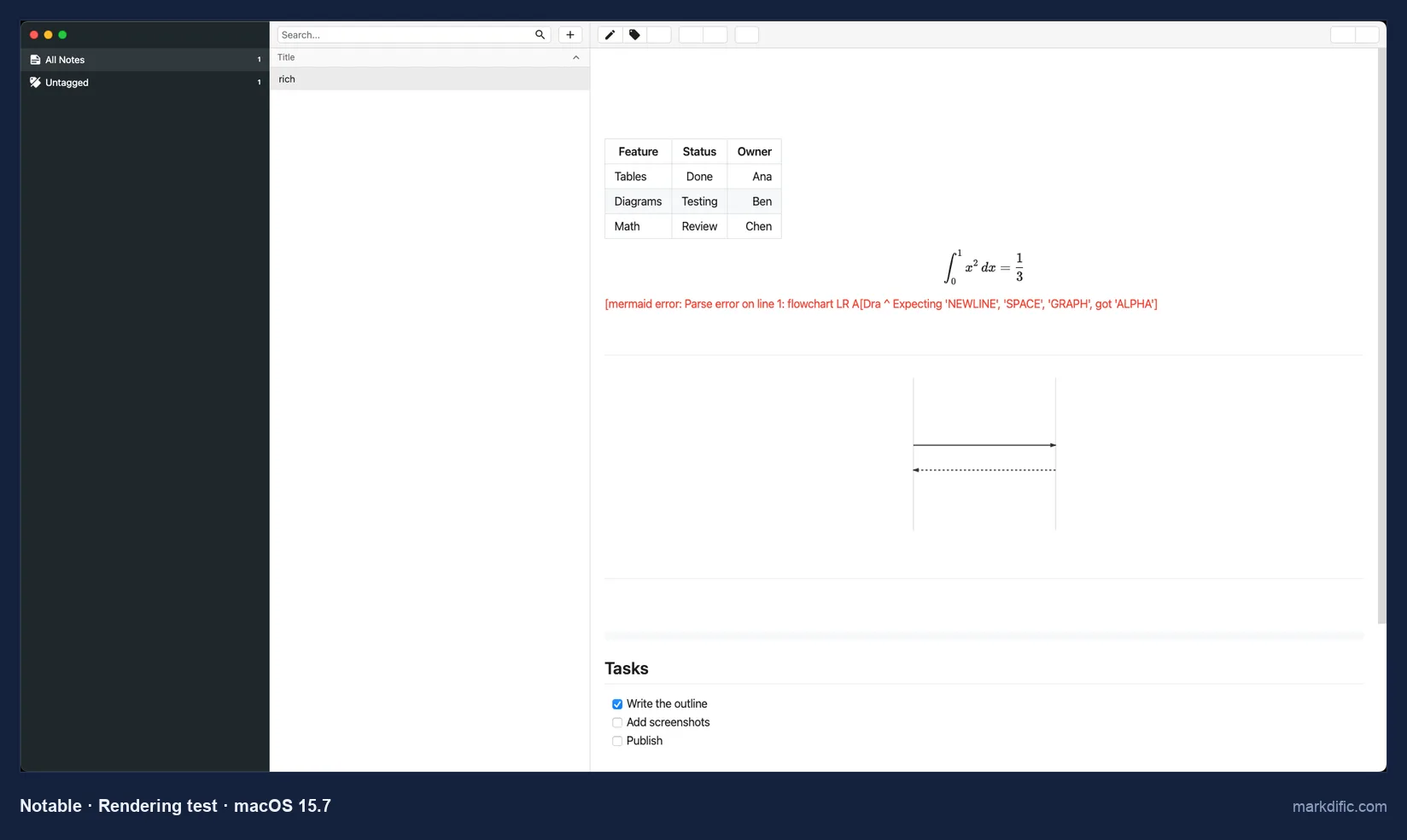
Its bundled Mermaid version drew the sequence diagram and failed on the flowchart.
What makes it stand out
- Notes stay as .md files in a folder.
- Math rendered inline and as blocks.
- Focus mode.
Key features
- Editor and preview toggle.
- Tags and a notes list.
- Notarised build.
Limitations
- No release since 2020.
- Older Mermaid; the flowchart failed.
- Intel build only.
Verdict
It still runs, but pick a maintained app for new work.
Test results
- Tested: 1.8.4 (latest release).
- Rendering was judged on screenshots. Autosave, save fidelity, line endings, open time and robustness were not measured, because the test files could not be selected in its notes list.
Install on Mac: download Notable-1.8.4.dmg from github.com/notable/notable/releases.
Quick Look: preview Markdown in Finder
Select a .md file in Finder and press Space, and macOS 15.7 shows the raw text with every # and | in place. A Quick Look extension from another app replaces that with a formatted preview. We installed five extensions and tested each on its own with the same rich.md.
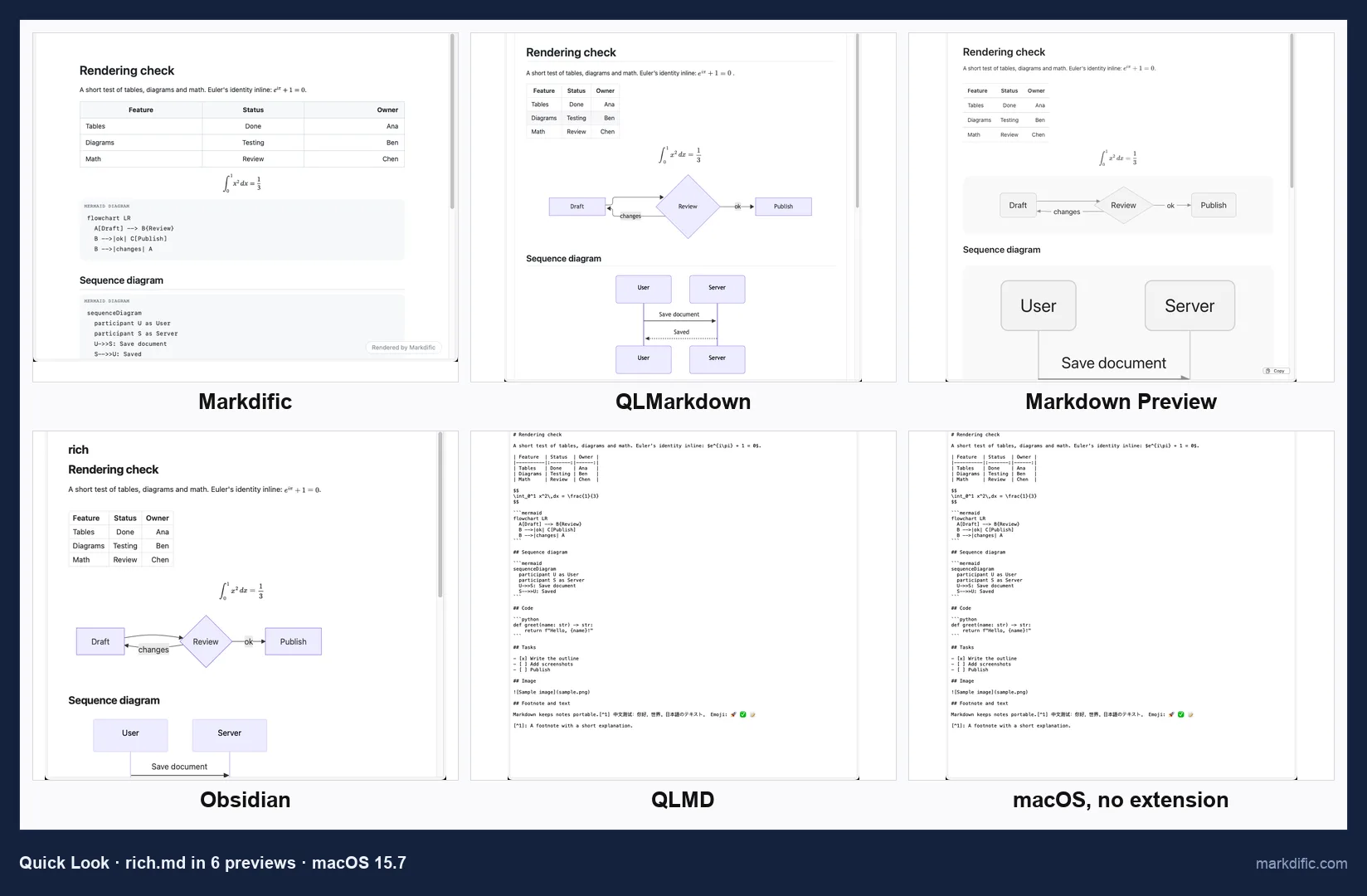
| Quick Look preview (version) | Tables | Mermaid | Math | Code colours | Images |
|---|---|---|---|---|---|
| Markdific 1.3.2 (extension 1.1.1) | Yes | No (labelled code) | Yes (inline + block) | No | No (placeholder) |
| QLMarkdown 1.5.7 | Yes | Yes | Yes | Yes | Yes |
| Markdown Preview 0.0.68 | Yes | Yes | Yes | Yes | Yes |
| Obsidian 1.14.4 (bundled) | Yes | Yes | Yes | Yes | No (blank) |
| QLMD 1.0.0 | No | No | No | No | No |
| macOS without an extension | No | No | No | No | No |
Markdific's preview. It comes with the free viewer, with nothing extra to install, and renders headings, tables and inline and block math. Mermaid blocks appear as code under a "Mermaid diagram" label, code blocks are plain monospace and images show a placeholder; open the file in the app to see them. QLMarkdown and Markdown Preview drew all of these in Finder itself.
Set up a preview.
- Markdific: install the DMG from markdific.com or with
brew install --cask markdific/tap/markdific, then open the app once (macOS 12 or later). - QLMarkdown (free, GPL-3.0):
brew install --cask qlmarkdown, then open QLMarkdown once. - Markdown Preview (free):
brew install --cask markdown-preview, then open the app once. - Obsidian: install Obsidian 1.14.4 or later; the extension comes with it.
Then open System Settings > General > Login Items & Extensions > Quick Look and leave only one Markdown extension on; if several are on, macOS picks one. If Finder still shows plain text, run qlmanage -r in Terminal and relaunch Finder.
Mac Markdown editors compared: autosave, line endings and packages
| App | Homebrew cask | Download | Notarised | Autosave (default) | CRLF kept | Open 20k lines (s) |
|---|---|---|---|---|---|---|
| Markdific | markdific/tap (own tap) | 34 MB | Yes | Yes | Yes | 8.3 |
| Typora | typora | 15 MB | Yes | No | Yes | 4.1 |
| Obsidian | obsidian | 234 MB | Yes | Yes | No (LF) | 1.4 |
| VS Code | visual-studio-code | 317 MB | Yes | No | Yes | 3.9 |
| Zettlr | zettlr | 194 MB | Yes | No | Yes | 4.4 |
| MarkText | Disabled (DMG) | 158 MB | No | No | Yes | Not loaded in 45 s |
| Zed | zed | 87 MB | Signed, not notarised | No | Yes | 0.9 |
| MarkEdit | markedit | 5 MB | Yes | Yes | Yes | 3.1 |
| MacDown 3000 | macdown-3000 | 8 MB | Yes | Not confirmed | Not tested | 0.8 |
| Joplin | joplin | 208 MB | Yes | n/a (imports) | n/a | n/a |
| SiYuan | siyuan | 279 MB | Yes | n/a (imports) | n/a | n/a |
| Notable | No (DMG) | 66 MB | Yes | Not measured | Not measured | Not measured |
Open times include app start-up, on a Mac virtual machine with no graphics card. See How we tested.
Speed, memory and stress-test results on Mac
Open time and memory
| App | 5k lines: s / MB | 20k lines: s / MB | 100 diagrams: s / MB | 2,000-row table: s / MB |
|---|---|---|---|---|
| Markdific | 6.3 / 319 | 8.3 / 1,348 | 4.9 / 437 | 6.8 / 470 |
| Typora | 7.4 / 422 | 4.1 / 887 | 3.9 / 576 | 4.5 / 600 |
| Obsidian | 1.5 / 467 | 1.4 / 778 | 1.3 / 470 | 3.2 / 736 |
| VS Code | 4.7 / 1,561 | 3.9 / 1,899 | 3.3 / 1,506 | 3.9 / 1,636 |
| Zettlr | 6.6 / 777 | 4.4 / 1,307 | 4.4 / 682 | 4.1 / 1,000 |
| MarkText | 3.1 / 514 | not loaded in 45 s / 688² | 2.3 / 683 | 20.1 / 661 |
| Zed | 1.6 / 209 | 0.9 / 321 | 0.8 / 187 | 2.0 / 222 |
| MarkEdit | 3.7 / 369 | 3.1 / 399 | 2.5 / 378 | 2.6 / 391 |
| MacDown 3000 | 1.3 / 199 | 0.8 / 415 | 0.7 / 194 | 1.1 / 247 |
Time runs from launch until the first heading was visible, start-up included (about ±1 s). Memory is resident memory summed over all the app's processes, including WebKit helpers, 8 s after the file loaded.
² Memory at 45 s, file not shown. Zed, MarkEdit and MacDown 3000 do not draw diagrams in the editor, so their diagram-file times are not directly comparable. Joplin, SiYuan and Notable were not timed.
Typing lag and robustness
| App | Typing lag, 20k lines (s)³ | 200k-char line | Invalid UTF-8 | Empty file |
|---|---|---|---|---|
| Markdific | 3.1 | Opens | Opens | Opens |
| Typora | 1.6 | Opens | Opens | Opens |
| Obsidian | 1.9 | Opens | Opens | Opens |
| VS Code | 1.1 | Opens | Opens | Opens |
| Zettlr | 27.2 | Opens | Opens | Opens |
| MarkText | Not tested (file did not load) | Opens | Opens | Opens |
| Zed | 4.4 | Opens | Opens | Opens |
| MarkEdit | 3.3 | Opens | Opens | Opens |
| MacDown 3000 | Not measured | Opens | "Could not be opened" | Opens |
³ Time from the end of typing 100 characters at the end of the file until they were visible on screen, checked about every 1 to 2 s, so treat small differences as noise.
Autosave, save fidelity and line endings
| App | Autosave without Cmd+S (defaults) | Unrelated lines changed on save | CRLF after save | LF after save |
|---|---|---|---|---|
| Markdific | Yes (1.1 s) | 0 | Kept | Kept |
| Typora | No | 0 | Kept | Kept |
| Obsidian | Yes (0.5 s) | 0 | Converted to LF | Kept |
| VS Code | No | 0 | Kept | Kept |
| Zettlr | No | 0 | Kept | Kept |
| MarkText | No | 0⁴ | Kept | Kept |
| Zed | No | 0 | Kept | Kept |
| MarkEdit | Yes (14.6 s) | 0 | Kept | Kept |
| MacDown 3000 | Not confirmed | 0 | Not tested | Not tested |
⁴ MarkText 0.23.0 added a blank line after each front matter --- line. Other blank lines next to the inserted word are not counted.
How we tested the Mac Markdown editors
On 21 and 22 October 2026 we set up a clean macOS 15.7 virtual machine on Apple silicon, with no graphics card, and installed each app from its Homebrew cask or the developer's DMG with default settings. Every app opened the same files: a 742-word product launch plan, a one-page rendering check with a table, math, two diagrams, code and an image, and stress files of up to 20,000 lines.
For each app we looked at:
- whether tables, math and Mermaid diagrams render, in the app and in Finder's Quick Look
- whether an edit reaches the disk without Cmd+S
- whether saving touches other lines or switches the file's line endings
- how long the large files take to open and how much memory the app uses
- how long typed text takes to appear at the end of the 20,000-line file
A Mac with a graphics card will be faster than ours, so compare the apps with each other rather than reading the times as exact. Each app section lists the version we tested.
What to look for in a Mac Markdown editor
Quick Look previews in Finder
- Without an extension, pressing Space on a .md file in macOS 15.7 shows plain text.
- Full previews (tables, Mermaid, math, code colours, images): QLMarkdown and Markdown Preview.
- Included with an app: Markdific (tables and math, macOS 12 or later) and Obsidian (also Mermaid).
- If several Markdown previews are installed, macOS uses only one; turn the others off under System Settings > General > Login Items & Extensions (details).
Homebrew, direct download or Mac App Store
- Homebrew cask: Typora, Obsidian, VS Code, Zettlr, Zed, MarkEdit, MacDown 3000, Joplin and SiYuan.
- The developer's own Homebrew tap: Markdific (
brew trust markdific/tap, thenbrew install --cask markdific/tap/markdific), or its DMG. - DMG from the developer: Notable, and MarkText (its cask is disabled).
- Mac App Store: iA Writer, Bear, Ulysses and MDash, which we did not test; Ulysses and Marked 3 are also on Setapp.
- Gatekeeper: 10 of the 12 apps were notarised and opened without a warning. Zed 1.25.2 was signed but not notarised, and MarkText 0.23.0 needed its quarantine flag removed.
Apple silicon and Intel
- One universal app: Markdific and Obsidian.
- Separate builds per processor: Zettlr and MarkText.
- Intel only: Notable 1.8.4, which runs through Rosetta on Apple silicon.
macOS version
- Markdific: macOS 11 or later (Quick Look preview: macOS 12).
- MacDown 3000: macOS 11. Zettlr: macOS 12.
- MarkEdit 1.37.0 needs macOS 26; older MarkEdit releases run on macOS 12 to 15.
Native, WebKit or Electron
- Electron apps bundle their own Chromium: Obsidian, VS Code, Zettlr, MarkText, Joplin, SiYuan and Notable were 66 to 317 MB downloads.
- Apps using the WebKit engine in macOS: Markdific, Typora, MarkEdit and MacDown 3000 were 5 to 34 MB.
- Download size did not predict memory: on the 20,000-line file, Zed (native, written in Rust) used 321 MB and VS Code 1,899 MB.
Files shared with Windows users
- Files written on Windows usually have CRLF line endings; an app that rewrites them makes Git show every line as changed.
- Kept CRLF and LF: Markdific, Typora, VS Code, Zettlr, MarkText, Zed and MarkEdit.
- Changed them: Obsidian saved CRLF files as LF.
Other Mac Markdown apps we considered
These apps often appear in Mac lists. Each row says why it was not ranked; facts come from the developers' pages, checked on 21 and 22 October 2026.
| App | What it is | License / price | Version | Why not ranked | Install |
|---|---|---|---|---|---|
| iA Writer | Writing app with a minimal interface; macOS 10.15 or later | $49.99 one-time; 7-day trial | Not tested | Sold through the Mac App Store | Mac App Store |
| Bear | Markdown notes for Mac, iPhone and iPad | Free; Bear Pro $2.99 per month or $29.99 per year | Not tested | Mac App Store only | Mac App Store |
| Ulysses | Writing app with a library and iCloud sync | $5.99 per month or $39.99 per year | Not tested | Mac App Store and Setapp only | Mac App Store, Setapp |
| Marked 3 | Previewer that sits next to any editor; Mermaid, math, PDF, DOCX and EPUB export; macOS 11 or later | Plan chosen before a 7-day trial; introductory prices $2.99 per month, $29.99 per year or $69.99 one-time | 3.2.4 (installed) | The plan screen at launch blocked our test | brew install --cask marked-app |
| MDash | Turns Markdown into print-ready PDF; macOS 15 or later | Free download; one-time purchase or yearly plan | Not tested | Mac App Store only | Mac App Store |
| QOwnNotes | Notes app on plain .md files in a folder, with Nextcloud sync | Free (GPL-2.0) | 26.10.9 (installed) | A keychain notice stayed on top at every launch, so no results were captured | DMG from GitHub |
| Logseq | Outliner for connected notes | Free (AGPL-3.0) | 2.0.2 (installed) | Opens a graph folder, not a single file; the test file did not appear | brew install --cask logseq |
MacDown. The original MacDown is not maintained; see MacDown 3000 for the continuation, which is the version ranked here.
How to install each Markdown editor on Mac
Each app section above ends with its install commands, with a Copy button. Jump to an app: Markdific · Typora · Obsidian · Visual Studio Code · Zettlr · MarkText · Zed · MarkEdit · MacDown 3000 · Joplin · SiYuan · Notable.
Mac Markdown editor FAQ
How do I open an MD file on Mac?
Select the file in Finder, choose File > Get Info, pick a Markdown app under Open with and click Change All; from then on a double-click opens every .md file in that app. Markdific opens them formatted for free, with tables, Mermaid and math. Pressing Space shows a Quick Look preview.
Does Quick Look preview Markdown on Mac?
Not by default. On macOS 15.7, pressing Space on a .md file showed plain text. Installing QLMarkdown or Markdown Preview added a full preview with tables, Mermaid, math, code colours and images. Obsidian and Markdific also bring Quick Look extensions; Markdific's renders tables and math and shows Mermaid as code.
What is the best free Markdown editor for Mac?
In our tests Zettlr was the best free Markdown editor for Mac: it is open source (GPL-3.0), rendered Mermaid and math, and bundles Pandoc. MarkText is the free WYSIWYG option for smaller files, Zed and MarkEdit are fast and light, and Markdific views files for free without editing.
Is MacDown still maintained?
The original MacDown is not: its last release, 0.7.3, came out on 3 January 2020, and its Homebrew cask is disabled. MacDown 3000 continues it under the MIT licence, needs macOS 11 or later and released 3000.0.7 on 13 July 2026. It opened our 20,000-line file in 0.8 s.
Which Mac Markdown apps render Mermaid diagrams?
Markdific, Typora, Zettlr and MarkText rendered Mermaid as you edit. Obsidian did after a per-vault prompt, VS Code and Zed in their previews, and Joplin and SiYuan after import. Notable failed on the flowchart. MarkEdit and MacDown 3000 showed the code with default settings.
Typora or Obsidian on Mac?
Typora edits individual .md files in one rendered view and costs $14.99 one-time. Obsidian is free, organises notes in a vault with backlinks and has an iPhone app, but it converted CRLF line endings to LF on save. Pick Typora for documents and Obsidian for a linked knowledge base.
Which Markdown editors work on older Intel Macs?
Markdific and Obsidian are universal apps for Intel and Apple silicon. Zettlr and MarkText have separate Intel builds, and Notable is Intel only. Check the macOS version too: Markdific needs macOS 11, Zettlr macOS 12 and the current MarkEdit macOS 26, so older Macs need an earlier MarkEdit release.
Is Markdific free on Mac?
Viewing is free: the universal DMG opens and renders Markdown files, and its Quick Look preview works in Finder, without a licence. Saving, autosave, themes and export run as a 14-day trial; after that a single $14.99 payment unlocks them on up to 3 of your devices, on any mix of Mac, Windows and Linux.
Related Markdown guides
- Markdific for Mac
- Best Markdown editors for Windows
- Best Markdown editors for Linux
- Typora alternatives
- MarkText alternatives
- How to open .md files
- Markdown in VS Code
- Markdown in Obsidian
- Mermaid diagrams in Markdown
- Math in Markdown
- Markdown cheat sheet
About this test
Markdific is made by the team that publishes this guide. It went through the same tests as every other app, and no developer paid to be included. Prices and versions were checked on 21–22 October 2026 and may change. Corrections: hi@markdific.com.
Last tested 2026-10-22.