
On this page
Why look for a Typora alternative?
Typora is a good single-file editor: the formatting appears as you type, the window stays out of the way, and it opened our 20,000-line test file in 4.1 s on macOS. People still move on, usually for one of these reasons:
- It is paid. Typora has cost money since version 1.0 in November 2021: $14.99 once for up to 3 devices, after a 15-day trial.
- One view at a time. You see either the rendered page or the source (Cmd+/ or Ctrl+/), never both side by side.
- No autosave by default. In our tests it wrote nothing to disk within 15 s of typing on any of the three systems.
- No phone app or linked notes. It edits files one at a time, with no backlinks, graph or mobile version.
- It is not open source. Some people want an editor whose code they can read, fork or package themselves.
Best Typora alternatives comparison table
| App | Price | Licence | Platforms | Files stored as | Tested by us |
|---|---|---|---|---|---|
| Markdific | $14.99 once; reading free | Proprietary | Mac, Windows, Linux | .md files | Yes |
| Obsidian | Free; Sync and Publish paid | Proprietary | Mac, Windows, Linux, iPhone, Android | .md files in a vault | Yes |
| Zettlr | Free | GPL-3.0 | Mac, Windows, Linux | .md files | Yes |
| MarkText | Free | MIT | Mac, Windows, Linux | .md files | Yes |
| VS Code | Free | Microsoft licence (Code-OSS MIT) | Mac, Windows, Linux | .md files | Yes |
| Joplin | Free; Joplin Cloud paid | AGPL-3.0 | Mac, Windows, Linux, iPhone, Android | Own database (imports .md) | Yes |
| Zed | Free; Pro $10 a month | GPL-3.0 (parts Apache-2.0) | Mac, Windows, Linux | .md files | Yes |
| MarkEdit | Free | MIT | Mac | .md files | Yes |
| MacDown 3000 | Free | MIT | Mac | .md files | Yes |
| ghostwriter | Free | GPL-3.0 | Linux, Windows (portable) | .md files | Yes |
| Apostrophe | Free | GPL-3.0 | Linux | .md files | Yes |
| KeenWrite | Free | GPL-2.0 | Linux, Mac, Java | .md files | Yes |
| SiYuan | Free core; paid extras | AGPL-3.0 | Mac, Windows, Linux, iPhone, Android | Own workspace (imports .md) | Yes |
| iA Writer | From $29.99 once | Proprietary | Mac, Windows, iPhone, iPad | Plain-text Markdown | Not tested |
| Typora (for comparison) | $14.99 once | Proprietary | Mac, Windows, Linux | .md files | Yes |
The Typora Markdown editor alternatives
Markdific
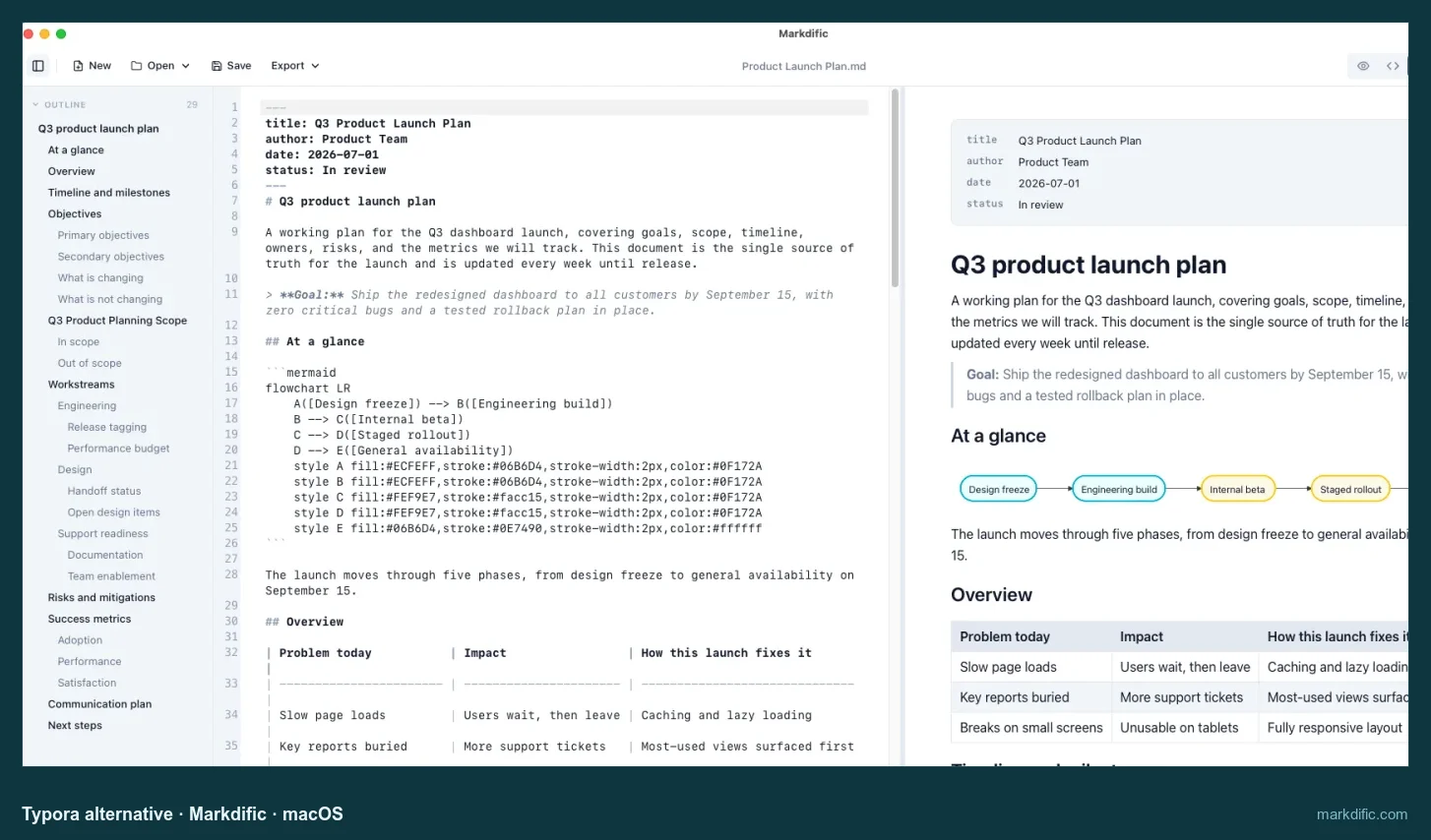
A rendered Markdown editor like Typora, with a split view, autosave and built-in export.
- Price
- $14.99 once to edit, up to 3 devices; reading is free; 14-day trial
- Licence
- proprietary
- Platforms
- Mac, Windows (Microsoft Store), Linux (.deb, .rpm, AppImage)
- Files
- plain .md files, several open in tabs
- Website
- markdific.com
Strengths:
- Three ways to edit the same file: the formatted page, the Markdown source, or both side by side (Cmd+3 or Ctrl+3).
- Autosave is on from the first launch, so nothing waits for Cmd+S.
- 14 export formats, including Word, EPUB and LaTeX, with no Pandoc to install (13 on Linux, where PDF is not available yet).
- Mermaid diagrams and inline and block math render with no setup (in Typora, inline math is off by default).
- Opens any .md file directly, several at once in tabs, with no vault or import.
- Saves your file as you wrote it: no unrelated lines changed, and Windows (CRLF) line endings kept.
Limits:
- No focus or typewriter mode.
- Not a notes system: no backlinks, graph view or phone app.
- Very large files (20,000+ lines) take a few seconds longer to open than in Typora.
Our test: tables, Mermaid diagrams and inline and block math rendered with default settings on all three systems, edits reached the disk within 15 s without saving by hand, and Windows line endings were kept.
Pick it if you like how Typora feels and want split view, autosave and export in the same app.
Obsidian
A notes app built on a folder of Markdown files, with backlinks, a graph and plugins.
- Price
- free, including for work; Sync $4 and Publish $8 a month, billed yearly
- Licence
- proprietary
- Platforms
- Mac, Windows, Linux, iPhone, Android
- Files
- .md files in a folder Obsidian calls a vault
- Website
- obsidian.md
Strengths:
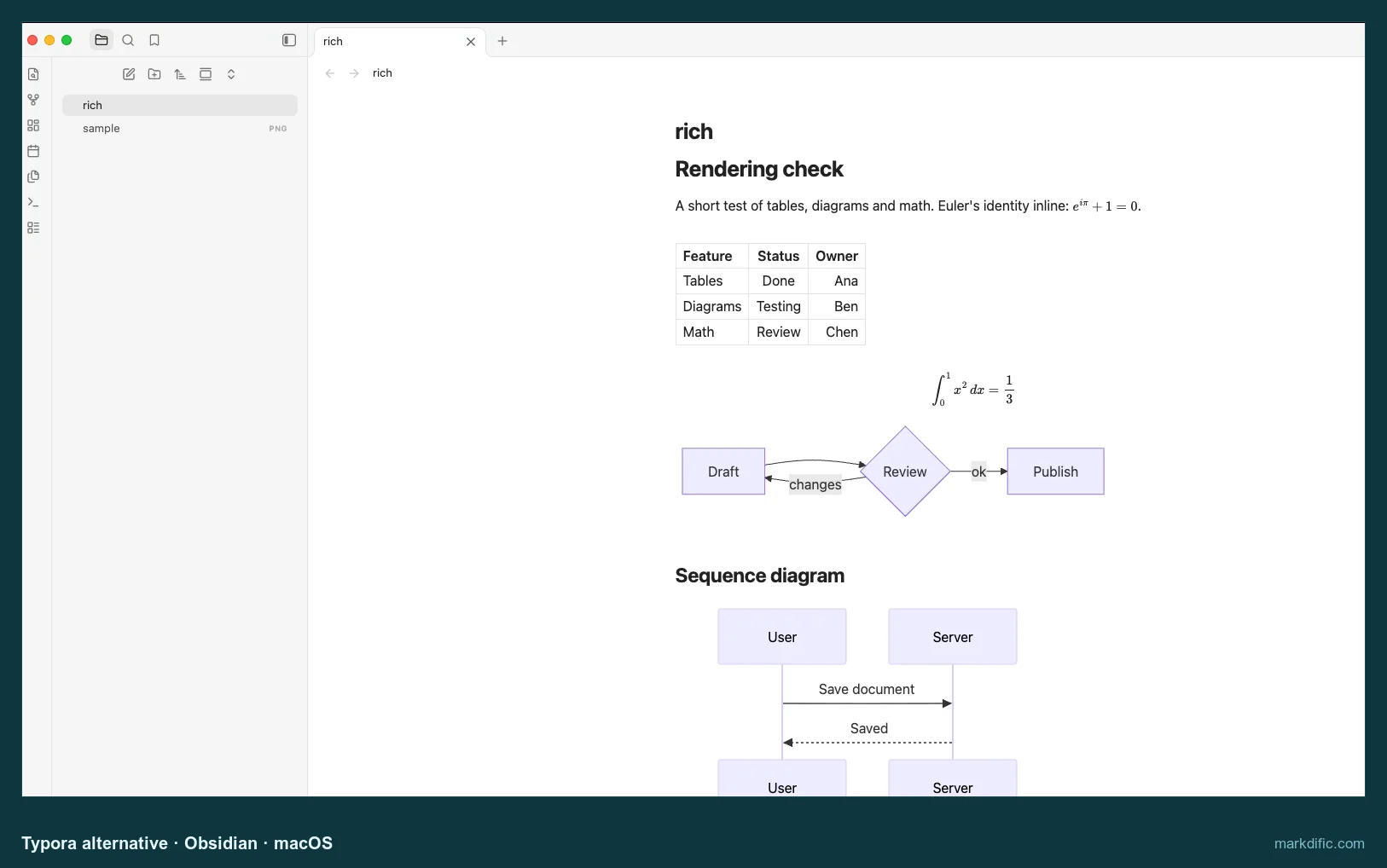
- Live preview formats text as you type, close to how Typora feels.
- Backlinks, a graph view and a large plugin library turn single files into a connected set of notes.
- Apps for iPhone and Android, with optional paid Sync between devices.
Limits:
- Files open inside a vault, which adds a step when you only want to edit one document.
- Rewrote Windows (CRLF) line endings as LF on save, so Git shows every line as changed.
- Asks for permission in each vault before it draws a Mermaid diagram.
Our test: it saved edits by itself and opened the 20,000-line file faster than Typora on every system, in 1.4 s on macOS against Typora's 4.1 s.
Pick it if your Typora files are really a set of notes that you want to link together and read on a phone.
Zettlr
A writing app for long documents and research, with citations and Pandoc built in.
- Price
- free
- Licence
- GPL-3.0
- Platforms
- Mac, Windows, Linux
- Files
- plain .md files
- Website
- www.zettlr.com
Strengths:
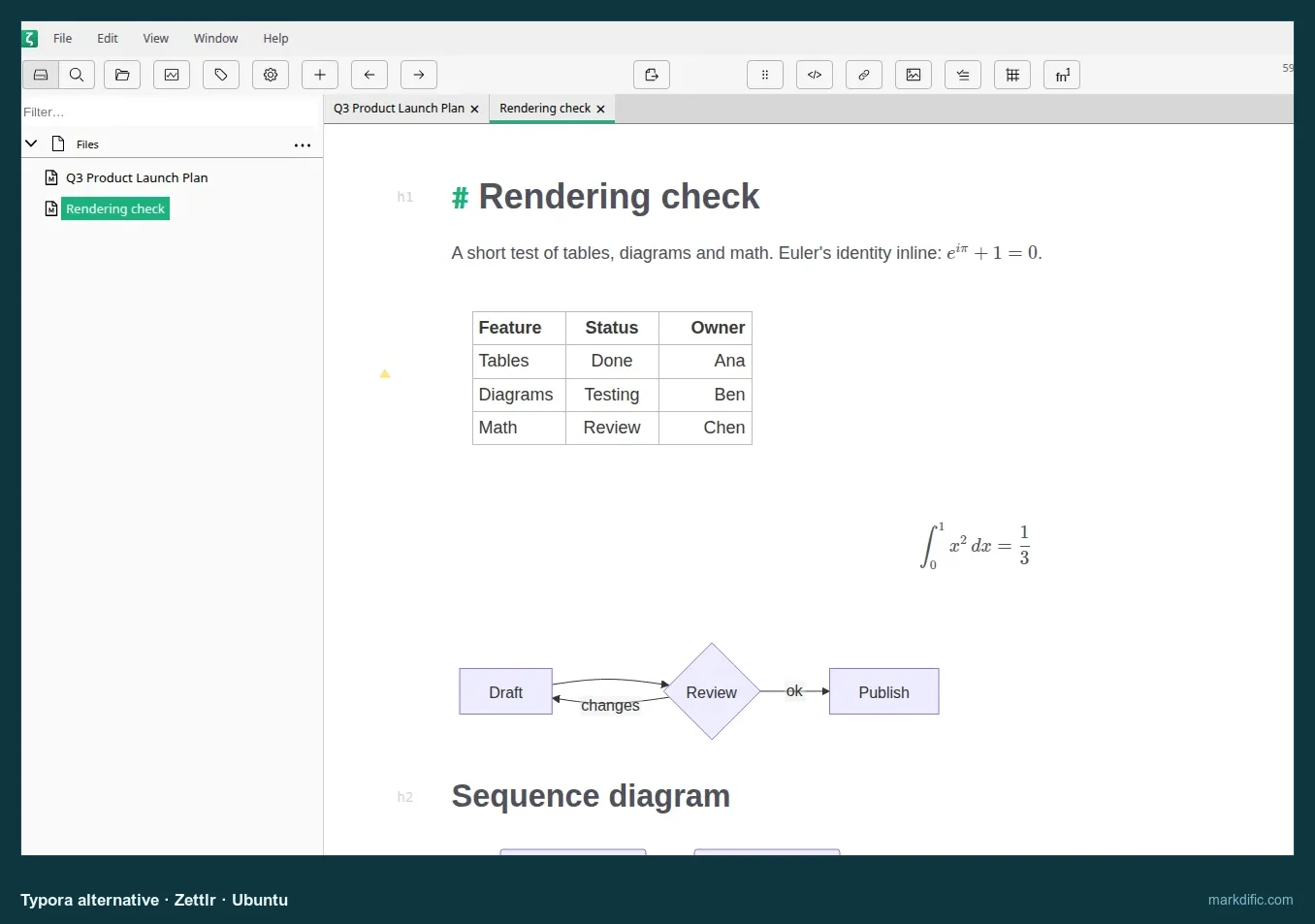
- Tables, formulas and Mermaid diagrams are drawn in the editor, between visible Markdown marks.
- A citation manager and links between files for academic writing.
- Ships its own copy of Pandoc, so Word and LaTeX export work straight after install.
Limits:
- No autosave within 15 s in our test, the same as Typora.
- Typing in very long files is slow.
Our test: it opened the 20,000-line file in 4.4 s on macOS, close to Typora, but 100 characters typed at the end took 27.2 s to appear.
Pick it if you write papers or long reports and need references and Pandoc output.
MarkText
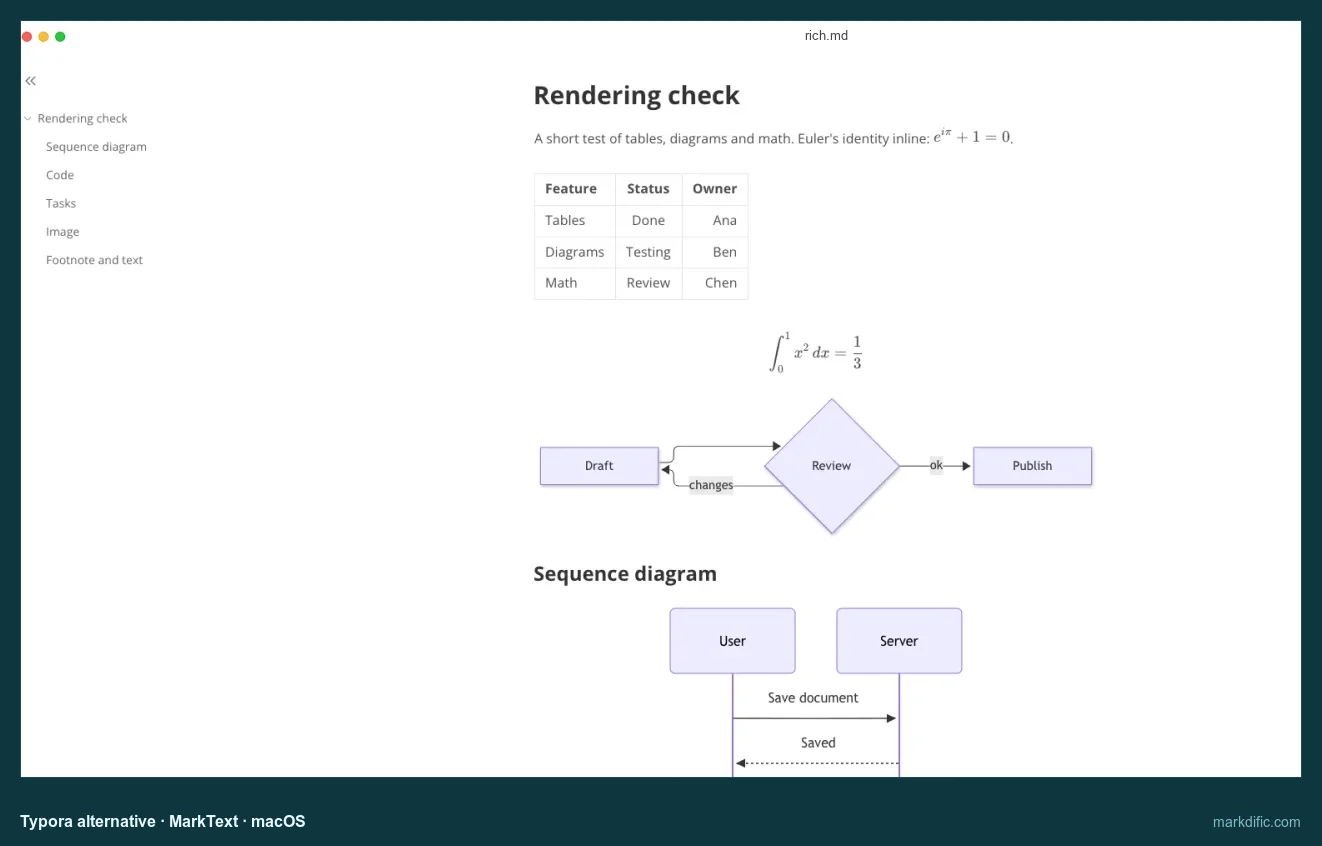
The free, open-source editor that copies Typora's single rendered pane most closely.
- Price
- free
- Licence
- MIT
- Platforms
- Mac, Windows, Linux
- Files
- plain .md files
- Website
- github.com/marktext/marktext
Strengths:
- One formatted editing pane with a source code mode and a file sidebar, laid out much like Typora.
- The View menu has both a focus mode and a typewriter mode.
- Inline math works on first launch, where Typora needs a preference.
Limits:
- Did not finish loading the 20,000-line file on any system.
- Added a blank line after each front matter
---when saving on macOS and Linux. - No autosave within 15 s.
Our test: tables, Mermaid and both kinds of math rendered with default settings on all three systems; the 2,000-row table took 20.1 s to open on macOS.
Pick it if you want Typora's look for free and your files are of ordinary length.
VS Code
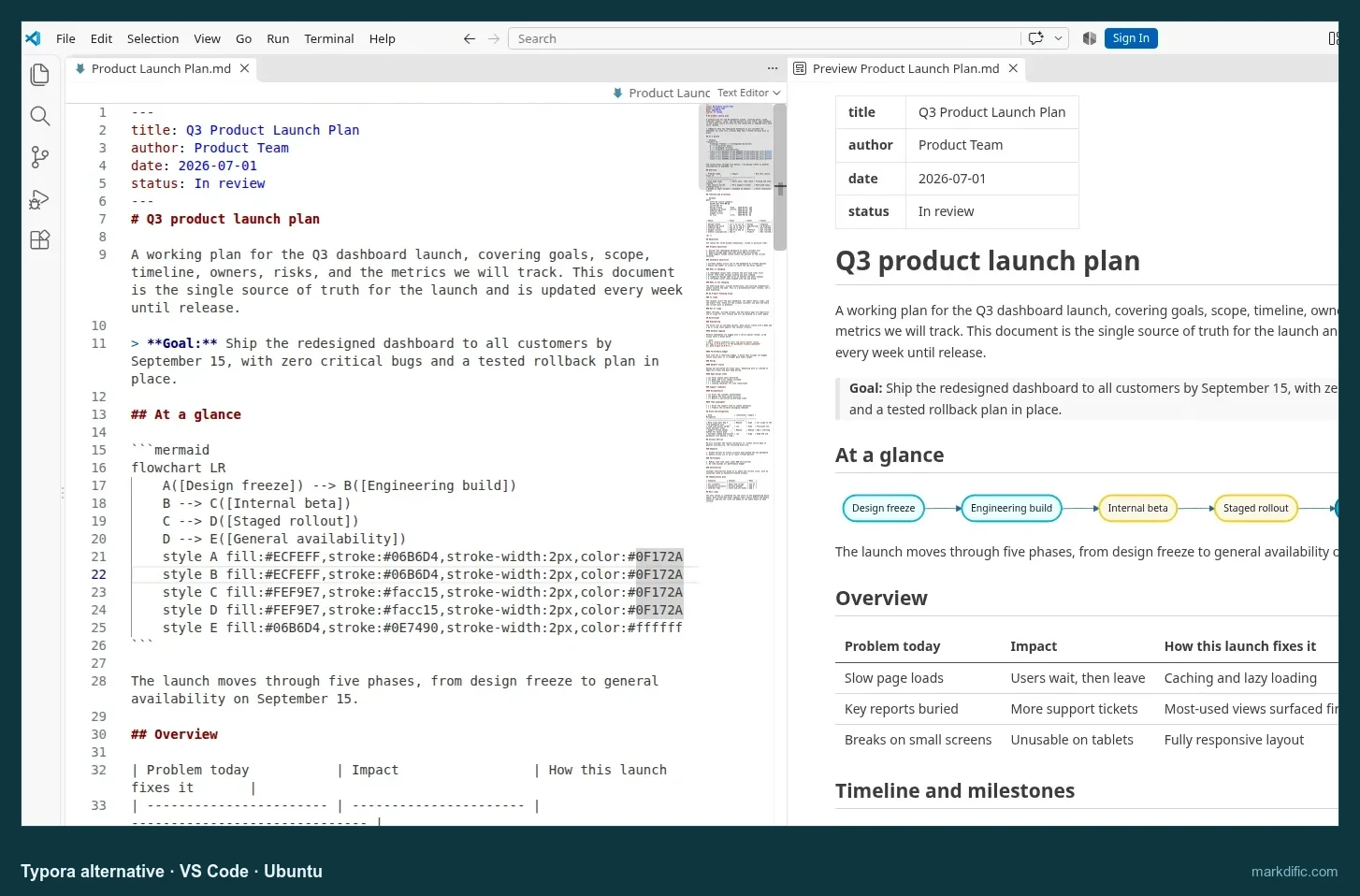
A code editor that shows Markdown source with a live preview beside it.
- Price
- free
- Licence
- Microsoft licence (Code-OSS source MIT)
- Platforms
- Mac, Windows, Linux
- Files
- plain .md files
- Website
- code.visualstudio.com
Strengths:
- Ctrl+K V (Cmd+K V on Mac) opens a preview that draws Mermaid and math with no extensions.
- Git, search across files and a terminal sit in the same window as your README.
- Windows (CRLF) line endings survived saving on all three systems.
Limits:
- You always type raw Markdown; the preview is read-only.
- Export to PDF or Word needs extensions.
- Used the most memory of the main apps, 1,899 MB for the 20,000-line file on macOS.
Our test: 100 characters typed at the bottom of the 20,000-line file appeared in 1.1 s on macOS, the quickest of the main apps.
Pick it if most of what you write is README and docs files inside Git projects.
Joplin
A note-taking app with notebooks, tags, to-dos and sync between desktop and phone.
- Price
- free; Joplin Cloud is paid
- Licence
- AGPL-3.0
- Platforms
- Mac, Windows, Linux, iPhone, Android
- Files
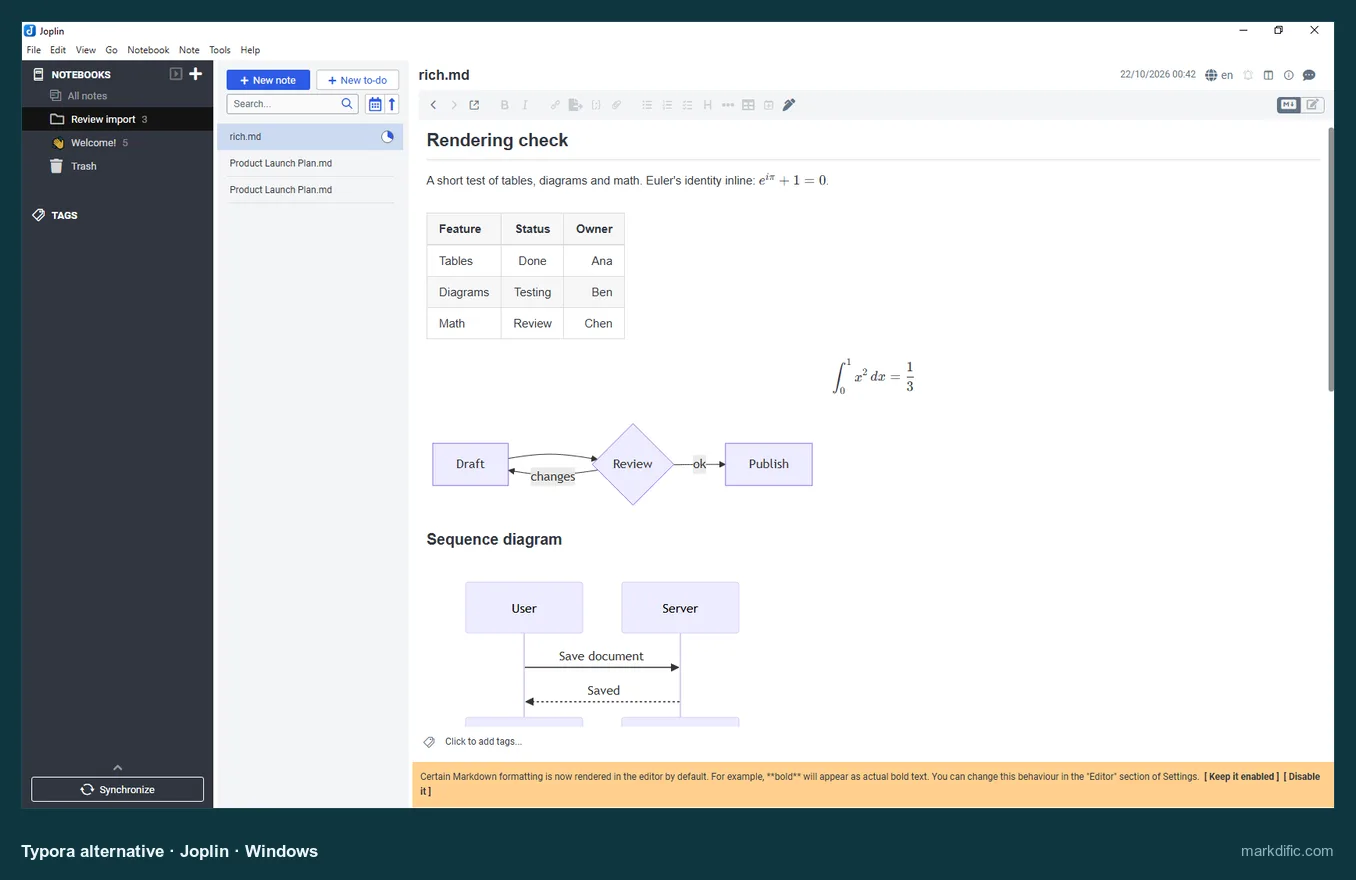
- its own database; .md files come in through File > Import > MD
- Website
- joplinapp.org
Strengths:
- Notebooks, tags and to-do items in one window.
- Syncs through Joplin Cloud, Nextcloud, Dropbox, OneDrive, WebDAV or a local folder.
- Free apps for desktop and phone.
Limits:
- Imported files become copies; edits do not go back to the original .md files.
- Not suited to Markdown kept in a Git repository.
Our test: after import, its viewer drew the table, Mermaid diagrams and math on macOS and Windows.
Pick it if you want the same notes on your laptop and phone, and loose .md files matter less to you.
Zed
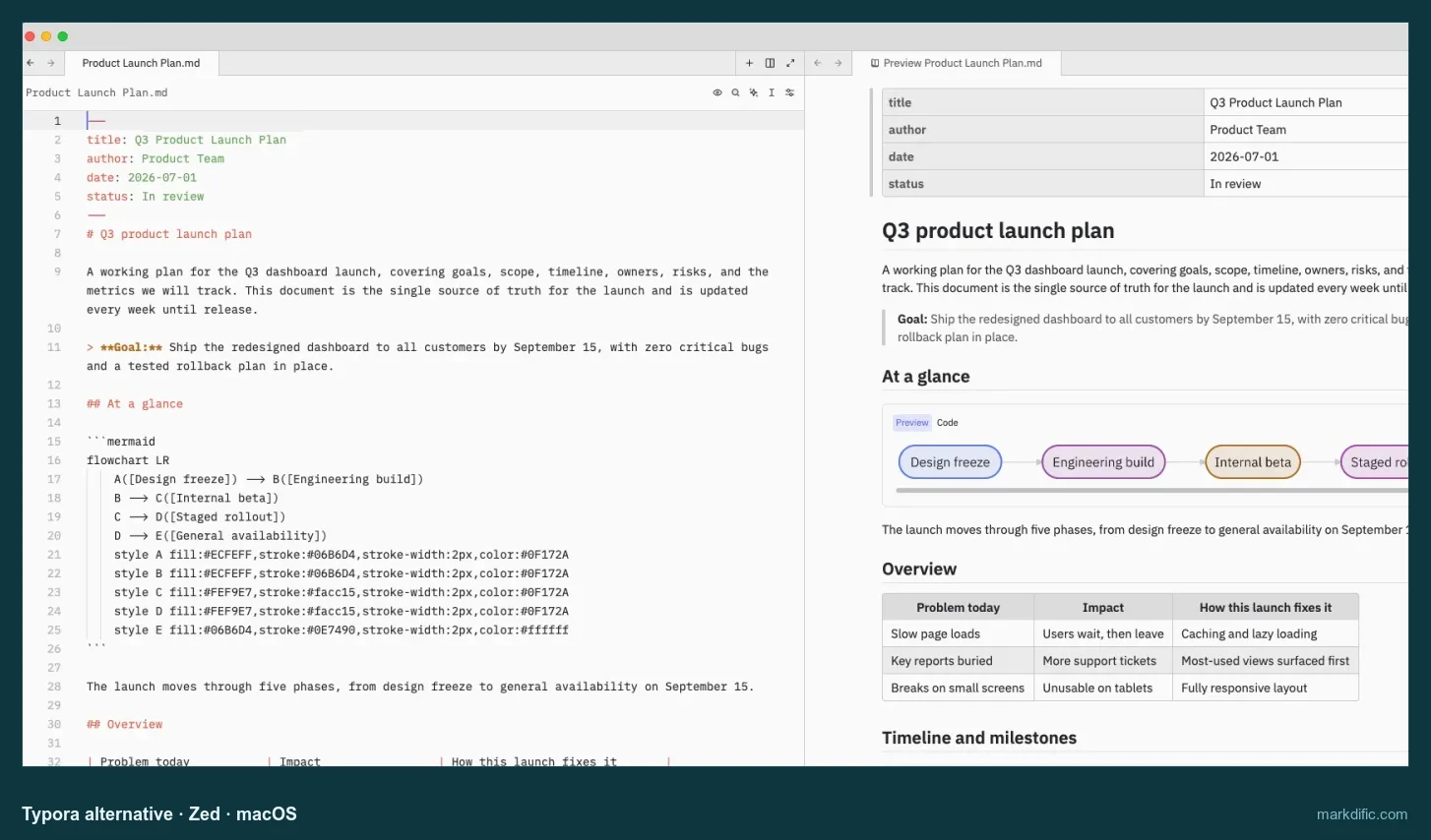
A fast open-source code editor with a Markdown preview pane.
- Price
- free; Pro $10 a month
- Licence
- GPL-3.0, some parts Apache-2.0
- Platforms
- Mac, Windows, Linux
- Files
- plain .md files
- Website
- zed.dev
Strengths:
- Opens long files quickly and with little memory.
- Cmd+K V puts a preview next to the text, and it draws Mermaid diagrams.
- Files with Windows line endings came back unchanged.
Limits:
- Formulas stay as raw
$$text in the preview. - No Word or PDF export, and no autosave in default settings.
Our test: it opened the 20,000-line file in 0.9 s on macOS using 321 MB, about a third of Typora's 887 MB.
Pick it if you write Markdown next to code and want speed over rendered editing.
MarkEdit
A tiny native Mac editor for people who prefer Markdown source.
- Price
- free
- Licence
- MIT
- Platforms
- Mac (latest version needs macOS 26; older versions run on macOS 12 to 15)
- Files
- plain .md files
Strengths:
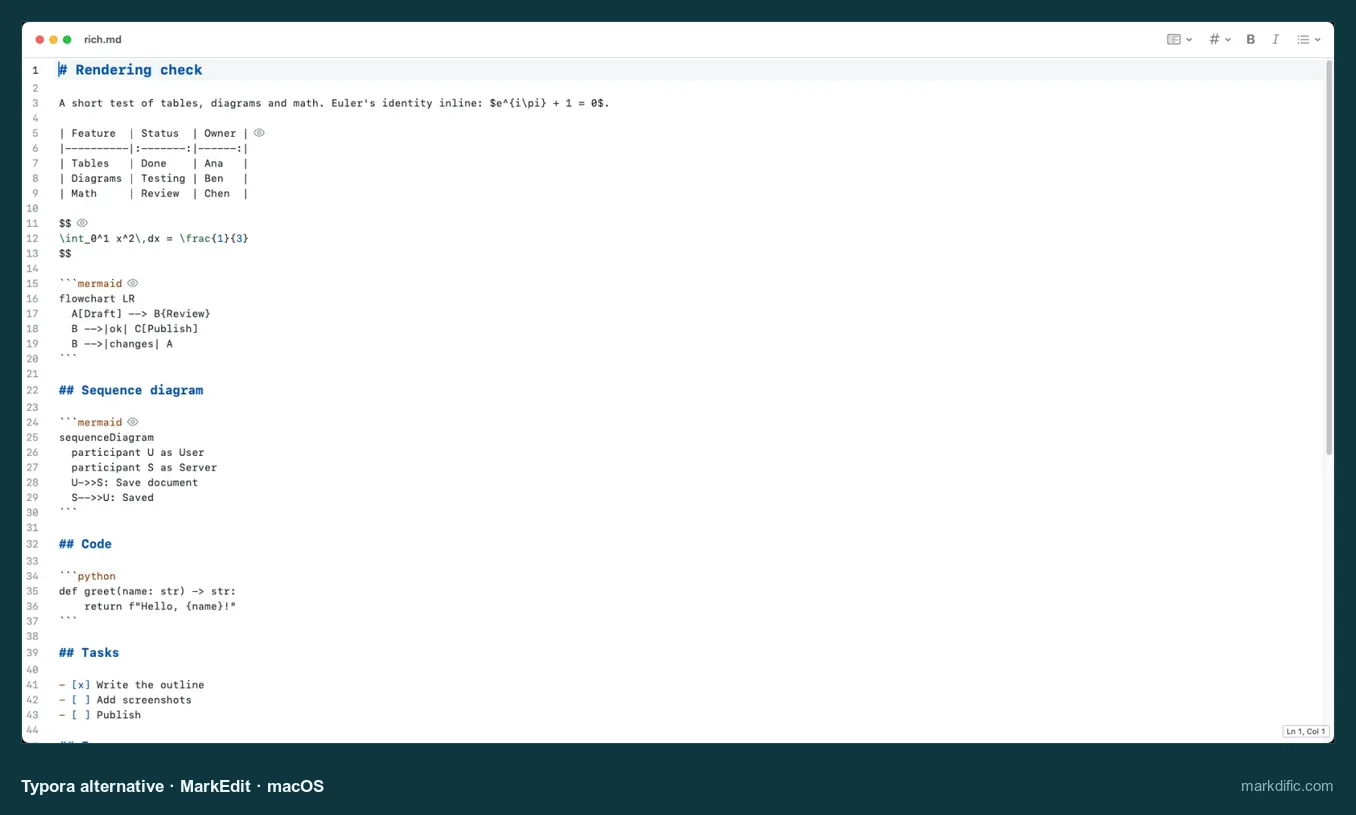
- A 4.6 MB download with coloured Markdown source and line numbers.
- Saves through the standard macOS document system, so edits reach the disk on their own.
- Memory never went past 400 MB, even with the biggest test files.
Limits:
- No rendered view in a default install; a preview needs an extension.
- Mac only.
Our test: it wrote our edit to disk 14.6 s after typing, without Cmd+S, and opened the 20,000-line file in 3.1 s.
Pick it if you mostly used Typora's source code mode anyway.
MacDown 3000
A maintained successor to the classic MacDown, with source and preview panes.
- Price
- free
- Licence
- MIT
- Platforms
- Mac (macOS 11 or later, Apple silicon and Intel)
- Files
- plain .md files
Strengths:
- Opened our largest test file faster than any other app on macOS.
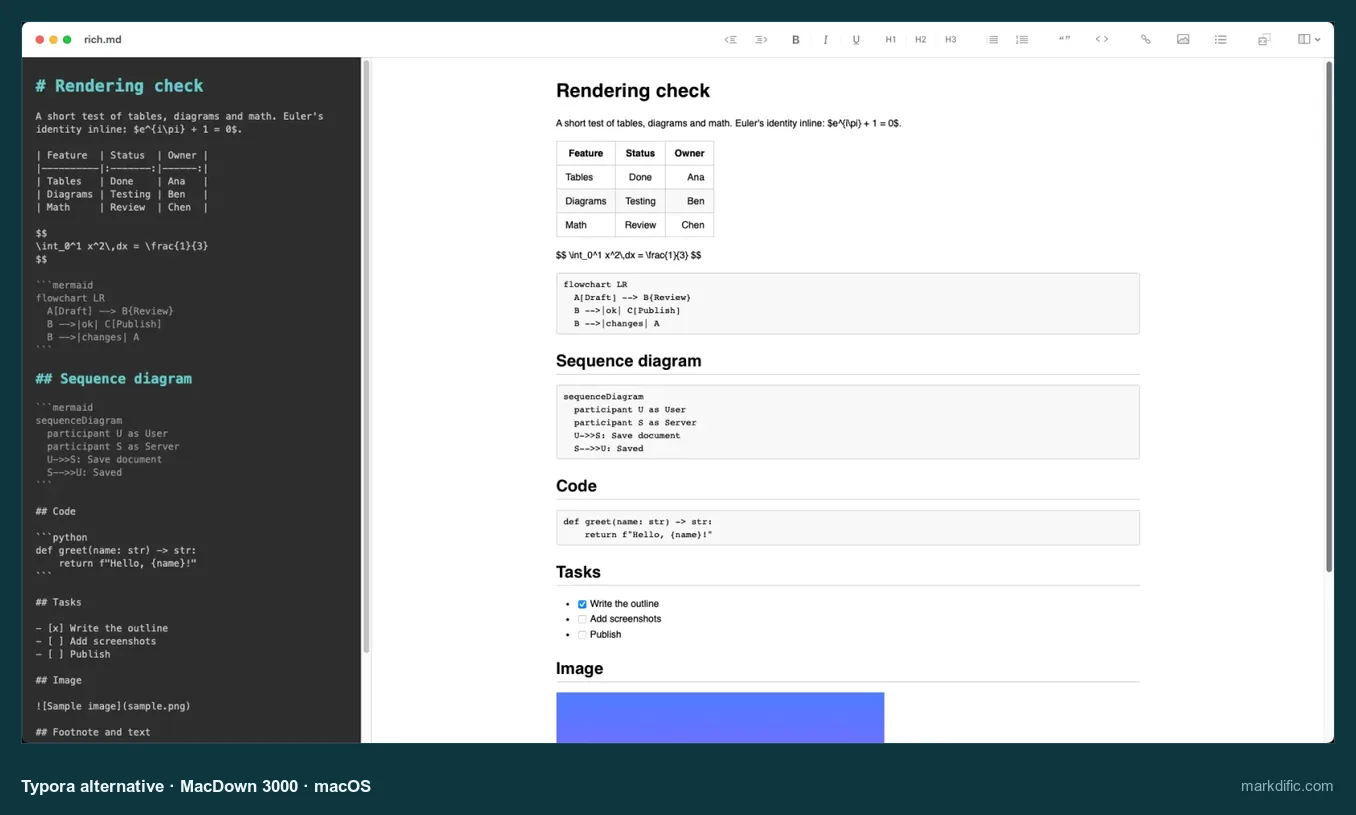
- Source and preview side by side, with a formatting toolbar.
- Free and open source.
Limits:
- Mermaid and math are off by default, so diagrams show as text until you change the settings.
- Mac only, and autosave could not be confirmed in our test.
Our test: the 20,000-line file opened in 0.8 s on macOS using 415 MB, against 4.1 s in Typora.
Pick it if you are on a Mac and open large files more often than you format them.
ghostwriter
A KDE writing app that pairs a source pane with a live preview.
- Price
- free
- Licence
- GPL-3.0
- Platforms
- Linux; portable build for Windows
- Files
- plain .md files
- Website
- ghostwriter.kde.org
Strengths:
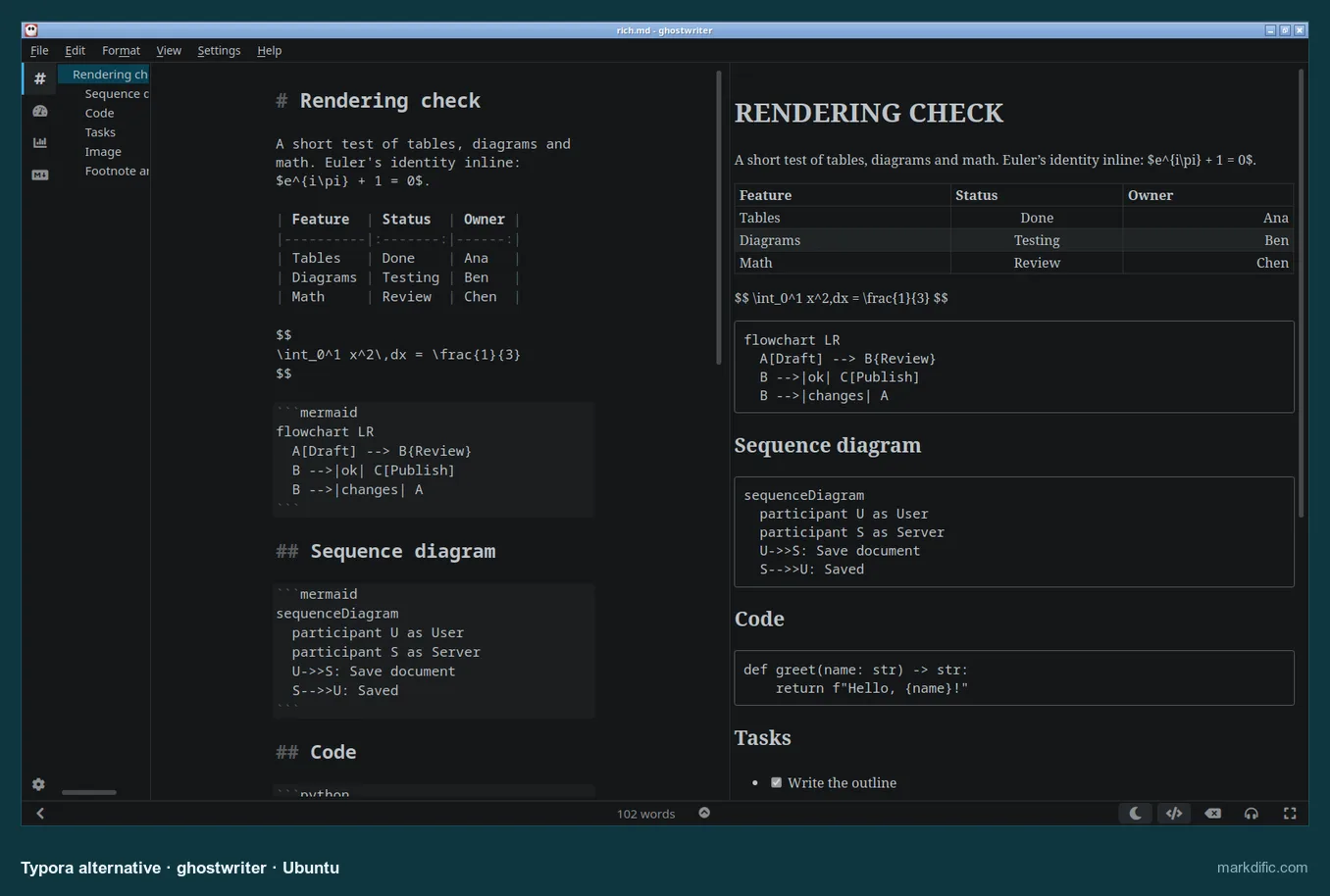
- Live preview next to the text, plus an outline of headings.
- Focus mode and a running word count for long drafts.
- Free and open source.
Limits:
- Diagrams and formulas show as text with default settings.
- Saved CRLF files with LF endings on Linux.
- No macOS version.
Our test: on Ubuntu it opened the 20,000-line file in 6.4 s using 785 MB.
Pick it if you write prose on Linux and want a preview without leaving the KDE family.
Apostrophe
A calm GNOME editor with a preview and a focus mode.
- Price
- free
- Licence
- GPL-3.0
- Platforms
- Linux, from Flathub
- Files
- plain .md files
- Website
- apps.gnome.org/Apostrophe
Strengths:
- A plain, distraction-free window that fits the GNOME desktop.
- Ctrl+D dims everything except the paragraph you are writing.
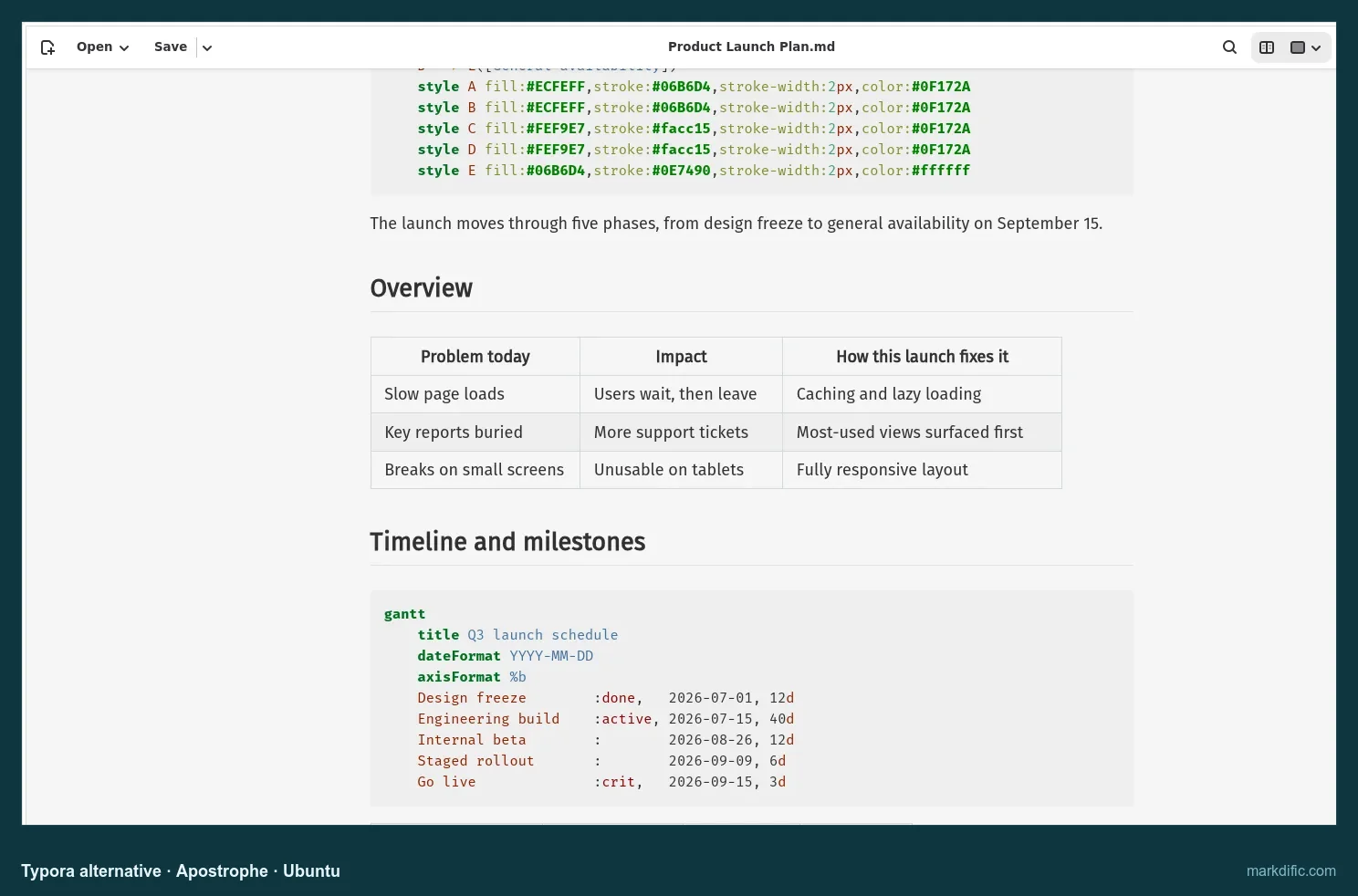
- Its preview shows tables and formulas properly.
Limits:
- Mermaid blocks stay as code.
- Saving a CRLF file left mixed line endings.
- Linux only.
Our test: memory stayed under 500 MB on every stress file; Typora on Linux used 820 to 1,453 MB.
Pick it if you use GNOME and want a quiet place to write.
KeenWrite
A source-and-preview editor aimed at typeset PDF output.
- Price
- free
- Licence
- GPL-2.0
- Platforms
- Linux, Mac, and other systems through its Java build
- Files
- plain .md files
- Website
- keenwrite.com
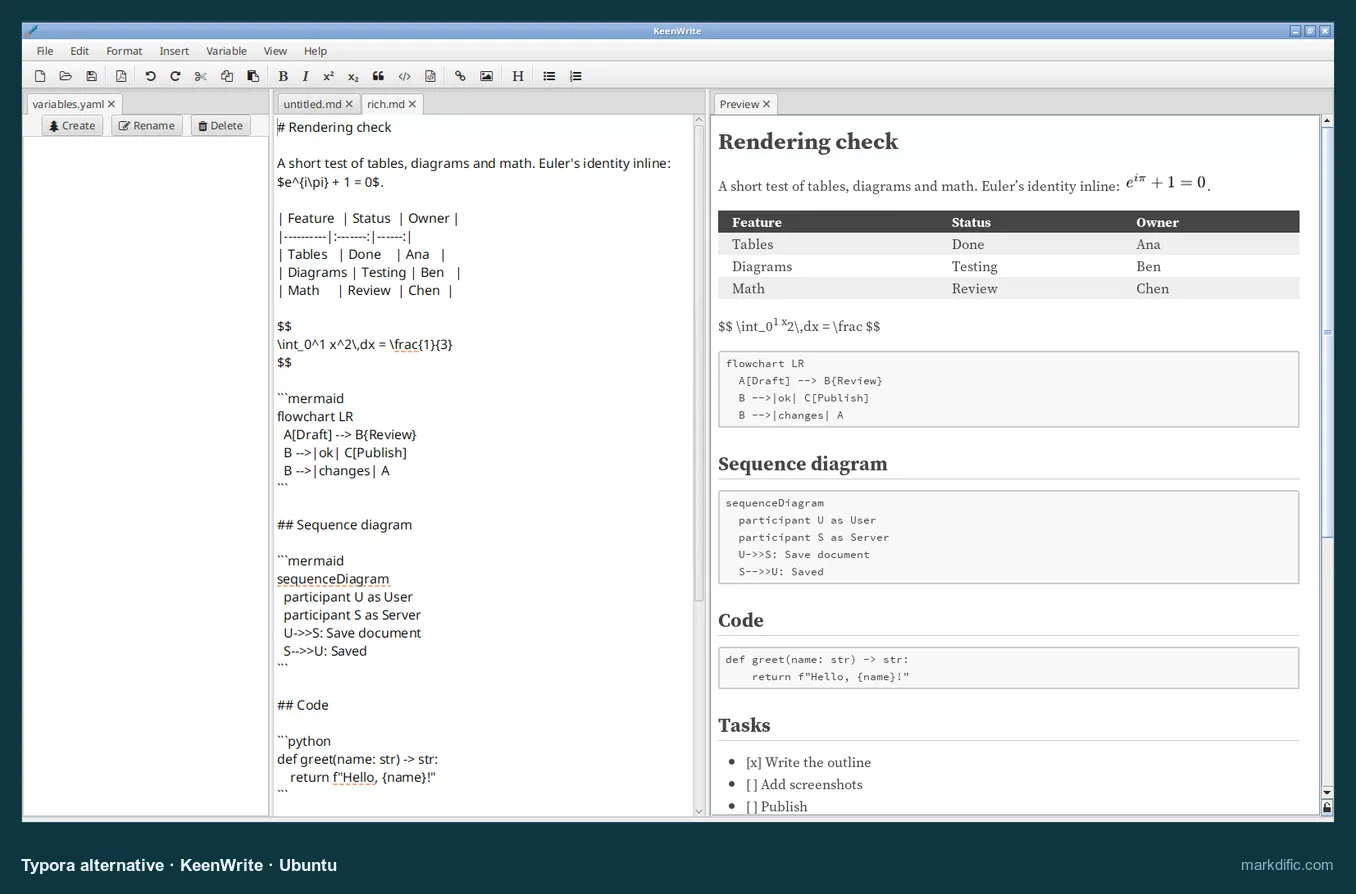
Strengths:
- Autosave on by default.
- Built around producing typeset PDF, with a command-line exporter.
- A variables panel lets one value, such as a product name, fill in across a document.
Limits:
- Mermaid blocks are not drawn, and display formulas show as raw LaTeX.
- Slow and memory-heavy with large files: 1,226 to 1,632 MB on the stress files.
- Saved CRLF files with LF endings.
Our test: it saved our edit 3.5 s after typing with no setting changed, but took 24.2 s to open the 20,000-line file on Ubuntu.
Pick it if your goal is a printed or PDF document with consistent terms.
SiYuan
A block-based knowledge base that formats text as you type.
- Price
- free core; some features paid
- Licence
- AGPL-3.0
- Platforms
- Mac, Windows, Linux, iPhone, Android
- Files
- its own workspace; .md files are imported
Strengths:
- Formats as you type, much like Typora.
- Block references and a graph link paragraphs across documents.
- Desktop and mobile apps.
Limits:
- Imported files are copies stored as blocks, so the original .md files stop changing.
- Better for starting a knowledge base than for editing loose files.
Our test: imported documents rendered tables, math and Mermaid diagrams on macOS and Linux.
Pick it if you want a block-based knowledge base and are happy to keep notes inside the app.
iA Writer
A paid focus-writing app with style checks. Not tested by us.
- Price
- one-time, per platform: Mac $49.99, Windows $29.99, iPhone and iPad $49.99 (prices checked 22 October 2026)
- Licence
- proprietary
- Platforms
- Mac, Windows, iPhone, iPad
- Files
- plain-text Markdown
- Website
- ia.net/writer
Strengths:
- Focus Mode highlights the current sentence or paragraph and fades the rest.
- Style Check flags filler words, and Authorship marks what you typed against what you pasted.
- Preview, plus export to PDF, Word and HTML.
Limits:
- Paid separately on each platform, and no Linux version.
- You write in plain text and switch to a preview, rather than editing the formatted page.
Pick it if you want a dedicated writing tool on Apple devices and Windows and do not need Linux.
What to consider in a Markdown viewer and editor alternative
Five kinds of Typora alternatives:
- Document editors (Markdific, MarkText, Zettlr): show formatted text while you type, like Typora.
- Knowledge-base apps (Obsidian, Joplin, SiYuan): linked notes and phone apps; Joplin and SiYuan copy your files into their own storage.
- Focus-writing apps (ghostwriter, Apostrophe, iA Writer): a plain page with a preview.
- Developer editors (VS Code, Zed): Markdown as code, with a preview beside it.
- Small Mac editors (MarkEdit, MacDown 3000): open very large files in about a second.
What we checked in every app (same files on macOS 15.7, Windows Server 2022 and Ubuntu 24.04):
- Tables, Mermaid diagrams and math rendered with default settings
- Autosave without pressing Cmd+S or Ctrl+S
- The file written back unchanged, including Windows (CRLF) line endings
- Time to open a 20,000-line file, and memory use
- Price, licence, systems and where your files are stored
Editing in a formatted view counted for more than raw speed, since that is why most people chose Typora. iA Writer is described from its maker's site and marked as not tested.
Full Markdown editor test results by system
Every measurement for each system is in the Linux and Windows guides.
Typora alternative Markdown editor FAQ
Is Typora still free?
No. Typora has been paid since version 1.0 in November 2021. A licence is $14.99 once and covers up to 3 devices; a 15-day trial comes first, and there is no subscription. Free apps with a similar formatted view include MarkText and Zettlr, and Markdific is free for reading and $14.99 once for editing.
What is the best free Typora alternative?
Markdific is free to download and to read .md files, and editing costs $14.99 once after a 14-day trial. For editing at no cost, MarkText and Zettlr did best in our tests: both rendered tables, Mermaid and math straight after install. MarkText could not open a 20,000-line file; Zettlr could, and adds citations.
Is there an open-source Typora alternative?
Yes. MarkText (MIT) is the open-source app closest to Typora, with one formatted editing pane and a source mode. Zettlr (GPL-3.0) renders inside a source editor, and ghostwriter, Apostrophe, Zed and MacDown 3000 are open source too. Typora itself is proprietary, and so are Markdific and Obsidian.
Which Typora alternative has a split view?
Markdific edits in a formatted view, a source view or a split view with both side by side (Cmd+3 or Ctrl+3). VS Code, Zed, MacDown 3000, ghostwriter and KeenWrite also show source next to a preview, but you cannot type into their preview. Typora switches between formatted and source views only.
Can I keep my Typora files?
Yes. Typora saves standard .md files, so every file-based app in this list opens them without conversion. Point the new app at the same folder. Themes and Pandoc settings do not carry over, and pasted images keep working as long as their folder moves with the files. Joplin and SiYuan import copies instead.
Obsidian vs Typora: which is better?
It depends on the job. Typora edits single files in one formatted view; Obsidian manages a vault of linked notes with backlinks, a graph and phone apps. In our tests Obsidian opened large files faster and saved on its own, but it asked before drawing Mermaid and changed CRLF line endings to LF.
Is MarkText still maintained?
Yes. After four years without a stable release (0.17.1, March 2022), MarkText published 0.19.0 in May 2026 and reached 0.23.0 on 21 October 2026, six stable releases in five months. It is still free under the MIT licence, with builds for Mac, Windows and Linux.
Is there a Typora alternative for iPhone or Android?
Yes, if you can work with notes apps. Obsidian, Joplin and SiYuan all have iPhone and Android apps that sync with their desktop versions. iA Writer runs on iPhone and iPad as a paid app. Typora and Markdific are desktop apps for Mac, Windows and Linux.
Related Markdown guides
- Best Markdown editors for Mac
- Best Markdown editors for Windows
- Best Markdown editors for Linux
- MarkText alternatives
- Obsidian alternatives
- MacDown alternatives
- Markdific features
- Pricing
About this Typora alternatives article
This article is written by the team that makes Markdific. We ran Markdific through the identical file set and checks as the other apps, and nobody paid for a spot on this list. Prices and versions are as of 22 October 2026. Corrections: hi@markdific.com.
Last tested 2026-10-22.